
Muse M-195 BT
Інструкцыя па эксплуатацыі аўтамагнітолы Muse M-195 BT
Model: M-195 BT
Уводзіны
The Muse M-195 BT is a 1-DIN car radio featuring a front USB port and a multi-function MCD display. This car radio includes integrated Bluetooth and an SD/MMC card reader, allowing for audio streaming from compatible devices such as laptops, tablets, or smartphones. The integrated hands-free system enables easy call management. The output power is 4 x 40 W.
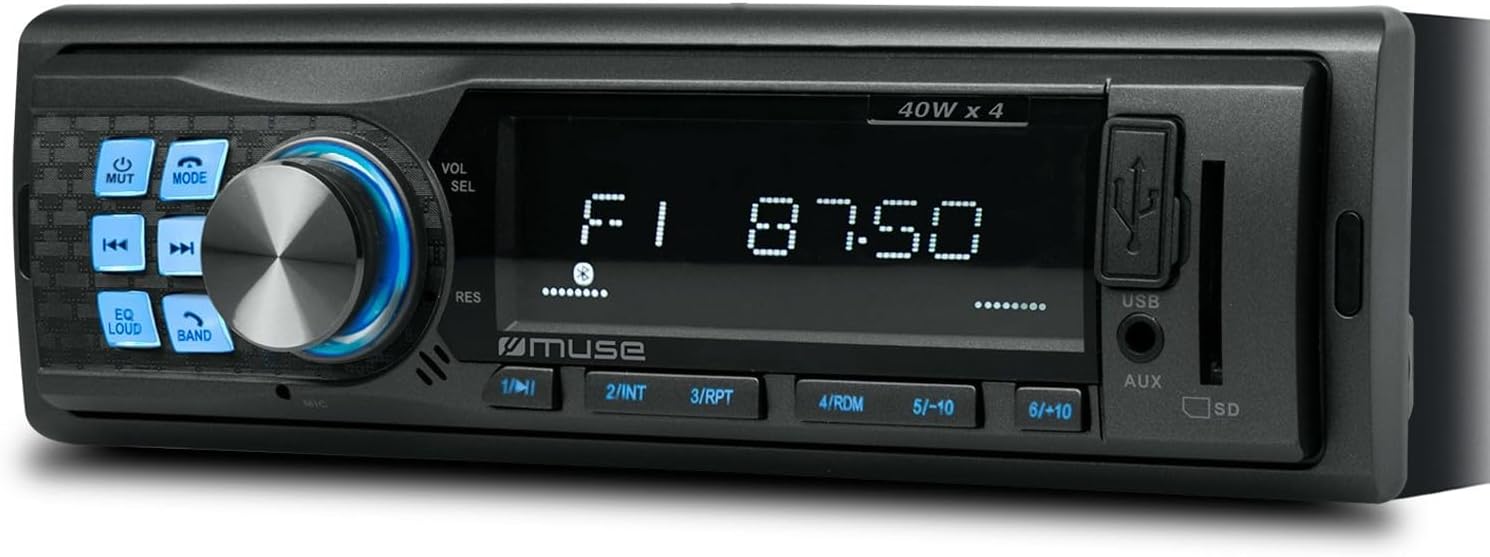
Малюнак 1: Спераду view of the Muse M-195 BT car radio. This image displays the main unit with its central display, a large rotary knob for volume and selection, various function buttons (Mute, Mode, EQ, Loud, Band, Skip), and front-facing USB and AUX inputs, along with an SD card slot.
Інфармацыя па бяспецы
- Перад устаноўкай і эксплуатацыяй уважліва прачытайце ўсе інструкцыі.
- Ensure proper wiring to prevent short circuits or damage. Consult a professional if unsure.
- Не карыстайцеся прыладай такім чынам, каб гэта адцягвала вас ад кіравання аўтамабілем.
- Пазбягайце ўздзеяння на прыладу экстрэмальных тэмператур, прамых сонечных прамянёў або вільгаці.
- Не спрабуйце разбіраць або мадыфікаваць прыладу. Гэта можа ануляваць гарантыю і прывесці да пашкоджанняў.
- Падтрымлівайце гучнасць на ўзроўні, які дазваляе чуць знешнія гукі, напрыклад, гукі машын хуткай дапамогі.
Змест пакета
Калі ласка, праверце наяўнасць усіх прадметаў у камплекце:
- Muse M-195 BT Car Radio Unit
- Мантажная гільза
- Wiring Harness (ISO connector)
- Removal Keys (2x)
- Кіраўніцтва карыстальніка (гэты дакумент)
Настройка і ўстаноўка
1. Ўстаноўка
The M-195 BT is designed for a standard 1-DIN dashboard opening (180x50mm). Ensure sufficient space behind the dashboard for wiring and ventilation.

Figure 2: Dimensions of the Muse M-195 BT car radio. The diagram illustrates the standard 1-DIN size, with a width of 185mm and a height of 58mm, crucial for proper fitment in a vehicle's dashboard.
- Prepare the Dashboard Opening: Remove the existing car radio or blanking plate from the 1-DIN slot.
- Install the Mounting Sleeve: Insert the supplied metal mounting sleeve into the dashboard opening. Bend the tabs on the sleeve outwards with a screwdriver to secure it firmly.
- Падключэнне правадоў: Connect the car's wiring harness to the supplied ISO connector. Ensure correct connections for power (constant 12V, ignition 12V, ground), speaker outputs, and antenna.
- Жоўты провад: Пастаяннае напружанне 12 В (батарэя)
- Чырвоны провад: Ignition 12V (ACC)
- Чорны провад: зямля
- Сіні провад: Магутная антэна / Amplifier Remote (Output)
- Правады акустычных сістэм: Падключыце да адпаведных дынамікаў аўтамабіля (напрыклад, белы/белы-чорны для пярэдняга левага, шэры/шэра-чорны для пярэдняга правага, зялёны/зялёны-чорны для задняга левага, фіялетавы/фіялетавы-чорны для задняга правага).
- Устаўце прыладу: Carefully slide the M-195 BT unit into the mounting sleeve until it clicks into place.
- Праверка функцыянальнасці: Turn on the car ignition and test all functions of the radio (power, radio, USB, Bluetooth, sound output).
2. Пачатковае ўключэнне
After successful installation, press the МАГУТ / РЭЖЫМ button to turn on the unit. The display will illuminate. The unit will typically start in the last used mode (e.g., FM radio).
Інструкцыя па эксплуатацыі
1. Асноўныя элементы кіравання
- POWER/MODE Button: Press to turn the unit ON/OFF. Short press to cycle through modes (FM, USB, SD, AUX, Bluetooth).
- Volume Knob (VOL/SEL): Rotate to adjust volume. Press to enter menu settings (e.g., Bass, Treble, Balance, Fader, EQ).
- Кнопка адключэння гуку: Mutes/unmutes audio output.
- Кнопка эквалайзера: Cycles through preset equalizer settings (e.g., Pop, Rock, Classic, Flat).
- LOUD Button: Activates/deactivates loudness compensation for enhanced bass and treble at low volumes.
- Кнопка BAND: In FM mode, cycles through FM bands (FM1, FM2, FM3).
- Кнопкі ПРАПУСЦІЦЬ (◀◀ / ►►): In radio mode, short press to seek previous/next station. Long press for manual tuning. In USB/SD/BT mode, short press for previous/next track.
- Лічбавыя кнопкі (1-6): In radio mode, short press to recall preset stations. Long press to save current station to a preset.
2. Radio Operation (FM)
- Прэса РЭЖЫМ until "FM" is displayed.
- Прэса ГУРТ to select FM1, FM2, or FM3.
- Кароткі націск ◀◀ or ►► to automatically seek the next strong station.
- Доўгі націск ◀◀ or ►► каб уручную наладзіць частату.
- To save a station: Tune to the desired station, then long press one of the numeric buttons (1-6) until the display confirms saving.
3. USB / SD Card Playback
- Insert a USB flash drive into the front USB port or an SD/MMC card into the SD card slot.
- The unit will automatically switch to USB/SD mode and begin playing compatible audio files (MP3). If not, press РЭЖЫМ каб выбраць.
- Выкарыстоўвайце ◀◀ or ►► прапускаць трэкі.
- Use numeric buttons for specific functions like 1/►►I (Play/Pause), 2/INT (Intro scan), 3/RPT (Repeat), 4/RDM (Random).
4. Аперацыя Bluetooth
The M-195 BT supports Bluetooth for audio streaming and hands-free calling.
- Спалучэнне:
- Пераканайцеся, што Bluetooth уключаны на вашым мабільным прыладзе.
- Прэса РЭЖЫМ on the car radio until "BT" or "Bluetooth" is displayed. The unit will enter pairing mode.
- On your mobile device, search for available Bluetooth devices. Select "M-195 BT" from the list.
- Калі будзе прапанаваны PIN-код, увядзіце «0000» (па змаўчанні).
- Once paired, the display will show "CONNECTED" or similar confirmation.
- Струменевая перадача аўдыё (A2DP):
- After pairing, play music on your mobile device. Audio will stream through the car speakers.
- Выкарыстоўвайце ◀◀ or ►► on the car radio to skip tracks.
- Званкі ў рэжыме гучнай сувязі (HFP):
- When a call comes in, the radio display will show "CALL" or the caller ID.
- Націсніце Адказ button (often the Play/Pause button or a dedicated call button if available) to answer.
- Націсніце Завяршыць выклік кнопку, каб пакласці трубку.
- The built-in microphone will be used for conversations.
5. Увод AUX
Connect an external audio device (e.g., MP3 player, smartphone) to the front 3.5mm AUX input using an audio cable.
- Connect the audio cable from your device to the AUX port on the car radio.
- Прэса РЭЖЫМ until "AUX" is displayed.
- Кіруйце прайграваннем са знешняй прылады.
Тэхнічнае абслугоўванне
- Уборка: Выкарыстоўвайце мяккую сухую тканіну для чысткі паверхні прылады. Для выдалення ўстойлівага брудуampЗлёгку прамакніце тканіну вадой. Не выкарыстоўвайце абразіўныя ачышчальнікі або растваральнікі.
- Пазбягайце вадкасці: Do not allow liquids to enter the unit, as this can cause damage.
- тэмпература: Пазбягайце ўздзеяння на прыладу экстрэмальных тэмператур, прамых сонечных прамянёў або высокай вільготнасці.
- USB/SD Slot Care: Трымайце слоты для USB і SD-карты чыстымі ад пылу і смецця.
Ліквідацыю непаладак
| праблема | Магчымая прычына | Рашэнне |
|---|---|---|
| Няма ўлады | Няправільная праводка; перагарэлы засцерагальнік; няшчыльнае злучэнне. | Check power (yellow, red) and ground (black) wire connections. Check vehicle's fuse box and the unit's fuse. Ensure connections are secure. |
| Няма гуку | Занадта нізкая гучнасць; уключаны гук без гуку; няправільная праводка дынамікаў; пашкоджаныя дынамікі. | Increase volume. Press MUTE button. Check speaker wire connections. Test with different speakers if possible. |
| Дрэнны прыём радыё | Antenna not connected; Weak signal; Damaged antenna. | Ensure antenna is properly connected. Try tuning to a stronger station. Check antenna for damage. |
| USB/SD не прайграваецца | Несумяшчальны file format; USB/SD card corrupted; Incorrect mode selected. | Забяспечыць files are MP3 format. Try a different USB/SD card. Press MODE to select USB/SD. |
| Спалучэнне Bluetooth не атрымалася | Bluetooth not enabled on device; Device too far; Incorrect PIN; Previous connection interference. | Ensure Bluetooth is ON on your device. Bring device closer. Re-enter PIN "0000". Delete previous pairings on your device and try again. |
Тэхнічныя характарыстыкі
- мадэль: М-195 БТ
- Выходная магутнасць: 4 х 40 Вт
- Дысплей: MCD Multi-function
- Падключэнне: Bluetooth, USB, SD/MMC, AUX (3.5mm Jack)
- Падтрымліваюцца аўдыяфарматы: MP3
- Радыё цюнэр: FM (18 прадусталяваных станцый)
- Гучная сувязь: Убудаваны мікрафон
- Памеры (Д х Ш х У): 14 x 18.5 x 5.8 cm (approx. 1-DIN standard)
- Вага: 550 г
- Папярэднеamplified Выхады: 1 pair (RCA audio rear or sub)
Гарантыя і падтрымка
This product comes with a standard manufacturer's warranty. For detailed warranty terms and conditions, please refer to the warranty card included with your purchase or visit the official Muse website. For technical support, troubleshooting assistance beyond this manual, or service inquiries, please contact your retailer or the Muse customer service department.
Калі ласка, захавайце доказы пакупкі для прэтэнзій па гарантыі.