
FLEXISPOT E4 Classic
FLEXISPOT E4 Classic Electric Standing Desk User Manual
Model: E4 Classic | Brand: FLEXISPOT
Уводзіны
This manual provides detailed instructions for the assembly, operation, and maintenance of your FLEXISPOT E4 Classic Electric Standing Desk. Please read this manual thoroughly before use to ensure proper function and longevity of your product.

Figure 1: The FLEXISPOT E4 Classic Electric Standing Desk, featuring a bamboo contour desktop and silver frame, set up with dual monitors in an office environment.
Інфармацыя па бяспецы
- Перад выкарыстаннем пераканайцеся, што ўсе кампаненты надзейна замацаваны.
- Трымайце дзяцей і хатніх жывёл далей ад стала падчас працы.
- Do not overload the desk beyond its specified weight capacity (220 lbs).
- Avoid placing liquids directly on the control panel or motor components.
- Перад чысткай або абслугоўваннем адключыце сілкаванне.
- Выкарыстоўвайце толькі адаптар сілкавання, які ўваходзіць у камплект.
Змест пакета
Перад пачаткам зборкі пераканайцеся, што ўсе дэталі ў наяўнасці. Калі якія-небудзь дэталі адсутнічаюць або пашкоджаныя, звярніцеся ў службу падтрымкі кліентаў.
- Bamboo Contour Whole-Piece Desktop (55"x28")
- Silver Frame Legs (Dual Motor)
- Панэль кіравання
- Адаптар сілкавання і кабель
- Зборныя дэталі (шрубы, інструменты і г.д.)
- Інструкцыя па эксплуатацыі (гэты дакумент)
Ўстаноўка і зборка
Для гэтага прадукту патрабуецца зборка. Калі ласка, уважліва выканайце наступныя дзеянні.
- Распакуйце кампаненты: Асцярожна выміце ўсе дэталі з упакоўкі і раскладзеце іх на чыстай мяккай паверхні, каб пазбегнуць драпін.
- Прымацаванне ножак да працоўнага стала: Position the desktop upside down. Align the leg frames with the pre-drilled holes on the underside of the desktop. Secure them using the provided screws and tools.
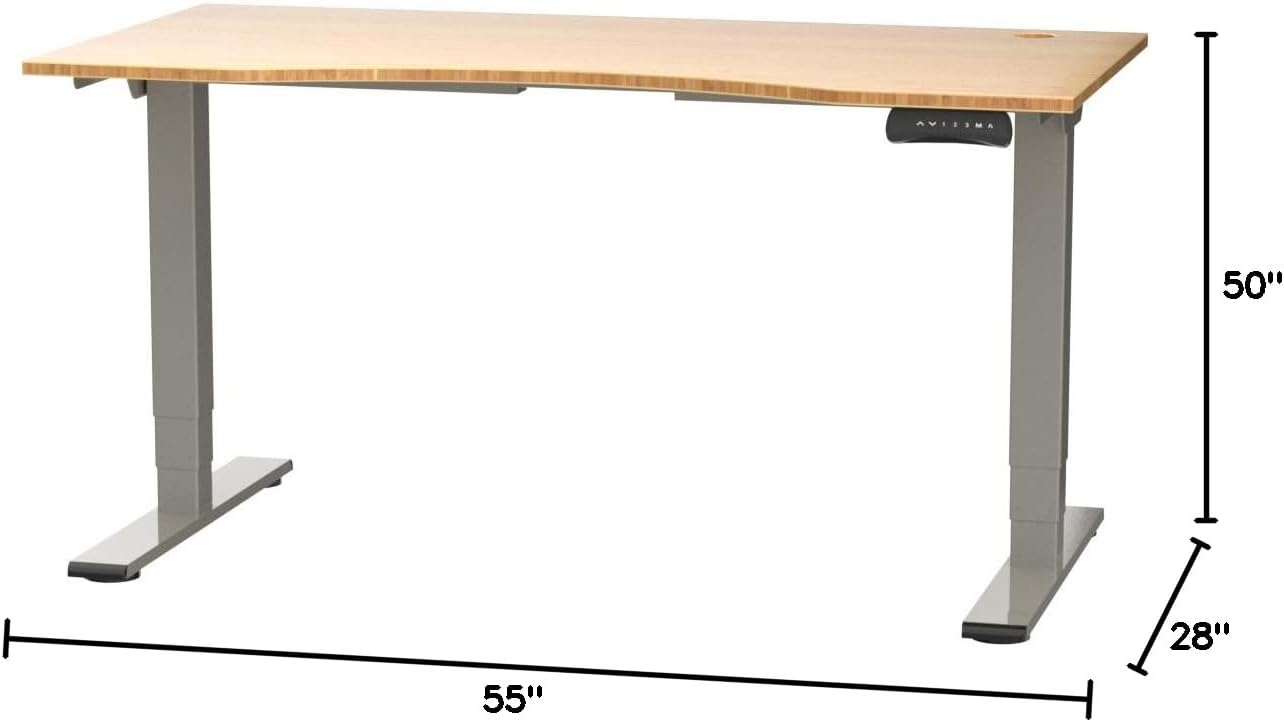
Figure 2: Desk dimensions indicating 55 inches width, 28 inches depth, and adjustable height up to 50 inches.
- Усталяваць панэль кіравання: Mount the control panel to the desired location on the underside of the desktop, typically on the front edge for easy access. Connect the control panel cable to the motor control box.

Figure 3: The programmable control panel with LED display, up/down buttons, and memory presets (1, 2, 3, M, A).
- Падключыце харчаванне: Plug the power adapter into the control box, and then plug the power cable into a standard electrical outlet.
- Кабельнае кіраванне: Utilize the two cable management holes on the desktop to route and organize your cables, preventing clutter.

Figure 4: Detail showing the integrated cable management holes and the water-resistant surface of the bamboo desktop.
- Першапачатковая каліброўка: After assembly and power connection, the desk may require an initial calibration. Refer to the "Operating Instructions" section for details on resetting or calibrating the desk.
Інструкцыя па эксплуатацыі
Рэгуляванне вышыні
The FLEXISPOT E4 Classic desk features a dual-motor lift system for smooth and quiet height adjustments.
- Падняць стол: Націсніце і ўтрымлівайце Стрэлка ўверх button (▲) on the control panel. The desk will move upwards.
- Ніжні стол: Націсніце і ўтрымлівайце Стрэлка ўніз button (▼) on the control panel. The desk will move downwards.
- Release the button at your desired height. The desk can adjust from 24.4 inches to 50 inches.
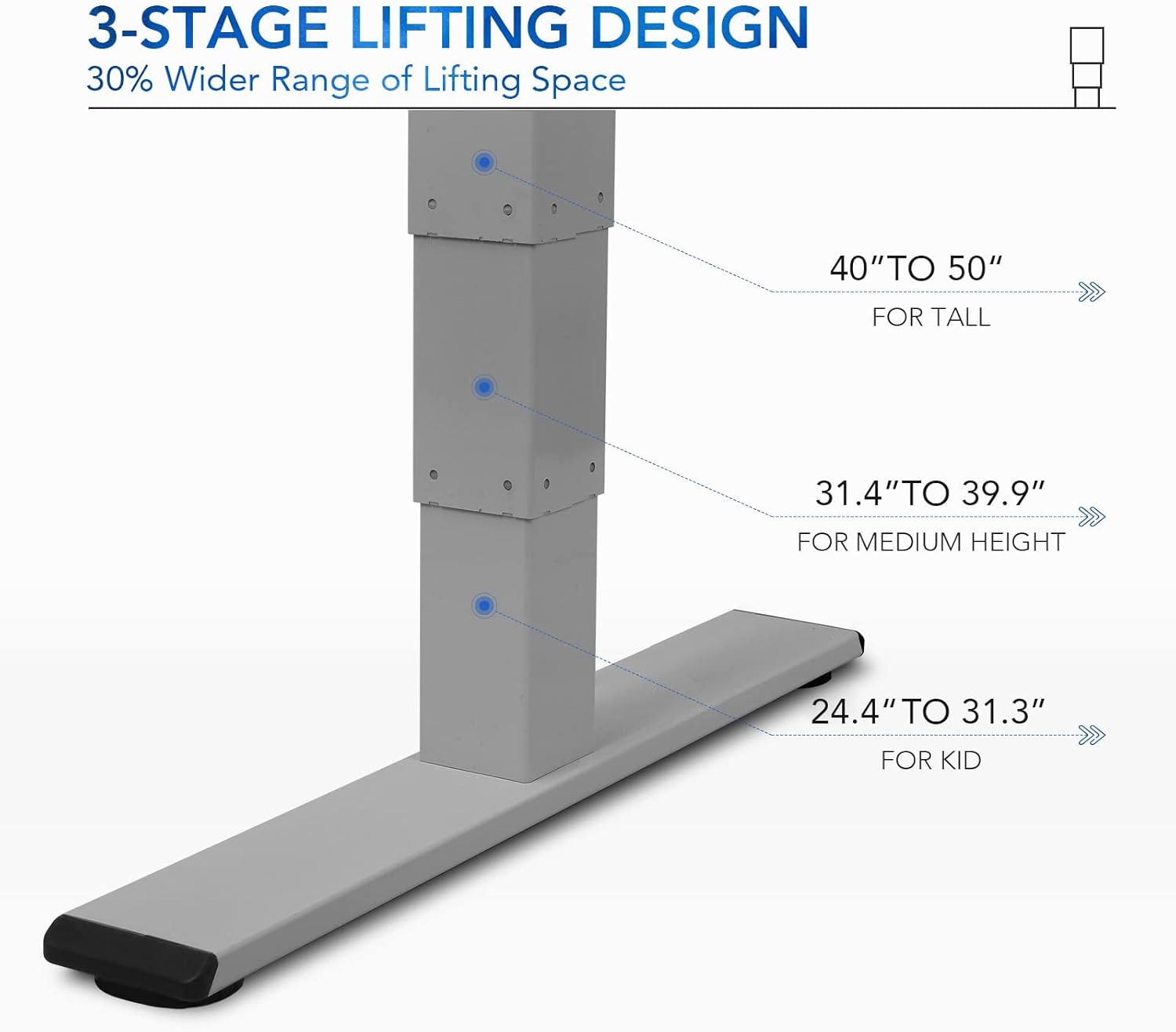
Малюнак 5: 3-кіtage lifting design provides a wide range of height adjustments, suitable for various user heights, from 24.4" (kid) to 50" (tall).
Programmable Memory Presets
The control panel allows you to save up to three preferred height settings for quick adjustments.
- Устанавіць пазіцыю памяці:
- Адрэгулюйце вышыню стала на патрэбную вышыню з дапамогай кнопак «Уверх»/«Уніз».
- Націсніце "М" button. The LED display will show "S-".
- На працягу 3 секунд націсніце адну з лічбавых кнопак ("1", "2", або "3") to save the current height to that preset. The display will show "S-1", "S-2", or "S-3" to confirm.
- Успомніце пазіцыю ў памяці: Проста націсніце адпаведную лічбавую кнопку ("1", "2", або "3"). Стол аўтаматычна перамясціцца на захаваную вышыню.
Sit/Stand Reminder
The "A" button can be used to set a reminder to switch between sitting and standing positions.
- Consult the full manual for detailed instructions on setting and customizing the sit/stand reminder function.
Ergonomic Curved Design
The 55"x28" desktop features an ergonomic curved design for enhanced comfort and efficiency during work or study.

Figure 6: The ergonomic curved edge of the desktop, designed to provide a more comfortable and natural working posture.
Тэхнічнае абслугоўванне
- Уборка: Працярыце паверхню стала і раму мяккай губкайamp cloth. Avoid abrasive cleaners or harsh chemicals. The bamboo surface is designed to be water-resistant, making it easy to clean.
- Сыход за рухавіком: The dual-motor system is designed for low noise and durability. No specific user maintenance is required for the motors.
- Кабельнае кіраванне: Periodically check that all cables are neatly routed through the cable management holes and are not pinched or tangled.
- Праверка крапяжу: Occasionally check all screws and fasteners to ensure they remain tight. Retighten if necessary.
Ліквідацыю непаладак
| праблема | Магчымая прычына | Рашэнне |
|---|---|---|
| Стол не рухаецца. | Power cable disconnected; overload protection activated; motor error. | Check power connections. Reduce weight on desk. Unplug and replug power after 10 minutes. Perform a reset (see below). |
| Стол рухаецца няроўна або выдае незвычайныя гукі. | Loose fasteners; obstruction; motor synchronization issue. | Check and tighten all assembly screws. Ensure no obstructions under the desk. Perform a reset. |
| LED display shows an error code (e.g., "E01", "RST"). | System error; need for reset. | Працэдура скіду: Press and hold the Down Arrow button until the desk reaches its lowest position and then slightly rises. Release the button. If the error persists, unplug the desk for 10 minutes and try again. |
| Не працуюць загадзя настроеныя налады памяці. | Прэсеты захаваны няправільна. | Re-save your desired memory positions following the "Programmable Memory Presets" instructions. |
If the issue persists after attempting these solutions, please contact FLEXISPOT customer support.
Тэхнічныя характарыстыкі
| Асаблівасць | Дэталь |
|---|---|
| мадэль | E4 Classic |
| Марка | ФЛЕКСІСПОТ |
| Матэрыял для працоўнага стала | Bamboo Contour Whole-Piece Board |
| Матэрыял каркаса | Alloy Steel (Silver Frame) |
| Памеры прадукту (Д х Ш х У) | 28"D x 55"W x 50"H (Max Height) |
| Дыяпазон рэгулявання вышыні | ад 24.4 да 50 цаляў |
| Пад'ёмная сістэма | Dual Motor, 3-Stagэлектронны пад'ём |
| Ёмістасць вагі | Да 220 фунтаў |
| Асаблівасці | Electric Height Adjustment, Programmable Memory Presets, Sit/Stand Reminder, Curved Ergonomic Design, Cable Management Holes, Waterproof Surface |
| Патрабуецца зборка | так |
Гарантыя і падтрымка
FLEXISPOT products are designed for durability and performance. For specific warranty details regarding your E4 Classic Electric Standing Desk, please refer to the warranty card included with your purchase or visit the official FLEXISPOT webсайт.
For technical support, troubleshooting assistance, or to inquire about replacement parts, please contact FLEXISPOT customer service:
- Webсайт: www.flexispot.com
- электронная пошта: support@flexispot.com
- тэлефон: Звяртайцеся да чыноўніка webсайт рэгіянальных кантактных тэлефонаў.
When contacting support, please have your product model (E4 Classic) and purchase information ready.