
Уводзіны
Thank you for choosing the VETEK AF6 4K Video Camera Camcorder. This manual provides comprehensive instructions for the proper setup, operation, and maintenance of your device. Please read this manual thoroughly before using the camcorder to ensure optimal performance and longevity.
Змест пакета
Праверце, ці ўсе пералічаныя ніжэй прадметы ўваходзяць у вашу ўпакоўку:
- 1x VETEK AF6 4K Camcorder
- 1x кабель USB
- 1x кабель HDMI
- 1x Lens Hood
- 1x Fill Light (External LED Light)
- 1x USB-зарадная прылада
- 1x Пульт дыстанцыйнага кіравання
- 1x 32GB SD-карта
- 1x Microphone Cable
- 1x External Microphone
- 1x Reusable Camera Bag
- 2x Rechargeable Lithium Batteries
- 1x Dual External Battery Charger
- 1x Camera Instruction Manual
- 1x Microphone Instruction Manual
- 1x Handheld Stabilizer

Прадукт скончаныview
Familiarize yourself with the main components of your VETEK AF6 camcorder.

Асноўныя характарыстыкі:
- Разрозненне відэа 4K: Records videos at 3840*2160.
- 48.0 MP Image Resolution: Captures still images at 7920*5940.
- 3.0-inch 270° Rotatable Touch Screen: Забяспечвае гнуткі viewing angles and intuitive control.
- 18-кратны лічбавы зум: Allows for closer shots of distant subjects.
- Падключэнне Wi-Fi: Enables remote control and file transfer via a smartphone app.
- Функцыя камеры ПК: Можна выкарыстоўваць як webcam for live streaming and video calls.
- Падтрымка знешняга мікрафона: Enhances audio quality.
- External Fill Light Support: Improves illumination in low-light conditions.
- Handheld Stabilizer Compatibility: Змяншае дрыжанне камеры для больш плыўнай здымкіtage.
- Спецыяльныя рэжымы здымкі: Includes Slow Motion and Time-Lapse.
Настройка
1. Усталёўка і зарадка акумулятара
- Адкрыйце вечка адсека для батарэй на відэакамеры.
- Insert a rechargeable lithium battery, ensuring correct polarity.
- Зачыніце крышку батарэйнага адсека.
- To charge, insert the batteries into the dual external battery charger. Connect the charger to a power source using the provided USB cable and charger. The indicator lights will show charging status.
Заўвага: Ensure batteries are fully charged before first use for optimal performance. If indicator lights flicker or do not show a stable charging status, ensure the batteries are correctly seated in the charger and the power connection is stable.
2. Устаноўка SD-карты
- Locate the SD card slot on the camcorder.
- Insert the 32GB SD card (included) into the slot with the metal contacts facing the correct direction, until it clicks into place.
- To remove, gently press the SD card until it pops out.
Важна: Format the SD card in the camcorder's menu before initial use to ensure compatibility and prevent data corruption.
3. Мацаванне аксесуараў
- Знешні мікрафон: Slide the external microphone onto the hot shoe mount on top of the camcorder. Connect the microphone cable to the MIC input port.
- Бленда: Attach the lens hood to the front of the camcorder lens by twisting it clockwise until secure. The lens hood helps reduce glare and protects the lens.
- External LED Light: Slide the external fill light onto the hot shoe mount. Ensure it is securely fastened. This light provides additional illumination.
- Handheld Stabilizer: Attach the camcorder to the handheld stabilizer using the screw mount at the bottom of the camcorder. The stabilizer helps maintain steady footage.



Інструкцыя па эксплуатацыі
1. Уключэнне/выключэнне харчавання
Open the LCD screen to power on the camcorder. Close the LCD screen to power off. Alternatively, use the power button located on the device.
2. Асноўны запіс (відэа/фота)
- Пераключэнне рэжымаў: Use the Mode button to switch between video recording mode and photo capture mode.
- Пачаць/спыніць запіс: In video mode, press the Record button to start recording. Press it again to stop.
- Зрабіць фота: In photo mode, press the Photo button to capture a still image.

3. Функцыя маштабавання
Use the T (Telephoto) and W (Wide) buttons on the camcorder or the zoom controls on the remote control to adjust the 18X digital zoom.
4. Сэнсарны экран
The 3.0-inch LCD screen is rotatable up to 270 degrees and supports touch input. Navigate menus, adjust settings, and review фуtage by tapping or swiping on the screen.
5. Wi-Fi Connection & App
Download the specified app (refer to the camera's manual for the app name) on your smartphone or tablet. Enable Wi-Fi on the camcorder and connect your mobile device to the camcorder's Wi-Fi network (SSID: 4K_WIFI1079, Password: 12345678). This allows for remote viewing, image capture, video shooting, and sharing to social media.

6. PC Camera Mode (Webcam Function)
Connect the camcorder to your PC using the USB cable. Select "PC CAM" mode on the camcorder. Your computer will recognize the camcorder as a webcam, enabling its use for video chatting and live streaming on platforms like YouTube or Facebook.

7. Асаблівасці
- Запаволены рух: Access this mode through the camcorder's menu to record videos at a higher frame rate, allowing for slow-motion playback.
- Пакадравая фотаздымка: Select this option in the menu to capture a series of still images at set intervals, which can then be compiled into a time-lapse video.
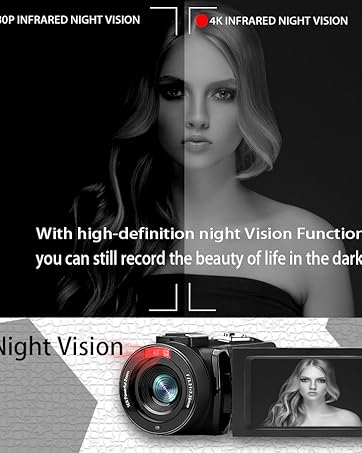
- Начное бачанне: The camcorder features an infrared night vision function, enabling recording in low-light or dark environments. Activate this feature via the menu.


8. Пульт дыстанцыйнага кіравання
The included remote control allows you to operate the camcorder from a distance, controlling functions such as recording, photo capture, and zoom without touching the device.

Тэхнічнае абслугоўванне
- Уборка: Use a soft, dry cloth to clean the camcorder body. For the lens, use a specialized lens cleaning cloth and solution. Avoid abrasive materials or harsh chemicals.
- захоўванне: Store the camcorder in a cool, dry place away from direct sunlight and extreme temperatures. Remove batteries if storing for extended periods.
- Воданепранікальнасць: This camcorder is не воданепранікальныПазбягайце кантакту з вадой або высокай вільготнасцю.
Ліквідацыю непаладак
| праблема | Магчымая прычына | Рашэнне |
|---|---|---|
| Відэакамера не ўключаецца. | Батарэя разраджана або няправільна ўсталявана. | Ensure batteries are fully charged and correctly inserted. |
| Battery charger indicator lights flicker. | Poor contact between battery and charger, or unstable power supply. | Re-seat batteries firmly in the charger. Check USB cable and power adapter connection. Try a different USB port or power source. |
| Нельга запісваць відэа ці рабіць фота. | SD card is full, not inserted, or corrupted. Incorrect mode selected. | Check SD card status, ensure it's inserted and has free space. Format the SD card if necessary (this will erase all data). Verify camcorder is in the correct mode. |
| Дрэнная якасць відэа/фота. | Lens is dirty. Insufficient lighting. Incorrect settings. | Clean the lens. Use the external fill light or shoot in better-lit conditions. Adjust resolution and other settings in the menu. |
| Праблемы з падключэннем да Wi-Fi. | Incorrect Wi-Fi password or app not installed. | Ensure correct SSID (4K_WIFI1079) and password (12345678). Download and install the correct app. |
Тэхнічныя характарыстыкі
- Марка: ВЕТЭК
- Нумар мадэлі: AF6
- Дазвол відэазахопу: 4K (3840*2160)
- Эфектыўнае дазвол фота: 48.0 МП (7920*5940)
- Лічбавае павелічэнне: 18X
- Памер экрана: 3.0 цалі
- Тып дысплея: 270° Rotatable Touch Screen
- Тып флэш-памяці: SD (supports up to 128GB, 32GB included)
- Фармат захопу відэа: MP4
- Падтрымліваюцца фарматы аўдыё: MP4
- Тэхналогія падключэння: USB, HDMI, Wi-Fi
- Сумяшчальнасць з аперацыйнай сістэмай: Windows XP/7/8/10, MAC
- Стабілізацыя выявы: Лічбавы
- Узровень воданепранікальнасці: Не воданепранікальны
- Колькасць батарэй: 2 літый-палімерная батарэя (у камплекце)
- Памеры прадмета (Д х Ш х У): 3.9" Г x 6.2" Ш x 7.8" У
Гарантыя і падтрымка
For warranty information and technical support, please refer to the contact details provided in the separate warranty card or visit the official VETEK webсайт. Калі ў вас узнікнуць якія-небудзь праблемы, не апісаныя ў гэтым кіраўніцтве, звярніцеся па дапамогу ў службу падтрымкі кліентаў.