
YABER YABER-V5-MINI
Кіраўніцтва карыстальніка міні-праектара YABER V5
Model: YABER-V5-MINI
1. Уводзіны
Дзякуй за пакупкуasing the YABER V5 Mini Projector. This manual provides detailed instructions for setting up, operating, and maintaining your projector to ensure optimal performance and longevity. Please read this manual thoroughly before use and keep it for future reference.

Image: The YABER V5 Mini Projector, shown with its included carrying bag and mini tripod, highlighting its portability and accessories.
2. Што ў скрынцы
Upon opening your YABER V5 Mini Projector package, please verify that all the following items are included:
- YABER V5 Mini Projector
- Сумка для пераноскі
- Міні штатыў
- Пульт дыстанцыйнага кіравання (батарэі не ўключаны)
- Сілавы кабель
- Кабель HDMI
- AV-кабель
- Кіраўніцтва карыстальніка
- Cap аб'ектыў

Image: The retail packaging for the YABER V5 Mini Projector, indicating the product and its branding.
3. Асаблівасці прадукту
- Dual-Band WiFi Connectivity (5G/2.4G): The V5 supports both 5GHz and 2.4GHz WiFi bands, providing faster and more stable wireless screen mirroring for smoother video and image transmission from your smartphone or tablet.
- Bluetooth 5.0: Equipped with Bluetooth 5.0, allowing seamless connection to external Bluetooth speakers, headphones, or AirPods for enhanced audio experience.
- Enhanced Brightness & 1080P Full HD Support: Features enhanced German jade glass lenses and increased brightness for clearer and more vibrant images. Supports Full HD 1080P resolution for a high-quality viewвопыту.
- Giant Screen & Zoom Function: Capable of projecting images from 45 to 200 inches. The digital zoom function allows you to reduce the image size from 100% to 50% using the remote control without moving the projector.
- Шырокая сумяшчальнасць: Multiple input ports including HDMI, USB, VGA, AV, Audio, and TF card ensure compatibility with a wide range of devices such as TV boxes, Fire Stick TV, Chromecast, PCs, laptops, tablets, and smartphones.
- Доўгі лamp жыццё: Utilizes SmarEco technology to minimize power consumption, extending the lamp's lifespan up to 100,000 hours.

Image: Illustration of the projector's dual-band (2.4GHz and 5GHz) WiFi capability, emphasizing faster transmission speeds for a smoother experience.

Image: The projector wirelessly connected to various Bluetooth audio devices like headphones and speakers, demonstrating its Bluetooth 5.0 capability.
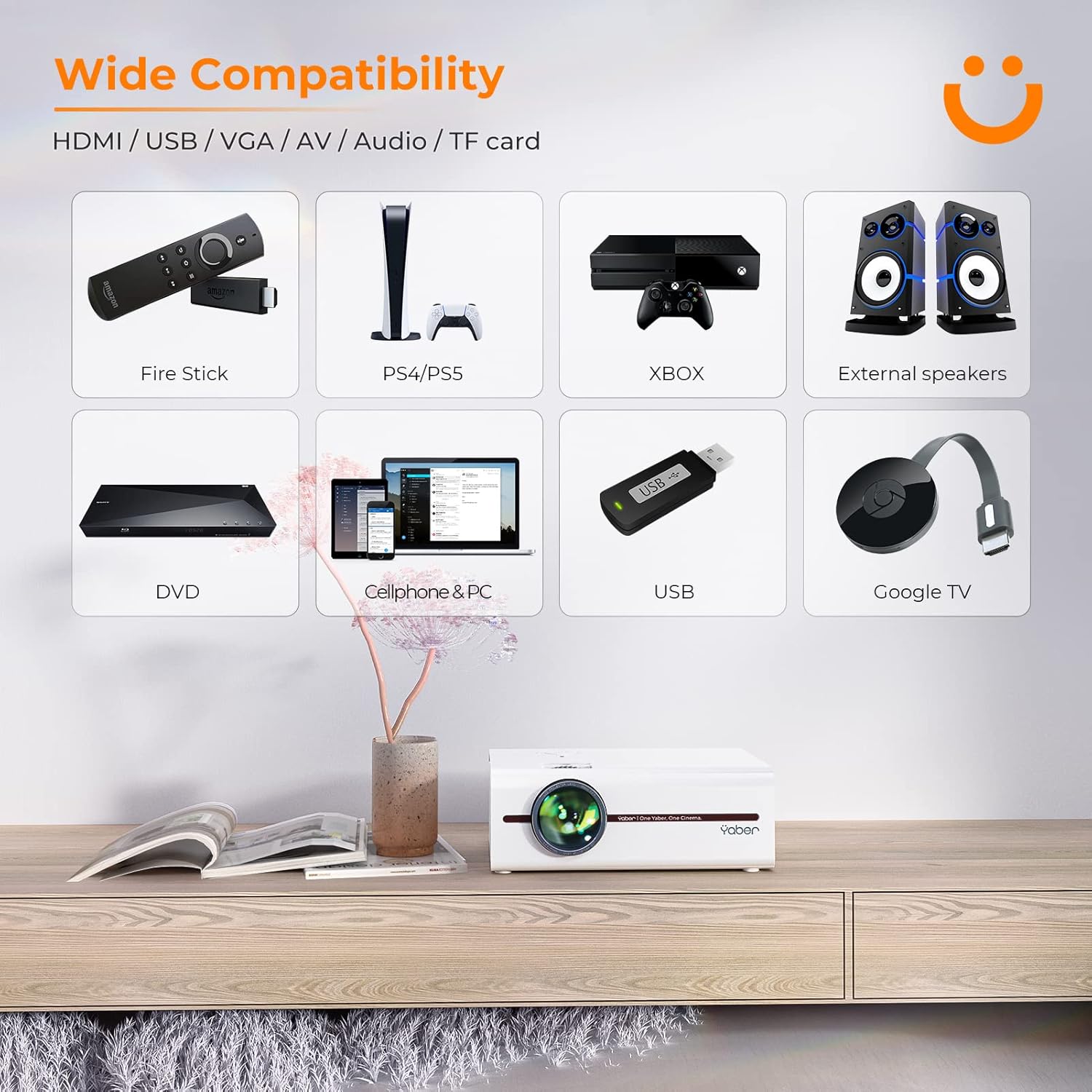
Image: A visual representation of the projector's wide range of compatible devices, including Fire Stick, PS4/PS5, Xbox, external speakers, DVD players, cellphones, PCs, USB drives, and Google TV, connected via various ports.
4. Настройка
4.1 Initial Placement and Power
- Place the projector on a stable, flat surface or mount it using a compatible tripod. Ensure proper ventilation around the unit.
- Падключыце кабель харчавання да ўваходу харчавання праектара, а затым да разеткі.
- Націсніце кнопку харчавання на праектары або пульце дыстанцыйнага кіравання, каб уключыць яго.
4.2 Рэгуляванне фокусу выявы і трапецападобнай карэкцыі
After powering on, adjust the focus and keystone correction for a clear, rectangular image.
- Фокус: Паварочвайце кольца факусоўкі на аб'ектыве праектара, пакуль выява не стане рэзкай і выразнай.
- Карэкцыя трапецеідальных скажэнняў: Use the keystone adjustment dial or the remote control to correct any trapezoidal distortion, ensuring the image is perfectly rectangular. The V5 supports both mechanical and digital keystone correction.

Image: A hand holding the projector's remote control, illustrating the ease of adjusting the projected image, including focus and keystone correction.
4.3 Падключэнне прылад
The YABER V5 offers various connectivity options:
- HDMI: Connect your laptop, game console, or streaming device via an HDMI cable.
- USB: Устаўце USB-назапашвальнік для прайгравання медыяфайлаў files непасрэдна.
- АВ: Use the AV cable for older devices like DVD players.
- VGA: Connect to computers with a VGA output.
- TF карта: Insert a TF card for media playback.
4.4 Wireless Screen Mirroring (WiFi)
To mirror your smartphone or tablet screen wirelessly:
- Пераканайцеся, што ваш праектар і мабільная прылада падключаны да адной сеткі Wi-Fi.
- On the projector, select the 'Screen Mirroring' input source.
- For iOS devices, open Control Center and tap 'Screen Mirroring' or 'AirPlay Mirroring', then select the projector from the list.
- For Android devices, enable 'Wireless Display', 'Smart View', 'Multi-screen', or similar function in your device settings, then select the projector.

Image: A visual comparison demonstrating the faster loading and transmission speed of 5GHz WiFi compared to 2.4GHz, highlighting the benefit for screen mirroring.
4.5 Аўдыёзлучэнне Bluetooth
To connect to a Bluetooth audio device:
- Enable Bluetooth on your external speaker or headphones and set it to pairing mode.
- На праектары перайдзіце ў меню налад Bluetooth.
- Выберыце сваю прыладу са спісу даступных прылад для спалучэння.

Image: The YABER V5 projector wirelessly connected to an external Bluetooth speaker, illustrating the enhanced audio experience possible.
5. Інструкцыя па эксплуатацыі
5.1 Уключэнне/выключэнне сілкавання
- To power on, press the power button on the projector or remote.
- Каб выключыць прыладу, зноў націсніце кнопку харчавання. Пацвердзіце выключэнне, калі будзе запытана.
5.2 Выбар крыніцы ўваходнага сігналу
Use the 'Source' button on the remote or projector to cycle through available input sources (HDMI, USB, AV, VGA, TF Card, Screen Mirroring).
5.3 Навігацыя па меню
Use the arrow keys on the remote or projector to navigate through the on-screen menu. Press 'OK' or 'Enter' to confirm selections. Use 'Return' or 'Exit' to go back or close the menu.
5.4 Adjusting Projection Size (Zoom Function)
To adjust the projection size without moving the projector, use the digital zoom function via the remote control. This allows you to shrink the image from 100% down to 50%.

Image: An illustration showing the digital zoom function, allowing the projected image size to be adjusted from 100% down to 50% without physically moving the projector.
6. Тэхнічнае абслугоўванне
6.1 Ачыстка аб'ектыва
Выкарыстоўвайце мяккую тканіну без ворса, спецыяльна распрацаваную для аптычных лінзаў, каб акуратна працерці аб'ектыў праектара. Пазбягайце выкарыстання абразіўных ачышчальнікаў або празмернага ціску.
6.2 Ачыстка корпуса праектара
Працірайце знешнія паверхні праектара мяккай сухой тканінай. Не выкарыстоўвайце вадкія ачышчальнікі або растваральнікі.
6.3 Вентыляцыя
Ensure the projector's ventilation vents are clear and unobstructed to prevent overheating. Do not block the vents during operation.
6.4 лamp жыццё
The YABER V5 projector lamp has an estimated lifespan of up to 100,000 hours. No user replacement is typically required for the lamp.
7. Выпраўленне непаладак
If you encounter issues with your YABER V5 Mini Projector, please refer to the following common problems and solutions:
| праблема | Магчымая прычына | Рашэнне |
|---|---|---|
| No image/No signal | Няправільная крыніца ўваходнага сігналу выбрана; няшчыльнае падключэнне кабеля; прылада не ўключана. | Select the correct input source. Check all cable connections. Ensure connected device is powered on. |
| Размыты малюнак | Focus not adjusted; Keystone not corrected. | Adjust the focus ring on the lens. Use keystone correction to square the image. |
| Няма гуку | Занадта нізкая гучнасць; гук выключаны; знешняя аўдыёпрылада не падключана/не спалучана. | Increase volume. Unmute the projector. Ensure Bluetooth device is paired or external speakers are properly connected. |
| Screen mirroring issues (freezing/disconnection) | Weak WiFi signal; Network congestion; Device compatibility. | Ensure strong WiFi signal (preferably 5G). Reduce network traffic. Try a wired connection if wireless is unstable. |
| Пульт дыстанцыйнага кіравання не працуе | Dead batteries; Obstruction between remote and projector. | Replace batteries. Ensure no objects are blocking the IR receiver on the projector. |
If the problem persists after trying these solutions, please contact YABER customer support for assistance.
8. Тэхнічныя характарыстыкі
| Асаблівасць | Дэталь |
|---|---|
| Нумар мадэлі | YABER-V5-MINI |
| Дазвол дысплея | 1920 x 1080 (Full HD Supported) |
| Тэхналогія падлучэння | Bluetooth, Wi-Fi (5G/2.4G), USB, HDMI, VGA, AV, TF Card |
| Асаблівасці | Portable, Built-in Wi-Fi, Bluetooth, Digital Zoom, Hi-Fi Stereo Speaker |
| Рэкамендуемае выкарыстанне | Хатні кінатэатр |
| Памеры прадукту | 8.19 х 6.63 х 3.07 цалі |
| Вага прадмета | 2.2 фунта |
| Lamp жыццё | Да 100,000 гадзін |
9. Гарантыя і падтрымка
YABER provides comprehensive support for your V5 Mini Projector:
- 6-Month Return Policy: Enjoy a 6-month return period from the date of purchase.
- 3-гадовая гарантыя: The projector is covered by a 3-year warranty for repairs.
- Пажыццёвая прафесійная тэхнічная падтрымка: YABER offers professional technical assistance for the lifetime of the product.
For any inquiries or support needs, please contact YABER customer service through their official channels or the retailer where you purchased the product.
Ask a question about this manual
Ask about setup, troubleshooting, compatibility, parts, safety, or missing instructions. Manuals+ will review the question and use this page’s manual context to help answer it.