
Пачатак працы
Змест пакета
Upon opening the MAXTOP Smart Watch T5 package, you should find the following items:
- MAXTOP Smart Watch T5 device
- Silicone watch strap (black)
- USB кабель для зарадкі
- Кіраўніцтва карыстальніка

Image: MAXTOP Smart Watch T5 package contents, showing the watch, a black silicone strap, a USB charging cable, and the user manual.
Зарадка прылады
Before first use, fully charge your smart watch. Connect the magnetic charging cable to the charging points on the back of the watch and plug the USB end into a standard USB power adapter (not included) or a computer's USB port. The watch display will indicate charging status.
Заўвага:
- Пераканайцеся, што кантакты зарадкі чыстыя і сухія.
- Use a 5V/1A charger for optimal charging.
Уключэнне/выключэнне
- Каб уключыць: Press and hold the side button for a few seconds until the MAXTOP logo appears.
- Каб выключыць: From the watch face, swipe down to access quick settings, or navigate to the "Settings" menu. Select the power icon and confirm to shut down the device.
Ўстаноўка прыкладання і спалучэнне
To unlock the full functionality of your MAXTOP Smart Watch T5, you need to install the companion app on your smartphone.
- Спампаваць прыкладанне: Пошук the "MAXTOP" app (or specified companion app in the included manual) in the Apple App Store (for iOS) or Google Play Store (for Android).
- Стварыць уліковы запіс: Адкрыйце праграму і выконвайце інструкцыі на экране, каб стварыць уліковы запіс і наладзіць свой прафесійны...file.
- Падключыце гадзіннік:
- Пераканайцеся, што Bluetooth уключаны на вашым смартфоне.
- Open the app and navigate to the device pairing section.
- Select "Add Device" or similar option. The app will search for nearby devices.
- Select "MAXTOP T5" from the list of found devices.
- Пацвердзіце запыт на спалучэнне як на тэлефоне, так і на гадзінніку, калі будзе адпаведная інфармацыя.
Важна:
- Трымайце гадзіннік блізка да тэлефона падчас працэсу спалучэння.
- Allow all requested permissions for the app to function correctly.
Асаблівасці і эксплуатацыя
Навігацыя па інтэрфейсе
The MAXTOP Smart Watch T5 features a 1.54-inch full touch screen for easy navigation.
- Правядзіце пальцам уверх/уніз: Пракручваць меню або апавяшчэнні.
- Правядзіце пальцам улева/управа: Access different feature screens or quick views.
- Націсніце: Выберыце элемент або пацвердзіце дзеянне.
- Бакавая кнопка: Націсніце, каб вярнуцца да асноўнага цыферблата або ўключыць экран.

Image: The MAXTOP Smart Watch T5 display showcasing multiple functions including heart rate, blood pressure, music control, and various sports modes.
Daily Activity Tracking
Your smart watch automatically tracks your daily activities, including steps, distance, and calories burned. You can view detailed summaries in the companion app.

Image: The MAXTOP Smart Watch T5 tracking daily activities such as steps, calories, and distance, alongside icons representing various sports modes like hiking, cycling, and running.
Спартыўныя рэжымы
The watch supports 10 different sport modes to accurately track your workouts. To start a sport mode:
- Swipe on the watch face to find the "Sport" icon or menu.
- Tap to select your desired activity (e.g., Outdoor Run, Indoor Walk, Cycling).
- The watch will begin tracking your activity. Tap to pause or end the workout.

Image: The MAXTOP Smart Watch T5 interface showing 10 distinct sport modes, such as hiking, outdoor cycling, indoor running, and elliptical training.
Heart Rate and Blood Pressure Monitoring
The watch can monitor your heart rate (HR) and blood pressure (BP). For accurate readings:
- Wear the watch snugly on your wrist, about one finger's width from your wrist bone.
- Заставайцеся нерухомымі падчас вымярэння.
- To measure: Navigate to the HR or BP icon on the watch and tap to start.

Image: The MAXTOP Smart Watch T5 displaying heart rate in beats per minute (BPM) and illustrating different sleep stages (awake, light, deep sleep).
Маніторынг сну
The watch automatically tracks your sleep patterns, including awake time, light sleep, and deep sleep. View your sleep quality report in the companion app.

Image: The MAXTOP Smart Watch T5's sleep monitoring feature, displaying sleep duration and a detailed sleep quality analysis within the companion application.
Апавяшчэнні аб паведамленнях
Receive notifications from your smartphone directly on your watch. Ensure the watch is paired and app notifications are enabled in your phone's settings and the companion app.
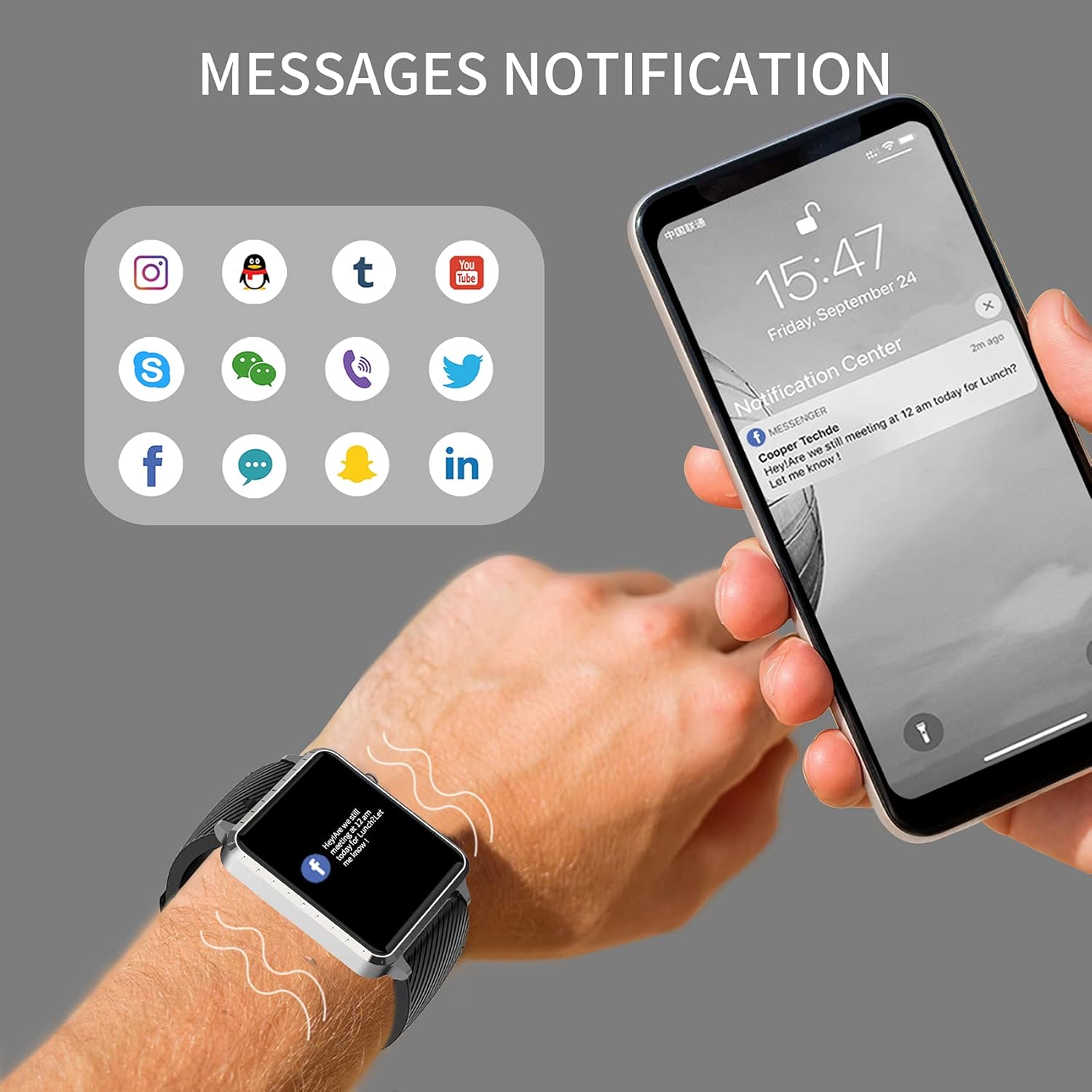
Image: The MAXTOP Smart Watch T5 showing incoming message notifications from popular social media and communication applications on its screen.
Кіраванне музыкай
Control music playback on your smartphone directly from your watch. This feature allows you to play, pause, skip tracks, and adjust volume without taking out your phone.

Image: The MAXTOP Smart Watch T5 demonstrating various features including music control, message notifications, sedentary reminders, and the 'find phone' function.
Іншыя функцыі
- Напаміны пра сядзячы рэжым: Усталюйце напаміны ў дадатку, каб заахвочваць рух пасля перыядаў бяздзейнасці.
- Знайсці тэлефон: Use this feature on your watch to make your paired phone ring, helping you locate it.
- Секундамер і зваротны адлік: Access these tools from the watch's menu for timing activities.
Тэхнічнае абслугоўванне і догляд
Воданепранікальнасць
The MAXTOP Smart Watch T5 is rated IP67 waterproof. This means it is resistant to splashes, rain, and brief immersion in water. It is suitable for daily use and can withstand hand washing or light rain.
Увага:
- Do not use the watch for swimming, diving, or showering with hot water.
- Avoid exposing the watch to high-pressure water or steam.
- Water resistance is not a permanent condition and may decrease over time with normal wear.
Уборка
Regularly clean your watch and strap to maintain hygiene and prevent skin irritation.
- Працірайце экран і корпус гадзінніка мяккай губкайamp, тканіна без ворса.
- For the silicone strap, you can wash it with mild soap and water, then rinse thoroughly and dry completely before reattaching to your wrist.
- Пазбягайце выкарыстання агрэсіўных хімікатаў або абразіўных матэрыялаў.
Сыход за батарэяй
Каб падоўжыць тэрмін службы батарэі:
- Перад першым выкарыстаннем цалкам зарадзіце гадзіннік.
- Пазбягайце экстрэмальных тэмператур.
- Калі гадзіннік не выкарыстоўваецца працяглы час, зарадзіце яго прыкладна да 50% перад захоўваннем.
Ліквідацыю непаладак
Гадзіннік не ўключаецца
- Пераканайцеся, што гадзіннік цалкам зараджаны. Падключыце яго да зараднай прылады як мінімум на 30 хвілін.
- Націсніце і ўтрымлівайце бакавую кнопку на працягу 10-15 секунд, каб прымусова перазапусціць.
Немагчыма спалучыць прыладу з тэлефонам
- Пераканайцеся, што Bluetooth уключаны на вашым тэлефоне, і гадзіннік знаходзіцца ў зоне дзеяння.
- Перазагрузіце і тэлефон, і гадзіннік.
- Пераканайцеся, што суправаджальнае прыкладанне ўсталявана і абноўлена да апошняй версіі.
- Forget the device from your phone's Bluetooth settings and try pairing again through the app.
- Праверце, ці не спалучаны гадзіннік з іншай прыладай.
Inaccurate Readings (HR/BP/Sleep)
- Ensure the watch is worn correctly: snug on the wrist, not too tight or too loose.
- Падчас вымярэнняў не рухайцеся.
- Note that smart watch readings are for reference only and should not be used for medical diagnosis.
Апавяшчэнні не з'яўляюцца
- Пераканайцеся, што гадзіннік паспяхова спалучаны з вашым тэлефонам.
- Праверце налады апавяшчэнняў праграм на тэлефоне і ў суправаджальнай праграме.
- Пераканайцеся, што праграма працуе ў фонавым рэжыме і не зачыняецца функцыямі энергазберажэння тэлефона.
Тэхнічныя характарыстыкі
| Асаблівасць | Дэталь |
|---|---|
| Марка | МАКСТОП |
| мадэль | T5 |
| Памер экрана | 1.54 цалі |
| Памеры прадукту | 1.46 х 1.57 х 0.28 цалі |
| Вага прадмета | 1.87 унцыі (53 грама) |
| Аперацыйная сістэма | Сумяшчальнасць з Android і iOS |
| Бесправадная сувязь | Bluetooth |
| Тып батарэі | Літый-палімерны (1 у камплекце) |
| Тэрмін службы батарэі | Да 10 дзён |
| Узровень воданепранікальнасці | Воданепранікальны (IP67) |
| Першая даступная дата | 6 ліпеня 2022 г |

Image: Detailed physical dimensions of the MAXTOP Smart Watch T5, including the watch face width, height, and the adjustable strap length.
Гарантыя і падтрымка
For warranty information and customer support, please refer to the official MAXTOP website or contact their customer service directly. Details are typically provided in the packaging or on the manufacturer's webсайт.
Захоўвайце чэк аб куплі ў якасці пацверджання пакупкі ў выпадку любых гарантыйных прэтэнзій.