
1. Уводзіны і большview
This manual provides essential information for the installation, operation, and maintenance of your ZOTAC Gaming GeForce RTX 3070 Ti AMP Extreme Holo graphics card. Please read this manual thoroughly before installation and retain it for future reference.
The ZOTAC Gaming GeForce RTX 3070 Ti AMP Extreme Holo is built on the NVIDIA Ampere architecture, featuring enhanced RT Cores and Tensor Cores, new streaming multiprocessors, and superfast GDDR6X memory. It is designed to deliver high-fidelity gaming experiences.

Figure 1: ZOTAC Gaming GeForce RTX 3070 Ti AMP Extreme Holo Graphics Card, front view.
Асноўныя характарыстыкі:
- NVIDIA Ampere architecture, 2nd Gen Ray Tracing Cores, 3rd Gen Tensor Cores
- 8GB 256-bit GDDR6X memory, 19 Gbps, PCIE 4.0
- HoloBlack Design with SPECTRA 2.0 RGB Lighting
- IceStorm 2.0 Advanced Cooling with 3x 100mm fans, FREEZE Fan Stop, and Active Fan Control
- PowerBoost and Dual BIOS
- Metal RGB Lighted Backplate
- 8K Ready, 4 Display Ready, HDCP 2.3, VR Ready
- Boost Clock 1890 MHz
2. Настройка і ўстаноўка
Сістэмныя патрабаванні:
- PCI Express 4.0 compliant motherboard with one x16 graphics slot.
- 750-watt power supply recommended.
- Minimum of 2 x 8-pin and 1 x 6-pin power connectors from the power supply.
- Windows 10 64-bit (build 2004 or later) operating system.
- Minimum 6.56 pounds of available space in your PC case.
- Dimensions: 355.9mm (Length) x 145.7mm (Height) x 59.7mm (Width, 3 slot).
Этапы ўстаноўкі:
- Падрыхтуйце сваю сістэму: Выключыце камп'ютар і адлучыце ўсе кабелі. Адкрыйце корпус камп'ютара.
- Знайдзіце слот PCIe: Знайдзіце вольны слот PCI Express x16 на матчынай плаце.
- Remove existing graphics card (if any): Carefully remove any existing graphics card and its power connectors.
- Install the ZOTAC Gaming GeForce RTX 3070 Ti: Align the graphics card with the PCIe slot and press down firmly until it is securely seated. Ensure the retention clip on the motherboard clicks into place.
- Замацуйце карту: Use screws to secure the graphics card to the PC case's expansion slot brackets.
- Падключыць харчаванне: Connect the 2 x 8-pin and 1 x 6-pin power connectors from your power supply to the corresponding ports on the graphics card.
- Close the case and connect peripherals: Зачыніце корпус кампутара, падключыце ўсе кабелі і ўключыце сістэму.
- Усталяваць драйверы: Once your operating system loads, install the latest NVIDIA Game Ready Drivers or NVIDIA Studio Drivers from the official NVIDIA webсайт.

Малюнак 2: Спераду view of the graphics card, highlighting the triple fan cooling system.
Падключэнне дысплеяў:
The graphics card supports up to four simultaneous displays. It features:
- 3 x DisplayPort 1.4a (up to 7680x4320@60Hz)
- 1 x HDMI 2.1 (up to 7680x4320@60Hz)
Ensure you use compatible cables for your desired resolution and refresh rate. HDCP 2.3 is supported.

Figure 3: Display output ports on the graphics card, including DisplayPort and HDMI.
3. Кіраванне відэакартай
Software Compatibility:
- Драйверы Game Ready і драйверы NVIDIA Studio
- Microsoft DirectX 12 Ultimate, Vulkan RT API
- OpenGL 4.6
Regularly update your graphics drivers to ensure optimal performance and compatibility with the latest games and applications.
RGB Lighting (SPECTRA 2.0):
The card features SPECTRA 2.0 RGB Lighting, which can be customized to match your system's aesthetic. This includes the HoloBlack design elements and the Metal RGB Lighted Backplate. An external LED strip can also be connected for synchronized lighting effects.

Малюнак 4: Пад вуглом view of the graphics card showcasinг яго наладжвальную RGB-падсветку.
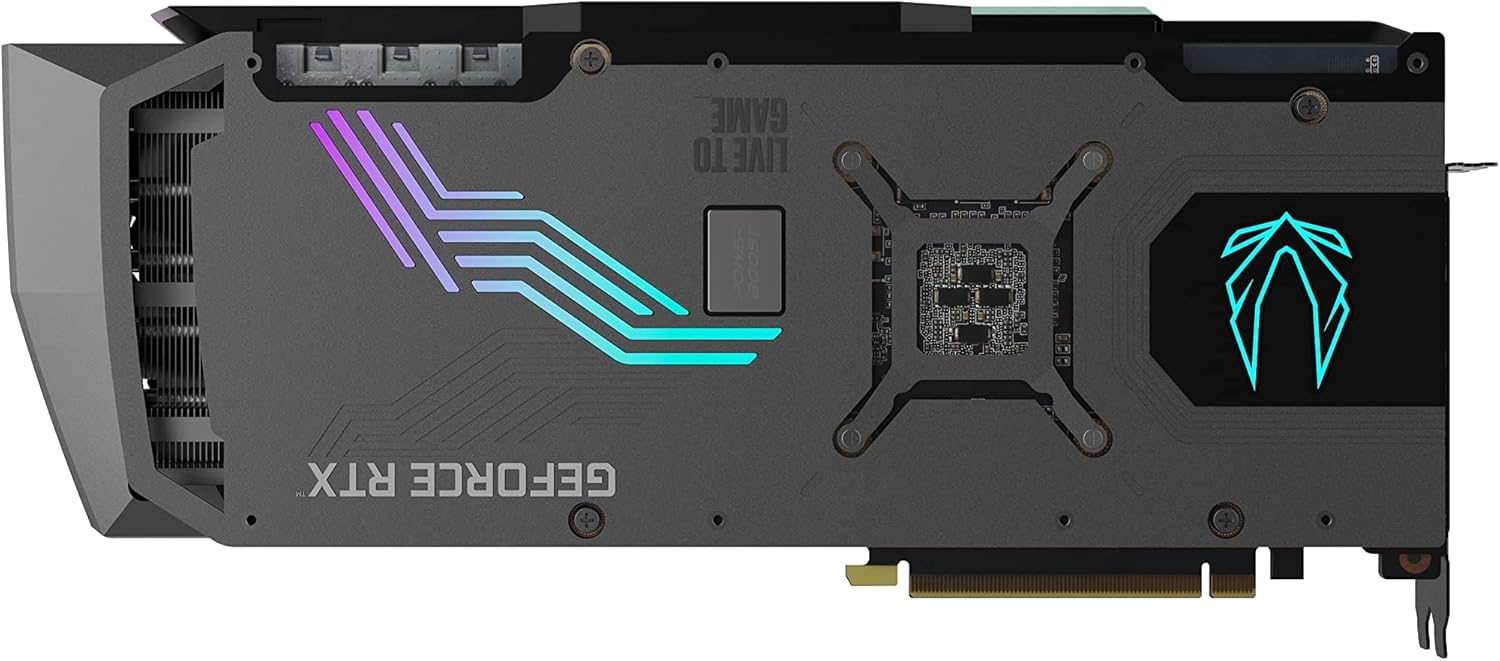
Малюнак 5: Задняя частка view of the graphics card, highlighting the RGB lighted backplate.
4. Тэхнічнае абслугоўванне
To ensure the longevity and optimal performance of your graphics card, regular maintenance is recommended.
Сістэма астуджэння:
The IceStorm 2.0 Advanced Cooling system features three 100mm fans. Key cooling features include:
- Active Fan Control: Dynamically adjusts fan speeds based on GPU temperature.
- FREEZE Fan Stop: Fans will stop completely during low-load conditions to reduce noise and conserve power.
Periodically inspect the fans and heatsink for dust buildup. Use compressed air to gently clean any accumulated dust to maintain efficient cooling. Ensure adequate airflow within your PC case.
5. Выпраўленне непаладак
If you encounter issues with your graphics card, consider the following general troubleshooting steps:
- Няма дысплея або чорны экран: Ensure all power cables are securely connected to the graphics card and the power supply. Verify that the display cable is properly connected to both the graphics card and the monitor. Try a different display output port or cable.
- Праблемы з драйверамі: Uninstall existing graphics drivers using a driver uninstaller utility, then download and install the latest drivers from the NVIDIA webсайт.
- Праблемы з прадукцыйнасцю: Check GPU temperatures using monitoring software. Ensure your PC case has good airflow. Verify that your power supply meets the recommended wattage.
- System instability: Ensure your operating system is up to date. Check for any conflicting software or background processes.
For more detailed troubleshooting or persistent issues, please refer to the ZOTAC support webсайт.
6. Тэхнічныя характарыстыкі
| Спецыфікацыя | Каштоўнасць |
|---|---|
| графічны працэсар | NVIDIA GeForce RTX 3070 Ti |
| Ядра CUDA | 6144 |
| Відэа памяць | 8 ГБ GDDR6X |
| Шына памяці | 256-бітны |
| Engine Boost Clock | 1890 МГц |
| Гадзіннік памяці | 19.0 Гбіт/с |
| PCI Express | 4.0 |
| Максімальны дазвол экрана | 7680x4320 |
| Раздымы харчавання | 2 x 8-pin, 1 x 6-pin |
| Рэкамендаваны БП | 750-ватны |
| Максімальнае энергаспажыванне | 310-ватны |
| Памеры (даўжыня) | 355.9 мм (14in) |
| Памеры (вышыня) | 145.7 мм (5.7in) |
| Памеры (шырыня) | 3 slot (59.7mm / 2.4in) |
| Вага прадмета | 6.56 фунта |
7. Што ў скрынцы
The following items are included with your ZOTAC Gaming GeForce RTX 3070 Ti AMP Extreme Holo graphics card:
- ZOTAC GAMING GeForce RTX 3070 Ti AMP Extreme Holo graphics card
- ZOTAC GAMING RGB GPU Support Bracket
- 3-кантактны кабель RGB-кабеля
- Кіраўніцтва карыстальніка (гэты дакумент)

Figure 6: Contents of the ZOTAC Gaming GeForce RTX 3070 Ti AMP Extreme Holo retail box.

Figure 7: The included ZOTAC Gaming RGB GPU Support Bracket.
8. Гарантыя і падтрымка
For customer service, technical support, or general inquiries regarding your ZOTAC Gaming GeForce RTX 3070 Ti AMP Extreme Holo graphics card, please visit the dedicated support page on the official ZOTAC webсайт.
Афіцыйная падтрымка Webсайт: www.zotac.com/support
Please retain your proof of purchase for warranty claims. Warranty terms and conditions are available on the ZOTAC support webсайт.


