
1. Інфармацыя па бяспецы
Please read all instructions carefully before assembly and use. Failure to follow these instructions may result in injury or product damage. Keep this manual for future reference.
- This desk requires assembly. Ensure all components are correctly installed before use.
- The maximum weight capacity for this desk is 220 pounds (100 kg). Do not exceed this limit.
- When adjusting the desk height, ensure there are no obstructions above or below the desk that could interfere with its movement.
- Трымайце дзяцей і хатніх жывёл далей ад стала падчас працы.
- Do not attempt to manually force the desk up or down. Use only the electric control panel.
- Ensure the power cord is properly connected and routed to prevent tripping hazards or damage.
- Для аптымальнай устойлівасці пераканайцеся, што стол размешчаны на роўнай паверхні.
Important Note: When using the LED control panel to adjust height, the three height keys must be pressed and held continuously until the desired height is reached.
2. Змесціва ўпакоўкі
Перад пачаткам зборкі пераканайцеся, што ўсе кампаненты ў наяўнасці. Калі якія-небудзь дэталі адсутнічаюць або пашкоджаныя, звярніцеся ў службу падтрымкі кліентаў.
- Desktop (71"x32" Black Top)
- Desk Frame (Black Frame)
- 4 ногі
- Панэль кіравання
- Адаптар сілкавання і кабель
- Зборныя элементы (шрубы, балты і г.д.)
- Кіраўніцтва па эксплуатацыі
3. Інструкцыя па зборцы
Assembly typically requires two people. Please follow these steps carefully. A power drill may be helpful for some steps, but is not strictly required.
- Распакуйце кампаненты: Асцярожна выміце ўсе дэталі з упакоўкі і раскладзеце іх на чыстай мяккай паверхні, каб пазбегнуць драпін.
- Прымацаваць ножкі да рамы: Securely attach the four legs to the desk frame using the provided hardware. Ensure all connections are tight.
- Install Desktop: Place the desktop upside down on a soft surface. Carefully align the assembled frame with the pre-drilled holes on the underside of the desktop. Secure the frame to the desktop using the appropriate screws.
- Mount Control Panel: Attach the LED control panel to the underside of the desktop, typically on the front edge, using the provided screws.
- Падключыце кабелі: Connect the motor cables from the legs to the control box. Connect the control panel cable to the control box. Finally, connect the power adapter to the control box and plug it into a power outlet. Ensure all cables are neatly managed to avoid interference with desk movement.
- Першапачатковая ўстаноўка: Once assembled, carefully flip the desk upright. Perform an initial height calibration by pressing and holding the 'Down' button until the desk reaches its lowest point, then release. The desk is now ready for operation.

Figure 3.1: Fully assembled FLEXISPOT 4 Leg Standing Desk.
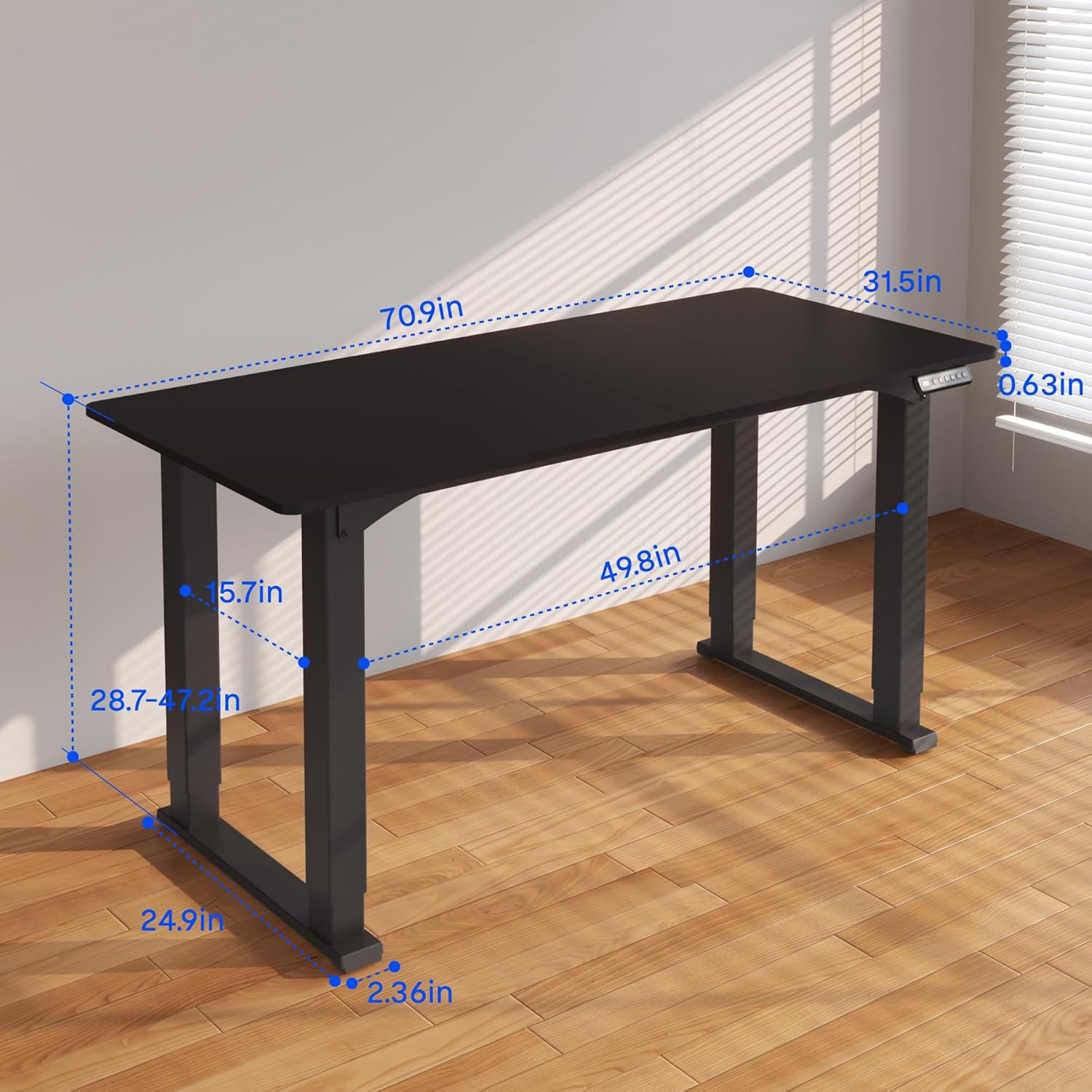
Figure 3.2: Detailed dimensions of the desk, including height range and desktop size.
4. Інструкцыя па эксплуатацыі
The FLEXISPOT 4 Leg Standing Desk features an intuitive LED control panel for easy height adjustments and memory settings.
4.1. Панэль кіравання скончанаview

Figure 4.1: Digital Keypad with memory functions and up/down controls.
- Стрэлкі ўверх/уніз (▲ / ▼): Press and hold to adjust the desk height upwards or downwards. The current height is displayed on the LED screen.
- Memory Buttons (1, 2, 3): These buttons allow you to save and recall preferred height settings.
- Memory Set Button (M): Used to program a height into a memory slot.
4.2. Рэгуляванне вышыні
To adjust the desk height, press and hold the ▲ (Up) or ▼ (Down) arrow button until the desk reaches your desired position. The desk will move smoothly between 28.7 inches and 47.2 inches.
4.3. Saving Memory Presets
You can save up to three preferred height settings for quick recall:
- Адрэгулюйце вышыню стала на патрэбную вам вышыню з дапамогай стрэлак уверх/уніз.
- Націсніце кнопку «M». На святлодыёдным дысплеі з'явіцца «S-».
- Within 3 seconds, press one of the memory buttons (1, 2, or 3). The LED display will show 'S-1', 'S-2', or 'S-3' to confirm the setting has been saved.
4.4. Выклік зададзеных налад памяці
To move the desk to a saved height, press and трымаць the corresponding memory button (1, 2, or 3) until the desk reaches the programmed height.
4.5. Сістэма прадухілення сутыкненняў
The desk is equipped with an anti-collision system to prevent damage. If the desk encounters an obstruction during movement, it will stop and reverse slightly. Remove the obstruction before resuming operation.

Figure 4.2: Anti-collision system in action, preventing damage from obstructions.
5. Тэхнічнае абслугоўванне
Regular maintenance ensures the longevity and smooth operation of your standing desk.
- Уборка: Працярыце працоўны стол і рамку мяккай губкайamp тканінай. Пазбягайце агрэсіўных хімічных рэчываў або абразіўных ачышчальнікаў.
- Кабельнае кіраванне: Periodically check and organize cables to prevent tangles and ensure they do not interfere with the desk's movement.
- Праверка крапяжу: Перыядычна правярайце ўсе шрубы і балты, каб пераканацца, што яны зацягнуты. Пры неабходнасці падцягвайце.
- Сыход за рухавіком: The electric motors are maintenance-free. Do not attempt to lubricate or disassemble them.
6. Выпраўленне непаладак
If you encounter issues with your desk, refer to the following common problems and solutions:
- Стол не рухаецца:
- Праверце, ці шнур харчавання надзейна падключаны як да стала, так і да разеткі.
- Пераканайцеся, што ўсе кабелі рухавіка правільна падключаны да блока кіравання.
- Perform a reset: Press and hold the 'Down' button until the desk reaches its lowest point and slightly retracts, then release.
- Няроўны рух або хістанне:
- Ensure the desk is on a level surface. Adjust the leveling feet if necessary.
- Check that all assembly screws and bolts are tightened securely.
- Verify that the weight on the desk does not exceed the maximum capacity of 220 lbs and is evenly distributed.
- Коды памылак на дысплеі:
- If an error code appears, try performing a reset as described above.
- If the error persists, disconnect power for 10 minutes, then reconnect and try again.
- Звярніцеся да вытворцы website or contact customer support with the specific error code.
- Не працуюць налады памяці:
- Пераканайцеся, што вы націскаеце і правядзенне the memory button until the desk reaches the saved height.
- Re-program the memory presets if they are not recalling correctly.
If these steps do not resolve the issue, please contact FLEXISPOT customer support for further assistance.
7. Тэхнічныя характарыстыкі
| Асаблівасць | Спецыфікацыя |
|---|---|
| Марка | ФЛЕКСІСПОТ |
| Нумар мадэлі | QS2B-1880-AU |
| Памер працоўнага стала | 71"D x 32"W (approx. 180.3cm x 81.3cm) |
| Рэгуляваны дыяпазон вышыні | 28.7" to 47.2" (approx. 72.9cm to 119.9cm) |
| Максімальная грузападымальнасць | 220 фунтаў (100 кг) |
| Матэрыял каркаса | Метал |
| Верхні матэрыял | Вуд |
| Колер | Black Frame & Black Top |
| Тып кіравання | LED Digital Keypad with Memory Presets |
| Асаблівасці | 4-Leg Design, Anti-Collision System, Corded Operation |
| Патрабуецца зборка | так |
8. Гарантыя і падтрымка
FLEXISPOT provides comprehensive warranty coverage for your peace of mind:
- 5-гадовая гарантыя: Covers the desk frame and motor components.
- 2-гадовая гарантыя: Covers the control panel and other electronic parts.
For warranty claims, technical support, or any questions regarding your FLEXISPOT product, please visit the official FLEXISPOT website or contact their customer service department. Please have your model number (QS2B-1880-AU) and proof of purchase available when contacting support.