
1. Уводзіны
Welcome to the BIGGERFIVE Vigor 2 Kids Fitness Tracker Watch manual. This guide provides detailed instructions for setting up, operating, maintaining, and troubleshooting your new fitness tracker. The Vigor 2 is designed to help children aged 5-12 track their daily activity, monitor heart rate and sleep, and encourage healthy habits.
2. Інфармацыя па бяспецы
Please read all safety instructions before using the device.
- Не спрабуйце разабраць або мадыфікаваць прыладу.
- Трымайце прыладу далей ад экстрэмальных тэмператур.
- Supervise children during use, especially during charging.
- Consult a doctor before starting any new exercise program, especially for children with pre-existing health conditions.
- Гэта прылада не з'яўляецца медыцынскім вырабам і не павінна выкарыстоўвацца ў дыягнастычных або лячэбных мэтах.
3. Змесціва ўпакоўкі
Праверце наяўнасць усіх прадметаў у камплекце:
- BIGGERFIVE Vigor 2 Fitness Tracker Watch
- Зарадны кабель
- Інструкцыя па эксплуатацыі (гэты дакумент)
4. Настройка
4.1. Зарадка прылады
Before first use, fully charge the fitness tracker.
- Connect the charging cable to the charging port on the back of the tracker.
- Падключыце USB-кабель да стандартнага USB-адаптара харчавання (не ўваходзіць у камплект) або да USB-порта кампутара.
- Значок батарэі на экране будзе паказваць стан зарадкі. Поўная зарадка займае прыблізна 2 гадзіны.

Image: The BIGGERFIVE Vigor 2 Fitness Tracker connected to its charging cable, illustrating the charging process.
4.2. Installing the BIGGERFIVE App
The BIGGERFIVE Vigor 2 requires the companion app for full functionality.
- Пошук "BIGGERFIVE" in the Apple App Store (for iOS devices) or Google Play Store (for Android devices).
- Спампуйце і ўсталюйце праграму.
4.3. Спалучэнне прылады
- Пераканайцеся, што Bluetooth уключаны на вашым смартфоне.
- Open the BIGGERFIVE app and follow the on-screen instructions to create an account.
- Абярыце «Дадаць прыладу» або падобную опцыю ў дадатку.
- Choose "BIGGERFIVE Vigor 2" from the list of available devices.
- Confirm the pairing request on both the app and the fitness tracker if prompted.

Image: A smartphone screen displaying the BIGGERFIVE app interface, showing steps, distance, calories, and sleep data.
4.4. Setting Up a Family Account
The BIGGERFIVE app supports family accounts to manage multiple trackers.
- Within the app, navigate to the "Family Account" section.
- Create child profiles and link each Vigor 2 tracker to the respective child's profile.

Image: A smartphone screen showing the BIGGERFIVE app's family account feature, allowing parents to manage multiple child profiles and their fitness trackers.
5. Эксплуатацыя прылады
5.1. Базавая навігацыя
The Vigor 2 features a touch-sensitive button at the bottom of the screen for navigation.
- Адзін націск: Short press to cycle through different screens (Time, Steps, Heart Rate, etc.).
- Доўгі націск: Press and hold to activate certain functions or enter sub-menus (e.g., start a workout, confirm a selection).
5.2. Адсочванне актыўнасці
The tracker automatically records daily activity.
- Крокі: Паказвае агульную колькасць пройдзеных крокаў.
- Адлегласць: Паказвае разліковую пройдзеную адлегласць.
- Калорыі: Indicates calories burned.
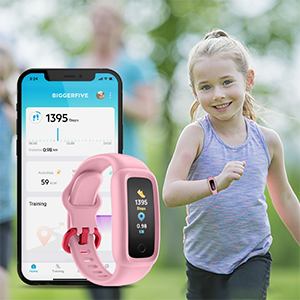
Image: The BIGGERFIVE Vigor 2 screen showing a step counter display.
5.3. Спартыўныя рэжымы
The Vigor 2 supports over 10 sport modes.
- Access sport modes through the device menu.
- Select the desired activity (e.g., Walking, Running, Cycling, Dancing, Basketball, Football, Tennis, Climbing, Workout).
- Long press to start and end a workout session.

Image: The BIGGERFIVE app displaying icons for various sport modes like walking, cycling, basketball, and tennis.
5.4. Маніторынг ЧСС
The device monitors heart rate automatically throughout the day.
- View real-time heart rate on the tracker screen or in the app.
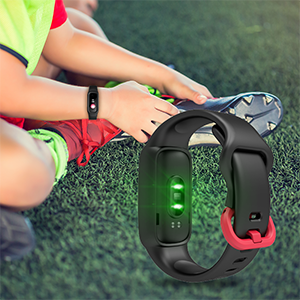
Image: The BIGGERFIVE Vigor 2 screen showing a heart rate display in beats per minute (BPM).
5.5. Адсочванне сну
The Vigor 2 automatically tracks sleep patterns.
- Wear the tracker to bed for accurate sleep data.
- Review sleep duration, deep sleep, light sleep, and awake times in the BIGGERFIVE app.
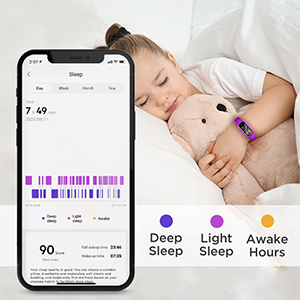
Image: A smartphone screen displaying the BIGGERFIVE app's sleep tracking feature, showing sleep duration and different sleep stagэс.
5.6. Silent Alarm Clock
Set silent alarms through the BIGGERFIVE app.
- Alarms vibrate gently on the wrist to wake the user without disturbing others.
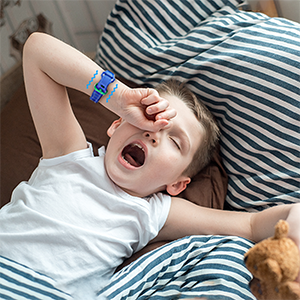
Image: The BIGGERFIVE Vigor 2 on a child's wrist, illustrating the silent alarm clock feature.
5.7. Секундамер
The tracker includes a stopwatch function.
- Navigate to the stopwatch screen on the device.
- Use the touch button to start, pause, and reset the timer.
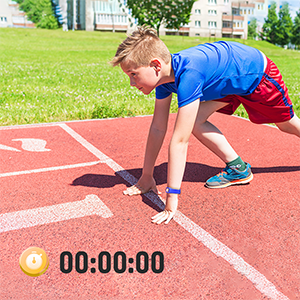
Image: The BIGGERFIVE Vigor 2 screen showing the stopwatch function with a timer displayed.
5.8. Карыстальніцкія цыферблаты
Personalize the tracker with different watch faces.
- Select and apply new watch faces through the BIGGERFIVE app.
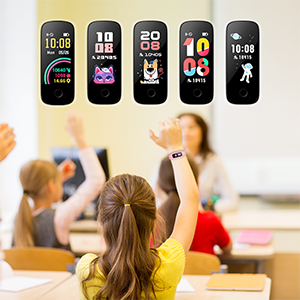
Image: A selection of customizable watch faces available for the BIGGERFIVE Vigor 2 Fitness Tracker.
6. Тэхнічнае абслугоўванне
6.1. Уборка
- Regularly clean the tracker and strap with a soft, damp тканіна.
- Пазбягайце выкарыстання агрэсіўных хімікатаў або абразіўных матэрыялаў.
- Перад зарадкай пераканайцеся, што кантакты зараднай прылады чыстыя і сухія.
6.2. Воданепранікальнасць (IP68)
The BIGGERFIVE Vigor 2 is IP68 waterproof, suitable for swimming and water activities.
- Do not use in hot water or saunas.
- Rinse with fresh water after exposure to salt water or chlorinated water.
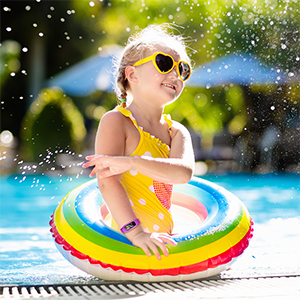
Image: A child wearing the BIGGERFIVE Vigor 2 Fitness Tracker while playing in water, highlighting its IP68 waterproof rating.
6.3. Сыход за батарэяй
- Рэгулярна зараджайце прыладу для падтрымання спраўнасці батарэі.
- Пазбягайце поўнай разрадкі акумулятара на працяглы час.
- Battery life is approximately 7 days on a 2-hour charge.
7. Выпраўленне непаладак
7.1. Прылада не ўключаецца
- Пераканайцеся, што прылада цалкам зараджана. Падключыце яе да зараднай прылады як мінімум на 10 хвілін.
- Try a soft reset by pressing and holding the touch button for 10-15 seconds.
7.2. Not Pairing with App
- Пераканайцеся, што Bluetooth уключаны на вашым смартфоне.
- Ensure the tracker is close to your phone during pairing.
- Restart both the tracker and your smartphone.
- Праверце, ці абноўлена праграма да апошняй версіі.
- If you have multiple trackers, ensure you are trying to pair the correct one.
7.3. Inaccurate Step Count
- Ensure the tracker is worn snugly on the wrist.
- Calibrate the tracker through the app if available.
- Movement of the arm not associated with walking (e.g., waving) may sometimes be counted as steps.
7.4. Heart Rate/Sleep Data Not Showing
- Ensure the tracker is worn correctly and snugly on the wrist.
- For sleep tracking, wear the device throughout the night.
- Sync the device with the app regularly to transfer data.
7.5. Экран не рэагуе
- Перазапусціце прыладу.
- Пераканайцеся, што экран чысты і сухі.
8. Тэхнічныя характарыстыкі
| Асаблівасць | Дэталь |
|---|---|
| Назва мадэлі | BF200 |
| Марка | ВЯЛІКІЯ |
| Памер экрана | 0.96 цалі |
| Тып дысплея | Электронныя |
| дазвол | 128 х 128 |
| Сувязь | Bluetooth |
| Рэйтынг воданепранікальнасці | IP68 (да 1.5 метра) |
| Тып батарэі | Літый-палімерны |
| Тэрмін службы батарэі | Да 7 дзён |
| Час зарадкі | Прыбл. 2 гадзіны |
| Матэрыял гурта | Сілікон |
| Матэрыял корпуса | Пластыкавыя |
| Вага прадмета | 0.02 кілаграма |
| Памеры | 20 х 1.5 х 1 см |
| Мэтавая аўдыторыя | Unisex Kids (Ages 5-12) |
| Падтрымліваюцца прыкладанні | Sleep Monitor, Pedometer, Heart Rate Monitor |
| Сумяшчальныя прылады | Most Android 6.0+ and iOS 9.0+ smartphones |
9. Гарантыя і падтрымка
9.1. Інфармацыя аб гарантыі
The BIGGERFIVE Vigor 2 Fitness Tracker Watch comes with a 1-year warranty. Please retain your proof of purchase for warranty claims. The warranty covers manufacturing defects but does not cover damage caused by misuse, accidents, or unauthorized modifications.
9.2. Падтрымка кліентаў
For further assistance, technical support, or warranty inquiries, please contact BIGGERFIVE customer service.
- Visit the official BIGGERFIVE webсайт для кантактных дадзеных.
- Refer to your purchase platform for seller contact information.