
Dascert Q38[NEW]
Dascert Q38 Wireless Bluetooth Earbuds User Manual
Model: Q38[NEW]
1. Уводзіны
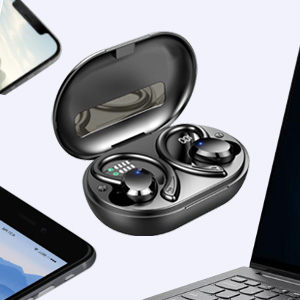
Thank you for choosing the Dascert Q38 Wireless Bluetooth Earbuds. These earbuds are designed to provide a comfortable and immersive audio experience, perfect for sports and daily use. Featuring Bluetooth 5.1 technology, IP7 waterproofing, and a long-lasting battery, the Q38 earbuds offer stable connectivity and high-fidelity stereo sound.
Калі ласка, уважліва прачытайце гэтую інструкцыю перад выкарыстаннем вырабу, каб забяспечыць правільную працу і максімальна падоўжыць тэрмін яго службы.
2. Змесціва ўпакоўкі
Пераканайцеся, што ўсе прадметы прысутнічаюць у пасылцы:
- Бесправадныя навушнікі Dascert Q38 (левыя і правыя)
- Чахол для зарадкі
- Зарадны кабель USB-C
- Кіраўніцтва карыстальніка
- Earhooks (pre-installed or included separately)
- Розныя памеры вушных наканечнікаў (S, M, L)

3. Прадукт скончыўсяview
The Dascert Q38 earbuds are designed for comfort and performance, especially during physical activity. Key features include secure earhooks, IP7 waterproofing, and intuitive touch controls.
3.1 Кампаненты навушнікаў-ўкладышаў

- Завушны кручок: Provides a secure and comfortable fit, ideal for sports.
- Вобласць сэнсарнага кіравання: Для кіравання прайграваннем, званкамі і галасавым памочнікам.
- Святлодыёдны індыкатар: Паказвае стан зарадкі і стан падключэння.
- Кантакты для зарадкі: Падключаецца да зараднага чахла для харчавання.
- Мікрафон: Для званкоў і галасавых каманд.
3.2 Кампаненты зараднага футляра
- Лічбавы святлодыёдны дысплей: Паказвае працэнты зарада батарэі зараднага чахлаtage (1%-100%).
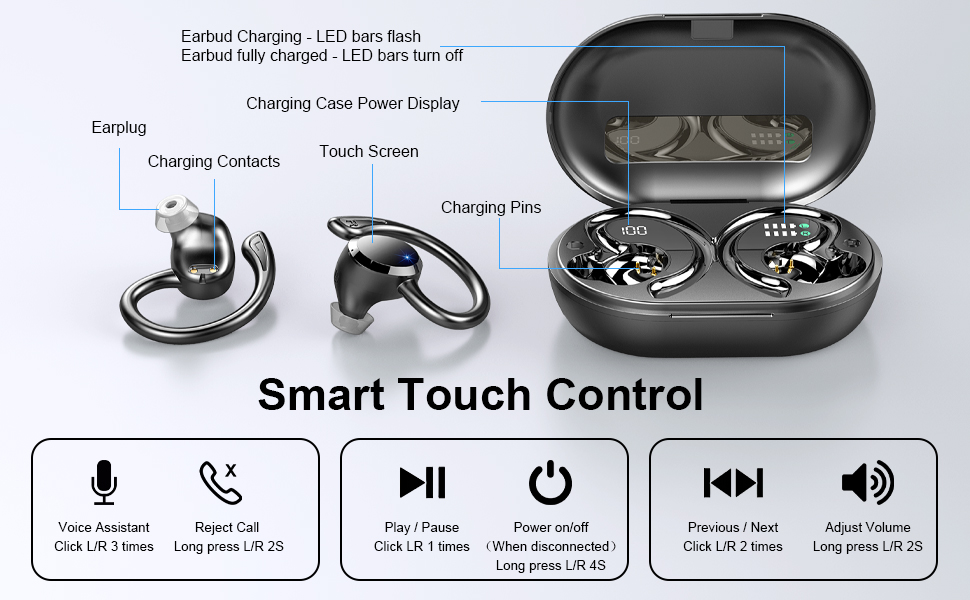
- Earbud Charging Indicators: LED bars for Left (L) and Right (R) earbuds, flashing when charging and turning off when fully charged.
- Порт для зарадкі USB-C: For fast charging the case.

4. Настройка
4.1 Першапачатковая плата
Перад першым выкарыстаннем цалкам зарадзіце навушнікі і зарадны футляр.
- Устаўце абодва навушнікі ў чахол для зарадкі.
- Падключыце зарадны кабель USB-C да порта зарадкі на корпусе, а другі канец — да адаптара харчавання USB (не ўваходзіць у камплект) або да порта USB кампутара.
- The LED display on the case will show the battery percentage, and the earbud indicators will flash during charging.
- Charging takes approximately 1 hour for earbuds and 1.5 hours for the case.

4.2 Pairing with a Device (One-Step Pairing)
Навушнікі маюць зручнае спалучэнне ў адзін крок.
- Адкрыйце зарадны кейс. Навушнікі аўтаматычна ўключацца і пяройдуць у рэжым спалучэння.
- На смартфоне або прыладзе з падтрымкай Bluetooth перайдзіце ў налады Bluetooth.
- Пошук "Q38" in the list of available devices and select it to connect.
- Пасля падключэння галасавая падказка пацвердзіць паспяховае спалучэнне.

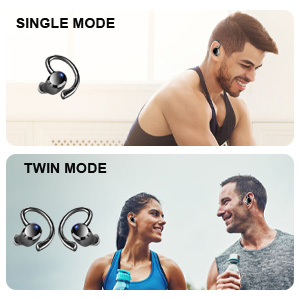
You can use either earbud independently (single mode) or both together (twin mode).
4.3 Choosing the Right Eartips
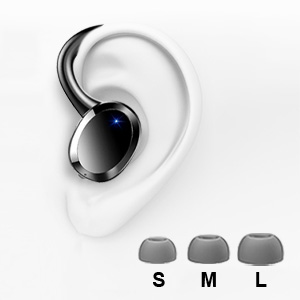
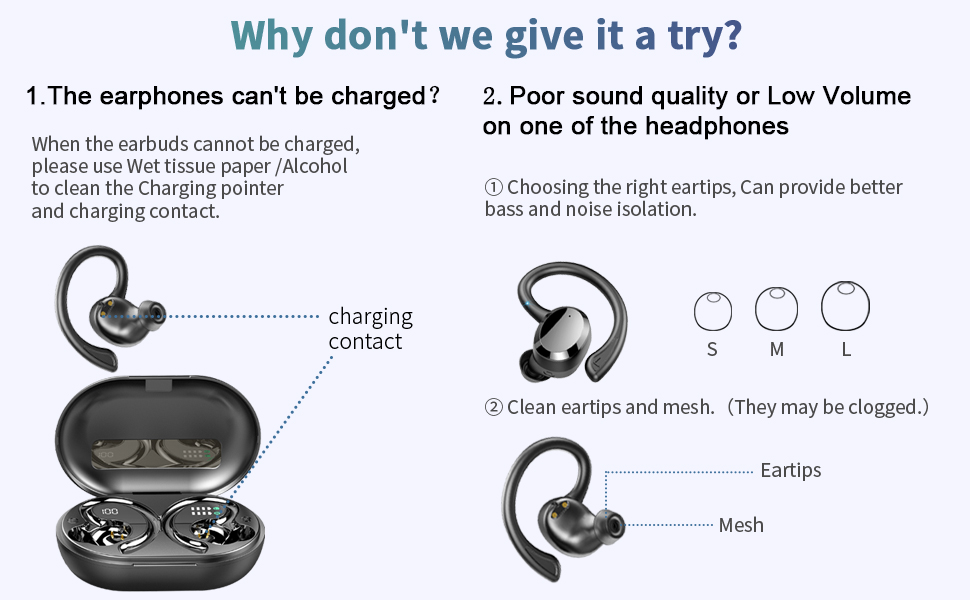
Selecting the correct eartip size is crucial for optimal sound quality and comfort. A proper seal enhances bass and noise isolation.
- Try each size (S, M, L) to find the one that fits snugly and comfortably in your ear canal.
- The earbud should feel secure and create a good seal without causing discomfort.
5. Інструкцыя па эксплуатацыі
5.1 Уключэнне/выключэнне сілкавання
- Уключэнне: Open the charging case, or long press the touch control area on either earbud for 4 seconds if disconnected.
- Выключэнне: Place the earbuds back into the charging case and close the lid. Alternatively, long press the touch control area on either earbud for 4 seconds if disconnected.
5.2 Сэнсарнае кіраванне
The Dascert Q38 earbuds feature multi-function touch panels for easy control.
| Функцыя | Дзеянне |
|---|---|
| Прайграванне/Паўза | Click L or R once |
| Наступная песня | Click R twice |
| Папярэдняя песня | Click L twice |
| Павялічыць гучнасць | Доўгі націск R на працягу 2 секунд |
| Памяншэнне гучнасці | Long press L for 2 seconds |
| Адказаць/пакласці трубку | Click L or R once |
| Адхіліць выклік | Long press L or R for 2 seconds |
| Актывацыя галасавога памочніка (Siri/Google Assistant) | Click L or R three times |
5.3 Нашэнне навушнікаў
The ergonomic design with earhooks ensures a secure and comfortable fit.
- Вызначце левы (L) і правы (R) навушнікі-ўкладышы.
- Акуратна ўстаўце навушнік у слыхавы праход.
- Адрэгулюйце завушны кручок на вуху, пакуль ён не будзе надзейна і камфортна сядзець.

6. Тэхнічнае абслугоўванне і догляд
- Уборка: Regularly clean the earbuds, especially the eartips and charging contacts, with a soft, dry cloth. For stubborn dirt, a slightly damp cloth or alcohol wipe can be used, ensuring no liquid enters the earbud openings.
- захоўванне: Калі навушнікі не выкарыстоўваюцца, захоўвайце іх у зарадным чахле, каб абараніць і падтрымліваць зараджанасць.
- Воданепранікальнасць: The earbuds are IP7 waterproof, meaning they can withstand sweat, rain, and splashes. However, they are not designed for swimming or submersion for extended periods. Ensure earbuds are dry before placing them back in the charging case.
- Пазбягайце экстрэмальных тэмператур: Do not expose the earbuds or charging case to extreme heat or cold, as this can damage the battery and internal components.

7. Выпраўленне непаладак
If you encounter issues with your Dascert Q38 earbuds, please refer to the following common problems and solutions:
| праблема | Рашэнне |
|---|---|
| Навушнікі не зараджаюцца |
|
| Дрэнная якасць гуку або нізкая гучнасць |
|
| Навушнікі не спалучаюцца або не падключаюцца |
|
| Працуе толькі адзін навушнік |
|
8. Тэхнічныя характарыстыкі
| Асаблівасць | Дэталь |
|---|---|
| Назва мадэлі | Q38[NEW] |
| Тэхналогія падлучэння | Бесправадная сувязь (Bluetooth 5.1) |
| Узровень воданепранікальнасці | Воданепранікальны IP7 |
| Час прайгравання (навушнікі) | 5-6 гадзін (адной зарадкі) |
| Агульны час прайгравання (з зарадным чахлом) | Да 48 гадзін |
| Час зарадкі (навушнікі) | Прыбл. 1 гадзіна |
| Час зарадкі (чахол) | Прыбл. 1.5 гадзіны |
| Порт для зарадкі | USB-C |
| Тып кіравання | Сэнсарнае кіраванне, галасавое кіраванне |
| Размяшчэнне вушэй | У вуху з завушнымі кручкамі |
| Кантроль шуму | Актыўнае падаўленне шуму |
| Дыяпазон частот | 20 Гц - 20 000 Гц |
| Вага прадмета | 2.54 унцыі |
| Памеры прадукту | 3.64 х 2.47 х 1.12 цалі |
9. Гарантыя і падтрымка
Dascert products come with a standard manufacturer's warranty. For detailed warranty information, please refer to the warranty card included in your package or visit the official Dascert webсайт.
If you require technical support or have any questions regarding your Dascert Q38 Wireless Bluetooth Earbuds, please contact our customer service team:
- электронная пошта: Не прадугледжана
- тэлефон: Не прадугледжана
- Інтэрнэт-падтрымка: Наведайце ст Dascert Store on Amazon каб атрымаць часта задаваныя пытанні і дадатковыя рэсурсы.
Please have your model number (Q38[NEW]) and purchase date ready when contacting support.
10. Інфармацыя па бяспецы
- Do not disassemble or attempt to repair the earbuds or charging case.
- Захоўваць удалечыні ад дзяцей і хатніх жывёл.
- Пазбягайце працяглага ўздзеяння высокай гучнасці, каб прадухіліць пашкоджанне слыху.
- Не выкарыстоўвайце навушнікі ў сітуацыях, калі немагчымасць чуць навакольныя гукі можа быць небяспечнай (напрыклад, падчас кіравання аўтамабілем, язды на ровары, хады ў руху).
- Утылізуйце прадукт адказна ў адпаведнасці з мясцовымі правіламі.
Ask a question about this manual
Ask about setup, troubleshooting, compatibility, parts, safety, or missing instructions. Manuals+ will review the question and use this page’s manual context to help answer it.