
Уводзіны
This manual provides detailed instructions for the setup, operation, and maintenance of your LENVII R777 Portable 2D Barcode Scanner. The R777 is a versatile handheld device designed for efficient barcode scanning, featuring multiple connectivity options and an LCD screen for real-time feedback. Please read this manual thoroughly before using the device to ensure optimal performance and longevity.
Асноўныя характарыстыкі
- Канструкцыя падключэння 3-у-1: Supports Bluetooth, 2.4G Wireless (with USB adapter), and Wired (USB cable) connections.
- Шырокая сумяшчальнасць: Easily connects with laptops, PCs, mobile phones, tablets, and POS systems. Compatible with Windows XP/7/8/10, Mac OS, Windows Mobile, Android OS, and iOS.
- Эрганамічны і партатыўны: Small, lightweight design for comfortable extended use and easy portability.
- Імгненная загрузка і афлайн-сховішча: Equipped with 16MB memory, capable of storing up to 12,500 barcodes. Allows for immediate data upload or storage for later transfer.
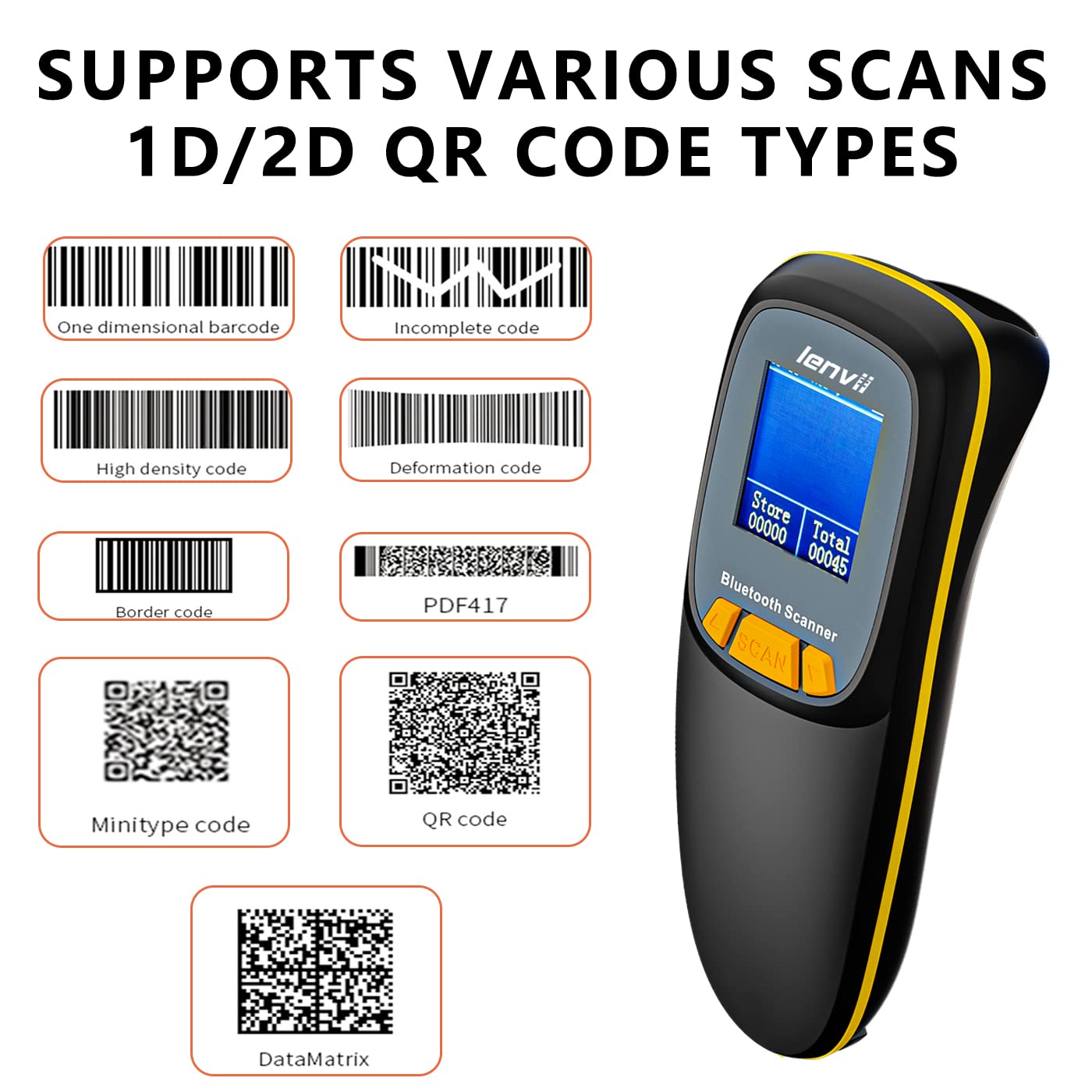
- Універсальная падтрымка штрых-кодаў: Scans both 1D and 2D barcodes, including PDF417, Data Matrix, QR Code, UPC, EAN, Code128, Code39, Code11, Interleaved 2 of 5, and Codabar.
- ВК-экран: Provides real-time information on connection mode, storage status, battery level, and scanned content.
- Вялікая адлегласць перадачы: Offers super long transmission distances of up to 100m (328ft) in barrier-free environments for 2.4G wireless and 40m (131ft) for Bluetooth.
Кіраўніцтва па ўстаноўцы
1. Зарадка сканера
Before initial use, ensure the scanner is fully charged. Connect the provided Type-C USB cable to the scanner and a power source (e.g., computer USB port or USB wall adapter). The LCD screen will indicate charging status.
2. Рэжымы падключэння
The LENVII R777 offers three connection methods:
- Бесправадное злучэнне 2.4G:
Insert the included 2.4G USB adapter into your computer's USB port. The scanner will automatically pair with the adapter. This is a plug-and-play connection requiring no driver installation.

Image: LENVII R777 scanner demonstrating 2.4G wireless connection to a laptop.
- Злучэнне Bluetooth:
On the scanner, navigate to the Bluetooth pairing mode using the navigation buttons. On your host device (smartphone, tablet, or Bluetooth-enabled PC), enable Bluetooth and search for available devices. Select "LENVII Scanner" (or similar) to pair. The scanner's LCD will confirm successful pairing.

Image: LENVII R777 scanner displaying high compatibility with various operating systems for Bluetooth connection.
- Правадное злучэнне:
Connect the scanner directly to your computer using the provided Type-C USB cable. The scanner will function as a wired device, and scanned data will be transmitted directly to your computer.
Video: Demonstration of LENVII R777 scanner's 2.4G wireless, USB wired, and Bluetooth connection methods, including scanning various barcode types and using the offline storage function.
Інструкцыя па эксплуатацыі
1. Базавае сканаванне
To scan a barcode, point the scanner's window at the barcode and press the "SCAN" button. A successful scan will be indicated by an audible beep and the barcode data appearing on the LCD screen or your connected device.
2. Інфармацыя пра ВК-экран
The integrated LCD screen provides essential operational details:
- Рэжым злучэння: Displays the current connection type (e.g., 2.4G, Bluetooth, USB).
- Рэжым захоўвання: Indicates if the scanner is in instant upload or offline storage mode.
- Зарад батарэі: Паказвае бягучы ўзровень батарэі.
- Scan Content: Displays the last scanned barcode data.
- Store Count: Shows the number of barcodes collected and saved in offline storage.
Выява: Падрабязная view of the LENVII R777's LCD screen and its displayed information.
Рэжымы перадачы дадзеных
The scanner supports two primary data transfer modes:
- Рэжым імгненнай загрузкі:
In this mode, scanned barcodes are immediately transmitted to the connected device. This is ideal for real-time inventory updates or point-of-sale operations.
- Рэжым захоўвання ў аўтаномным рэжыме:
When not connected or when real-time transfer is not required, the scanner can store up to 12,500 barcodes in its internal 16MB memory. Data can be uploaded to a connected device later by switching to instant upload mode or using a specific upload function (refer to scanner settings on the LCD).

Image: Visual representation of the two data transfer modes: instant upload and offline storage.
Сумяшчальнасць штрых-кодаў
The LENVII R777 scanner supports a wide range of 1D and 2D barcode symbologies:
1D штрых-коды:
- UPC/EAN/JAN (UPC-A, UPC-E, EAN-8, EAN-13, JAN-8, JAN-13)
- ISBN/ISSN
- Code 39 (with full ASCII)
- Codabar (NW7)
- Code 128 & EAN 128
- Код 93
- Чаргаванне 2 з 5 (ITF)
- Appendix 2 of 5 IATA code
- MSI/Plessy
- Chinese postal code
- Code 32 (Italian Pharmacopoeia)
- RSS 14, RSS Limited, RSS Extension
2D штрых-коды:
- QR-код
- Матрыца дадзеных
- PDF417
- ацтэкскі
- Максікод
- GS1 DataBar Stack

Малюнак: Examples of 1D and 2D barcode types supported by the LENVII R777 scanner.
Тэхнічнае абслугоўванне
1. Уборка
Regularly clean the scanner's window and exterior with a soft, dry, lint-free cloth. Avoid using abrasive cleaners or solvents, which can damage the device.
2. Сыход за батарэяй
The scanner is equipped with a 1500mAh rechargeable lithium battery. For optimal battery life, avoid fully discharging the battery frequently. Charge the device using the provided Type-C USB cable. The battery provides 8-10 hours of continuous scanning and 25 days of standby time.

Image: Information on the LENVII R777's 1500mAh battery capacity and usage times.
3. Захоўванне
Store the scanner in a cool, dry place away from direct sunlight and extreme temperatures. The maximum storage temperature is 60 degrees Celsius.
Ліквідацыю непаладак
- Сканер не падключаецца: Ensure the scanner is charged and in the correct connection mode (2.4G, Bluetooth, or Wired). For wireless connections, verify the USB adapter is properly inserted or Bluetooth is enabled and paired on your host device.
- Няма перадачы дадзеных: Check the connection status on the LCD screen. Ensure the host device is ready to receive input (e.g., a text editor or application is open and active).
- Немагчыма сканаваць некаторыя штрых-коды: Verify the barcode is not damaged or smudged. Ensure the scanner's settings support the specific barcode symbology. Adjust scanning distance if necessary.
- Slow scanning speed: Ensure the scanner's firmware is up to date. Environmental factors or complex barcode types can sometimes affect speed.
Калі ў вас узнікнуць пастаянныя праблемы, звярніцеся ў раздзел падтрымкі, каб атрымаць кантактную інфармацыю.
Тэхнічныя характарыстыкі
| Асаблівасць | Спецыфікацыя |
|---|---|
| мадэль | R777 |
| Тэхналогія падлучэння | USB Cable, 2.4G Wireless, Bluetooth |
| Сумяшчальныя прылады | Laptop, Tablet, Smartphone (Windows XP/7/8/10, Mac OS, Windows Mobile, Android OS, iOS) |
| Крыніца харчавання | Працуе ад акумулятара (1 літый-іённы акумулятар уключаны) |
| Ёмістасць батарэі | 1500 мАг |
| Хуткасць сканавання | 30 кадраў у секунду |
| Датчык выявы | CMOS |
| Дазвол чытання | Exceeds 5 million |
| Ёмістасць памяці | 16MB (up to 12,500 EAN 13 codes) |
| Адлегласць сувязі 2.4G | 100 метраў (пад адкрытым небам) |
| Адлегласць сувязі Bluetooth | 40 метраў (пад адкрытым небам) |
| Аперацыйная Voltage | 5 В пастаяннага току ±10% |
| Вага прадмета | 0.25 Kilograms (104 grams for scanner only) |
| Памеры | 135mm * 51mm * 40mm (Length * Width * Height) |
| Трываласць падзення | Can withstand a drop of 2 meters |
| Energy Specifications Standard | CE |
Падтрымка і гарантыя
For any questions regarding product usage, technical assistance, or warranty information, please contact LENVII customer support:
- электронная пошта: support@lenvii.net
- Тэлефон/WhatsApp: +86 13316203488
LENVII is committed to providing high-quality products and excellent after-sales service. Our team can assist with product usage and provide professional purchase plans based on your specific needs.