
1. Уводзіны
This manual provides essential information for setting up, operating, and maintaining your Beelink EQ14 Mini PC. The Beelink EQ14 is a compact desktop computer designed for daily tasks, office work, online education, home entertainment, and industrial use. It features an Intel Twin Lake N150 processor, 16GB DDR4 RAM, and a 500GB PCIe 3.0 SSD, offering efficient and smooth performance.
2. Што ў скрынцы
Upon unpacking your Beelink EQ14 Mini PC, please verify that all the following items are included:
- 1x Beelink EQ14 Mini PC
- 1x Кіраўніцтва карыстальніка
- 1x AC Cable (Optional: US/EU/UK/JP/AU)
- 1x 100cm HDMI Cable

3. Прадукт скончыўсяview
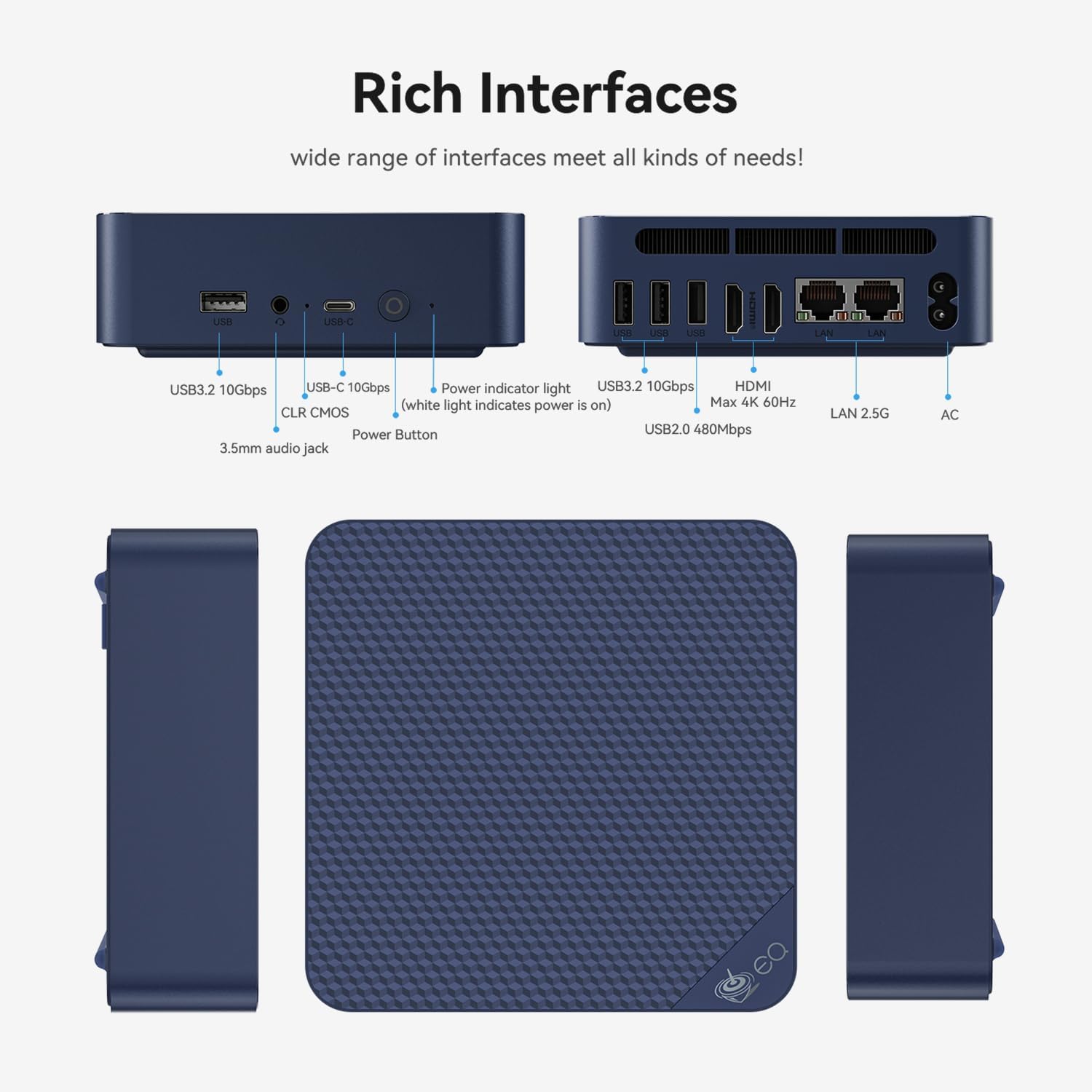
3.1 Пярэдняя панэль
- 1 порт USB 2.0
- 3 порта USB 3.2
- 1x Type-C Port (Data)
- 1x 3.5 мм аўдыяраз'ём
- Кнопка харчавання
- Power Indicator Light (white light indicates power is on)
- CLR CMOS (BIOS Reset)
3.2 Задняя панэль
- 2x HDMI Ports (supports dual 4K displays at 60Hz)
- 2x 2.5G LAN Ports
- Уваход пастаяннага току

4. Кіраўніцтва па наладцы
- Падключэнне да дысплея: Use the provided HDMI cable to connect your Beelink EQ14 Mini PC to a monitor or TV. The device supports dual 4K displays.
- Падключэнне перыферыйных прылад: Падключыце клавіятуру і мыш да даступных USB-партоў.
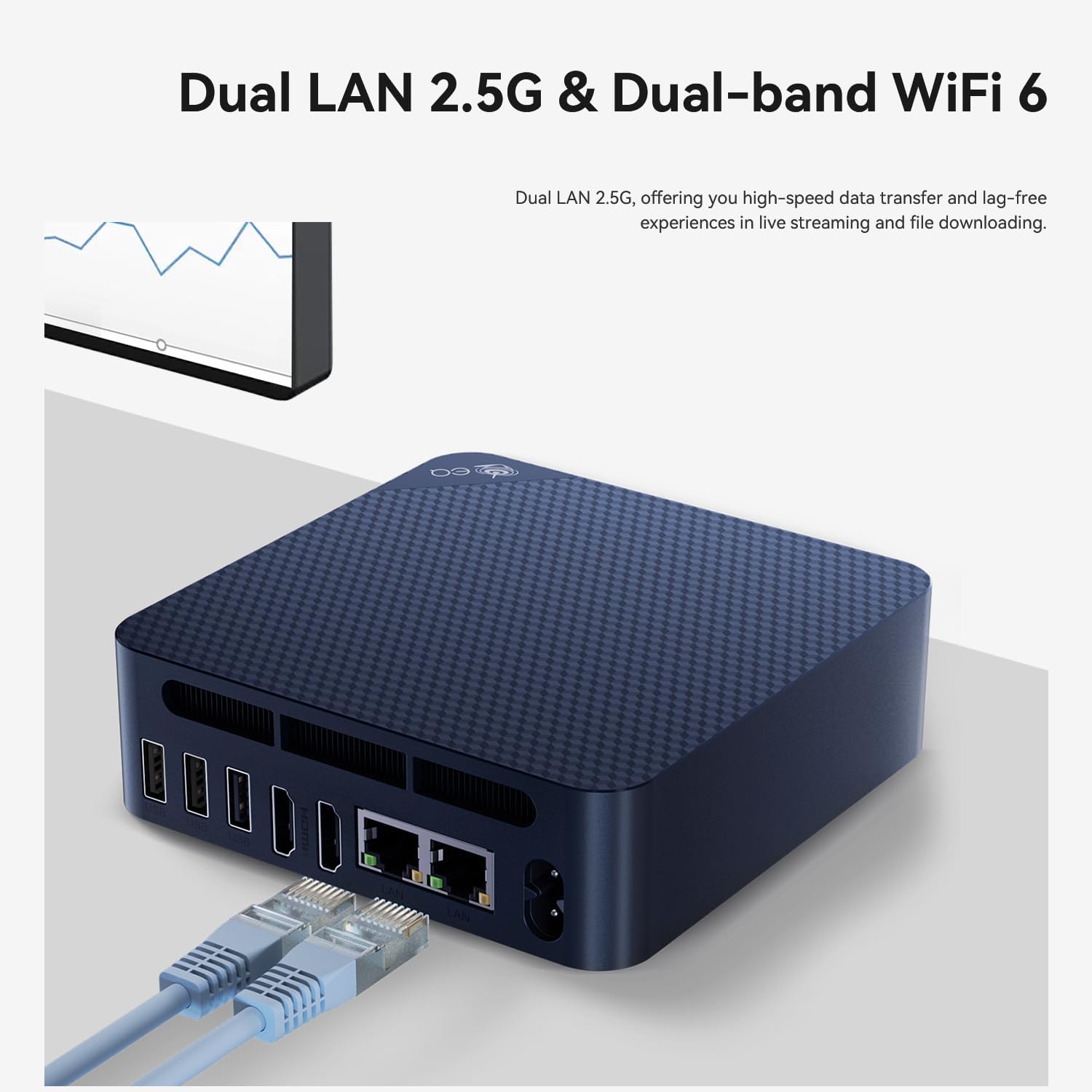
- Падключэнне да сеткі: For wired internet, connect an Ethernet cable to one of the 2.5G LAN ports. For wireless internet, the device supports WiFi6.
- Уключэнне: Connect the AC power cable to the DC input port on the rear of the mini PC, then plug it into a power outlet. Press the power button on the front panel.
- Першапачатковая ўстаноўка: Выконвайце інструкцыі на экране, каб завяршыць наладу Windows 11 Home.

5. Інструкцыя па эксплуатацыі
The Beelink EQ14 Mini PC comes pre-installed with Windows 11 Home, providing a familiar and user-friendly operating environment. It is designed for efficient multitasking and can handle various applications simultaneously, including office suites, photo editing software, web browsing, and video streaming.
5.1 Асноўныя аперацыі
- Уключэнне/выключэнне харчавання: Press the power button once to turn on the device. To shut down, use the Windows Start menu or press and hold the power button for a few seconds.
- Перазапуск: Выкарыстоўвайце меню «Пуск» Windows, каб перазагрузіць сістэму.
- Рэжым сну: The system will enter sleep mode after a period of inactivity or can be manually put to sleep via the Start menu.

6. Пашырэнне сховішча
The Beelink EQ14 Mini PC offers flexible storage expansion options:
- Pre-installed Storage: Comes with a 500GB PCIe 3.0 SSD.
- Два слота M.2: Features one M.2 SATA3 2280 slot and one M.2 PCIe 3.0 x1 (NVMe) slot.
- Maximum Internal Storage: Supports up to 8TB total internal storage.
To install additional storage, carefully open the chassis and insert your M.2 SSD into the appropriate slot. Refer to the detailed instructions in the user manual for safe installation.

7. Сувязь
The EQ14 Mini PC provides robust connectivity options for various needs:
- Бесправадная сувязь: Built-in WiFi6 (802.11ax, AX101, dual-band 2.4/5GHz) and Bluetooth 5.2 for stable and fast wireless connections.
- Wired: Dual 2.5G LAN ports for high-speed wired network connections.
- Дысплей: Dual HDMI ports supporting 4K 60Hz output for connecting multiple displays.

8. Performance Notes
The Beelink EQ14 Mini PC is equipped with an Intel Twin Lake N150 processor (4C/4T, up to 3.6GHz) and Intel Graphics (24EUs, 1000MHz). It includes 16GB DDR4 3200MHz RAM, ensuring smooth performance for everyday computing tasks.
- працэсар: Intel Twin Lake N150 (4 Cores, 4 Threads, Max 3.6GHz)
- Графічны працэсар: Intel Graphics (24EUs, 1000MHz) for 4K video playback and web прагляд.
- Аператыўная памяць: 16GB DDR4 3200MHz (single-channel, expandable up to 16GB).
- Астуджэнне: Features an MSC2.0 Cooling System with lower fan speed for near-silent operation (approx. 32dB).


9. Тэхнічнае абслугоўванне
To ensure the longevity and optimal performance of your Beelink EQ14 Mini PC, regular maintenance is recommended:
- Захоўваць у чысціні: Regularly clean the exterior of the device with a soft, dry cloth. Ensure ventilation holes are free from dust and obstructions to prevent overheating.
- Абнаўленні праграмнага забеспячэння: Keep your Windows 11 Home operating system and drivers updated to the latest versions for security and performance improvements.
- Рэзервовае капіраванне даных: Перыядычна рабіце рэзервовыя копіі важных дадзеных на знешні дыск або ў воблачнае сховішча, каб прадухіліць іх страту.
- Правільнае выключэнне: Always shut down the PC properly through the operating system rather than simply unplugging it.
10. Выпраўленне непаладак
If you encounter issues with your Beelink EQ14 Mini PC, refer to the following common troubleshooting steps:
- Няма харчавання: Ensure the power adapter is securely connected to both the PC and a working power outlet. Check the power indicator light.
- Няма дысплея: Verify that the HDMI cable is correctly connected to both the PC and the monitor. Try a different HDMI port or cable if available. Ensure the monitor is set to the correct input source.
- Праблемы з сеткай: Для правадных падключэнняў праверце кабель Ethernet і маршрутызатар. Для Wi-Fi пераканайцеся, што адаптар Wi-Fi уключаны, і вы падключаны да правільнай сеткі з правільным паролем.
- Нізкая прадукцыйнасць: Закрыйце непатрэбныя праграмы. Праверце наяўнасць фонавых абнаўленняў. Забяспечце дастатковую вентыляцыю.
- Скід BIOS: If you experience boot issues due to BIOS settings, use the CLR CMOS button on the front panel to reset BIOS to default settings.
11. Тэхнічныя характарыстыкі
| Асаблівасць | Дэталь |
|---|---|
| Марка | Білінк |
| Нумар мадэлі | EQ14 |
| Мадэль працэсара | Intel Twin Lake N150 (4C/4T) |
| Хуткасць працэсара | Да 3.6 Ггц |
| Графічны супрацэсар | Intel UHD Graphics (24EUs, 1000MHz) |
| RAM Memory Installed | 16 ГБ DDR4 3200 МГц |
| Максімальны памер аператыўнай памяці | 16 ГБ |
| Ёмістасць памяці | 500 GB PCIe 3.0 SSD (expandable up to 8TB) |
| Аперацыйная сістэма | Windows 11 хатняя |
| Відэавыхад | 2x HDMI (4K@60Hz) |
| Парты LAN | 2x 2.5G LAN |
| Бесправоднае падключэнне | WiFi6 (802.11ax, AX101, dual-band 2.4/5GHz), Bluetooth 5.2 |
| Парты USB | 3x USB 3.2, 1x USB 2.0, 1x Type-C (Data) |
| Аўдыёвыхад | 3.5mm Audio Jack |
| Спосаб астуджэння | MSC2.0 Cooling System (Ultra Quiet) |
| Тып сілкавання | Тып A - 2-кантактны (паўночнаамерыканскі) |
12. Гарантыя і падтрымка
Beelink is committed to providing reliable products and excellent customer service.
- Гарантыя: Your Beelink EQ14 Mini PC comes with a 3-year worry-free warranty.
- Тэхнічная падтрымка: Пажыццёвая тэхнічная падтрымка даступная.
- Абслугоўванне кліентаў: 24-hour customer service is provided to assist with any questions or issues.
For further assistance, please visit the official Beelink store or contact customer support: