
TAOPON smartwatch zl02
Інструкцыя па эксплуатацыі разумных гадзіннікаў TAOPON
Model: smartwatch zl02
Уводзіны
Thank you for choosing the TAOPON Smart Watch. This device is designed to enhance your daily life with its comprehensive features, including fitness tracking, health monitoring, and smart notifications. This manual provides detailed instructions to help you set up, operate, and maintain your smartwatch for optimal performance.

Figure 1: TAOPON Smart Watch Overview
Што ў скрынцы
- TAOPON Smart Watch (with Watch Band)
- Зарадны кабель
- Кіраўніцтва карыстальніка
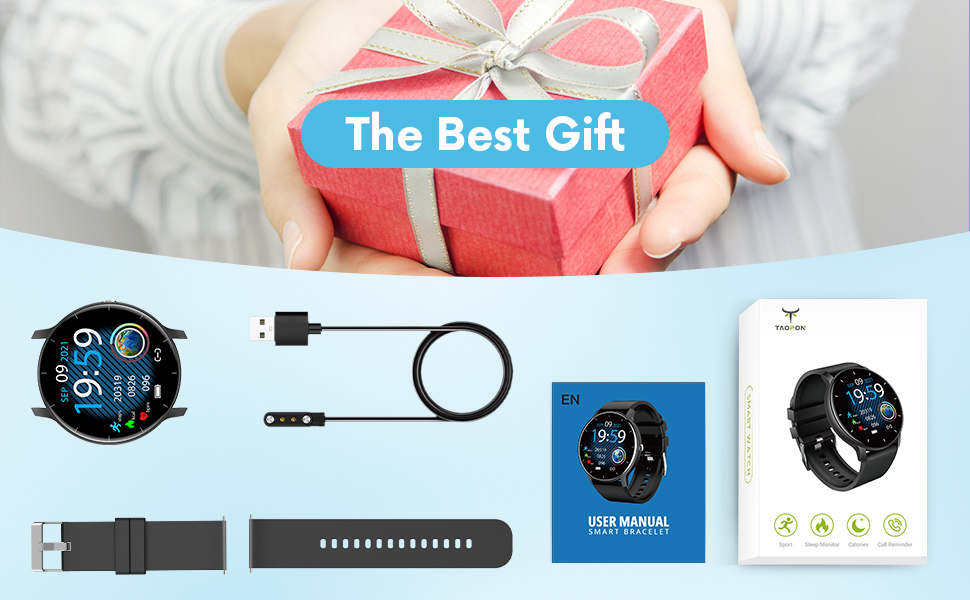
Малюнак 2: Змест пакета
Кіраўніцтва па ўстаноўцы
1. Зарадка разумнага гадзінніка
Before first use, fully charge your smartwatch. Connect the magnetic charging cable to the charging points on the back of the watch and plug the USB end into a power adapter (not included) or a computer's USB port. A full charge typically takes about 2 hours and provides up to 7 days of typical use or 30 days of standby time.

Малюнак 3: Зарадка разумнага гадзінніка
2. Усталёўка праграмы і спалучэнне
To unlock the full potential of your TAOPON Smart Watch, download and install the "Da Fit" app on your smartphone. The app is compatible with iOS 9.0 & Android 5.0 or higher.
- Scan the QR code in the manual or search for "Da Fit" in your phone's app store (App Store for iOS, Google Play Store for Android).
- Усталюйце праграму «Da Fit».
- Адкрыйце праграму і выконвайце інструкцыі на экране, каб стварыць уліковы запіс або ўвайсці.
- Уключыце Bluetooth на вашым смартфоне.
- In the "Da Fit" app, navigate to the device section and search for your smartwatch. Select "smartwatch zl02" to pair.
- Пацвердзіце запыт на спалучэнне як на тэлефоне, так і на разумным гадзінніку.
Пасля спалучэння гадзіннік сінхранізуе час і дадзеныя з вашым тэлефонам.
Інструкцыя па эксплуатацыі
Базавая навігацыя
- Сэнсарны экран: Swipe left/right or up/down to navigate through menus and features.
- Бакавая кнопка: Press to quickly return to the home screen or turn the screen on/off.
- Падняць, каб абудзіць: The display will automatically light up when you raise your wrist.
Customizing Watch Dials
Your smartwatch offers a variety of pre-installed dials. You can also personalize your watch face by setting your favorite photo as the dial through the "Da Fit" app.

Figure 4: Watch Dial Customization
Адсочванне фізічнай формы
The watch supports 8 sports modes to track your activities:
- Хада
- Бег
- Язда на ровары
- Скакалка
- Бадмінтон
- Баскетбол
- футбол
- Swimming (IP67 waterproof, suitable for hand washing or rainy days, not for prolonged submersion or hot water)
During exercise, the watch tracks calorie consumption, steps, distance, minutes of activity, and heart rate. Connect to your mobile phone's GPS via the app to record your movement track.

Figure 5: Multiple Sports Modes Tracking
Маніторынг здароўя
The smartwatch accurately tracks real-time health data:
- Маніторынг сардэчнага рытму: Records your heart rate throughout the day. You can also measure it in real-time by tapping the heart rate icon on the watch.
- Маніторынг кіслароду ў крыві: Provides SpO2 readings.
- Маніторынг артэрыяльнага ціску: Measures blood pressure levels.
- Манітор сну: Tracks deep sleep, light sleep, and overall sleep duration, showing trends in sleep quality over a week.

Figure 6: Comprehensive Health Monitoring
Разумныя функцыі і інструменты
The TAOPON Smart Watch offers various convenient tools:
- Апавяшчэнні аб паведамленнях: Receive call reminders, SMS, Facebook, Twitter, LinkedIn, WhatsApp, Line, Instagram, etc., by connecting to the "Da Fit" APP. You can reject calls directly from the watch.
- Аддаленая камера: Control your phone's camera remotely from your watch.
- Кіраванне музыкай: Play, pause, skip tracks on your phone's music player.
- Прагноз надвор'я: Атрымлівайце абнаўленні надвор'я ў рэжыме рэальнага часу.
- Шагомер: Лічыць вашыя штодзённыя крокі.
- Сядзячы напамін: Папярэджвае вас аб неабходнасці рухацца пасля перыядаў бяздзейнасці.
- Таймер: Built-in timer function.
- Deep Breathing Guide: Assists with guided breathing exercises.
- сігналізацыя: Set up to 3 alarms directly on the watch.
- Рэгуляваная яркасць: Наладзьце яркасць экрана для аптымальнай viewінж.
- Тэатральны рэжым: Reduces screen brightness and disables vibrations for undisturbed viewінж.

Figure 7: Remote Camera

Малюнак 8: Кіраванне музыкай
Тэхнічнае абслугоўванне
- Уборка: Regularly wipe your smartwatch and band with a soft, damp тканіна. Пазбягайце выкарыстання агрэсіўных хімічных рэчываў або абразіўных матэрыялаў.
- Воданепранікальнасць: The watch is IP67 waterproof, meaning it is effective against splashes and can be worn during hand washing or rainy days. It is not recommended for showering with hot water, diving, or prolonged submersion.
- Сыход за батарэяй: Каб падоўжыць тэрмін службы батарэі, пазбягайце экстрэмальных тэмператур і не дапускайце частай поўнай разрадкі батарэі. Рэгулярна зараджайце гадзіннік.
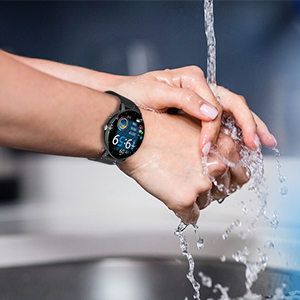
Малюнак 9: Воданепранікальнасць IP67
Ліквідацыю непаладак
- Гадзіннік не ўключаецца: Пераканайцеся, што гадзіннік цалкам зараджаны. Падключыце яго да зараднага кабеля і крыніцы харчавання як мінімум на 30 хвілін.
- Немагчыма спалучыць прыладу з тэлефонам:
- Пераканайцеся, што на вашым тэлефоне ўключаны Bluetooth, і гадзіннік знаходзіцца ў зоне дзеяння.
- Перазагрузіце тэлефон і разумны гадзіннік.
- Check if the "Da Fit" app is updated to the latest version.
- If previously paired, try unpairing the device from your phone's Bluetooth settings and re-pairing through the app.
- Недакладныя дадзеныя пра здароўе:
- Пераканайцеся, што гадзіннік шчыльна прылягае да запясця, прыкладна на шырыню аднаго пальца ад запясцевай косткі.
- Трымайце датчык чыстым і без смецця.
- Note that health monitoring features are for reference only and should not be used for medical diagnosis.
- Апавяшчэнні не атрыманы:
- Check app permissions in your phone settings to ensure "Da Fit" has access to notifications.
- Verify that notification settings are enabled within the "Da Fit" app for specific applications.
- Пераканайцеся, што гадзіннік падключаны да тэлефона праз Bluetooth.
Тэхнічныя характарыстыкі
| Асаблівасць | Дэталь |
|---|---|
| Нумар мадэлі | smartwatch zl02 |
| Памер экрана | 1.28 цалі (дыяганаль бачнай часткі экрана: 2 цаляў / 4 см) |
| дазвол | 240*240 пікселяў |
| Ёмістасць батарэі | Літый-палімерны акумулятар ёмістасцю 200 мАг (у камплекце) |
| Тэрмін службы батарэі | 7 days (typical use), 30 days (standby) |
| Рэйтынг воданепранікальнасці | IP67 |
| Сумяшчальнасць | iOS 9.0 & Android 5.0 or higher |
| Сувязь | Bluetooth |
| Вага прадмета | 110 грам (3.88 унцый) |
| Памеры прадукту | 6.18 х 4.02 х 1.06 цалі |
| Вытворца | ТААПОН |
Важная інфармацыя па бяспецы
- Не спрабуйце разабраць, адрамантаваць або мадыфікаваць прыладу.
- Трымайце прыладу далей ад экстрэмальных тэмператур, прамых сонечных прамянёў і адкрытага агню.
- Пазбягайце моцных удараў або падзення прылады.
- Захоўваць у месцах, недаступных дзецям.
- Dispose of the device and its battery according to local regulations. Do not dispose of with household waste.
- Consult a medical professional before starting any new exercise regimen or if you have any health concerns. The health monitoring data is for reference only.
Гарантыя і падтрымка
For warranty information, technical support, or customer service inquiries, please refer to the contact details provided on the product packaging or the official TAOPON webсайт. Калі ласка, захавайце пацвярджэнне пакупкі для прэтэнзій па гарантыі.
Ask a question about this manual
Ask about setup, troubleshooting, compatibility, parts, safety, or missing instructions. Manuals+ will review the question and use this page’s manual context to help answer it.