
Уводзіны
Thank you for choosing the Soulbytes S12 Gaming Headset. This manual provides essential information for setting up, operating, and maintaining your headset to ensure an optimal gaming experience. The S12 headset is designed for multi-platform compatibility, featuring immersive audio, a noise-canceling microphone, and dynamic RGB lighting.
Змест пакета
- Soulbytes S12 Gaming Headset
- 3.5-мм аўдыёкабель (інтэграваны)
- USB Cable for RGB Lighting (integrated)
- 3.5mm Splitter Cable (for PC audio/mic separation)
Прадукт скончаныview
The Soulbytes S12 Gaming Headset combines high-fidelity audio with user-friendly features for an enhanced gaming session.
Immersive 3D Sound
Equipped with professional-grade 50mm high-definition drivers, the headset delivers high-fidelity stereo surround sound with strong bass and rich details. This allows for precise localization of in-game sounds, such as footsteps and gunfire, providing a competitive edge.

Выява: Унутраная view of the headset's 50mm audio drivers, illustrating how they produce immersive stereo surround sound for gaming, capturing details like car sounds, footsteps, and role sounds.
Мікрафон з шумапрыглушэннем
The flexible, omnidirectional microphone features noise reduction technology, ensuring clear voice communication. It can be positioned for optimal voice pickup. An inline switch allows for easy muting, with an LED indicator on the microphone to show its active status.

Image: The headset's adjustable microphone, demonstrating its 120-degree rotation and the effectiveness of its noise-canceling feature by comparing sound waves before and after reduction.
Дынамічнае асвятленне RGB
The headset features dynamic RGB LED lighting on both earcups, offering 16.8 million colors and various patterns. You can cycle through four lighting modes (fluid, circulation, gradient, static) using the inline LED controller. The USB connector powers these lights.

Image: The headset displaying its customizable RGB lighting effects, including breathing, color cycling, gradual brightening, and fixed color modes.
Эрганамічны дызайн для камфорту
Designed for extended wear, the S12 headset features soft, breathable earcups, a retractable and padded headband, and an adaptive Y-shaped stem. The earcups and headband cushion are made from skin-friendly mesh fabric and breathable memory foam to reduce sweat, heat, and pressure, ensuring comfort for both adults and children.

Выява: Падрабязная view of the headset's ergonomic design elements, including breathable earcups, an adjustable headband, and a soft head cushion for comfort.
Настройка і падключэнне
The Soulbytes S12 headset offers wide compatibility with various gaming platforms. The 3.5mm jack provides audio and microphone functionality, while the USB connector powers the RGB lighting.

Выява: Зверхуview of the headset's universal compatibility with gaming consoles (Xbox, PS4, Switch), computers (PC, Mac), and mobile phones.
Кіраўніцтва па падключэнні
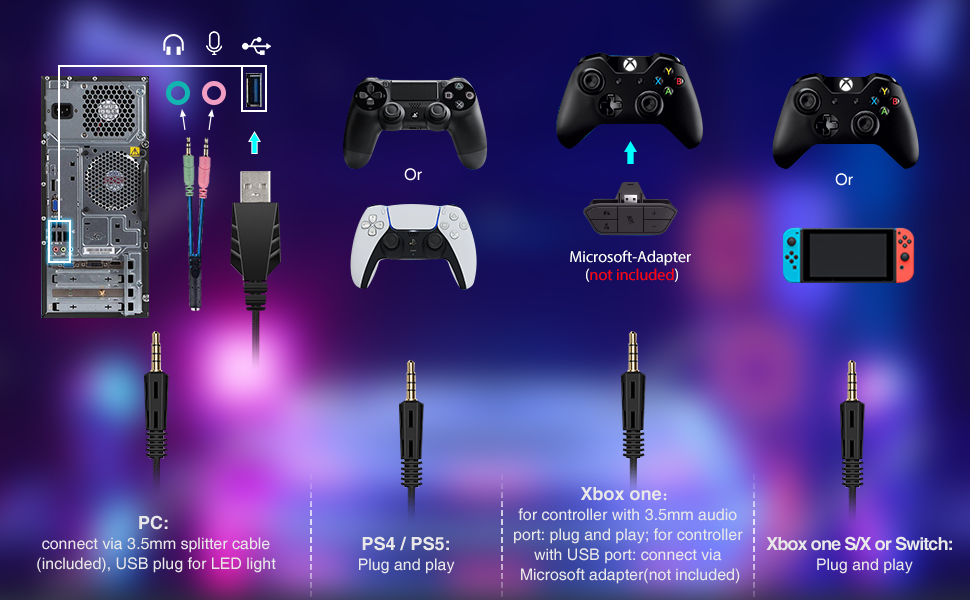
Image: A comprehensive diagram detailing the connection methods for the headset across different platforms: PC, PS4/PS5, Xbox One, and Nintendo Switch.
- Для ПК: Connect the 3.5mm 4-pin plug to the included 3.5mm splitter cable. Plug the pink connector of the splitter into your PC's microphone input and the green connector into the headphone output. Plug the USB cable into an available USB port for RGB lighting.
- For PS4 / PS5: Plug the 3.5mm 4-pin plug directly into the controller's 3.5mm jack. The USB cable can be plugged into a console USB port for RGB lighting.
- For Xbox One (Older models): An official Microsoft adapter (not included) is required to connect the 3.5mm 4-pin plug to older Xbox One controllers. For Xbox One S/X controllers, plug the 3.5mm 4-pin plug directly into the controller. The USB cable can be plugged into a console USB port for RGB lighting.
- Для Nintendo Switch: Plug the 3.5mm 4-pin plug directly into the Switch's 3.5mm audio jack. The USB cable is not used for the Switch as it does not provide power for RGB lighting in this configuration.
- For Laptops/Smartphones: Plug the 3.5mm 4-pin plug directly into the device's 3.5mm jack. The USB cable is for RGB lighting and may not be usable with all mobile devices.
Інструкцыя па эксплуатацыі
The headset features an inline controller for convenient access to audio and lighting functions.

Image: A user wearing the Soulbytes S12 headset while gaming, highlighting its practical use and comfortable design.
Inline Controller Functions:
- Рэгулятар гучнасці: Use the scroll wheel on the inline controller to adjust the headset's audio volume.
- Уключэнне/выключэнне мікрафона: Flip the switch on the inline controller to mute or unmute the microphone. The LED on the microphone will indicate its status (on/off).
- Кіраванне святлом RGB: Press the dedicated button on the inline controller to cycle through the four RGB lighting modes (fluid, circulation, gradient, static).
Тэхнічнае абслугоўванне
Proper care will extend the lifespan of your Soulbytes S12 Gaming Headset.
- Уборка: Выкарыстоўвайце мяккую сухую тканіну для чысткі амбушюр і агалоўя. Пазбягайце выкарыстання агрэсіўных хімічных рэчываў або абразіўных матэрыялаў.
- захоўванне: Захоўвайце гарнітуру ў прахалодным, сухім месцы, удалечыні ад прамых сонечных прамянёў і экстрэмальных тэмператур.
- Сыход за кабелем: Пазбягайце рэзкіх выгібаў або празмернага нацягвання кабеляў, каб пазбегнуць пашкоджанняў.
- Мікрафон: Handle the flexible microphone gently.
Ліквідацыю непаладак
Калі ў вас узніклі праблемы з гарнітурай, звярніцеся да наступных распаўсюджаных рашэнняў:
| праблема | Рашэнне |
|---|---|
| Няма гуку з гарнітуры |
|
| Не працуе мікрафон |
|
| RGB-ліхтары не працуюць |
|
| Якасць гуку дрэнная |
|
Тэхнічныя характарыстыкі
| Асаблівасць | Дэталь |
|---|---|
| Назва мадэлі | S12 |
| Марка | Soulbytes |
| Тэхналогія падлучэння | Wired (3.5mm Jack, USB for RGB) |
| Формаў-фактар навушнікаў | Накладныя на вуха (цыркум-аурыкулярныя) |
| Памер аўдыё драйвера | 50 мм |
| Тып аўдыё драйвера | Дынамічны |
| Дыяпазон частот | 20 Гц - 20 000 Гц |
| Тып мікрафона | Omnidirectional, Noise-Canceling |
| Тып кіравання | Inline Controller (Volume, Mic Mute, RGB Mode) |
| Кантроль шуму | None (Passive noise isolation from earcups) |
| Матэрыял | Скура, пластык |
| Колер | Чорны |
| Сумяшчальныя прылады | PS4, PS5, Xbox One, Switch, PC, Laptops, Smartphones |
| Апісанне ўзроставага дыяпазону | дзіця |
Гарантыя і падтрымка
For warranty information and technical support, please refer to the documentation provided with your purchase or visit the official Soulbytes webсайт. Захоўвайце пацвярджэнне пакупкі для любых гарантыйных прэтэнзій.