
VEIERSIA bone conduction
VEIERSIA Bone Conduction Headphones User Manual
Model: bone conduction
1. Уводзіны
Дзякуй за пакупкуasing the VEIERSIA Bone Conduction Headphones. This manual provides detailed instructions on how to set up, operate, and maintain your new headphones. Please read this manual carefully before use to ensure proper functionality and longevity of the product.

Выява 1.1: Канецview of the VEIERSIA Bone Conduction Headphones. These headphones feature an open-ear design, allowing users to remain aware of their surroundings while listening to audio.
2. Што ў скрынцы
Калі ласка, праверце змесціва вашай упакоўкі, каб пераканацца ў наяўнасці ўсіх прадметаў:
- VEIERSIA Wireless Bone Conduction Headphones
- Special Earbuds (2 pairs)
- Вытанчаная сумка для навушнікаў
- Кіраўніцтва карыстальніка (гэты дакумент)
- Зарадны кабель
3. Асаблівасці прадукту
- Тэхналогія касцяной праводнасці: Transmits sound through cheekbones, leaving ears open to ambient sounds.
- Воданепранікальнасць IP68: Fully submersible, suitable for swimming and other water sports.
- Падключэнне Bluetooth 5.1: Provides stable and fast wireless connection up to 50 feet.
- Built-in 16GB MP3 Player: Allows direct music playback without a connected device.
- Убудаваны мікрафон: Для званкоў па гучнай сувязі.
- Функцыя галасавога памочніка: Compatible with intelligent voice assistants like Siri.
- Лёгкі дызайн: Weighs approximately 30 grams for comfortable wear.
- Гнуткая структура: Designed for durability and a secure fit during various activities.
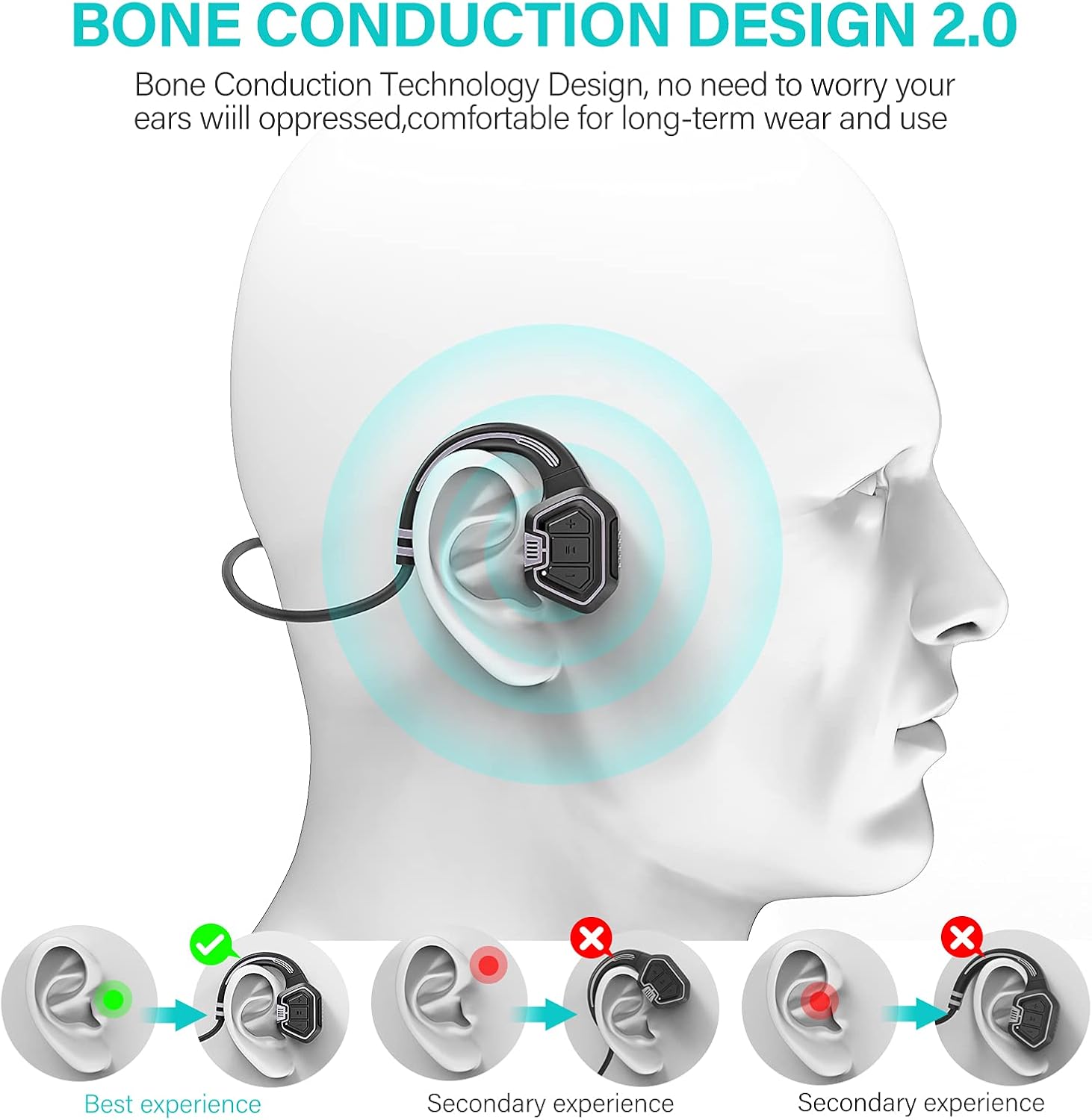
Image 3.1: Visual representation of how bone conduction technology works, showing sound transmission through the cheekbones to the inner ear.

Image 3.2: The headphones are IP68 waterproof, suitable for use during swimming and other water activities, as demonstrated by a person swimming underwater.
4. Элементы кіравання і функцыі
Familiarize yourself with the control buttons on your headphones:

Малюнак 4.1: Падрабязны view of the headphone controls, including volume buttons, power button, and the magnetic charging port.
- Кнопка харчавання:
- Доўгі націск для ўключэння/выключэння.
- Націсніце, каб прайграць/прыпыніць музыку.
- Volume Up (+) / Next Song:
- Short press for Volume Up.
- Long press for Next Song.
- Volume Down (-) / Previous Song:
- Short press for Volume Down.
- Long press for Previous Song.
- Порт для зарадкі: Magnetic connection for charging and data transfer.
5. Настройка
5.1. Зарадка навушнікаў
Перад першым выкарыстаннем цалкам зарадзіце навушнікі. Поўная зарадка займае прыблізна 1.5 гадзіны.
- Падключыце магнітны зарадны кабель да зараднага порта на навушніках.
- Падключыце USB-кабель да USB-адаптара сілкавання (не ўваходзіць у камплект) або да USB-порта кампутара.
- The indicator light will show charging status (refer to LED indicator section for details, if available).
- Пасля поўнай зарадкі адключыце кабель.
5.2. Uploading Music (MP3 Mode)
The headphones have a built-in 16GB memory for MP3 playback. To upload music:
- Connect the headphones to your computer using the provided charging cable. The computer should recognize the headphones as a removable disk.
- Перацягніце патрэбны аўдыёфайл MP3 files into the recognized disk folder.
- Аднойчы files are transferred, safely eject the device from your computer before disconnecting the cable.

Image 5.1: Visual guide demonstrating how to charge the headphones and upload music files to the built-in 16GB memory, as well as mode switching.
6. Інструкцыя па эксплуатацыі
6.1. Уключэнне/выключэнне харчавання
- To power on, long press the Power button until you hear a prompt.
- To power off, long press the Power button again until you hear a prompt.
6.2. Рэжым Bluetooth
Каб падключыцца праз Bluetooth:
- Ensure the headphones are powered on and in Bluetooth mode (indicated by a specific LED light or voice prompt).
- На вашай прыладзе (смартфоне, планшэце і г.д.) уключыце Bluetooth і знайдзіце даступныя прылады.
- Select "VEIERSIA Headphones" (or similar name) from the list to pair.
- Once paired, you can play audio from your device through the headphones.
6.3. MP3 Mode (Local Player)
To use the built-in MP3 player:
- Switch the headphones to MP3 mode. This is typically done by a short press of the mode switch button (refer to Image 5.1 for visual).
- Заўвага: For optimal performance in MP3 mode, especially during swimming, ensure your mobile phone's Bluetooth connection to the headphones is off. Water can interfere with Bluetooth signals.
6.4. Switching Between Modes
The headphones support switching between Bluetooth and MP3 modes. Refer to the control diagram (Image 5.1) for the specific button. A short press of the mode button will toggle between Bluetooth and MP3 playback.
6.5. Здзяйсненне і прыём званкоў
Пры падключэнні да смартфона праз Bluetooth:
- Адказ/завяршэнне выкліку: Кароткае націсканне кнопкі харчавання.
- Адхіліць выклік: Доўга націсніце кнопку харчавання.
6.6. Галасавы памочнік
To activate your device's voice assistant (e.g., Siri, Google Assistant), double-click the Power button.

Image 6.1: The open-ear design allows for safe driving by enabling awareness of surrounding sounds while listening to audio.
7. Тэхнічнае абслугоўванне і догляд
- Уборка: Працярыце навушнікі мяккай, damp тканіна. Не выкарыстоўвайце агрэсіўныя хімікаты або абразіўныя ачышчальнікі.
- захоўванне: Store the headphones in the provided bag when not in use to protect them from dust and scratches.
- Ўздзеянне вады: While IP68 waterproof, it is recommended to rinse the headphones with fresh water after use in chlorinated or saltwater environments to prevent corrosion. Ensure the charging port is dry before charging.
- тэмпература: Avoid exposing the headphones to extreme temperatures (hot or cold) or direct sunlight for prolonged periods.
- Зарадка: Use only the provided charging cable. Do not attempt to charge if the headphones or cable are wet.
8. Выпраўленне непаладак
| праблема | Магчымая прычына | Рашэнне |
|---|---|---|
| Навушнікі не ўключаюцься. | Нізкі акумулятар. | Зараджайце навушнікі 1.5 гадзіны. |
| Немагчыма падключыцца праз Bluetooth. | Навушнікі не ў рэжыме спалучэння; Bluetooth прылады выключаны; занадта далёка ад прылады. | Ensure headphones are in Bluetooth mode. Turn device Bluetooth off/on. Move closer to device (within 50 ft). |
| Няма гуку ў рэжыме MP3. | Без музыкі files loaded; headphones in Bluetooth mode. | Upload MP3 files to the internal memory. Switch to MP3 mode. |
| Якасць гуку дрэнная або гучыць перарывіста. | Low battery; interference; water affecting Bluetooth signal (in water). | Charge headphones. Move away from sources of interference. Use MP3 mode when swimming. |
| Кампутар не распазнае навушнікі. | Faulty cable; driver issue; improper connection. | Try a different USB port or computer. Ensure cable is securely connected. |
9. Тэхнічныя характарыстыкі
| Асаблівасць | Дэталь |
|---|---|
| Назва мадэлі | касцяная праводнасць |
| Тэхналогія падлучэння | Бесправадная сувязь (Bluetooth) |
| Версія Bluetooth | 5.1 |
| Дыяпазон Bluetooth | Да 50 футаў (прыблізна 15 метраў) |
| Унутраная памяць | 16GB (for MP3 playback) |
| Узровень воданепранікальнасці | Воданепранікальны IP68 |
| Тэрмін службы батарэі | Up to 5 hours (playback time) |
| Час зарадкі | Прыбл. 1.5 гадзіны |
| Вага прадмета | 30 грам (1.06 унцый) |
| Памеры | 3.94 х 3.15 х 0.39 цалі |
| Матэрыял | Пластыкавыя |
| Дыяпазон частот | 20 Гц - 20 000 Гц |
| Тып кіравання | Кіраванне медыя, сэнсарнае |

Image 9.1: Summary of key specifications and benefits, including Bluetooth version, battery life, charging time, and control features.
10. Інфармацыя па бяспецы
- Не разбірайце, не рамантуйце і не мадыфікуйце выраб. Гэта можа прывесці да пажару, паражэння электрычным токам або поўнага пашкоджання вырабу.
- Трымайце выраб далей ад экстрэмальных тэмператур, вільготнасці і агрэсіўных рэчываў.
- Пазбягайце праслухоўвання на высокім узроўні гучнасці на працягу доўгага часу, каб прадухіліць пашкоджанне слыху.
- When using the headphones in environments requiring attention (e.g., driving, cycling, walking near traffic), ensure the open-ear design allows you to hear surrounding sounds for safety.
- Утылізуйце прадукт і батарэі адказна ў адпаведнасці з мясцовымі правіламі.
11. Гарантыя і падтрымка
VEIERSIA provides a 360-day after-sales service for its products. If you encounter any issues or have questions regarding your headphones, please contact VEIERSIA customer support through the retailer where you purchased the product or visit the official VEIERSIA store page on Amazon for contact information.
Для атрымання дадатковай інфармацыі наведайце VEIERSIA Store on Amazon.
Ask a question about this manual
Ask about setup, troubleshooting, compatibility, parts, safety, or missing instructions. Manuals+ will review the question and use this page’s manual context to help answer it.