
1. Уводзіны
Thank you for choosing the Medivon Stream PRO Professional Muscle Electro Stimulator. This device is designed to provide Transcutaneous Electrical Nerve Stimulation (TENS), Electrical Muscle Stimulation (EMS), and Fitness programs to support muscle training, relaxation, and pain relief. Please read this manual carefully before using the device to ensure safe and effective operation. Keep this manual for future reference.
2. Важная інфармацыя па бяспецы
ПАПЯРЭДЖАННІ:
- Always read the label, warnings, and instructions provided with the product before use.
- Do not use this device if you have a pacemaker, implanted defibrillator, or other metallic or electronic implants.
- Consult your doctor before use if you have any medical conditions, including but not limited to heart disease, epilepsy, cancer, or if you are pregnant.
- Do not apply electrodes to the head, neck (carotid sinus), chest, or over open wounds, rashes, or swollen, infected, or inflamed areas.
- Захоўваць у месцах, недаступных дзецям.
- Do not use while driving, operating machinery, or during any activity where involuntary muscle contractions could put you at risk of injury.
- Discontinue use immediately if you experience any adverse reactions such as skin irritation, discomfort, or dizziness, and consult a medical professional.
- Use only the accessories supplied or recommended by Medivon.
3. Прадукт скончыўсяview
The Medivon Stream PRO is a compact and professional electro stimulator featuring an LCD display for easy program selection and intensity adjustment. It offers TENS, EMS, and Fitness modes with multiple intensity levels.
3.1 Кампаненты прылады
- Main control unit with LCD display
- Электродныя калодкі
- Connection cables for electrodes
- Кабель для зарадкі
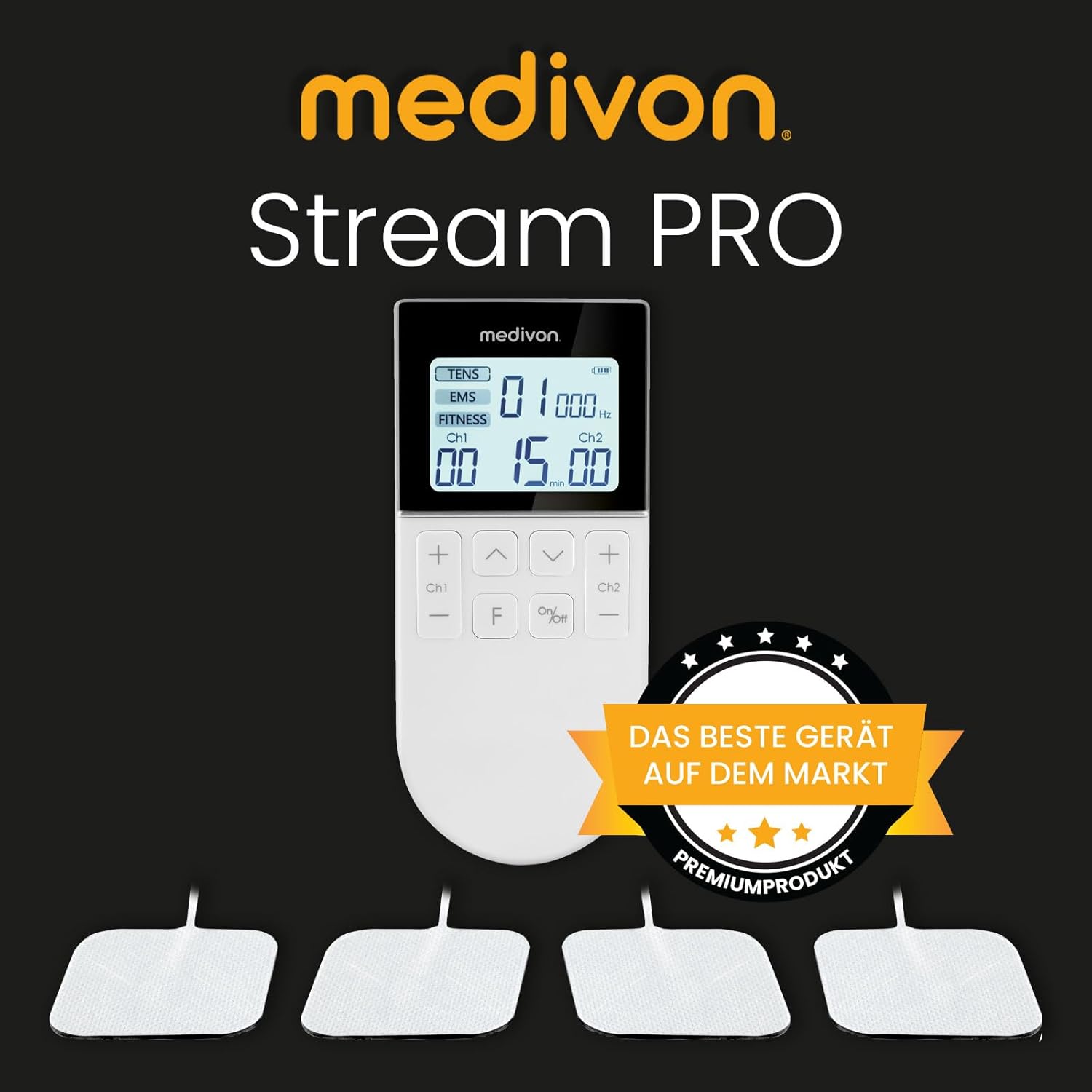
Figure 1: Medivon Stream PRO main unit and electrode pads. The device features a clear LCD screen and intuitive buttons for control.

Figure 2: Close-up of the Medivon Stream PRO LCD display, showing program selection (TENS, EMS, FITNESS), frequency, and time settings. A finger is shown interacting with the screen.
4. Усталёўка і першае выкарыстанне
4.1 Зарадка прылады
- Падключыце зарадны кабель да зараднага порта прылады.
- Plug the other end of the cable into a suitable USB power adapter (not included) or a computer USB port.
- The battery indicator on the LCD display will show charging status. Charge fully before first use.
4.2 Прымацаванне электродаў
- Пераканайцеся, што прылада выключана.
- Connect the electrode cables to the main unit's output ports (Ch1, Ch2).
- Attach the electrode pads securely to the ends of the cables.
- Clean and dry the skin area where the electrodes will be placed.
- Remove the protective film from the electrode pads and firmly press them onto the skin. Ensure good contact.
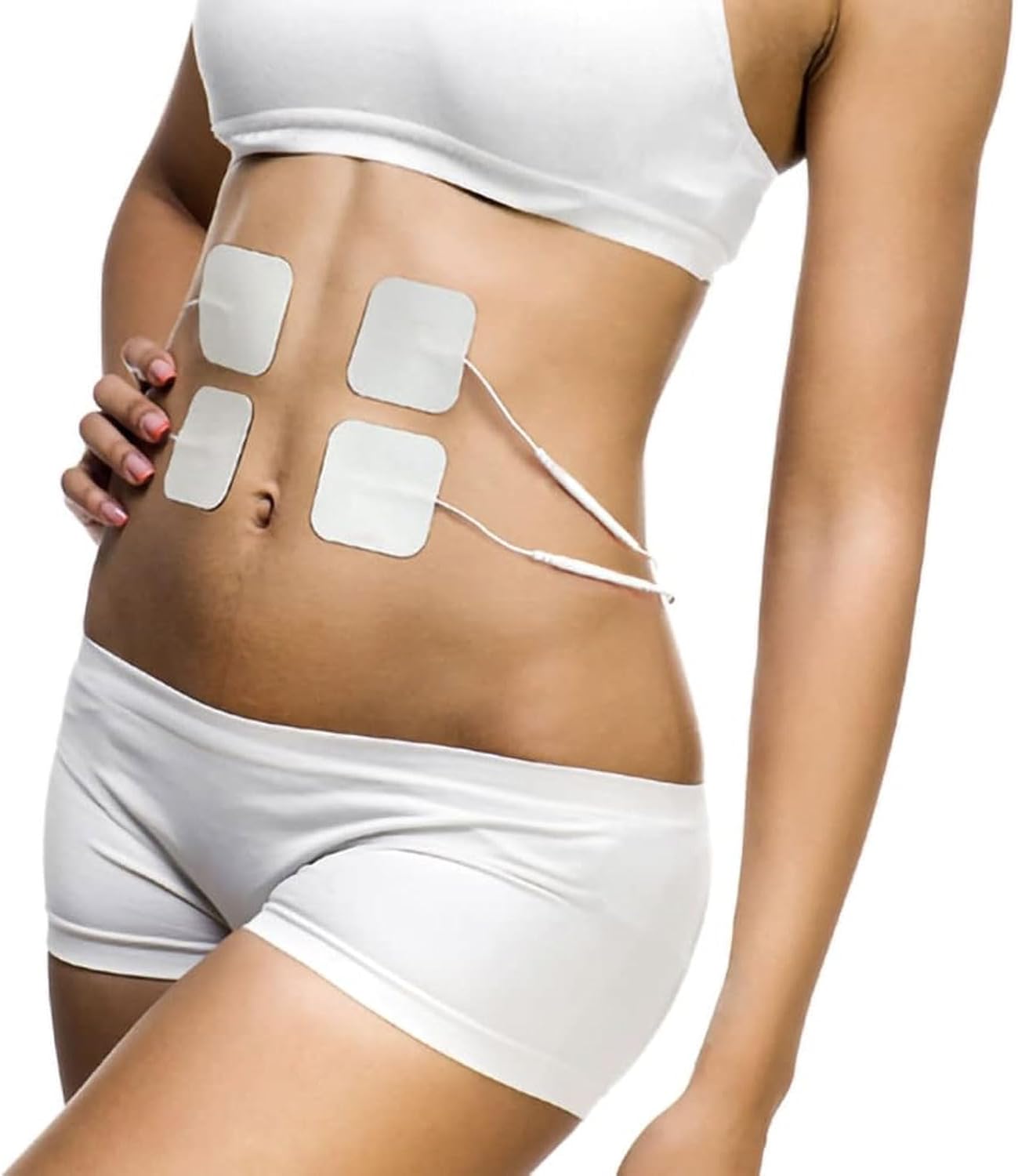
Малюнак 3: Выпample of proper electrode placement on the abdominal area for muscle stimulation. Ensure pads are firmly attached to clean, dry skin.

Малюнак 4: Выпample of electrode placement on the knee for targeted relief or stimulation.
5. Інструкцыя па эксплуатацыі
5.1 Уключэнне/выключэнне
Націсніце і ўтрымлівайце Уключэнне/Выключэнне кнопку, каб уключыць або выключыць прыладу.
5.2 Selecting a Program Mode (TENS, EMS, FITNESS)
After turning on, the device will display the available modes: TENS, EMS, and FITNESS. Use the F button to cycle through the modes. The selected mode will be highlighted on the LCD.
- TENS (Чрескожная электрычная стымуляцыя нерваў): Primarily for pain relief.
- EMS (электрычная стымуляцыя цягліц): For muscle strengthening, rehabilitation, and recovery.
- Фітнес: Designed for muscle toning and training.

Малюнак 5: бок view of the Medivon Stream PRO, showing its compact design. The control buttons are visible on the front.
5.3 Рэгуляванне інтэнсіўнасці
Each channel (Ch1, Ch2) can be adjusted independently.
- Выкарыстоўвайце + і - buttons for Channel 1 (Ch1) to increase or decrease intensity.
- Выкарыстоўвайце + і - buttons for Channel 2 (Ch2) to increase or decrease intensity.
- Start with the lowest intensity and gradually increase until you feel a comfortable, yet effective, muscle contraction or tingling sensation. Avoid painful levels. The device offers 16 intensity levels.
5.4 Setting Treatment Time
Выкарыстоўвайце Up і Уніз arrow buttons to adjust the treatment duration. The time is displayed in minutes on the LCD. The device will automatically shut off after the set time.
5.5 Агульныя парады па выкарыстанні
- Ensure electrode pads are always moist and sticky for optimal conductivity. Replace them when they lose their adhesiveness.
- Do not use the device for more than 60 minutes per session on the same area.
- Allow at least 30 minutes between sessions on the same muscle group.
- For specific conditions or muscle groups, consult a healthcare professional or physical therapist for optimal electrode placement and program settings.

Figure 6: The Medivon Stream PRO can be used for various body areas, including the head, neck, back, and legs, to address different types of discomfort or for muscle training.
6. Тэхнічнае абслугоўванне і захоўванне
6.1 Ачыстка прылады
- Turn off the device and disconnect all cables before cleaning.
- Працярыце асноўны блок мяккай, злёгкуamp тканіна. Не выкарыстоўвайце абразіўныя ачышчальнікі і не апускайце прыладу ў ваду.
- Clean electrode pads by gently wiping the adhesive surface with a damp cloth. Allow them to air dry before reattaching the protective film.
6.2 Захоўванне
- Store the device and accessories in a cool, dry place, away from direct sunlight and extreme temperatures.
- Ensure electrode pads have their protective film reattached to maintain adhesiveness and prolong their lifespan.
- Keep the device fully charged if storing for extended periods to preserve battery health.
7. Выпраўленне непаладак
| праблема | Магчымая прычына | Рашэнне |
|---|---|---|
| Прылада не ўключаецца. | Нізкі зарад батарэі або прылада выключана. | Charge the device. Press and hold the On/Off button. |
| Няма адчуванняў або слабыя адчуванні. | Electrodes not properly attached, low intensity, or worn-out pads. | Ensure electrodes are firmly on clean skin. Increase intensity gradually. Replace old electrode pads. Check cable connections. |
| Раздражненне скуры пад электродамі. | Poor skin hygiene, allergic reaction, or excessive use. | Clean skin thoroughly before use. Discontinue use if irritation persists and consult a doctor. Reduce session duration. |
| Прылада нечакана выключаецца. | Battery low or session time completed. | Recharge the device. Check the set session time. |
8. Тэхнічныя характарыстыкі
| Асаблівасць | Дэталь |
|---|---|
| Нумар мадэлі | 5904119280092 |
| Марка | Medivon |
| Памеры прадукту (ДxШxВ) | 16 х 8.5 х 6 см |
| Вага прадмета | 300 грам |
| Колькасць частак | 1 (галоўны блок) |
| Колькасць адзінак | 1.00 Граф |
| Праграмы | TENS, EMS, FITNESS |
| Узроўні інтэнсіўнасці | 16 |
| Дысплей | ВК |
9. Гарантыя і падтрымка
For warranty information and customer support, please refer to the documentation included in your product packaging or contact Medivon customer service directly. Contact details can typically be found on the manufacturer's webсайце або на ўпакоўцы прадукту.