
1. Уводзіны
This manual provides detailed instructions for the proper use and maintenance of your Cellularline Task Dual-Mode Headset. Please read this manual thoroughly before using the product to ensure optimal performance and longevity.
The Cellularline Task headset is designed for versatility, offering both wired and wireless (Bluetooth) connectivity. It features a detachable microphone, making it suitable for smart working, remote learning, and music listening.
2. Прадукт скончыўсяview
The Cellularline Task headset combines comfort with functionality, featuring over-ear cushions and intuitive controls. Its dual-mode capability allows seamless switching between wired and Bluetooth connections.

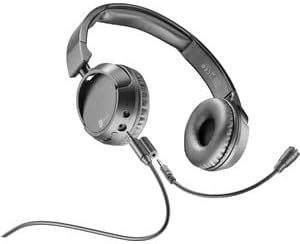
Малюнак 2.1: Cellularline Task Dual-Mode Headset with detachable microphone connected.
Асноўныя характарыстыкі:
- Dual-mode stereo headset (wired and Bluetooth).
- Wireless communication technology compatible with various devices (iPhone, Samsung, Huawei, Xiaomi, etc.).
- Modern design with comfortable over-ear cushions.
- Adaptable and removable microphone, ideal for video calls and audio recording.
- Volume limitation feature for hearing protection.
- Up to 18 hours of continuous music playback or talk time.
3. Настройка
3.1 Змест пакета
Before proceeding, ensure your package contains the following items:
- Cellularline Task Headset
- Здымны мікрафон
- Зарадны кабель (USB)
- Аўдыёкабель (раздым 3.5 мм)
- Кіраўніцтва карыстальніка (гэты дакумент)
3.2 Зарадка гарнітуры
Before first use, fully charge the headset. Connect the provided USB charging cable to the charging port on the headset and to a compatible USB power source. The LED indicator will show charging status and turn off or change color when fully charged.
3.3 Падключэнне здымнага мікрафона
The microphone can be easily attached or detached based on your usage needs.
- Locate the microphone input port on the left earcup of the headset.
- Align the 3.5mm jack of the detachable microphone with the port.
- Акуратна ўстаўце раз'ём мікрафона ў порт, пакуль ён надзейна не зафіксуецца.
Малюнак 3.1: Headset with the detachable microphone removed, showing the input port.
3.4 Правадное злучэнне
Каб выкарыстоўваць гарнітуру ў правадным рэжыме:
- Пераканайцеся, што гарнітура адключана.
- Connect one end of the 3.5mm audio cable to the audio input port on the headset.
- Connect the other end of the 3.5mm audio cable to the audio output jack of your device (e.g., computer, smartphone, tablet).
- The headset will function as a wired headset, drawing power from the connected device if needed, or using its own battery for active features.

Малюнак 3.2: Headset connected via 3.5mm audio cable, demonstrating wired mode.
3.5 Спалучэнне па Bluetooth
To connect your headset wirelessly via Bluetooth:
- Уключэнне: Press and hold the Power button on the headset until the LED indicator flashes, indicating pairing mode.
- Актываваць Bluetooth: На вашай прыладзе (смартфоне, планшэце, камп'ютары) перайдзіце ў налады Bluetooth і пераканайцеся, што Bluetooth уключаны.
- Пошук прылады: Your device will scan for available Bluetooth devices.
- Выберыце гарнітуру: From the list of found devices, select "Cellularline Task" (or similar name).
- Пацвердзіце падключэнне: Once connected, the LED indicator on the headset will change to a steady light or flash slowly, and your device will confirm the connection.
The headset is compatible with iPhone, Samsung, Huawei, Xiaomi, and other Bluetooth-enabled devices.
4. Інструкцыя па эксплуатацыі
4.1 Уключэнне/выключэнне сілкавання
- Уключэнне: Націсніце і ўтрымлівайце кнопку харчавання прыблізна 3 секунды, пакуль не загарыцца святлодыёдны індыкатар.
- Выключэнне: Націсніце і ўтрымлівайце кнопку харчавання прыблізна 5 секунды, пакуль не пагасне святлодыёдны індыкатар.
4.2 Рэгулятар гучнасці
The headset features tactile controls for volume adjustment.
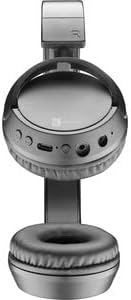
Малюнак 4.1: Буйны план view of the earcup showing control buttons for volume and playback.
- Павялічыць гучнасць: Націсніце кнопку «+».
- Паменшыць гучнасць: Націсніце кнопку «-».
The headset includes a volume limitation feature to protect your hearing.
4.3 Кіраванне выклікамі
When connected via Bluetooth, you can manage calls directly from the headset:
- Адказаць на званок: Press the Multi-function button (usually the Power button or a dedicated call button) once.
- Завяршыць выклік: Націсніце шматфункцыянальную кнопку адзін раз падчас размовы.
- Адхіліць выклік: Націсніце і ўтрымлівайце шматфункцыянальную кнопку на працягу 2 секунд, калі паступае ўваходны званок.
4.4 Прайграванне музыкі
When connected via Bluetooth, control your music playback:
- Прайграванне/Паўза: Націсніце шматфункцыянальную кнопку адзін раз.
- Наступны трэк: Націсніце і ўтрымлівайце кнопку «+».
- Папярэдні трэк: Націсніце і ўтрымлівайце кнопку «-».
4.5 Выкарыстанне мікрафона
The detachable microphone is designed for clear voice capture during calls or recordings.
- Ensure the microphone is securely attached (refer to Section 3.3).
- Размясціце мікрафон належным чынам для аптымальнага ўспрымання голасу.
- When using the headset in wired mode, the microphone functionality will depend on the connected device's compatibility with 4-pole 3.5mm jacks.
5. Тэхнічнае абслугоўванне
5.1 Ачыстка
- Выкарыстоўвайце мяккую, сухую тканіну для чысткі гарнітуры.
- Не выкарыстоўвайце абразіўныя ачышчальнікі, растваральнікі або агрэсіўныя хімікаты.
- Пазбягайце траплення вільгаці ў любыя адтуліны.
5.2 Захоўванне
- Захоўвайце гарнітуру ў прахалодным, сухім месцы, удалечыні ад прамых сонечных прамянёў і экстрэмальных тэмператур.
- If storing for an extended period, ensure the battery is partially charged (around 50%) to maintain battery health.
5.3 Сыход за акумулятарам
- Пазбягайце частай поўнай разрадкі акумулятара.
- Не падвяргайце акумулятар уздзеянню высокіх тэмператур.
- If the headset will not be used for a long time, charge it every few months to prevent deep discharge.
6. Выпраўленне непаладак
6.1 Headset Does Not Power On
- Пераканайцеся, што гарнітура цалкам зараджана. Падключыце яе да крыніцы харчавання і пачакайце некалькі хвілін, перш чым спрабаваць зноў уключыць.
- Паспрабуйце іншы кабель для зарадкі або адаптар харчавання.
6.2 Няма гуку або нізкі ўзровень гучнасці
- Check the volume levels on both the headset and the connected device.
- If using Bluetooth, ensure the headset is properly paired and connected.
- If using wired mode, ensure the 3.5mm audio cable is fully inserted into both the headset and the device.
- Праверце з іншай крыніцай гуку або прыладай.
6.3 Праблемы са спалучэннем Bluetooth
- Пераканайцеся, што гарнітура знаходзіцца ў рэжыме спалучэння (мігае святлодыёдны індыкатар).
- Выключыце і ўключыце Bluetooth на вашай прыладзе.
- Forget the headset from your device's Bluetooth list and attempt to pair again.
- Ensure the headset is within the effective range of your device (typically 10 meters).
6.4 Мікрафон не працуе
- Пераканайцеся, што здымны мікрафон надзейна прымацаваны да гарнітуры.
- Check microphone settings on your connected device to ensure the headset's microphone is selected as the input device.
- Праверце мікрафон з дапамогай іншага прыкладання або прылады.
- Ensure the microphone is not muted on your device or via any headset controls (if applicable).
7. Тэхнічныя характарыстыкі
| Марка | Сотавая лінія |
| Назва мадэлі | BTHEADBTASKK |
| Тэхналогія падлучэння | Wireless (Bluetooth), Wired (3.5mm jack) |
| Тэхналогія бесправадной сувязі | Bluetooth |
| Формаў-фактар | Надвушная |
| Асаблівасці | Fast Charging, Volume Control, Included Microphone |
| Час гульні | Да 18 гадзін |
| Час размовы | 18 гадзіны |
| Сумяшчальныя прылады | Laptop, Tablet, Mobile Phone, Universal |
| Тып кіравання | Сэнсарнае кіраванне, дыстанцыйнае кіраванне |
| Матэрыял | Пластык, гума |
| Колер | Чорны |
8. Гарантыя і падтрымка
Cellularline products are designed and manufactured to the highest quality standards. For information regarding warranty coverage, please refer to the warranty card included with your product or visit the official Cellularline webсайт.
If you encounter any issues not covered in this manual or require further assistance, please contact Cellularline customer support through their official webсайт або кантактную інфармацыю, указаную на ўпакоўцы прадукту.
Webсайт: www.cellularline.com