
Albrecht 27861
Інструкцыя па эксплуатацыі малой радыёстанцыі для пажылых людзей Albrecht DR 86
Model: 27861 | Brand: Albrecht
Уводзіны
This user manual provides comprehensive instructions for the operation and maintenance of your Albrecht DR 86 Small Senior Radio. Please read this manual carefully before using the device to ensure proper function and safety. Keep this manual for future reference.
Інструкцыі па тэхніцы бяспекі
- Do not expose the radio to water, moisture, or extreme temperatures.
- Не кідайце прыладу і не падвяргайце яе моцным ударам.
- Do not attempt to disassemble or repair the radio yourself. Refer all servicing to qualified personnel.
- Для зарадкі выкарыстоўвайце толькі блок харчавання, які ўваходзіць у камплект.
- Трымайце радыё далей ад крыніц цяпла і прамых сонечных прамянёў.
- Забяспечце належную вентыляцыю падчас працы прылады.
Змест пакета
Калі ласка, праверце наяўнасць усіх прадметаў у камплекце:
- Albrecht DR 86 Radio
- Integrated 2200 mAh Battery (pre-installed)
- Блок харчавання
- Кіраўніцтва карыстальніка (гэты дакумент)
Прадукт скончаныview
Familiarize yourself with the main components and controls of your Albrecht DR 86 radio.

Малюнак 1: Фронт view of the Albrecht DR 86 radio, showing the display, speaker grille, and control buttons. Key controls include the power button, menu button, OK button, navigation/volume knob, and dedicated preset buttons (1-5).
Элементы кіравання і дысплей
- 2.4-цалевы ВК-дысплей: Shows station information, time, menu options, and battery status. Designed for clear readability with large fonts.
- Кнопка харчавання (●): Уключае або выключае радыё.
- Кнопка меню: Accesses the radio's settings and options.
- Кнопка ОК: Пацвярджае выбар у меню.
- Navigation/Volume Knob: Rotates to navigate menus or adjust volume. Press to select.
- Кнопка DAB/FM: Switches between DAB+ and FM radio modes.
- Кнопка BT: Activates Bluetooth mode for music streaming.
- Кнопкі загадзя настроеных налад (1-5): Directly access your stored favorite stations.
Парты і злучэнні
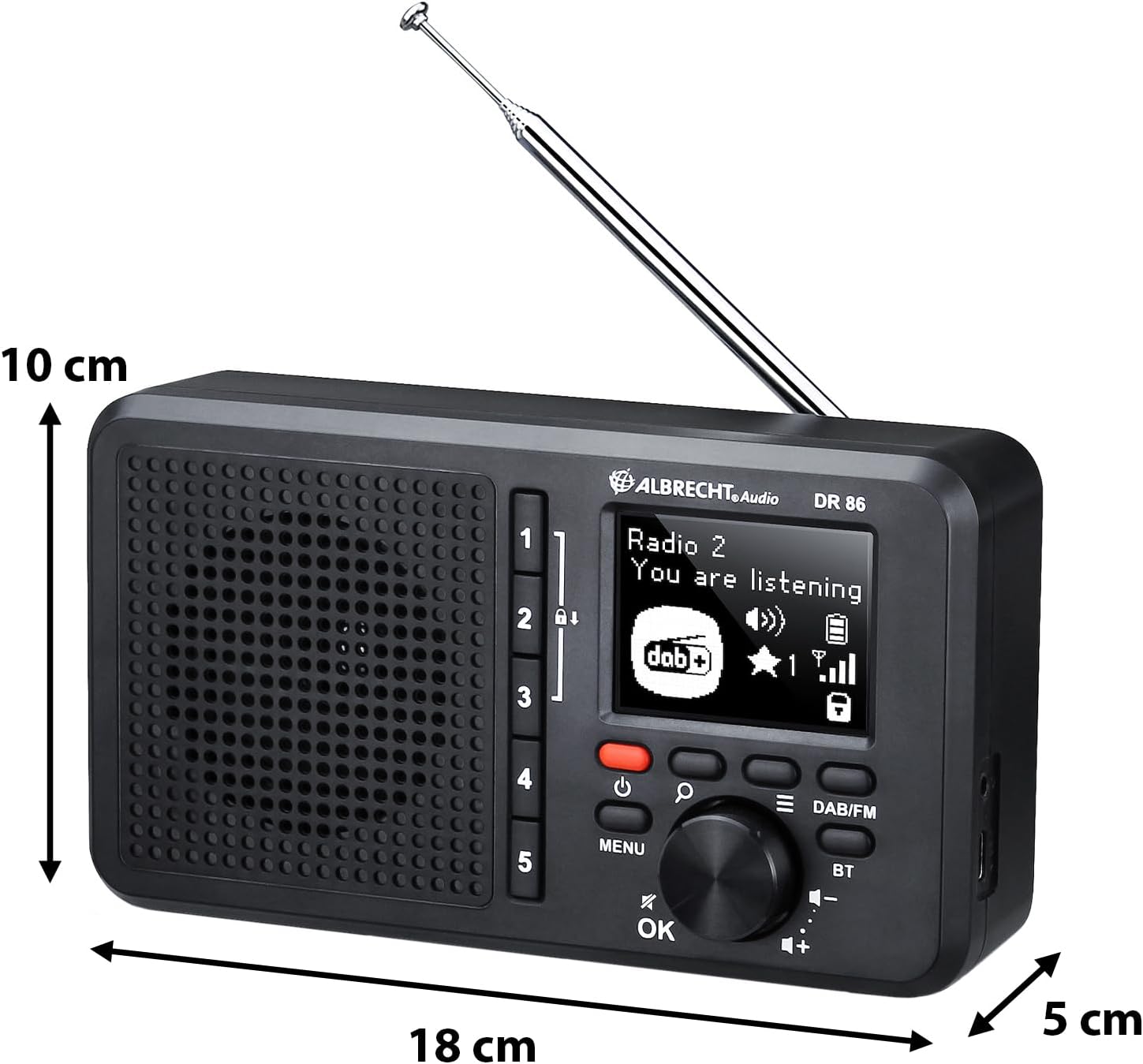
Малюнак 2: Збоку view of the Albrecht DR 86 radio, illustrating its compact dimensions and the location of the telescopic antenna and USB-C charging port.
- Гняздо для зарадкі USB-C: For connecting the power supply to charge the integrated battery.
- Раз'ём для навушнікаў: Для прыватнага праслухоўвання (навушнікі не ўваходзяць у камплект).
- Тэлескапічная антэна: Extend fully for optimal radio reception.
Настройка
Першапачатковае ўключэнне і зарадка
- Connect the provided power supply to the USB-C charging socket on the radio and plug it into a wall outlet. The battery icon on the display will indicate charging status.
- Націсніце і ўтрымлівайце кнопку харчавання (●), каб уключыць радыё.
- Upon first power-on, the radio will automatically perform a station scan for DAB+ and FM stations. This may take a few minutes.
Setting Up Senior Mode
The Senior Mode simplifies operation by limiting functions to only essential controls, preventing accidental changes. Follow these steps to activate it:
- Ensure the radio has completed its initial station scan.
- Tune to your desired DAB+ or FM stations using the standard mode (if not already in Senior Mode).
- To store a favorite station, tune to the station, then press and hold one of the Preset buttons (1-5) until "Preset Saved" appears on the display. Repeat for up to 5 favorite stations.
- To enable Senior Mode, navigate through the menu (using the Menu button and Navigation knob) to find the "Senior Mode" option and select "On". Once activated, only the Power button, Volume control, and Preset buttons (1-5) will be active.
Аперацыйная
Switching Operating Modes (Senior vs. Standard)
The radio offers two operating modes:
- Senior Mode: Provides simplified operation with only power on/off, volume adjustment, and direct access to 5 preset stations. All other settings are locked to prevent accidental changes.
- Стандартны рэжым: Offers full functionality, including station search, station list browsing, and access to all settings. This mode is used for initial setup and advanced configurations.
To switch between modes, access the "Senior Mode" option in the system settings menu. Note that Senior Mode can only be disabled from Standard Mode.
Праца радыё DAB+
- Націсніце DAB / FM button to select DAB+ mode.
- If a station scan has not been performed recently, the radio may initiate one.
- Rotate the Navigation knob to browse available DAB+ stations. Press the knob or OK выбраць станцыю.
- To save a favorite station, tune to it, then press and hold one of the Preset buttons (1-5).
Праца FM-радыё
- Націсніце DAB / FM кнопка для выбару рэжыму FM.
- Rotate the Navigation knob to manually tune to a frequency.
- To auto-scan for the next available station, press and hold the Navigation knob briefly.
- To save a favorite station, tune to it, then press and hold one of the Preset buttons (1-5).
Music Streaming via Bluetooth

Малюнак 3: The Albrecht DR 86 radio connected via Bluetooth to a smartphone, ready for music streaming.
- Націсніце BT button on the radio to enter Bluetooth pairing mode. The display will show "Pairing".
- On your smartphone or tablet, enable Bluetooth and search for available devices. Select "Albrecht DR 86" from the list.
- Once paired, the radio will indicate a successful connection. You can now stream audio from your device to the radio.
- Control playback (play/pause, skip tracks) from your connected device. Volume can be adjusted on both the radio and your device.
Зарадка і акумулятар
The Albrecht DR 86 features an integrated 2200 mAh Lithium-Ion battery for portable operation.
- Зарадка: Connect the radio to the power supply using the USB-C port. The battery indicator on the display will show charging progress.
- Тэрмін службы батарэі: A fully charged battery provides approximately 7 hours of playback at 50% volume. Actual battery life may vary depending on volume level and usage.
- Сыход за батарэяй: For optimal battery longevity, avoid fully discharging the battery frequently. If storing the radio for an extended period, charge it to about 50% before storage.
Тэхнічнае абслугоўванне
- Уборка: Use a soft, dry cloth to clean the radio's exterior. Do not use abrasive cleaners, waxes, or solvents.
- захоўванне: Захоўвайце радыёпрыёмнік у прахалодным, сухім месцы, удалечыні ад прамых сонечных прамянёў і экстрэмальных тэмператур, калі ён не выкарыстоўваецца працяглы час.
- Антэна: Асцярожна звяртайцеся з тэлескапічнай антэнай, каб пазбегнуць яе згінання або паломкі.
Ліквідацыю непаладак
| праблема | Магчымая прычына | Рашэнне |
|---|---|---|
| Радыё не ўключаецца. | Акумулятар разраджаны. | Connect the radio to the power supply and charge the battery. |
| Няма гуку або нізкі ўзровень гучнасці. | Volume is too low; Mute is active; Poor signal. | Increase volume; Check if headphones are connected; Extend antenna fully; Perform a station scan. |
| Слабы прыём радыё (DAB+/FM). | Антэна не выцягнута; Зона слабага сігналу. | Fully extend the telescopic antenna. Try repositioning the radio. Perform a new station scan. |
| Збой спалучэння Bluetooth. | Radio not in pairing mode; Device too far; Bluetooth disabled on device. | Ensure radio is in BT pairing mode; Move devices closer; Enable Bluetooth on your smartphone/tablet. |
| Buttons are unresponsive (Senior Mode). | Radio is in Senior Mode. | This is normal behavior in Senior Mode. To access full functionality, disable Senior Mode via the menu (if accessible, or consult someone who can disable it). |
Тэхнічныя характарыстыкі
| Асаблівасць | Дэталь |
|---|---|
| Нумар мадэлі | 27861 |
| Памеры (Д х Ш х У) | 18.1 х 4.9 х 10.1 см |
| Вага | 420 г |
| акумулятар | Integrated 2200 mAh Lithium Ion |
| Крыніца харчавання | Battery Powered / USB-C |
| Выхадная магутнасць гуку | 3 ват |
| Дысплей | 2.4-цалевы ВК-экран |
| Радыё цюнэр | DAB+, FM |
| Сувязь | Bluetooth, USB-C (charging), Headphone Jack |
Гарантыя і падтрымка
For warranty information or technical support, please refer to the warranty card included with your product or visit the official Albrecht Audio website. You may also contact your local retailer for assistance.
Заўвага: Характарыстыкі і характарыстыкі прадукту могуць быць зменены без папярэдняга паведамлення.
Ask a question about this manual
Ask about setup, troubleshooting, compatibility, parts, safety, or missing instructions. Manuals+ will review the question and use this page’s manual context to help answer it.