
1. Уводзіны
Thank you for choosing the Shinco WiFi Karaoke Machine. This portable system features a 15-inch touch screen, two wireless microphones, and multiple connectivity options including Wi-Fi and Bluetooth. This manual provides detailed instructions to help you get the most out of your device.
2. Што ў скрынцы
Акуратна распакуйце ўсе прадметы і пераканайцеся, што вы атрымалі наступныя кампаненты:
- Wifi Karaoke Machine with Touch Screen
- 2 УВЧ бесправадныя мікрафоны
- Пульт дыстанцыйнага кіравання
- Адаптар сілкавання
- RCA кабель
- Кіраўніцтва карыстальніка (гэты дакумент)
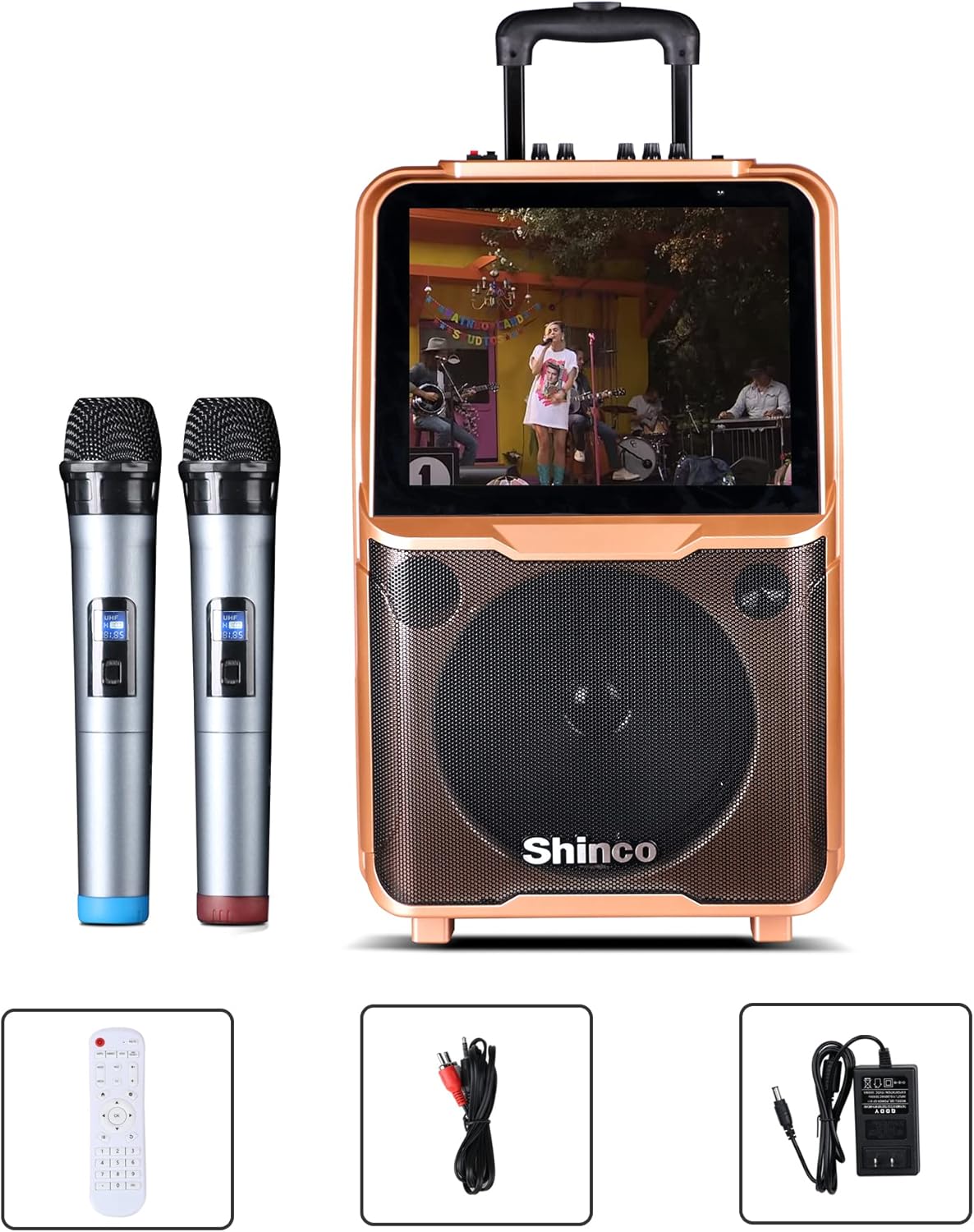
Image: Shinco Karaoke Machine with its accessories, including two wireless microphones, a remote control, an RCA cable, and a power adapter.
3. Асаблівасці прадукту
- 15-цалевы сэнсарны экран: Navigate menus and applications with ease.
- Падключэнне Wi-Fi: Access online content and download apps from the Google Play Store.
- 2 Wireless Microphones: Enjoy untethered vocal performance.
- 50 Вт RMS магутнасць Ampпадпітка: Delivers clear audio through a 10-inch woofer.
- Выхад HDMI: Connect to an external TV for a larger display.
- Злучэнне Bluetooth: Бесправадная трансляцыя аўдыё з сумяшчальных прылад.
- Функцыя запісу: Record your vocal performances.
- FM-радыё: Наладзьцеся на свае любімыя радыёстанцыі.
- USB/TF Card Compatible: Play media directly from storage devices.
- Партатыўны дызайн: Equipped with a trolley and retractable handle for easy transport.
- Убудаваны акумулятар: Provides power for outdoor use.

Image: The Shinco Karaoke Machine highlighting its Android operating system, YouTube app compatibility, and Wi-Fi connectivity.
4. Настройка
- Распакуйце прыладу: Remove the karaoke machine and all accessories from the packaging.
- Падключэнне сілкавання: Connect the power adapter to the DC 15V input port on the back of the machine and plug it into a standard electrical outlet. The machine can operate on battery power, but it is recommended to charge it fully before first use.
- Уключэнне: Press the Power button located on the control panel to turn on the machine. The 15-inch touch screen will illuminate.
- Падрыхтоўка мікрафона: Insert 2 AA batteries (not included) into each wireless microphone. Turn on the microphones using their respective power switches. The microphones are pre-paired with the machine.

Выява: Задняя частка view of the Shinco Karaoke Machine, illustrating the storage compartments for the two wireless microphones.
5. Інструкцыя па эксплуатацыі
5.1. Навігацыя па сэнсарным экране
The 15-inch touch screen operates like a tablet. Swipe left or right to navigate between screens, tap icons to open applications, and use the on-screen keyboard for input.
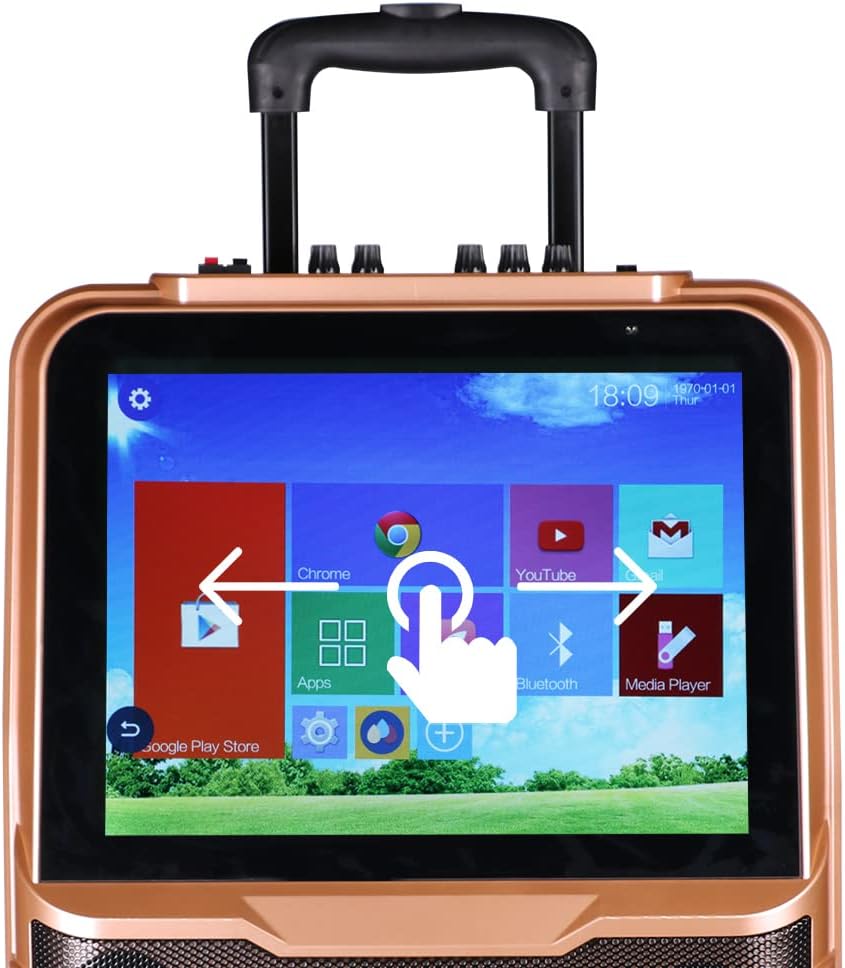
Image: A close-up of the Shinco Karaoke Machine's touch screen, displaying app icons and illustrating touch navigation with a hand gesture.
5.2. Злучэнне Wi-Fi
- На галоўным экране націсніце значок «Налады».
- Выберыце «Wi-Fi» і ўключыце яго.
- Выберыце патрэбную сетку са спісу і ўвядзіце пароль, калі будзе прапанавана.
- Once connected, you can access online karaoke apps, YouTube, and other internet services.
5.3. Спарванне Bluetooth
- Tap the 'Bluetooth' icon on the home screen or navigate through 'Settings'.
- Пераканайцеся, што Bluetooth уключаны як на караоке-машыне, так і на знешняй прыладзе (напрыклад, смартфоне, планшэце).
- Select the karaoke machine's name from your device's Bluetooth list, or select your device from the machine's list to pair.
- Пацвердзіце код спалучэння, калі будзе запытана.
5.4. Using Wireless Microphones
The two UHF wireless microphones are designed for ease of use. Simply turn them on, and they will automatically connect to the karaoke machine. Adjust microphone volume using the dedicated knobs on the machine's control panel.
5.5. HDMI Output to TV
To display the karaoke machine's screen on a larger television:
- Connect one end of an HDMI cable (not included) to the HDMI OUT port on the karaoke machine.
- Connect the other end of the HDMI cable to an HDMI input port on your television.
- Select the corresponding HDMI input on your TV using your TV's remote control.

Image: The Shinco Karaoke Machine connected to a television via an HDMI cable, demonstrating how lyrics are displayed on both the machine's screen and the TV.
5.6. Прайграванне з USB/TF-карты
Insert a USB drive or TF card into the designated port. Use the 'Media Player' app on the touch screen to browse and play audio or video files захоўваюцца на прыладзе.
5.7. Recording Voice
Utilize the recording function within compatible karaoke applications to capture your vocal performances. Refer to the specific app's instructions for detailed recording steps.
5.8. FM-радыё
Access the FM Radio application from the touch screen. Use the on-screen controls to scan for stations and adjust the frequency.
5.9. Партатыўнасць
The machine is equipped with a retractable handle and wheels for easy transportation. Extend the handle and tilt the machine to roll it to your desired location.

Image: A person demonstrating the portability of the Shinco Karaoke Machine by pulling it with its retractable handle and wheels.
6. Тэхнічнае абслугоўванне
- Уборка: Use a soft, dry cloth to clean the exterior of the machine. For the touch screen, use a microfiber cloth specifically designed for electronics. Avoid abrasive cleaners or solvents.
- Сыход за батарэяй: For optimal battery life, avoid completely draining the battery frequently. Charge the machine regularly, especially if it will be stored for an extended period.
- захоўванне: Захоўвайце караоке-машыну ў прахалодным, сухім месцы, удалечыні ад прамых сонечных прамянёў і экстрэмальных тэмператур.
- Сыход за мікрафонам: Remove batteries from the wireless microphones if they will not be used for a long time to prevent leakage.
7. Выпраўленне непаладак
| праблема | Магчымая прычына | Рашэнне |
|---|---|---|
| Машына не ўключаецца. | No power, low battery, or power adapter issue. | Ensure power adapter is securely connected and plugged into a working outlet. Charge the battery. |
| Няма гуку з дынамікаў. | Volume too low, mute activated, or incorrect audio source. | Increase master volume. Check if mute is active. Verify correct audio input source is selected. |
| Wireless microphones not working. | Microphones off, low batteries, or pairing issue. | Ensure microphones are powered on. Replace batteries. If issues persist, refer to pairing instructions in the full manual (if applicable, otherwise assume pre-paired). |
| Wi-Fi connection unstable or failing. | Weak signal, incorrect password, or router issue. | Move closer to the Wi-Fi router. Re-enter Wi-Fi password. Restart your Wi-Fi router. |
| Touch screen unresponsive or slow. | Temporary software glitch or excessive background apps. | Restart the machine. Close unnecessary applications. Ensure screen is clean. |
8. Тэхнічныя характарыстыкі
| Асаблівасць | Дэталь |
|---|---|
| Нумар мадэлі | B09K73CG2P |
| Вага прадмета | 22.4 фунта |
| Памеры ўпакоўкі | 26.5 х 17 х 10.5 цалі |
| Дысплей | 15-цалевы сэнсарны экран |
| Колькасць спікераў | 1 (with 10-inch woofer) |
| Крыніца харчавання | Харчаванне ад батарэек / адаптар пераменнага току |
| Сувязь | Wi-Fi, Bluetooth, USB, TF Card, HDMI Out, RCA |
| Мікрафоны | 2 УВЧ бесправадныя мікрафоны |
| Асаблівасць | Wireless, Portable with Trolley and Retractable Handle |
9. Гарантыя і падтрымка
For warranty information and technical support, please refer to the warranty card included with your product or visit the official Shinco webсайт. Захоўвайце чэк аб куплі як пацвярджэнне пакупкі ў выпадку любых гарантыйных прэтэнзій.