
1. Прадукт скончыўсяview
The emotal Dual-Mic AI Noise Cancelling Bluetooth Headset is designed for clear communication and extended use, ideal for cell phone calls, driving, and business environments. It features advanced AI noise-cancelling technology, dual HD microphones, and a lightweight, ergonomic design for comfort.
Асноўныя функцыі ўключаюць у сябе:
- Шумапрыглушэнне з дапамогай штучнага інтэлекту: Isolates your voice from background noise for crystal-clear conversations.
- Пашыраны час размовы: Up to 30 hours of HD talk time and 240 hours of standby on a 1.5-hour charge. Includes a quick charge feature for 3 hours of playtime with a 10-minute charge.
- Ultralight & Ergonomic: Weighing only 0.5oz, designed for comfortable, secure fit during long periods of use.
- IPX6 воданепранікальны: Забяспечвае абарону ад пырскаў і поту.
- Сістэма падвойных батарэй: Comes with an extra battery for continuous use.

Image: The emotal Dual-Mic AI Noise Cancelling Bluetooth Headset, showcasing its sleek black design and over-ear hook.
2. Змесціва ўпакоўкі
Пераканайцеся, што ўсе прадметы прысутнічаюць у пасылцы:
- 1x emotal Bluetooth Headset
- 1x USB-C зарадны кабель
- 6x Eartips (one pair pre-installed)
- 1x Кіраўніцтва карыстальніка
- 1x дадатковы акумулятар
3. Кіраўніцтва па наладцы
3.1 Першапачатковая зарадка
Before first use, fully charge the headset. The headset needs to be detached from the ear hook for charging.
- Detach the main headset unit from the ear hook.
- Connect the USB-C cable to the charging port on the headset unit.
- Падключыце другі канец кабеля USB-C да сумяшчальнай крыніцы харчавання USB (напрыклад, адаптара да сеткі, USB-порта кампутара).
- The indicator light will show charging status (refer to LED indicator section for details). A full charge takes approximately 1.5 hours.
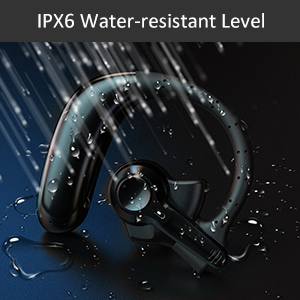
Image: Correct USB-C charging method for the headset, showing the detachable unit being charged.
3.2 Выбар вушных наканечнікаў
For optimal sound quality and comfort, select the eartip size that best fits your ear canal. Three sizes are provided.

Image: Illustration of different eartip sizes and how to achieve a secure and comfortable fit in the ear.
3.3 Нашэнне гарнітуры
The headset is designed for use in either the left or right ear. The main unit can be rotated and the microphone adjusted for optimal positioning.
- Надзеньце завушніцу на вуха.
- Insert the eartip into your ear canal.
- Adjust the main unit by rotating it 180 degrees to switch between left and right ear wear.
- Adjust the microphone boom to point towards your mouth for clear voice pickup.
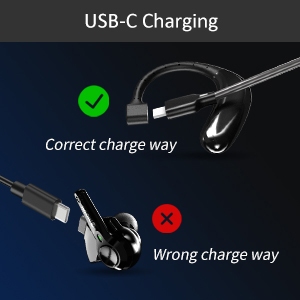
Image: Step-by-step guide on how to switch the headset for left or right ear use by rotating the main unit and adjusting the microphone.
3.4 Спалучэнне па Bluetooth
To connect your headset to a device:
- Пераканайцеся, што гарнітура зараджана і выключана.
- Press and hold the multi-function button on the headset for 3-5 seconds until the indicator light flashes blue and red, indicating pairing mode.
- На вашай прыладзе (смартфоне, планшэце, ноўтбуку) уключыце Bluetooth.
- Пошук "emotal UFO4-01" (or similar name) in the list of available Bluetooth devices.
- Select the headset to connect. Once connected, the indicator light will turn solid blue or flash slowly.
Заўвага: The headset cannot connect with two devices simultaneously.
4. Інструкцыя па эксплуатацыі
4.1 Асноўныя элементы кіравання
The headset features a single multi-function button for various operations:
- Уключэнне/выключэнне харчавання: Long touch for 3 seconds to power on, 5 seconds to power off.
- Наступная песня: Double touch the button.
- Адказаць на званок/пакласці трубку: Double touch the button.
- Павялічыць гучнасць: Long touch the button. (Note: There is no dedicated volume down or mute button on the headset itself. Volume down must be controlled via the connected device.)
- Актывацыя галасавога памочніка (Siri/Google Assistant): Triple touch the button.

Image: Visual representation of the single button controls for power, music playback, call management, volume, and voice assistant activation.
4.2 Кіраванне выклікамі
The dual-mic AI noise-cancelling technology ensures clear conversations even in noisy environments.

Image: Diagram illustrating how dual-mic and AI noise cancelling technology reduce background noise for clearer calls, showing "Before" and "After" sound wave comparisons.
For business professionals and truckers, the headset provides a hands-free solution for reliable communication on the go.
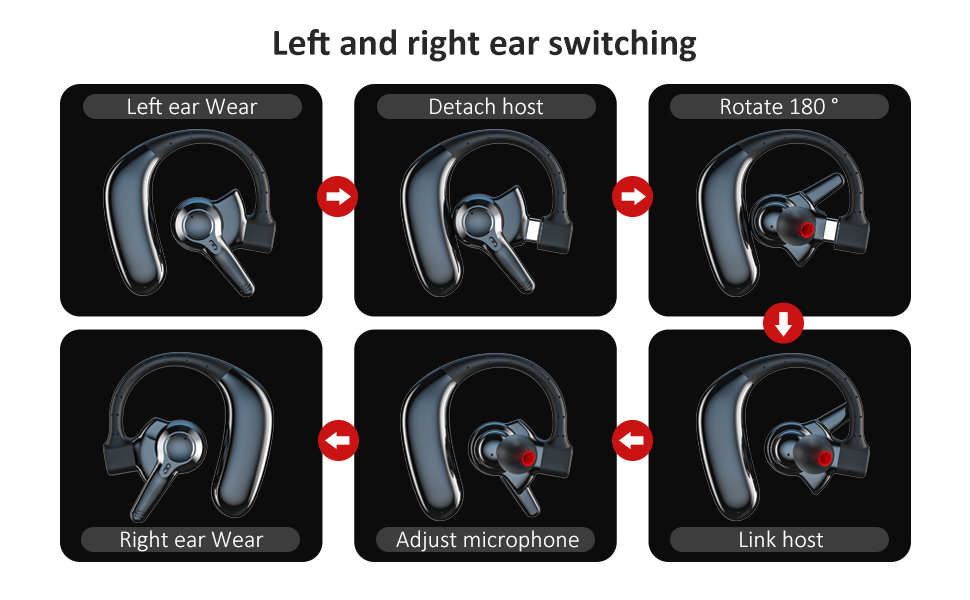
Image: A man driving a car while wearing the headset, emphasizing its hands-free functionality for calls on the road.
4.3 Кіраванне батарэяй
The headset offers significant battery life and comes with an extra battery for extended use.

Image: Visual representation of the headset's battery life, highlighting 30 hours of HD talk time and 240 hours of standby time.
To swap batteries:
- Gently detach the current battery unit from the headset.
- Attach the fully charged spare battery to the headset.
- Charge the depleted battery using the USB-C cable for future use.
5. Тэхнічнае абслугоўванне і догляд
To ensure the longevity and optimal performance of your emotal Bluetooth Headset, follow these care instructions:
- Уборка: Wipe the headset with a soft, dry cloth. Do not use abrasive cleaners or solvents.
- Воданепранікальнасць: The headset is IPX6 waterproof, meaning it is protected against powerful water jets. It can withstand sweat and light rain, but it is not designed for submersion in water.
- захоўванне: Захоўвайце гарнітуру ў прахалодным, сухім месцы, удалечыні ад экстрэмальных тэмператур і прамых сонечных прамянёў.
- Сыход за батарэяй: Avoid fully depleting the battery frequently. Charge it regularly to maintain battery health.
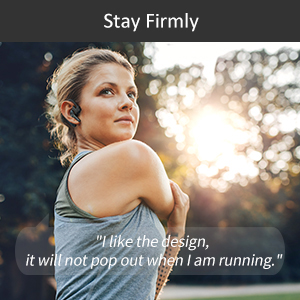
Image: Visual depicting the headset's IPX6 water resistance, showing water splashing on the device.
6. Выпраўленне непаладак
Калі ў вас узніклі праблемы з гарнітурай, паспрабуйце наступныя рашэнні:
| праблема | Магчымае рашэнне |
|---|---|
| Гарнітура не ўключаецца. | Ensure the headset is fully charged. Press and hold the multi-function button for 3 seconds. |
| Немагчыма спалучыць прыладу. | Ensure Bluetooth is enabled on your device and the headset is in pairing mode (flashing blue/red light). Make sure the headset is not already connected to another device. Restart both devices and try again. |
| Дрэнная якасць гуку падчас званкоў. | Ensure the microphone is adjusted to point towards your mouth. Check for obstructions. Move closer to your connected device to avoid interference. |
| Гучнасць занадта нізкая/высокая. | Adjust volume using the long touch on the multi-function button (volume up only) or directly from your connected device. |
| Гарнітура часта адключаецца. | Ensure you are within the Bluetooth range (approx. 33 feet/10 meters). Avoid strong electromagnetic interference. Re-pair the headset if necessary. |
7. Тэхнічныя характарыстыкі
| Асаблівасць | Дэталь |
|---|---|
| Назва мадэлі | UFO4-01 |
| Тэхналогія падлучэння | Бесправадная сувязь (Bluetooth 5.0) |
| Кантроль шуму | Active Noise Cancellation (AI Noise Cancelling) |
| Час размовы | Up to 30 Hours HD Talk Time |
| Час чакання | Да 240 гадзін |
| Час зарадкі | Прыбл. 1.5 гадзін |
| Узровень воданепранікальнасці | IPX6 воданепранікальны |
| Вага прадмета | 0.48 унцый (прыблізна 0.03 фунта) |
| Памеры прадукту | 2.36 х 1.96 х 1.1 цалі |
| Сумяшчальныя прылады | Cellphones (iOS/Android), Windows |
| Тып кіравання | Voice Control (Siri, Google Assistant) |
| Форма навушніка | Circle (In Ear with Over-Ear Hook) |
| Матэрыял | Кампазітны |
| UPC | 850040753158 |
8. Гарантыя і падтрымка
emotal offers comprehensive customer support for your headset:
- Гарантыя: Replacement within 18 months of purchase.
- Абслугоўванне кліентаў: 24-hour customer service is available for any concerns or inquiries. Please contact us via message through your purchase platform.
- Дадатковыя рэсурсы: For further details, you may refer to the official User Guide and Safety Information PDFs available online.
For the most up-to-date support information, please visit the official emotal store or contact customer service directly.