
Уводзіны
Thank you for choosing the Ciciglow Wireless Bluetooth Mouse. This manual will guide you through the setup, operation, and maintenance of your new device. Please read these instructions carefully before use to ensure optimal performance and longevity of your mouse.
Змест пакета
- 1 x Ciciglow Wireless Bluetooth Mouse
- 1 х Кіраўніцтва карыстальніка
Асаблівасці
- Professional Optical Positioning: Ensures precise and accurate cursor control.
- Трывалы матэрыял ABS: Constructed from high-quality, practical, and durable ABS material.
- Рэгуляваны DPI: Three adjustable DPI levels (800/1200/1600) for varied sensitivity needs.
- Кнопка адключэння: Designed for a quiet and comfortable user experience.
- Эрганамічны дызайн: Reduces wrist pressure, allowing for comfortable long-term use.
- Smart Power-Saving Technology: Automatically enters sleep mode after 5 minutes of inactivity, reactivating with a slide.
- Шырокая сумяшчальнасць: Compatible with Windows, iOS, and Android operating systems.
- Бесправаднае падключэнне: Bluetooth 3.0 for stable connection up to 10 meters (10.9 yards).
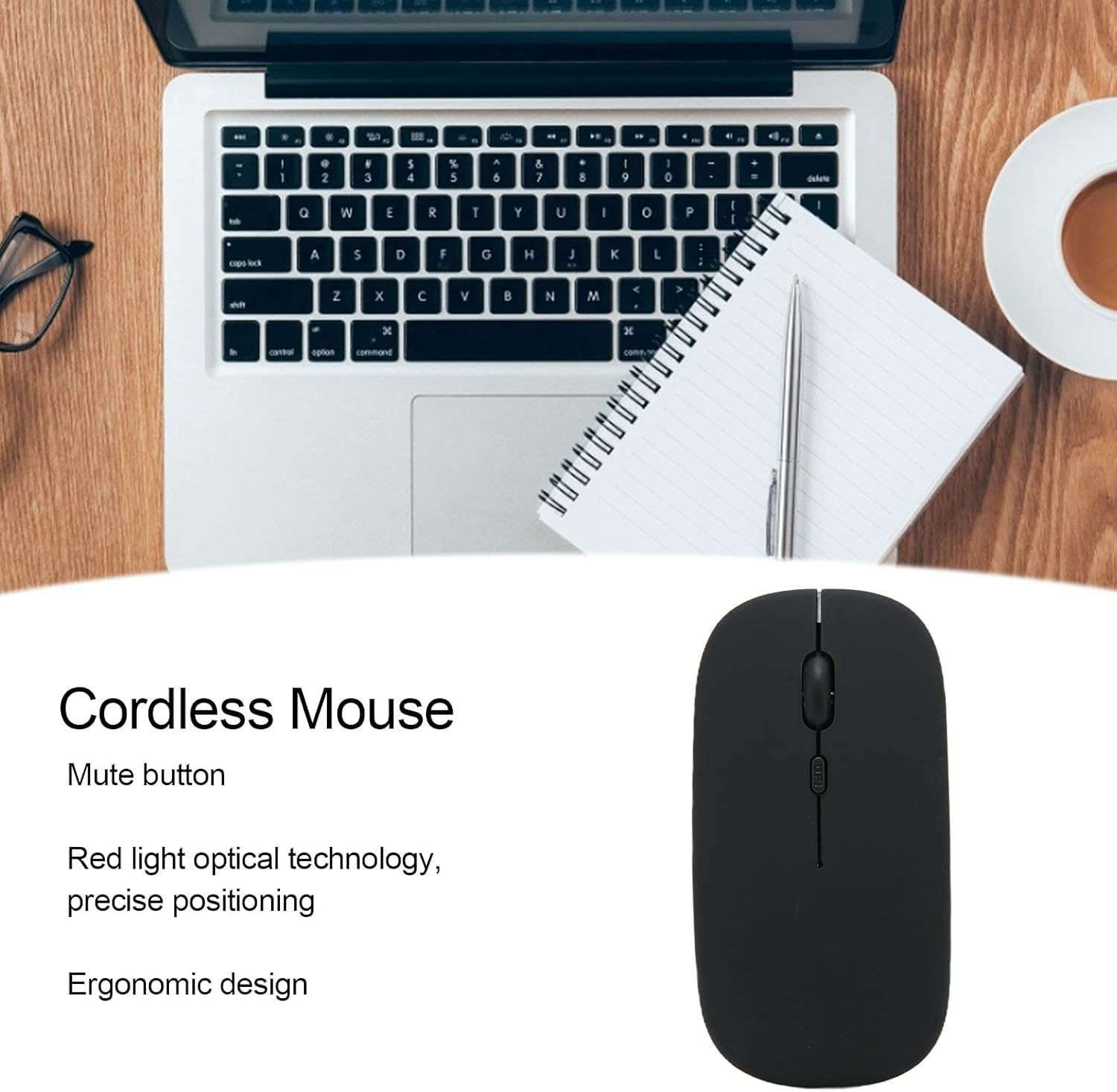
This image illustrates the key features of the Ciciglow Wireless Bluetooth Mouse, including its quiet click buttons, precise optical sensor, and comfortable shape.
Настройка
1. Усталюйце батарэю
- Знайдзіце батарэйны адсек на ніжняй баку мышы.
- Акуратна адчыніце вечка батарэйнага адсека.
- Устаўце адну батарэйку тыпу АА (не ўваходзіць у камплект) у адсек, сачыце за правільнай палярнасцю (+/-).
- Зачыняйце вечка батарэйнага адсека, пакуль яно надзейна не зафіксуецца на месцы.
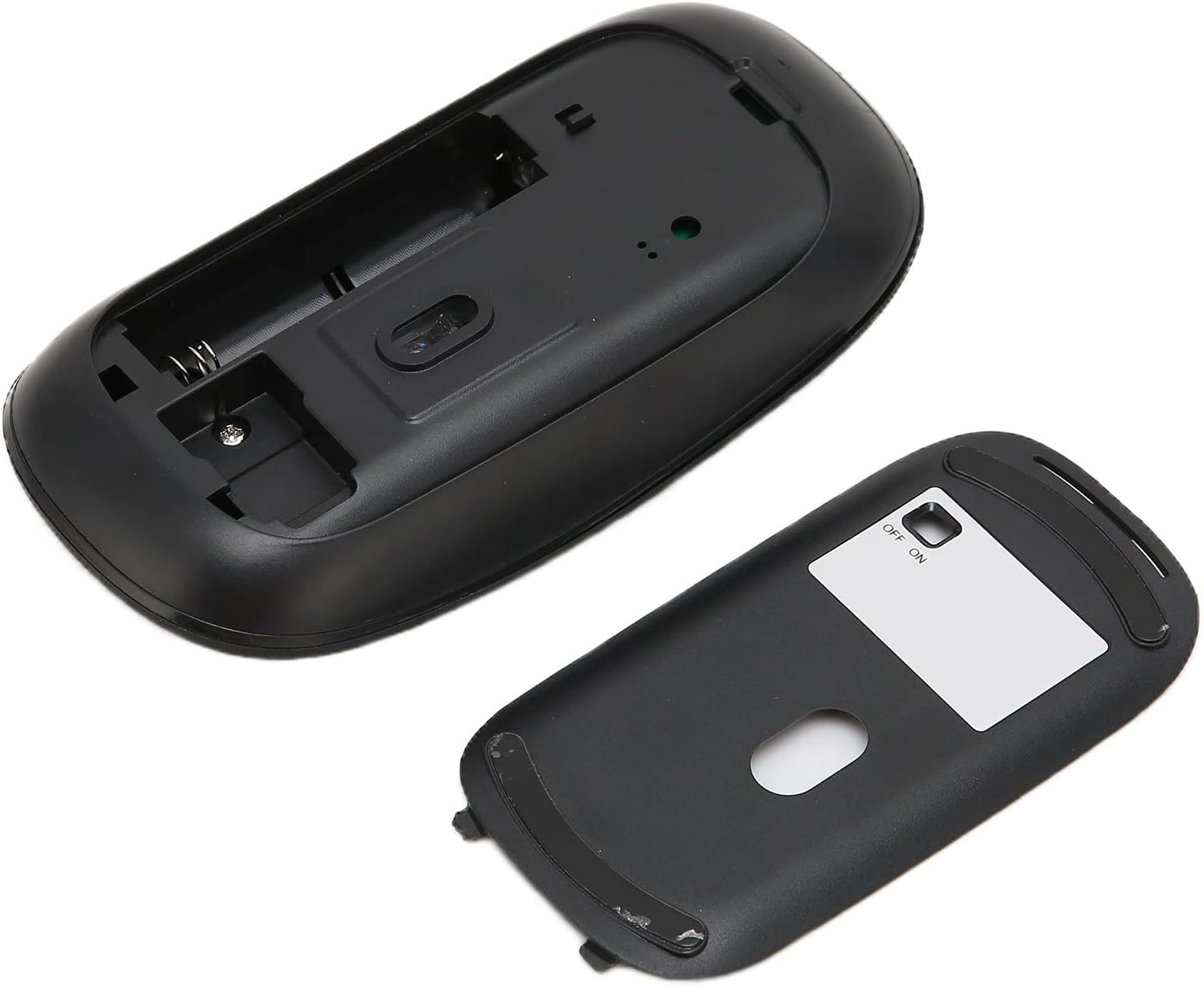
The image displays the open battery compartment of the mouse, indicating where to insert the AA battery.
2. Уключэнне
Locate the ON/OFF switch on the underside of the mouse and slide it to the 'ON' position.
3. Спалучэнне праз Bluetooth
- Ensure your device (laptop, tablet, smartphone) has Bluetooth enabled.
- На прыладзе перайдзіце ў налады Bluetooth і знайдзіце новыя прылады.
- The mouse should appear as 'Bluetooth Mouse' or similar. Select it to pair.
- Пасля спалучэння мыш гатовая да выкарыстання.
Інструкцыя па эксплуатацыі
Асноўныя функцыі
- Пстрычка левай кнопкай мышы: Першасны выбар і актывацыя.
- Пстрыкніце правай кнопкай мышы: Доступ да кантэкстных меню.
- Кола пракруткі: Пракручвае дакументы і web старонкі.

Гэты буйны план view highlights the scroll wheel and the DPI adjustment button on the mouse.
Рэгуляванне DPI
The mouse features a DPI button located behind the scroll wheel. Press this button to cycle through the three available DPI settings: 800, 1200, and 1600. Adjust the DPI to match your preference for cursor speed and precision.
Smart Power-Saving Mode
To conserve battery life, the mouse will automatically enter sleep mode after 5 minutes of inactivity. To wake the mouse, simply move it slightly. No button press is required.

A user operating the Ciciglow Wireless Bluetooth Mouse with a laptop, demonstrating typical usage.
Тэхнічнае абслугоўванне
- Уборка: Для чысткі мышы выкарыстоўвайце мяккую сухую тканіну. Пазбягайце выкарыстання агрэсіўных хімічных рэчываў або абразіўных матэрыялаў.
- Замена батарэі: Replace the AA battery when the mouse performance degrades or it stops responding.
- захоўванне: Калі мыш доўга не выкарыстоўваецца, выключайце яе, каб падоўжыць тэрмін службы батарэі. Захоўвайце ў прахалодным, сухім месцы.
Ліквідацыю непаладак
| праблема | Рашэнне |
|---|---|
| Мышка не рэагуе |
|
| Рух курсора няўстойлівы |
|
| Немагчыма падключыць прыладу праз Bluetooth |
|
Тэхнічныя характарыстыкі
| Асаблівасць | Дэталь |
|---|---|
| Тып прадукту | Бесправадная мыш |
| Нумар мадэлі | ciciglow5av8h132zk2305-16 |
| Матэрыял | АБС |
| Тэхналогія падлучэння | Bluetooth 3.0 |
| Photoelectric Resolution (DPI) | 800/1200/1600 |
| Адлегласць перадачы | Approx. 10 meters / 10.9 yards |
| Колькасць кнопак | 3 |
| Тэхналогія выяўлення руху | Аптычны |
| Рука арыентацыі | Амбідэкстр |
| Крыніца харчавання | 1 батарэі АА (не ўключаны) |
| Сумяшчальныя аперацыйныя сістэмы | Windows, iOS, Android |
| Вага прадмета | 60 грамаў |

This image highlights the wireless transmission range of the mouse, approximately 10 meters.
Гарантыя
This product comes with a standard manufacturer's warranty. Please refer to the product packaging or contact your retailer for specific warranty terms and conditions. Keep your purchase receipt as proof of purchase.
Падтрымка
For technical support or customer service inquiries, please contact your point of purchase or visit the official Ciciglow website for contact information. Ensure you have your product model number (ciciglow5av8h132zk2305-16) ready when seeking support.