
1. Прадукт скончыўсяview
The MAKINGTEC B-40 Laser Measure is a compact and versatile digital device designed for accurate distance, area, and volume measurements. It features an LCD backlit display, multiple measurement modes, and a durable, waterproof design. This manual will guide you through its functions and proper usage.
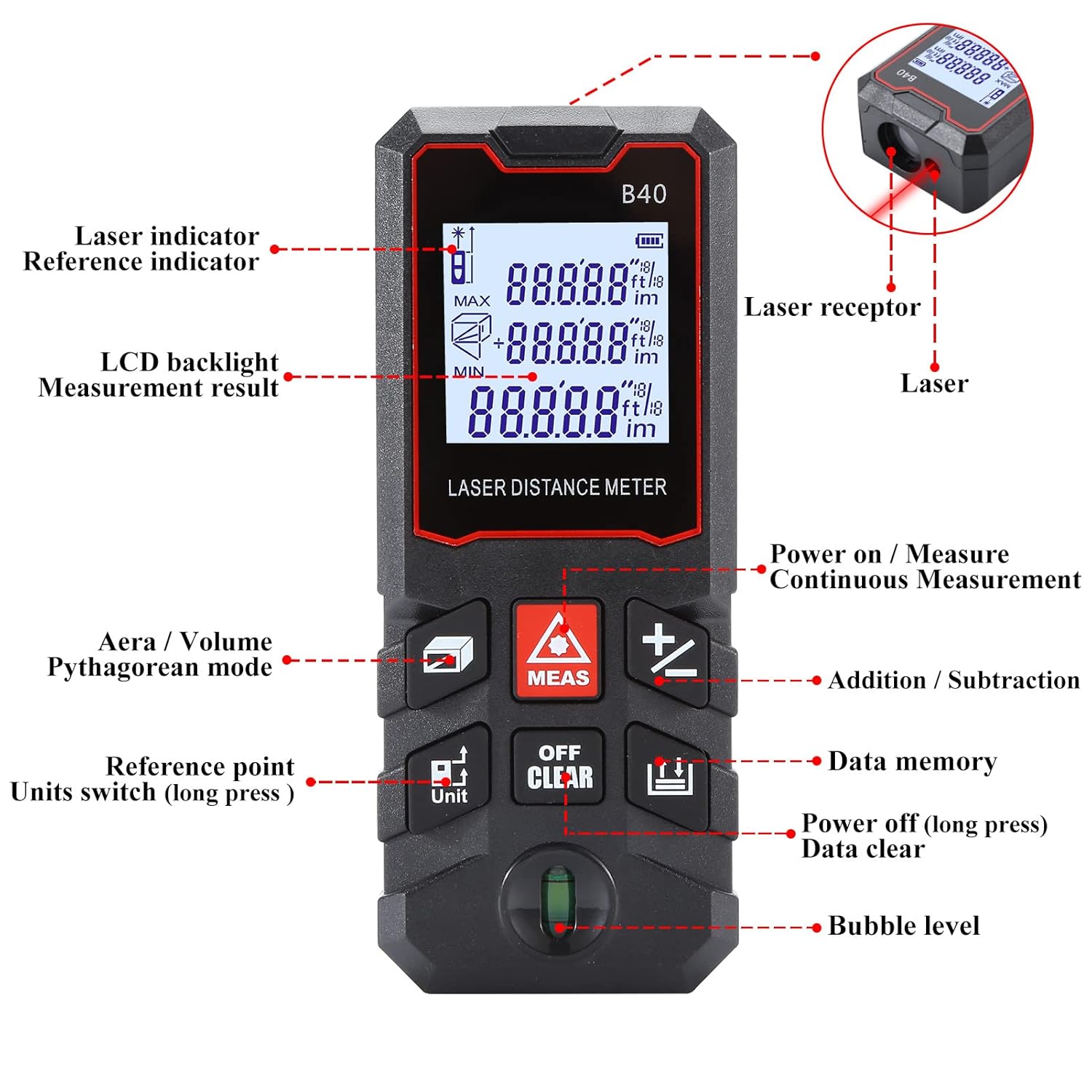
Малюнак 1.1: Фронт view of the MAKINGTEC B-40 Laser Measure with key components labeled. This includes the laser indicator, LCD backlight, measurement result display, area/volume/Pythagorean mode button, reference point/units switch, power on/measure button, continuous measurement, addition/subtraction, data memory, power off/data clear, and bubble level.
2. Усталёўка і першае выкарыстанне
2.1 Устаноўка батарэі
The MAKINGTEC B-40 Laser Measure operates on alkaline batteries, which are typically included. To install or replace batteries:
- Знайдзіце вечка батарэйнага адсека на задняй панэлі прылады.
- Адкрыйце вечка, зрушыўшы яго з месца або адчыніўшы зашчапку.
- Устаўце батарэйкі, выконваючы палярнасць (+/-).
- Надзейна зачыніце крышку батарэйнага адсека.
2.2 Уключэнне/выключэнне
- Каб уключыць: Націсніце ВЫМЯР button. The device will turn on and be ready for measurement.
- Каб выключыць: Доўгі націск ВЫКЛ/АЧЫСТКА кнопку больш за 2 секунд.
3. Асноўная аперацыя
This section covers the fundamental steps for using your laser measure.
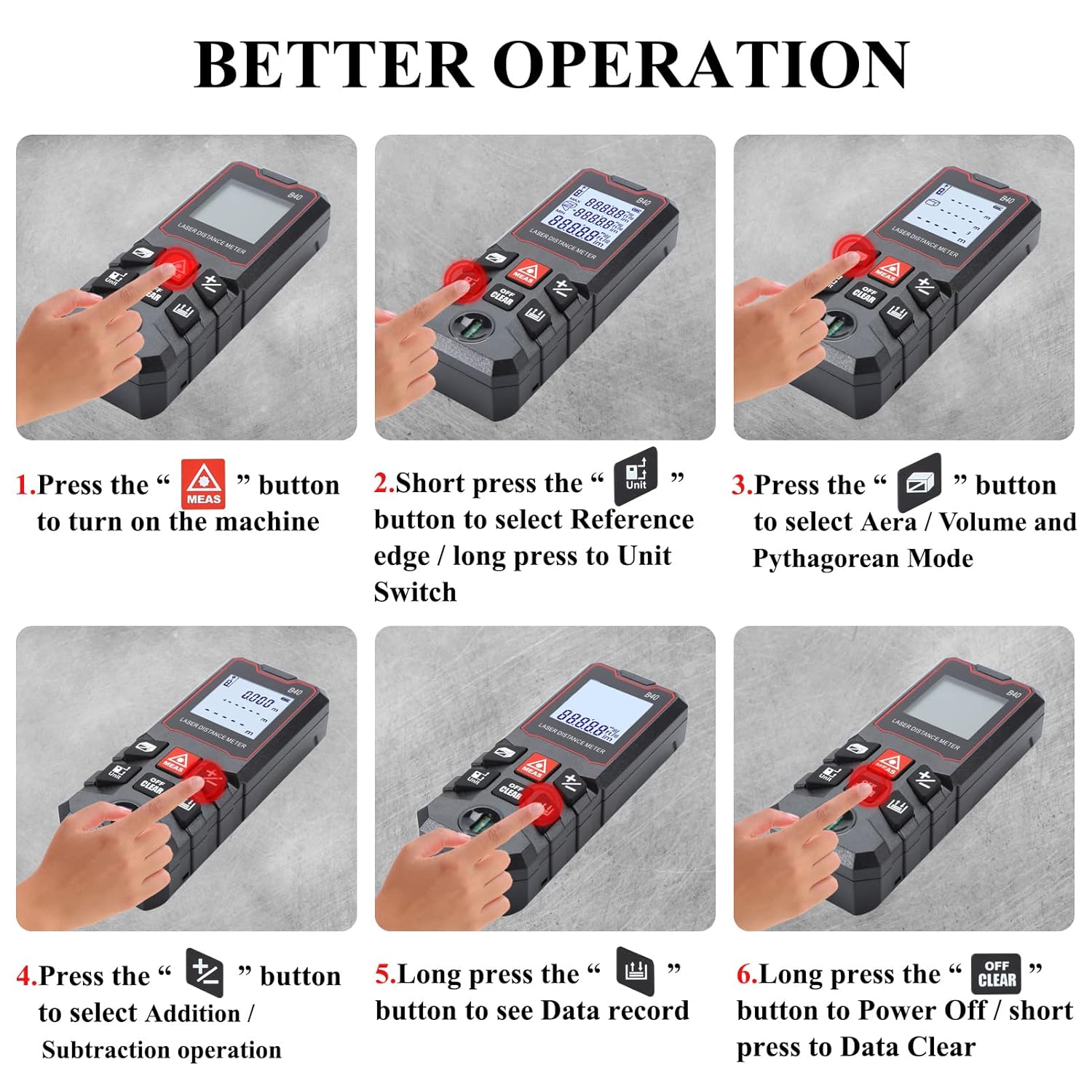
Малюнак 3.1: Visual guide for basic operations including powering on, selecting reference point, choosing measurement modes, performing addition/subtraction, viewing data records, and powering off.
3.1 Single Distance Measurement
- Пераканайцеся, што прылада ўключана.
- Накіруйце лазер на мэтавую паверхню.
- Націсніце ВЫМЯР адзін раз націсніце кнопку. Вымярэнне будзе адлюстравана на экране.
3.2 Пераключэнне блокаў
The device supports multiple units of measurement. To switch between units (meter, feet, inch, feet+inch, inch with fraction mode):
- Доўгі націск Адзінка button. The unit will cycle through the available options.

Малюнак 3.2: Illustration of unit switching sequence and reference point adjustment using the 'Unit' button.
3.3 Reference Point Adjustment
The measurement reference point can be set from the front or the back of the device. This is crucial for accurate measurements depending on where the device is placed.
- Кароткае націсканне Адзінка button to toggle between front and back reference points. An icon on the display will indicate the current reference point.
3.4 Складанне і адніманне
The B-40 allows for adding or subtracting measurements.
- Выканайце вымярэнне.
- Націсніце + button for addition or the - кнопка для аднімання.
- Perform the next measurement. The result will be added or subtracted from the previous one.
3.5 Захоўванне дадзеных
The device can store up to 50 groups of measurement data.
- каб view stored data, long press the Памяць дадзеных кнопка.
- To clear data, short press the ВЫКЛ/АЧЫСТКА кнопка пакуль viewатрыманне даных.
4. Рэжымы вымярэнняў
The MAKINGTEC B-40 offers several advanced measurement functions.

Малюнак 4.1: Візуальны эксamples of the different measurement modes available on the device.
4.1 Бесперапыннае вымярэнне
This mode allows for dynamic measurement, continuously updating the distance as the device is moved. It is useful for finding minimum and maximum distances.
- Націсніце ВЫМЯР button to enter continuous measurement mode.
- Move the device, and the display will show real-time measurements, along with minimum and maximum values.
- Прэса ВЫМЯР зноў для выхаду.
4.2 Вымярэнне плошчы
To calculate the area of a rectangular space:
- Націсніце Плошча/Аб'ём/Піфагор button until the area icon appears on the display.
- Measure the first side (length) by pressing ВЫМЯР.
- Measure the second side (width) by pressing ВЫМЯР.
- Прылада аўтаматычна разлічыць і адлюструе плошчу.
4.3 Вымярэнне аб'ёму
To calculate the volume of a cubic space:
- Націсніце Плошча/Аб'ём/Піфагор button until the volume icon appears.
- Measure the length, width, and height sequentially by pressing ВЫМЯР after each measurement.
- Прылада аўтаматычна разлічыць і адлюструе аб'ём.
4.4 Pythagorean Mode
This mode uses the Pythagorean theorem to calculate indirect measurements, such as height or distance, when direct measurement is not possible.
- Націсніце Плошча/Аб'ём/Піфагор button until the desired Pythagorean mode icon appears (e.g., for single or double Pythagorean calculations).
- Follow the on-screen prompts to measure the required sides (hypotenuse, base) by pressing ВЫМЯР для кожнага.
- Прылада разлічыць і адлюструе невядомы бок.
5. Тэхнічнае абслугоўванне і догляд
Proper maintenance ensures the longevity and accuracy of your MAKINGTEC B-40 Laser Measure.
5.1 Ачыстка
- Працярыце прыладу мяккай, damp тканіна. Не выкарыстоўвайце абразіўныя ачышчальнікі або растваральнікі.
- Clean the laser lens carefully with a soft cloth, similar to cleaning camera lenses, to avoid scratching.
5.2 Захоўванне
- Захоўвайце прыладу ў прахалодным, сухім месцы, удалечыні ад прамых сонечных прамянёў і экстрэмальных тэмператур.
- If storing for extended periods, remove the batteries to prevent leakage.
5.3 Трываласць
The MAKINGTEC B-40 has an IP54 protection rating, meaning it is protected against dust ingress and splashing water from any direction. While durable, avoid submerging the device in water or exposing it to heavy rain.

Малюнак 5.1: The device is designed with IP54 protection, offering resistance to dust and water splashes.
6. Выпраўленне непаладак
Калі ў вас узніклі праблемы з прыладай, звярніцеся да наступных распаўсюджаных праблем і рашэнняў:
| праблема | Магчымая прычына | Рашэнне |
|---|---|---|
| Прылада не ўключаецца. | Разраджаныя або слабыя батарэі; няправільная ўстаноўка батарэй. | Замяніце батарэйкі; пераканайцеся ў правільнай палярнасці. |
| Недакладныя вымярэнні. | Dirty laser lens; incorrect reference point; unstable surface. | Clean the laser lens; verify reference point setting; ensure stable measurement conditions. |
| Дысплей цьмяны або нечытэльны. | Нізкі зарад батарэі; экстрэмальна высокая тэмпература. | Replace batteries; operate within specified temperature range. |
7. Тэхнічныя характарыстыкі
Key technical specifications for the MAKINGTEC B-40 Laser Measure.
| Асаблівасць | Дэталь |
|---|---|
| Марка | ВЫТВОРЧАСЦЬ |
| Нумар мадэлі | B-40 laser measure |
| Дыяпазон вымярэння | 0.03-40m (0.1-131ft) |
| Дакладнасць | ±1/16 цалі |
| Міжнародны рэйтынг абароны | IP54 (воданепранікальны, пыланепранікальны) |
| Матэрыял | Метал, пластык |
| Вага прадмета | 85 грам |
| Памеры прадукту | 10.9 Д х 4.9 Ш х 2.5 У сантыметраў |
| Тып батарэі | Alkaline (Batteries Included: Yes) |
| Дысплей | LCD з падсветкай |
| Захоўванне дадзеных | 50 груп |

Малюнак 7.1: The B-40 Laser Measure offers fast and precise measurements with an accuracy of ±1/16 inch.
8. Дэманстрацыйнае відэа прадукту
Watch this official product video for a visual demonstration of the MAKINGTEC B-40 Laser Measure's features and operation.
Відэа 8.1: An official demonstration of the MAKINGTEC B-40 Laser Measure, showcasing its design, button functions, and various measurement capabilities including length, area, and unit switching. This video provides a comprehensive visual guide to the device's operation.
9. Гарантыя і падтрымка
The MAKINGTEC B-40 Laser Measure comes with a 12-month return policy. Additionally, a 1-year extended warranty by Onsitego is available for purchase, providing further protection for your device.
For further assistance or inquiries, please refer to the contact information provided with your purchase or visit the official MAKINGTEC support channels.