
1. Уводзіны
This manual provides essential information for the safe and effective use of your Canon PowerShot G1 X Mark III Digital Camera. Please read this manual thoroughly before using the camera and retain it for future reference.

Малюнак 1.1: Спераду view of the Canon PowerShot G1 X Mark III Digital Camera with the lens extended. This image displays the camera's compact body, the integrated zoom lens, and the Canon branding.
The PowerShot G1 X Mark III is an advanced compact camera featuring a 24.2MP APS-C CMOS sensor and a DIGIC 7 image processor. It is designed for high-quality still photography and Full HD video recording, offering a versatile 3x optical zoom lens and Dual Pixel CMOS AF for precise focusing.
2. Што ў скрынцы
Пераканайцеся, што ў камплекце ёсць усе наступныя прадметы:
- Canon PowerShot G1 X Mark III Digital Camera
- Canon NB-13L Lithium-Ion Battery Pack (3.6V, 1250mAh)
- Canon CB-2LH Battery Charger for NB-13L Li-Ion Batteries
- Cap аб'ектыў
- Шнур крышкі аб'ектыва
- NS-DC12 Neck Strap
- Strap Adapter for NS-DC12
- Мікра-кабель HDMI
3. Настройка
3.1. Зарадка і ўстаноўка акумулятара
- Insert the NB-13L battery into the CB-2LH charger.
- Падключыце зарадную прыладу да разеткі. Загарыцца індыкатар зарадкі.
- Once charging is complete, the indicator will change or turn off. Remove the battery.
- Open the battery compartment cover on the camera.
- Insert the charged battery into the camera, ensuring correct orientation. Close the cover securely.
3.2. Устаўка карты памяці
The camera supports SD, SDHC, and SDXC memory cards. For optimal performance, especially with video recording and continuous shooting, use a UHS Speed Class 3 (U3) card.
- Адкрыйце крышку слота для карты памяці.
- Устаўце карту памяці этыкеткай да пярэдняй часткі камеры і пачуйце пстрычку.
- Шчыльна зачыніце вечка слота для карты памяці.
3.3. Мацаванне рамяня на шыі
Thread the NS-DC12 neck strap through the strap adapters and then through the camera's strap mounts. Ensure both ends are securely fastened to prevent accidental drops.
3.4. Пачатковае ўключэнне і асноўныя налады
Націсніце ВКЛ/ВЫКЛ button to power on the camera. Follow the on-screen prompts to set the date, time, and language. These settings are crucial for proper image file кіравання.
4. Кіраванне камерай
4.1. Кіраванне камерайview

Малюнак 4.1: Верх view of the camera, illustrating the mode dial, hot shoe, and various control dials for quick adjustments.

Малюнак 4.2: Задняя частка view of the camera, highlighting the LCD screen, electronic viewfinder, and the arrangement of control buttons for menu navigation and settings.
Familiarize yourself with the camera's buttons and dials. The mode dial on the top allows selection of various shooting modes, including Program AE, Shutter-priority AE, Aperture-priority AE, Manual, and Automatic modes. Dedicated dials provide direct adjustment of exposure compensation and other settings.
4.2. Асновы фатаграфіі
Каб зрабіць здымак:
- Turn the mode dial to your desired shooting mode (e.g., АЎТА для аўтаматычных налад).
- Скампануйце аб'ект з дапамогай электроннага viewшукальнік або ВК-экран.
- Press the shutter button halfway down to focus. The camera uses Dual Pixel CMOS AF for fast and accurate phase-detection autofocus.
- Націсніце кнопку спуску засаўкі цалкам, каб зрабіць здымак.
4.3. Запіс відэа
The camera supports Full HD 1080p video recording at up to 60 frames per second in MP4 format.
- Set the camera to video recording mode (if applicable, or press the dedicated video record button).
- Націсніце кнопку запісу відэа, каб пачаць запіс.
- Націсніце кнопку яшчэ раз, каб спыніць запіс.
4.4. Using the LCD Monitor and Electronic Viewшукальнік

Малюнак 4.3: бок view of the camera with the vari-angle touchscreen LCD extended, demonstrating its flexibility for various shooting angles.
The camera features a 3.0-inch vari-angle touchscreen LCD, allowing for flexible shooting angles and intuitive control. You can also use the built-in 2.36m-dot OLED electronic viewfinder for a clear view, асабліва ў яркіх умовах.
4.5. Убудаваная ўспышка
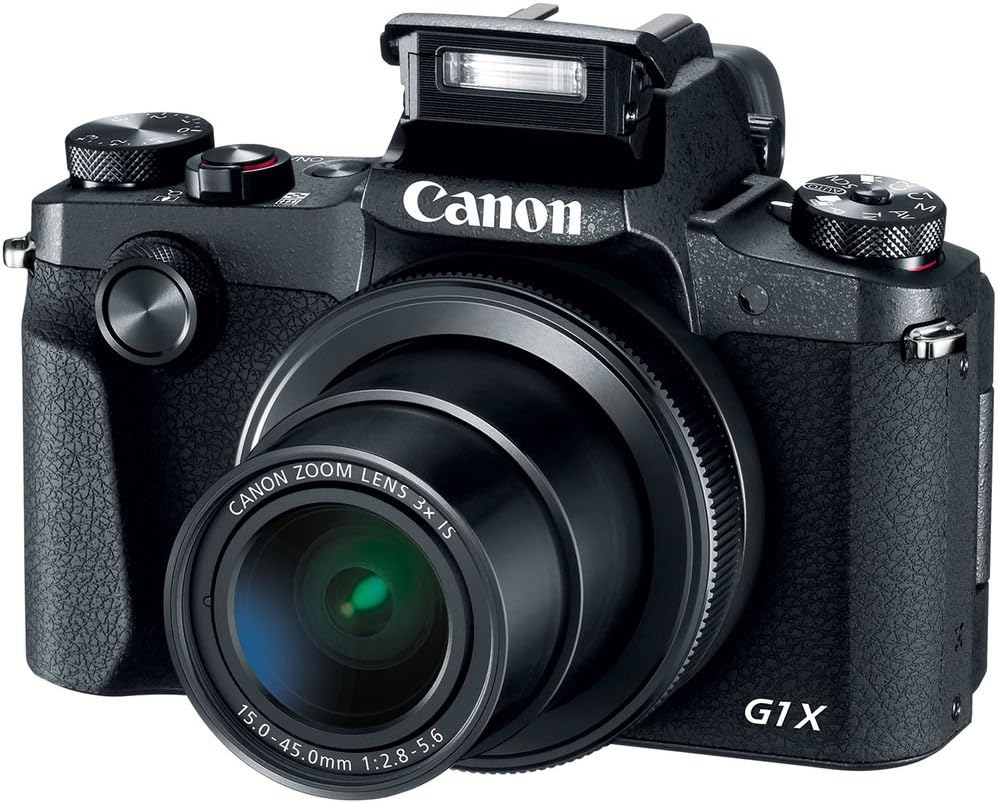
Малюнак 4.4: Спераду view of the camera with the pop-up flash in the raised position, ready for use in low-light conditions.
The camera includes a built-in pop-up flash. To activate it, press the flash release button. Flash modes include Auto, On, Slow Synch, and Off. The hot shoe allows for external flash units.
4.6. Сувязь
The PowerShot G1 X Mark III offers Wi-Fi, NFC, and Bluetooth connectivity for transferring images to smart devices and remote control. Refer to the camera's menu for pairing instructions.
5. Тэхнічнае абслугоўванне
5.1. Чыстка камеры
- Для чысткі корпуса камеры выкарыстоўвайце мяккую тканіну без ворса.
- Для чысткі аб'ектыва і ВК-экрана выкарыстоўвайце спецыяльную сурвэтку і раствор для чысткі аб'ектыва. Пазбягайце выкарыстання агрэсіўных хімічных рэчываў.
- Use a blower brush to remove dust from the lens and sensor area (when exposed).
5.2. Сыход за батарэяй
- Поўнасцю зараджайце акумулятар перад кожным выкарыстаннем.
- Калі батарэі не выкарыстоўваюцца, захоўвайце яе ў прахалодным сухім месцы.
- Пазбягайце ўздзеяння экстрэмальных тэмператур на батарэі.
5.3. Захоўванне
When storing the camera for extended periods, remove the battery and memory card. Store the camera in a dry, dust-free environment, preferably in a camera bag.
6. Выпраўленне непаладак
| праблема | Магчымая прычына / рашэнне |
|---|---|
| Камера не ўключаецца. | Магчыма, батарэя разраджаная або няправільна ўстаўленая. Пераканайцеся, што батарэя зараджаная і правільна ўстаўленая. |
| Немагчыма фатаграфаваць. | Memory card may be full, locked, or not inserted. Check card status and free space. |
| Выявы размытыя. | Check focus settings. Ensure sufficient light. Use image stabilization or a tripod if necessary. |
| Успышка не спрацоўвае. | Flash may be set to 'Off' or in a mode where it does not fire automatically. Check flash settings. |
7. Тэхнічныя характарыстыкі
- Датчык: 24.2 MP APS-C CMOS Sensor
- Працэсар выявы: DIGIC 7
- Аб'ектыў: 24-72mm (35mm Equivalent) 3x Optical Zoom, f/2.8-5.6
- Стабілізацыя выявы: Аптычны
- Аўтафокус: Dual Pixel CMOS AF (Phase Detection)
- Дыяпазон ISO: 100-25600 (пашыраны)
- Бесперапынная здымка: Да 9 кадраў у секунду
- Запіс відэа: Full HD 1080p at 60 fps (MP4)
- Viewшукальнік: 2.36m-dot OLED Electronic Viewшукальнік
- ВК: 3.0" Vari-Angle Touchscreen LCD (1280 x 720 resolution)
- Падключэнне: Built-In Wi-Fi, NFC, Bluetooth, Micro HDMI
- Носьбіт: SD, SDHC, SDXC (UHS-I compatible)
- акумулятар: NB-13L Lithium-Ion
- Памеры (прыбл.): 4.53 х 3.00 х 2.36 цалі (115 х 76 х 60 мм)
- Вага (прыбл.): 14.0 oz (399 g) with battery and memory card
- Будаўніцтва: Dust- and Water-Resistant
8. Гарантыя і падтрымка
This product is covered by a 90-day limited warranty. For warranty claims or technical support, please refer to the official Canon support channels or contact your retailer.