
PPLEE CR1018I
PPLEE Extra Loud Vibrating Alarm Clock with Bed Shaker
Model: CR1018I
1. Прадукт скончыўсяview
The PPLEE Extra Loud Vibrating Alarm Clock is designed to provide effective wake-up solutions for deep sleepers, individuals with hearing impairment, and the deaf. It features multiple wake-up modes, a large digital display, dual alarm settings, and convenient charging capabilities.

Image 1.1: The PPLEE Extra Loud Vibrating Alarm Clock with its bed shaker accessory.
Асноўныя характарыстыкі:
- Strong Bed Shaker & Loud Alarm Buzzer: Offers three wake-up modes: loud buzzer, strong bed shaker, or a combination of both.
- 8.7" Large Mirror LED Display: Provides clear time visibility and can also function as a makeup mirror.
- Dual Alarms with Snooze Function: Allows setting two independent alarms with a 9-minute snooze option.
- Рэгуляваная яркасць і гучнасць: Features 8 levels of display brightness and 7 levels of alarm volume.
- Порт для зарадкі USB: Зручна зараджайце свае мабільныя прылады непасрэдна ад гадзінніка.
- Рэзервовае капіраванне батарэі: Захоўвае налады часу і будзільніка падчас адключэння электраэнергііtages (CR2032 battery included).
- 12/24H Mode & DST Function: Supports both 12-hour and 24-hour time formats, along with Daylight Saving Time adjustment.
2. Змесціва ўпакоўкі
Калі ласка, пастаўце галачку для наступных пунктаў:
- 1 x PPLEE Mirror Alarm Clock
- 1 x Bed Shaker
- 1 x Power Plug with USB Cable
- 1 х Інструкцыя па эксплуатацыі
- 1 x CR2032 Cell Coin Battery (pre-installed or separate)

Малюнак 2.1: Усе кампаненты, якія ўваходзяць у камплект прадукту.
3. Кіраўніцтва па наладцы
3.1 Падключэнне харчавання
- Connect the USB cable to the alarm clock's power input port.
- Падключыце адаптар сілкавання да звычайнай электрычнай разеткі. Загарыцца дысплей гадзінніка.
- Ensure the CR2032 backup battery is installed in its compartment. This battery preserves time and alarm settings during power interruptions.

Малюнак 3.1: ззаду view of the alarm clock showing the AC power input and backup battery compartment.
3.2 Bed Shaker Placement
The bed shaker provides a strong vibration to assist in waking. For optimal effectiveness, place the bed shaker in one of the following locations:
- Пад тваёй падушкай.
- Пад тваёй прасціной.
- Паміж матрацам і спружынным матрацам.

Image 3.2: Recommended placements for the bed shaker to maximize vibration effectiveness.
4. Інструкцыя па эксплуатацыі
4.1 Настройка часу
- Націсніце і ўтрымлівайце УСТАНОВА ЧАСУ кнопку, пакуль не пачнуць міргаць лічбы гадзін.
- Выкарыстоўвайце ГАДЗІНА і ХВІЛІНА кнопкі для рэгулявання часу.
- Прэса УСТАНОВА ЧАСУ яшчэ раз, каб пацвердзіць і выйсці з рэжыму налады часу.
4.2 Налада сігналаў трывогі (сігнал трывогі 1 і сігнал трывогі 2)
Гадзіннік падтрымлівае два незалежныя будзільнікі.
- Націсніце і ўтрымлівайце ТРЫВОГА 1 or ТРЫВОГА 2 кнопку, пакуль не пачнуць міргаць лічбы часу будзільніка.
- Выкарыстоўвайце ГАДЗІНА і ХВІЛІНА кнопкі, каб усталяваць патрэбны час будзільніка.
- Прэса ТРЫВОГА 1 or ТРЫВОГА 2 again to confirm the alarm time.
- To activate or deactivate an alarm, short press the corresponding ТРЫВОГА 1 or ТРЫВОГА 2 кнопка. На дысплеі з'явіцца/знікне значок сігналу трывогі.

Image 4.1: The dual alarm feature allows setting two separate wake-up times.
4.3 Функцыя паўтору
Калі гучыць будзільнік, націсніце кнопку СНАОЗ button to temporarily silence the alarm for 9 minutes. The alarm will sound again after the snooze period.
4.4 Выключэнне будзільнікаў
- Temporary Turn Off: Націсніце ТРЫВОГА ВЫКЛ button once when the alarm is sounding to stop it for the current day. It will reactivate the next day.
- Permanent Turn Off: Націсніце і ўтрымлівайце ТРЫВОГА ВЫКЛ button to deactivate the alarm permanently. The alarm icon will disappear from the display.
4.5 Рэгуляванне яркасці дысплея
The display has 8 levels of brightness. Short press the ДЫММЕР button repeatedly to cycle through the brightness levels (OFF, Level 1-7). When in 'OFF' mode, the red indicator on top will remain on.
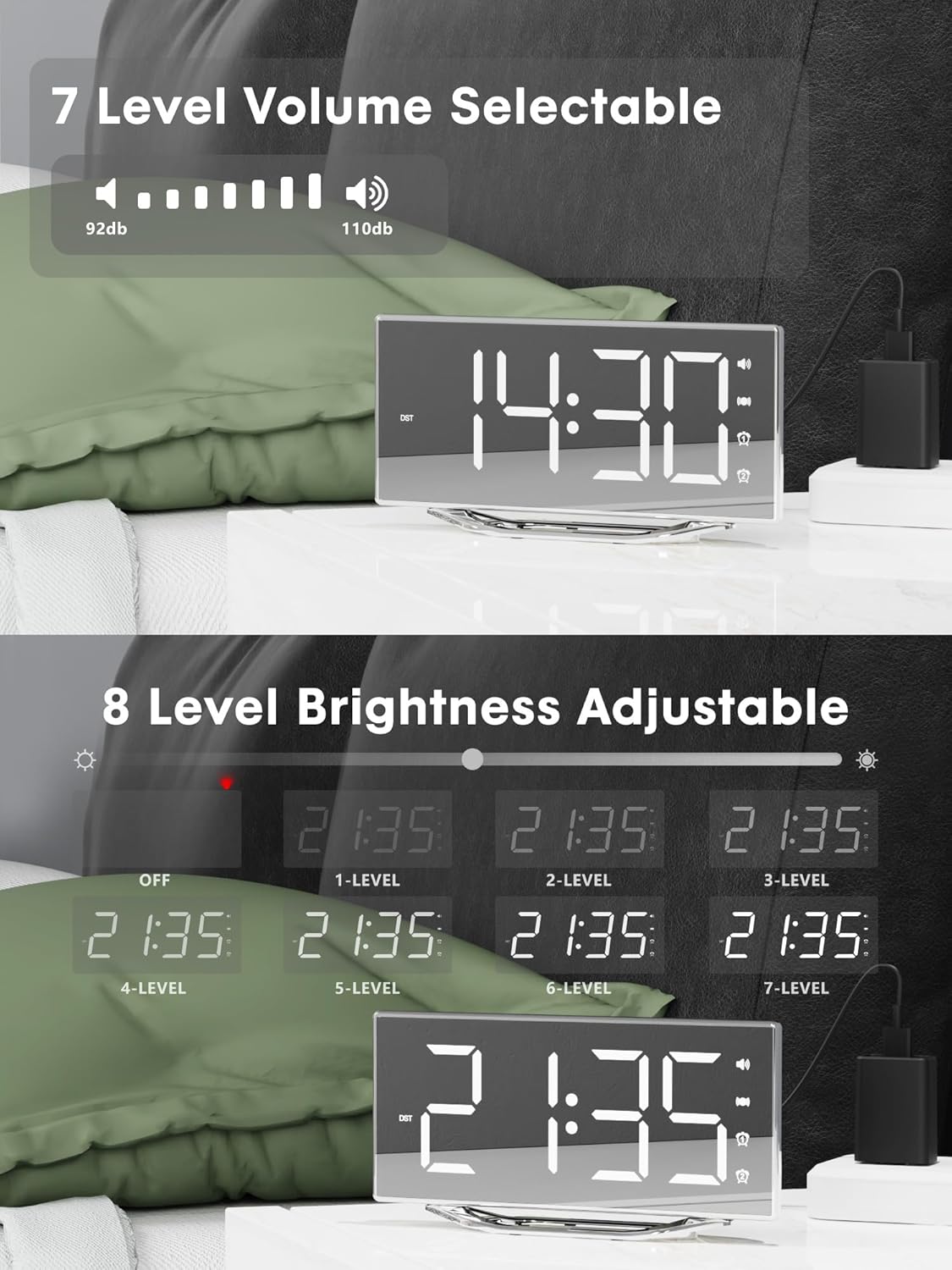
Image 4.2: Visual representation of the 8-level brightness adjustment for the LED display.
4.6 Рэгуляванне гучнасці сігналу трывогі
The alarm buzzer has 7 adjustable volume levels. Short press the АБ'ЁМ button repeatedly to cycle through the volume levels.

Image 4.3: The alarm volume can be adjusted across 7 levels, from 92dB to 110dB.
4.7 Selecting Wake-Up Mode
Націсніце ГУЧЭННЕ/ВІБРАЦЫЯ button to select your preferred wake-up method:
- Loud Buzzer only
- Strong Bed Shaker only
- Both Buzzer and Shaker

Image 4.4: The alarm clock offers three distinct wake-up modes for personalized use.
4.8 12/24 Hour Format & DST
- 12/24-гадзінны фармат: Кароткае націсканне 12/24 гадзіны button to switch between 12-hour and 24-hour time display.
- Функцыя летняга часу: Кароткае націсканне летні час button to activate or deactivate Daylight Saving Time.

Image 4.5: The clock supports both 12-hour and 24-hour time formats, and features a USB charging port.
4.9 USB-порт для зарадкі
The integrated USB charging port allows you to charge your smartphone or other USB-powered devices directly from the alarm clock. Simply connect your device's USB charging cable to the port on the clock.
5. Тэхнічнае абслугоўванне
- Clean the clock surface with a soft, dry cloth. Avoid using abrasive cleaners or solvents.
- Трымайце гадзіннік далей ад вады і высокай вільготнасці.
- Do not expose the clock to direct sunlight or extreme temperatures.
- If the clock will not be used for an extended period, consider removing the backup battery to prevent leakage.
6. Выпраўленне непаладак
| праблема | Магчымая прычына | Рашэнне |
|---|---|---|
| Адлюстраванне гадзінніка выключана. | Няма блока харчавання; кабель харчавання не падключаны. | Ensure the power adapter is securely plugged into the clock and a working outlet. Check if the dimmer is set to 'OFF'. |
| Сігналізацыя не гучыць/не вібруе. | Alarm not activated; volume too low; bed shaker not connected or placed incorrectly. | Verify alarm is activated (icon visible). Increase alarm volume. Ensure bed shaker is securely plugged in and properly placed. |
| Скід часу/налад пасля адключэння харчаванняtage. | Backup battery is dead or not installed. | Replace the CR2032 backup battery. Ensure it is installed correctly. |
| Зарадка ад USB не працуе. | Device not compatible; cable faulty; clock not powered. | Ensure the clock is powered. Try a different USB cable. Verify your device is compatible with standard USB charging. |
7. Тэхнічныя характарыстыкі
| Асаблівасць | Дэталь |
|---|---|
| Марка | PPLEE |
| Нумар мадэлі | CR1018I |
| Колер | Silver Surface (with Bed Shaker) |
| Тып дысплея | Лічбавы святлодыёд |
| Памеры прадукту | 8.7"W x 8.7"H (Display size) |
| Крыніца харчавання | Правадная электрычная |
| Рэзервовы акумулятар | 1 х CR2032 (у камплекце) |
| Матэрыял | Пластыкавыя |
| Вага прадмета | 7 унцыі (0.2 кілаграма) |
| Рэжымы сігналізацыі | Buzzer, Vibration, Buzzer + Vibration |
| Яркасць дысплея | 8 Levels (including OFF) |
| Гучнасць будзільніка | 7 узроўняў |
| Фармат часу | 12/24 гадзіны на выбар |
| Асаблівасці | Dual Alarms, Snooze, USB Charging Port, DST Function, Mirror Surface |
8. Гарантыя і падтрымка
PPLEE is committed to providing high-quality products and customer satisfaction.
- 1-гадовая гарантыя: The product is covered by a 1-year warranty from the date of purchase against manufacturing defects.
- 90-дзённая гарантыя вяртання грошай: If you are unsatisfied with the product, you may be eligible for a full refund within 90 days of purchase.
- Lifetime Free Support: PPLEE offers free lifetime user support for any questions or concerns regarding the product.
- 24-Hour Response Service: For any inquiries, please contact us via Amazon. We aim to respond within 24 hours.

Image 8.1: Summary of warranty and support offerings.