
1. Прадукт скончыўсяview
The NC GBS-8100 is a versatile video converter board designed for arcade game systems. It facilitates the conversion of VGA/SVGA/XGA/SXGA signals to CGA, RGBS, CVBS, or S-Video outputs, making it compatible with a wide range of display devices, including older arcade monitors and standard definition televisions. This board features true digital 24-bit A/D conversion for accurate color reproduction and offers user controls for image adjustment.
Асноўныя характарыстыкі:
- Спажываная магутнасць: DC 5V/2A via 6.3mm connector.
- Input Signal Support: VGA/SVGA/XGA/SXGA resolutions (640x480, 800x600, 1024x768, 1280x1024).
- Параметры вываду: CGA (15K), VGA bypass, Video (CVBS), S-Video.
- Кантроль выявы: Supports position and zoom adjustments.
- Глыбіня колеру: True digital 24-bit A/D converter for 16.7-million color conversion.
- Экраннае меню: English On-Screen Display for adjustments.
- Кантроль карыстальніка: Dedicated keys for Output Switch, Image Zoom, Image Position, and Output Adjust.
- Сумяшчальнасць: Supports NTSC and PAL video standards.
Змест пакета:
- 1x Video Output Converter Board (GBS-8100)
- 1x Power supply wire

Figure 1: The GBS-8100 converter board along with the included power supply wire and a multi-color signal cable.
2. Настройка і ўстаноўка
This section provides instructions for connecting and setting up your GBS-8100 converter board.
2.1. Ідэнтыфікацыя кампанентаў
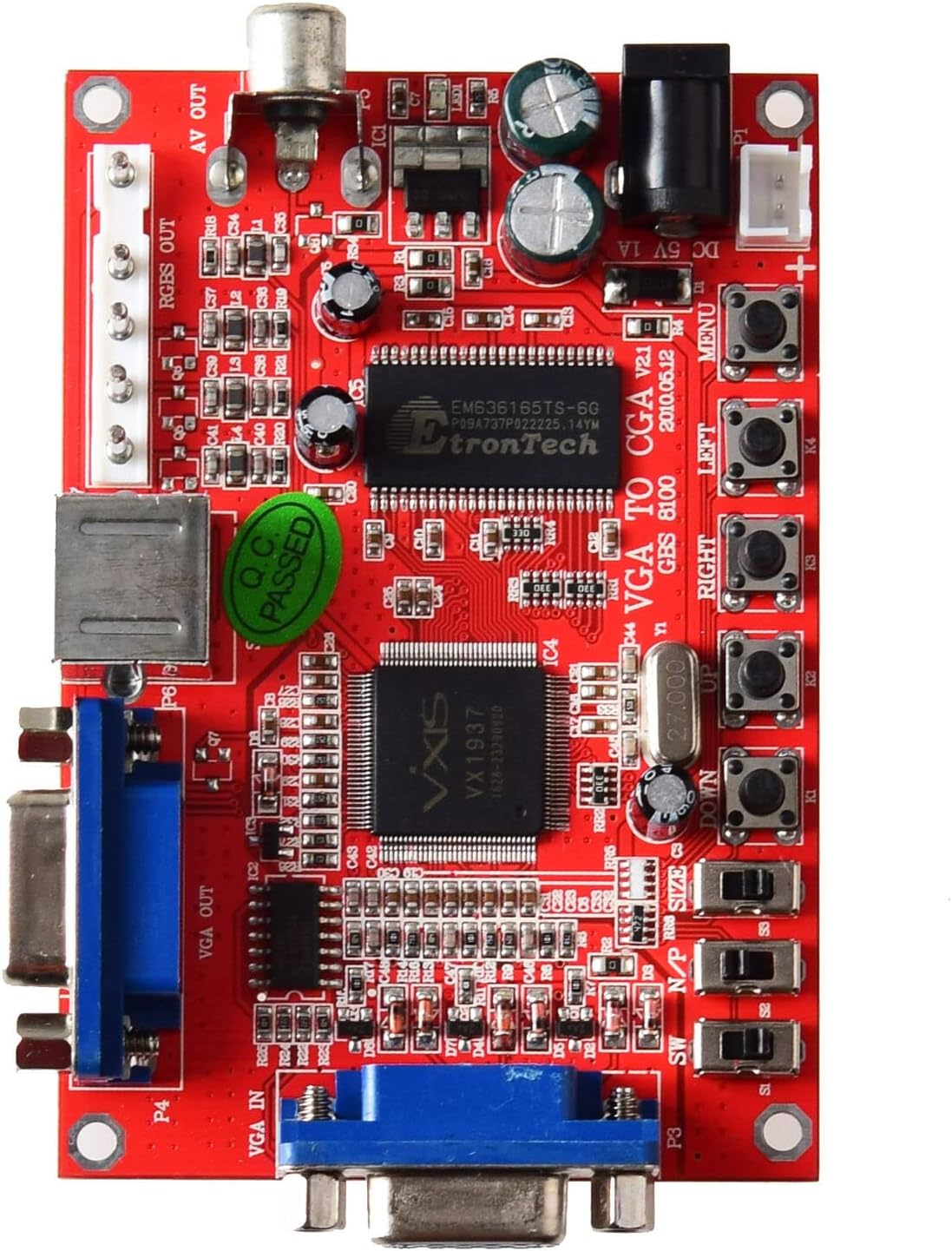
Малюнак 2: Верх view of the GBS-8100 board, highlighting VGA IN, VGA OUT, AV OUT, RGBS OUT, S-Video port, DC 5V input, and control buttons.
- VGA IN (P3): Connect your source device (e.g., PC, game console) with a VGA output here.
- VGA OUT (P4): For VGA bypass, connect a VGA monitor here.
- RGBS/CGA OUT (P7): Connect to an arcade monitor or display that accepts RGBS or CGA signals.
- AV OUT (P5): Connect to a standard definition TV using a composite video cable.
- S-Video OUT (P6): Connect to a TV or display using an S-Video cable.
- Уваход пастаяннага току 5 В/2 А: Connect the included power supply wire here. Ensure the power supply provides 5V DC at 2A.
- Кнопкі кіравання: Buttons for MENU, UP, DOWN, LEFT, RIGHT, Output Switch, Image Zoom, Image Position, Output Adjust.
2.2. Этапы падлучэння
- Падключэнне сілкавання: Connect the provided power supply wire to the DC 5V/2A input on the GBS-8100 board. Connect the other end to a suitable 5V DC power source (not included, typically a power adapter).
- Крыніца ўводу: Connect your VGA source (e.g., PC, arcade JAMMA board with VGA output) to the VGA IN (P3) port on the converter board.
- Дысплей выхаду:
- Для CGA/RGBS output: Connect your arcade monitor or display to the RGBS/CGA OUT (P7) порт.
- Для Composite Video (AV) output: Connect your TV to the AV OUT (P5) порт.
- Для S-відэа output: Connect your TV to the S-Video OUT (P6) порт.
- Для VGA Bypass: Connect a VGA monitor to the VGA OUT (P4) порт.
- Аўдыё (неабавязкова): If your source provides audio via VGA, ensure your display setup can handle it, or use a separate audio solution as this board primarily handles video.

Малюнак 3: Буйны план view of the VGA IN, VGA OUT, and S-Video ports on the GBS-8100 board.
3. Інструкцыя па эксплуатацыі
Once connected, power on the GBS-8100 board and your display. The board will automatically detect the input signal. Use the onboard buttons to navigate the OSD menu and adjust settings.
3.1. Экраннае меню (OSD).
Націсніце МЕНЮ button to access the OSD. Use the UP і УНІЗ buttons to navigate through menu options, and НАЛЕВА і ПРАВІЛЬНА buttons to change values or select sub-menus.
3.2. Элементы кіравання карыстальнікам
- Пераключальнік выхаду: Cycles through available output modes (CGA, Video, S-Video, VGA Bypass).
- Маштаб выявы: Adjusts the zoom level of the displayed image.
- Image Position: Adjusts the horizontal and vertical position of the image on the screen.
- Рэгуляванне выхаду: Fine-tunes specific output parameters.
3.3. Supported Input/Output Resolutions
| Катэгорыя | Дэталі |
|---|---|
| Input Signal (Auto Scan) |
|
| Выхадны сігнал |
|
4. Тэхнічнае абслугоўванне
The GBS-8100 converter board is designed for durability and requires minimal maintenance.
- Уборка: Use a soft, dry cloth to gently wipe the surface of the board. Avoid using liquid cleaners or solvents, as they may damage the electronic components.
- Асяроддзе: Operate the board in a clean, dry environment, away from excessive dust, moisture, and extreme temperatures.
- Апрацоўка: Handle the board by its edges to avoid touching components, especially when powered on.
- Выключэнне: Always disconnect power before making or changing any connections.
5. Выпраўленне непаладак
If you encounter issues with your GBS-8100 converter board, refer to the following common problems and solutions:
| праблема | Магчымая прычына / рашэнне |
|---|---|
| Няма выявы на дысплеі. |
|
| Выява скажоная або мігціць. |
|
| OSD menu not appearing or unresponsive. |
|
| Колеры няправільныя. |
|
6. Тэхнічныя характарыстыкі
Detailed technical specifications for the GBS-8100 converter board.
| Параметр | Каштоўнасць |
|---|---|
| Нумар мадэлі | GBS-8100 |
| Уваход блока харчавання | DC 5V/2A (6.3mm connector) |
| Input Signal Support | VGA/SVGA/XGA/SXGA (640x480, 800x600, 1024x768, 1280x1024) |
| Input Signal Frequencies |
|
| Тыпы выхадных сігналаў | CGA (15K), VGA (Bypass), Video (CVBS), S-Video |
| Output Signal Resolutions |
|
| Пераўтварэнне колеру | True digital 24-bit A/D converter (16.7 million colors) |
| Мова экраннага меню | англійская |
| Памеры (прыбл.) | 3.94 х 3.15 х 1.18 цаляў (памеры ўпакоўкі) |
| Вага прадмета | 3.52 унцыі (0.1 кілаграма) |
7. Гарантыя і падтрымка
This section provides information regarding product warranty and customer support.
7.1. Інфармацыя аб гарантыі
Specific warranty details for the NC GBS-8100 converter board are typically provided at the point of purchase or within the product packaging. Please refer to your purchase receipt or contact the seller for precise warranty terms and conditions. Generally, electronic components may come with a limited manufacturer's warranty covering defects in materials and workmanship.
7.2. Падтрымка кліентаў
For technical assistance, troubleshooting beyond this manual, or inquiries regarding your product, please contact the seller or manufacturer directly. Contact information can often be found on the product packaging, the seller's webсайт або дакументы аб куплі.
Па агульных пытаннях вы можаце наведаць NC Store on Amazon.