
1. Уводзіны
Thank you for choosing the Mesqool CR1009Pro DAB/FM Portable Emergency Radio. This device is designed to provide reliable communication and essential features in various situations, from daily use to outdoor adventures and emergencies. It combines DAB+ and FM radio reception with multiple power sources, including a hand crank, solar panel, and a 5000mAh internal battery, which also functions as a power bank. Additional features include an LED flashlight, a reading lamp, and an SOS alarm.
Калі ласка, уважліва прачытайце гэтую інструкцыю перад выкарыстаннем прылады, каб забяспечыць яе правільнае выкарыстанне і максімальна падоўжыць тэрмін яе службы.
2. Інфармацыя па бяспецы
- Не падвяргайце прыладу ўздзеянню экстрэмальных тэмператур, прамых сонечных прамянёў на працягу доўгага часу (пасля зарадкі) або высокай вільготнасці.
- The device has an IPX4 water resistance rating, meaning it is protected against splashing water from any direction. Do not immerse the device in water.
- Трымайце прыладу далей ад моцных магнітных палёў.
- Не спрабуйце разбіраць або мадыфікаваць прыладу. Гэта прывядзе да анулявання гарантыі і можа прывесці да пашкоджанняў або траўмаў.
- Use only specified charging cables and power adapters.
- Захоўваць у месцах, недаступных дзецям.
3. Прадукт скончыўсяview
Familiarize yourself with the components and controls of your Mesqool CR1009Pro radio.

Малюнак 3.1: Фронт view of the radio with display and controls.
Элементы кіравання і парты:
- Кнопка харчавання: Уключае/выключае радыё.
- Кнопка MODE: Switches between DAB, FM, and other modes.
- Кнопка СКАНІРАВАЦЬ: Пачынае аўтаматычнае сканаванне станцый.
- Кнопка ENTER: Пацвярджае выбар.
- Кнопка МЕНЮ: Доступ да меню налад.
- Кнопка INFO: Displays station information (RDS/DAB data).
- PRESET/RECALL/STORE Buttons: Manages preset radio stations.
- Кнопкі рэгулявання гучнасці (+/-): Рэгулюе гучнасць гуку.
- Кнопкі налады (уверх/уніз): Manually tunes frequencies or navigates menus.
- Тэлескапічная антэна: Для паляпшэння прыёму радыё.
- Святлодыёдны ліхтарык: Размешчаны збоку.
- Чытаючы Лamp: Складаны лamp located on top.
- SOS Alarm Button: Актывуе аварыйную сігналізацыю.
- Ручная шатуна: Для ручной выпрацоўкі энергіі.
- Панэль сонечных батарэй: Для сонечнай зарадкі.
- Micro USB ўваход: Для зарадкі ўнутранай батарэі.
- Выхад USB: Для зарадкі знешніх прылад (функцыя паўэрбанка).
- Гняздо для навушнікаў 3.5 мм: Для прыватнага праслухоўвання.
- AAA Battery Compartment: For optional AAA battery power.
4. Настройка
4.1 Першапачатковая зарадка
Before first use, fully charge the internal 5000mAh battery using the provided Micro USB cable and a 5V/2A power adapter (not included). The battery indicator on the display will show charging status.
4.2 Inserting AAA Batteries (Optional)
For an additional power source, open the battery compartment and insert 3 AAA batteries (not included), ensuring correct polarity. The radio can automatically switch to AAA battery power if the internal Li-ion battery is low.
4.3 Падаўжэнне антэны
For optimal radio reception, fully extend the telescopic antenna.
5. Інструкцыя па эксплуатацыі
5.1 Уключэнне/выключэнне сілкавання
Націсніце УЛАДА кнопку, каб уключыць або выключыць радыё.
5.2 Radio Operation (DAB/FM)

Малюнак 5.1: Раз'ём для навушнікаў для прыватнага праслухоўвання.
- Выберыце рэжым: Націсніце РЭЖЫМ кнопка для пераключэння паміж рэжымамі радыё DAB і FM.
- Аўтаматычнае сканаванне: У рэжыме DAB або FM націсніце СКАНІРАВАЦЬ button to automatically search for available stations. The radio will store them.
- Ручная настройка: Выкарыстоўвайце НАЛАДКА Уверх/Уніз кнопкі для ручной рэгулявання частаты.
- Захаванне налад: After finding a station, press the PRESET/STORE кнопку, выберыце нумар папярэдняй налады з дапамогай НАЛАДКА Уверх/Уніз кнопкі і націсніце УВОД to save. The radio supports up to 30 preset stations.
- Успамінаючы прасеты: Націсніце PRESET/RECALL кнопку і выкарыстоўвайце НАЛАДКА Уверх/Уніз buttons to select a saved station.
- DRC Function (DAB): In DAB mode, access the menu to adjust the Dynamic Range Control (DRC) compression rate, which helps balance volume levels.
- RDS Function (FM): In FM mode, the RDS (Radio Data System) function displays station information on the screen, such as program name or song title.
- Выкарыстанне навушнікаў: Падключыце навушнікі 3.5 мм да раздыма для навушнікаў, каб слухаць музыку ў адзіноце.
5.3 Зарадка радыё

Малюнак 5.2: Hand crank charging.

Малюнак 5.3: Five ways to charge the radio.
- USB-зарадка: Connect the Micro USB cable to the radio's input port and a power source.
- Сонечная зарадка: Place the radio with the solar panel facing direct sunlight. This method is primarily for maintaining charge or slow charging.
- Ручная зарадка: Rotate the hand crank clockwise or counter-clockwise at a steady pace for manual power generation. A few minutes of cranking can provide power for basic functions.
- Батарэі AAA: If inserted, the radio can draw power from AAA batteries when the internal rechargeable battery is low.
5.4 Выкарыстанне ў якасці паўэрбанка
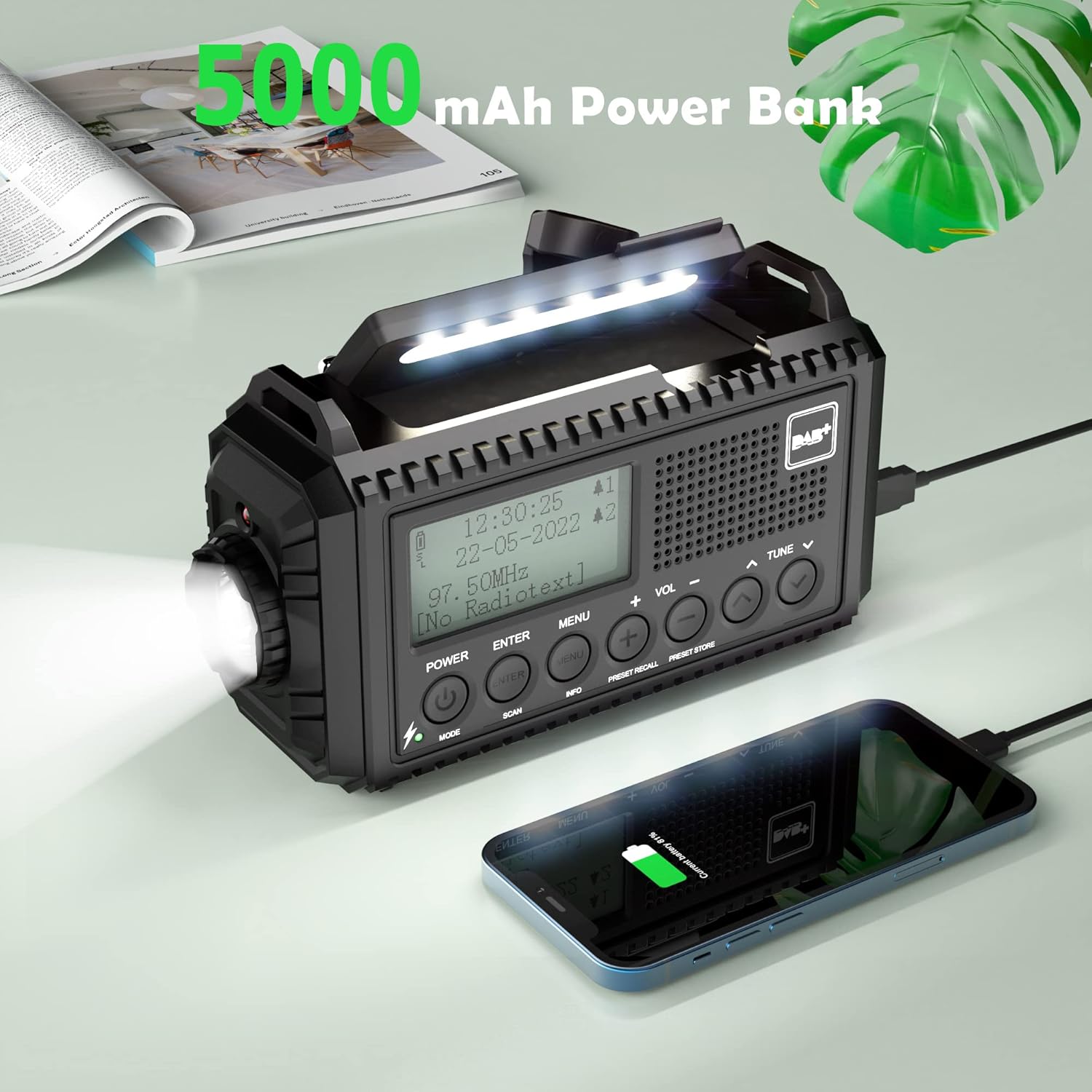
Малюнак 5.4: Charging a smartphone using the radio's power bank function.
Connect your smartphone or other USB-powered device to the radio's USB output port using a compatible charging cable. The radio's internal 5000mAh battery will begin charging the external device.
5.5 Функцыі асвятлення

Малюнак 5.5: Reading with the integrated lamp.

Малюнак 5.6: Using the flashlight for navigation.
- Ліхтарык: Press the dedicated flashlight button (usually on the side) to turn it on. Press again to cycle through brightness levels (High/Normal) or turn off.
- Чытаючы Лamp: Разгарніце чытальную лamp from the top of the radio. Press its button to turn it on and cycle through brightness levels (High/Normal) or turn off.
5.6 Сігнал SOS
У надзвычайнай сітуацыі націсніце і ўтрымлівайце SOS button. The radio will emit a loud siren sound and flash a red light to attract attention. Press the SOS button again to deactivate it.
5.7 Будзільнік і таймер сну
- Двайны будзільнік: Access the menu to set up to two independent alarms. You can configure alarm duration (e.g., 15, 30, 45, 60, 90, 120 minutes) and volume.
- Таймер сну: Access the menu to set a sleep timer (e.g., 15, 30, 45, 60, 90 minutes). The radio will automatically turn off after the set time.
5.8 Налады мовы і падсвятлення
- мова: Navigate to the system settings in the menu to select your preferred language (English, Portuguese, French, Italian, German).
- Падсвятленне: Adjust the display backlight brightness (High, Medium, Low) and duration (10s, 20s, 30s, 45s, 60s, 90s, 120s, 180s) via the menu settings.
6. Тэхнічнае абслугоўванне

Малюнак 6.1: IPX4 water resistance for outdoor use.
- Уборка: Працярыце радыё мяккай, damp тканіна. Не выкарыстоўвайце абразіўныя ачышчальнікі або растваральнікі.
- Сыход за батарэяй: For optimal battery life, fully charge the internal battery at least once every three months if not in regular use.
- захоўванне: Захоўвайце радыёпрыёмнік у прахалодным, сухім месцы, удалечыні ад прамых сонечных прамянёў і экстрэмальных тэмператур.
- Воданепранікальнасць: While IPX4 rated, avoid prolonged exposure to heavy rain or submersion in water. Ensure all port covers are securely closed.
7. Выпраўленне непаладак
| праблема | Магчымая прычына | Рашэнне |
|---|---|---|
| Радыё не ўключаецца. | Low battery or no power source. | Charge the internal battery via USB, solar, or hand crank. Check if AAA batteries are inserted correctly and have charge. |
| Дрэнны прыём радыё. | Антэна не выцягнута, слабы сігнал або ёсць перашкоды. | Fully extend the telescopic antenna. Try repositioning the radio. Perform an automatic scan for stations. |
| Немагчыма зараджаць знешнія прылады. | Radio's internal battery is low or cable is incompatible. | Ensure the radio's internal battery is sufficiently charged. Use a compatible USB charging cable for your device. |
| SOS alarm activates accidentally. | SOS button is highly sensitive. | Be mindful of the SOS button's location when handling the radio. Avoid placing objects that might press it. |
| Lights (flashlight/reading lamp) do not work. | Low battery or light function not activated. | Charge the radio. Ensure you are pressing the correct button for the desired light function. |
8. Тэхнічныя характарыстыкі
- Марка: Мескул
- мадэль: CR1009Pro DAB
- колер: Чорны
- Падключэнне: USB
- Асаблівасці: SOS Alarm, Built-in Clock, Portable, Rechargeable, LED Flashlight, Reading Lamp
- матэрыял: Пластыкавыя
- Парты USB: 1 (выхад)
- Сумяшчальныя прылады: Headphones, Smartphone
- Памеры: 17.2 Д x 9.4 Ш x 6.3 У см
- Тэхналогія цюнінгу: DAB+
- Крыніца харчавання: Solar panel, Hand crank, Micro USB input, Internal 5000mAh rechargeable battery, 3 AAA batteries (not included)
- Падтрымліваюцца дыяпазоны радыё: FM, DAB+
- Воданепранікальнасць: IPX4
9. Гарантыя і падтрымка
For warranty information or technical support, please refer to the warranty card included with your product or contact Mesqool customer service directly. You can often find support contact details on the official Mesqool webна сайце або праз вашага прадаўца.
Manufacturer: Mesqool E-commerce Co.Ltd