
OKAI Neon Series (ES20)
OKAI Neon Electric Scooter User Manual
Model: Neon Series (ES20)
1. Уводзіны
Welcome to the OKAI Neon Electric Scooter user manual. This guide provides essential information for the safe assembly, operation, maintenance, and troubleshooting of your new electric scooter. Please read this manual thoroughly before your first ride to ensure optimal performance and safety.
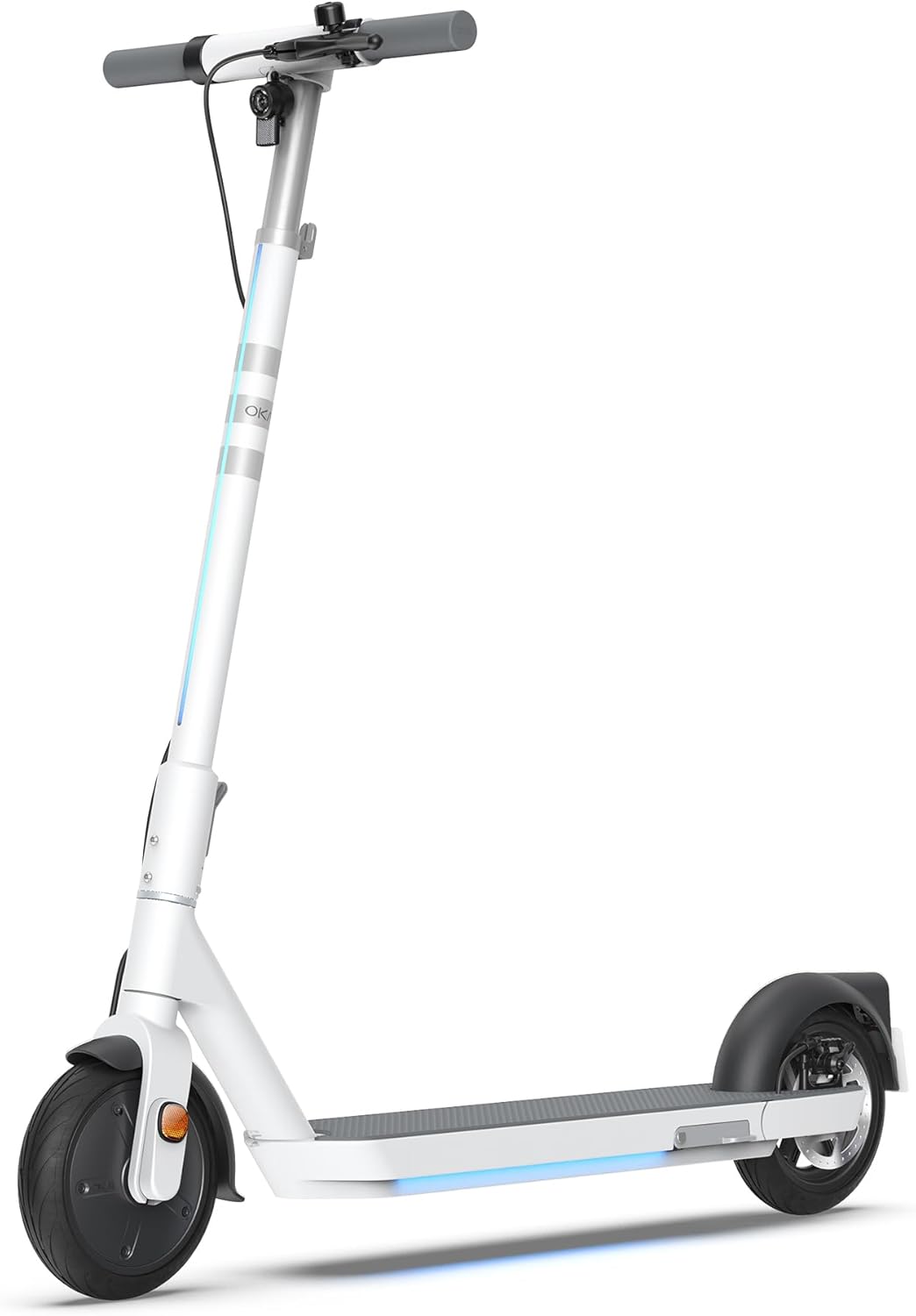
Figure 1: The OKAI Neon Electric Scooter, showcasing its sleek white design and integrated lighting.
2. Інфармацыя па бяспецы
Riding an electric scooter carries inherent risks. To minimize these risks, always adhere to the following safety guidelines:
- Заўсёды апранайце шлем і адпаведную ахоўную экіпіроўку (накаленнікі, налакотнікі) падчас язды.
- Перад кожнай паездкай пераканайцеся, што ўсе кампаненты надзейна замацаваны.
- Не ездзіце ў вільготных умовах, падчас моцнага дажджу або па лужынах.
- Выконвайце мясцовыя законы і правілы дарожнага руху.
- Падтрымлівайце бяспечную хуткасць і дыстанцыю ад іншых транспартных сродкаў і пешаходаў.
- Пазбягайце язды ў стане алкагольнага або наркатычнага ап'янення.
- Максімальная вага гэтага самаката складае 100 кг (220 фунты). Не перавышайце гэту вагу.
- Гэты самакат прызначаны для выкарыстання дарослымі.
3. Змесціва ўпакоўкі
Пераканайцеся, што ўсе прадметы ёсць у наяўнасці і ў добрым стане пасля распакавання:
- OKAI Neon Electric Scooter
- Адаптар для зарадкі
- Кіраўніцтва карыстальніка (гэты дакумент)
- Інструменты для зборкі (пры неабходнасці)
- Карта-ключ NFC
4. Усталёўка і першапачатковая аплата
4.1 Распакоўка і зборка
Carefully remove the scooter and all accessories from the packaging. The OKAI Neon Electric Scooter typically comes pre-assembled with minimal setup required. Follow these steps:
- Lift the handlebar stem until it clicks into place. Ensure the folding mechanism is securely locked.
- Attach the handlebars to the stem, ensuring all cables are properly connected and not pinched. Tighten any screws as instructed in the quick start guide (if provided separately).
4.2 Першапачатковая зарадка
Before your first ride, fully charge the scooter's battery. This helps prolong battery life.
- Знайдзіце порт для зарадкі на скутэры.
- Connect the charging adapter to the scooter's charging port, then plug the adapter into a standard wall outlet.
- The scooter's display will indicate charging status. A full charge typically takes approximately 5.5 hours.
- Пасля поўнай зарадкі адключыце зарадная прылада.
5. Інструкцыя па эксплуатацыі
5.1 Уключэнне/выключэнне
- To power on: Press and hold the power button on the handlebar until the display illuminates.
- Каб выключыць харчаванне: націсніце і ўтрымлівайце кнопку харчавання, пакуль дысплей не выключыцца.
5.2 Асновы язды
To begin riding, place one foot on the deck and push off with the other foot to gain some initial momentum. Once moving, gently press the accelerator lever to engage the motor. For braking, use the hand levers for the electric brake (front) and disc brake (rear).

Figure 2: Key features including the smart display, disc brake, 300W power motor, and hidden rear suspension.
5.3 рэжыму хуткасці
The OKAI Neon Electric Scooter features multiple speed modes to suit different riding conditions and rider preferences. Refer to the scooter's display or the OKAI app to switch between modes. The maximum speed is approximately 15.5 MPH (25 km/h).
5.4 Механізм складання
The scooter features a one-click folding design for easy storage and transport. To fold, locate the folding latch near the base of the handlebar stem, release it, and carefully fold the stem down until it locks into place with the rear fender.
5.5 App Connectivity and Customization
Enhance your riding experience by connecting your OKAI Neon Electric Scooter to the OKAI app. The app allows for:
- Adjusting ambient light settings.
- Monitoring real-time ride updates and battery status.
- Customizing dashboard settings.
- Locking/unlocking the scooter (using the NFC key card or app).
Download the official OKAI app from your device's app store and follow the in-app instructions to pair your scooter.
6. Тэхнічнае абслугоўванне
Regular maintenance ensures the longevity and safe operation of your OKAI Neon Electric Scooter.
6.1 Сыход за акумулятарам
- Перад першым выкарыстаннем цалкам зарадзіце акумулятар.
- Avoid completely draining the battery. Recharge after each use, or at least once a month if not used regularly.
- Захоўвайце самакат у прахалодным, сухім месцы, удалечыні ад прамых сонечных прамянёў і экстрэмальных тэмператур.
- Use only the official OKAI charging adapter.
6.2 Ціск у шынах
The front tire is pneumatic, and maintaining correct tire pressure is crucial for ride comfort, range, and safety. Check tire pressure regularly. While specific recommended PSI is not provided in this manual, generally, electric scooters require tire pressure between 30-50 PSI. Consult a professional if unsure or if you experience frequent deflation.
6.3 Ачыстка і захоўванне
- Ачысціць скутэр з рэкламайamp тканінай. Не выкарыстоўвайце струмені вады пад высокім ціскам або агрэсіўныя ачышчальнікі.
- Перад чысткай пераканайцеся, што вечка порта для зарадкі надзейна зачынена.
- Store the scooter indoors in a dry environment when not in use.
6.4 Праверка тармазоў
Regularly inspect the front electric brake and rear disc brake for proper function. Ensure brake levers are responsive and brake pads are not excessively worn. Adjust or replace components as needed, or seek professional assistance.
7. Выпраўленне непаладак
This section addresses common issues you might encounter with your OKAI Neon Electric Scooter.
| праблема | Магчымая прычына | Рашэнне |
|---|---|---|
| Скутэр не ўключаецца. | Нізкі зарад батарэі; няшчыльныя кантакты; праблема з кнопкай харчавання. | Charge the battery fully. Check all visible cable connections. Ensure the power button is not stuck. |
| Рухавік не ўключаецца. | Low battery; kick-start not performed; faulty accelerator. | Ensure battery is charged. Push off to gain initial speed before pressing accelerator. Contact support if issue persists. |
| Зніжэнне далёкасці руху або хуткасці. | Нізкі ціск у шынах; вялікі груз; язда ў гару; халоднае надвор'е; дэградацыя акумулятара. | Check and inflate tires to recommended pressure. Reduce load. Battery performance can be affected by temperature. |
| Тормазы слабыя або не рэагуюць. | Worn brake pads; loose brake cable; air in hydraulic system (disc brake). | Inspect brake pads for wear and replace if necessary. Adjust brake cable tension. For hydraulic issues, seek professional service. |
| Error codes on display (e.g., E3). | Sensor malfunction; motor issue; controller issue. | Refer to the OKAI app or contact customer support with the specific error code for diagnosis. |
If you encounter an issue not listed here or if the suggested solutions do not resolve the problem, please contact OKAI customer support.
8. Тэхнічныя характарыстыкі
| Асаблівасць | Дэталь |
|---|---|
| Марка | ОКАЙ |
| Назва мадэлі | Neon Series (ES20) |
| Колер | Белы |
| Максімальная хуткасць | Да 15.5 міль/г (25 км/г) |
| Максімальная далёкасць | Да 25 міль (40 км) |
| Абмежаванне вагі | 220 фунтаў (100 кг) |
| Час зарадкі | Прыбл. 5.5 гадзін |
| Памеры прадукту (Д х Ш х У) | 45 цалі х 17.7 цалі х 44.5 цалі (114.3 см х 44.9 см х 113 см) |
| Вага прадмета | 35.2 фунтаў (16 кг) |
| Матэрыял каркаса | Алюміній |
| Памер колы | 9 цалі |
| Тормазны стыль | Front: Electric Brake, Rear: Disc Brake |
| Тып падвескі | Задняя падвеска |
| Асаблівасці | Dual Braking System, Cruise Control, Wide Platform, Lockable, Foldable, Ambient Light |

Figure 3: Dimensions of the OKAI Neon Electric Scooter.
9. Гарантыя і падтрымка кліентаў
9.1 Інфармацыя аб гарантыі
The OKAI Neon Electric Scooter comes with a 1 Year Limited Warranty. This warranty covers manufacturing defects under normal use. Please retain your proof of purchase for warranty claims. For full warranty terms and conditions, refer to the official OKAI webсайт або звярніцеся ў службу падтрымкі кліентаў.
9.2 Падтрымка кліентаў
For technical assistance, warranty claims, or any other inquiries, please contact OKAI customer support. You can find contact information on the official OKAI website or through the OKAI app. OKAI offers 100% local customer support.
Visit the official OKAI Store on Amazon: OKAI Store
Ask a question about this manual
Ask about setup, troubleshooting, compatibility, parts, safety, or missing instructions. Manuals+ will review the question and use this page’s manual context to help answer it.