
1. Уводзіны
Thank you for choosing the TRONIC 61-Key Mechanical Gaming Keyboard. This manual provides essential information for setting up, operating, maintaining, and troubleshooting your new keyboard. Please read this manual thoroughly before use to ensure optimal performance and longevity of your device.
2. Прадукт скончыўсяview
The TRONIC 61-Key Mechanical Gaming Keyboard is a compact, wired keyboard designed for gaming and typing efficiency. It features professional mechanical keys, vibrant RGB backlighting, and full anti-ghosting capabilities. Its ergonomic design ensures comfort during extended use, and the durable ABS construction provides resistance against accidental drops and splashes.
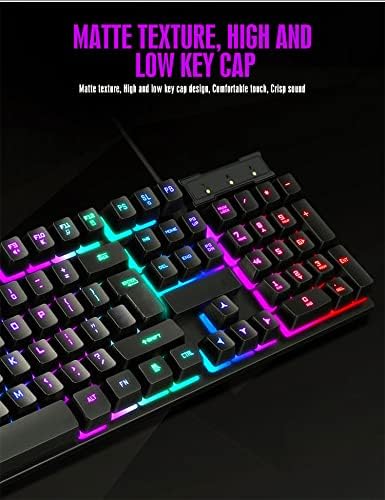
Накладныя выдаткі view of the TRONIC 61-Key Mechanical Gaming Keyboard, showcasing its compact layout and vibrant RGB backlighting across all keys.
Асноўныя характарыстыкі:
- Кампактная раскладка з 61 клавішамі: Provides more desk space for mouse movement and other peripherals.
- Механічныя ключы: Professional mechanical switches for responsive and tactile feedback.
- RGB-падсветка: Customizable rainbow backlighting with various effects and colors (red, green, yellow, blue, purple, cyan, pink).
- Full Anti-Ghosting: Allows multiple key presses to be registered simultaneously without conflict, crucial for gaming.
- Трывалая канструкцыя: Made from high-resistance ABS thermoplastic material, designed to withstand daily use and minor liquid splashes.
- Laser-Engraved Keycaps: Characters are clear and luminous, ensuring visibility in dark environments.
- Эрганамічны дызайн: Engineered for comfort during long typing and gaming sessions.

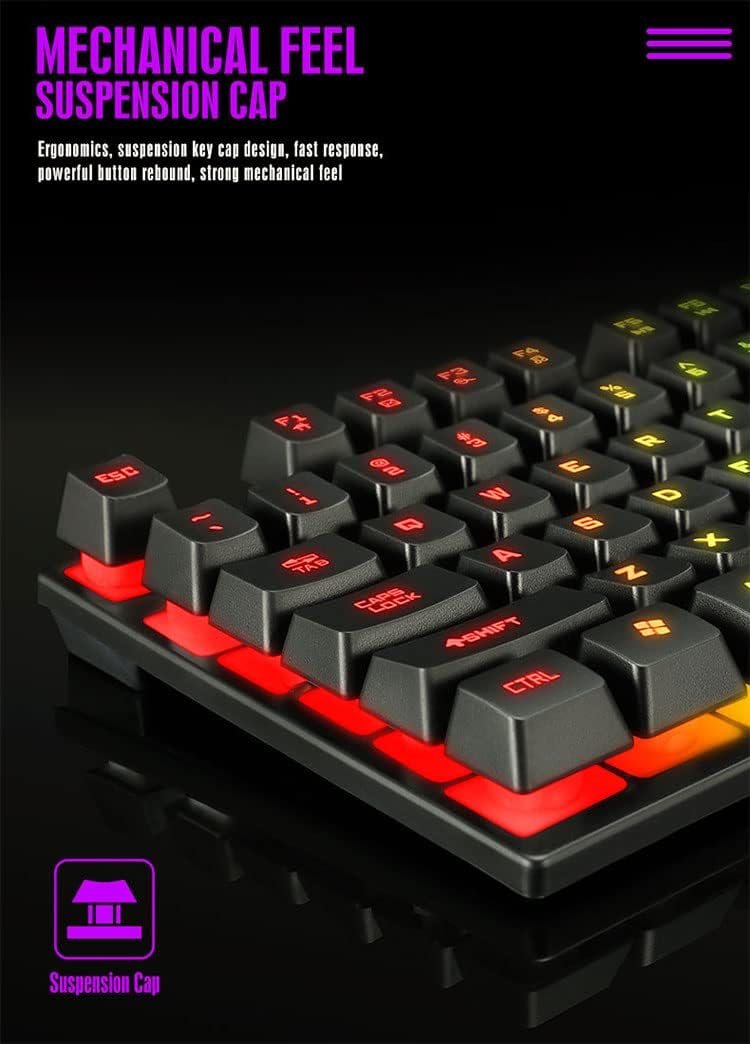
Падрабязны view of the keyboard's suspension keycap design, highlighting the mechanical feel and ergonomic profile for comfortable typing and gaming.
3. Настройка
Setting up your TRONIC Mechanical Gaming Keyboard is a straightforward process.
Падключэнне клавіятуры:
- Unpack the keyboard and its USB cable from the packaging.
- Connect the USB cable to the keyboard's USB port.
- Plug the other end of the USB cable into an available USB port on your computer or laptop.
- The keyboard is plug-and-play; your operating system (Windows or Linux) should automatically detect and install the necessary drivers.
The TRONIC keyboard connected to a device via its integrated USB cable, ready for use.
Сумяшчальнасць:
The keyboard is compatible with Windows and Linux operating systems. Заўвага: This keyboard is not compatible with PS4 or XBOX gaming consoles.
4. Інструкцыя па эксплуатацыі
Basic Keyboard Use:
Once connected, the keyboard functions as a standard QWERTY layout keyboard. The 61-key compact design includes all essential keys for typing and gaming. The UK layout ensures familiarity for users accustomed to this standard.
Кіраванне падсветкай:
The keyboard features dynamic RGB backlighting. You can control the lighting effects and turn them on or off using a dedicated button on the keyboard. This button typically cycles through various rainbow lighting modes, including a cyclical breathing effect, and allows you to disable the lighting when not needed.

This image illustrates the location of the dedicated button for controlling the keyboard's RGB backlighting, allowing users to easily switch the lighting effects on or off.
Anti-Ghosting Function:
The full anti-ghosting feature ensures that every key press is registered accurately, even when multiple keys are pressed simultaneously. This is particularly beneficial in fast-paced gaming scenarios where complex key combinations are common.
5. Тэхнічнае абслугоўванне
Proper maintenance will help extend the life and performance of your TRONIC keyboard.
Уборка:
- Адключыце клавіятуру ад кампутара перад чысткай.
- Use a soft, dry cloth to wipe down the keycaps and keyboard surface.
- Для ўстойлівага бруду падыдзе злёгкуamp можна выкарыстоўваць тканіну з мяккім ачышчальным растворам, сачыце за тым, каб вадкасць не патрапіла на клавіятуру.
- Compressed air can be used to remove dust and debris from between the keys.
Трываласць:
The keyboard's ABS construction provides a degree of resistance to minor impacts and liquid splashes. However, it is not fully waterproof. Avoid submerging the keyboard in liquid or exposing it to excessive moisture.
6. Выпраўленне непаладак
If you encounter issues with your TRONIC keyboard, refer to the following common solutions:
- Клавіятура не адказвае:
- Пераканайцеся, што USB-кабель надзейна падключаны як да клавіятуры, так і да кампутара.
- Паспрабуйце падключыць клавіятуру да іншага USB-порта на вашым кампутары.
- Перазагрузіце кампутар.
- Падсвятленне не працуе:
- Press the dedicated backlight control button to cycle through lighting modes or turn the backlight on.
- Пераканайцеся, што клавіятура правільна падключана і атрымлівае харчаванне.
- Ключы не рэгіструюцца:
- Праверце наяўнасць фізічных перашкод пад клавішамі.
- Ensure the keyboard drivers are correctly installed (usually automatic).
- Праблемы сумяшчальнасці:
- Remember, the keyboard is compatible with Windows and Linux. It is не compatible with PS4 or XBOX consoles.
If these steps do not resolve your issue, please contact TRONIC customer support for further assistance.
7. Тэхнічныя характарыстыкі
| Асаблівасць | Спецыфікацыя |
|---|---|
| Марка | ТРОНІК |
| Нумар мадэлі | B09MH9ZC6M |
| Тэхналогія падлучэння | Правадной USB |
| Апісанне клавіятуры | Механічны |
| Раскладка клавіятуры | QWERTY (UK Layout) |
| Колькасць ключоў | 61 |
| Падтрымка падсвятлення | RGB (Вясёлка) |
| Сумяшчальныя аперацыйныя сістэмы | Windows, Linux |
| Крыніца харчавання | Cable Powered |
| Асаблівасці | Backlit, Anti-Ghosting |
| Матэрыял | ABS Тэрмапластык |
| Тэрмін службы клавіш | 10,000,000 XNUMX XNUMX націсканняў клавіш |
| Час водгуку | 2 мс |
| UPC / GTIN | 793072706689 |
8. Гарантыя і падтрымка
For warranty information and customer support, please refer to the documentation included with your purchase or visit the official TRONIC webсайт. Захоўвайце пацвярджэнне пакупкі для любых гарантыйных прэтэнзій.