
OFANTOP 52YFT-7068
OFANTOP 52-Inch Smart Ceiling Fan with Lights and Remote Control (Model: 52YFT-7068)
Кіраўніцтва па эксплуатацыі
1. Інфармацыя па бяспецы
Read and understand all instructions before beginning installation. This product must be installed in accordance with the applicable installation code by a person familiar with the construction and operation of the product and the hazards involved. Failure to follow these instructions may result in electric shock, fire, or serious personal injury.
- Заўсёды адключайце харчаванне з дапамогай галоўнага выключальніка перад устаноўкай або абслугоўваннем.
- Ensure all electrical connections are in accordance with local codes, ordinances, and the National Electric Code.
- Вентылятар павінен быць усталяваны на адлегласці не менш за 7 футаў (2.1 метра) ад падлогі да задняй абзы лапатак.
- The fan must be mounted to a ceiling outlet box marked "Acceptable for Fan Support of 35 lbs (15.9 kg) or less."
- Do not operate the fan with damaged blades. Replace all blades if one is damaged.
- Пазбягайце размяшчэння прадметаў на шляху лопасцей вентылятара.
- This fan is ETL Listed for indoor and outdoor use. Ensure proper sealing for outdoor installations to prevent water damage.
2. Змесціва ўпакоўкі
Перад пачаткам усталёўкі пераканайцеся, што ўсе кампаненты наяўныя.
- Зборка рухавіка
- Лопасці вентылятара (3)
- Downrod (5" and 10" included for Downrod Mount)
- Мантажны кранштэйн
- Навес
- Пульт дыстанцыйнага кіравання з насценным мацаваннем
- Сборка Light Kit
- Набор фурнітуры (шрубы, гайкі, шайбы)
- Кіраўніцтва па эксплуатацыі

Image: Main components of the OFANTOP 52-Inch Smart Ceiling Fan.
3. Тэхнічныя характарыстыкі прадукту
| Марка | ОФАНТОП |
| Назва мадэлі | 52YFT-7068 |
| Памер | 52 цалі |
| Колькасць лязоў | 3 |
| Тып рухавіка | Бесщеточный рухавік пастаяннага току |
| Ёмістасць паветранага патоку | 6031 кубічных футаў у хвіліну (CFM) |
| Крыніца харчавання | AC/DC (120 Volts AC) |
| Ватtage | 35 ват |
| Метад кантролю | Remote, App (Smart Life), Voice (Alexa, Google Assistant) |
| Святло Асаблівасці | Dimmable, 3 Color Temperature Options (3000K, 4500K, 6000K), Memory Function |
| Выкарыстанне ў памяшканні/на вуліцы | Yes (ETL Listed, IP44 for outdoor) |
| Тып мацавання | Downrod Mount (5" and 10" downrods included) |
| Узровень шуму | 35 дБ (ціхая праца) |
| Энергаэфектыўнасць | 75% Less Energy than AC Fan |

Image: Energy Efficiency label for the ceiling fan.
4. Інструкцыя па ўстаноўцы
4.1 Кантрольны спіс перад устаноўкай
- Пераканайцеся, што электрычнасць адключана з дапамогай аўтаматычнага выключальніка.
- Confirm you have all necessary tools (screwdriver, wire strippers, ladder, etc.).
- Verify the mounting location can support the fan's weight (16.42 lbs).
- Choose the appropriate downrod length (5" or 10") for your ceiling height.
4.2 Варыянты мантажу
This fan supports both standard downrod mount and angled mount (up to 20 degrees).
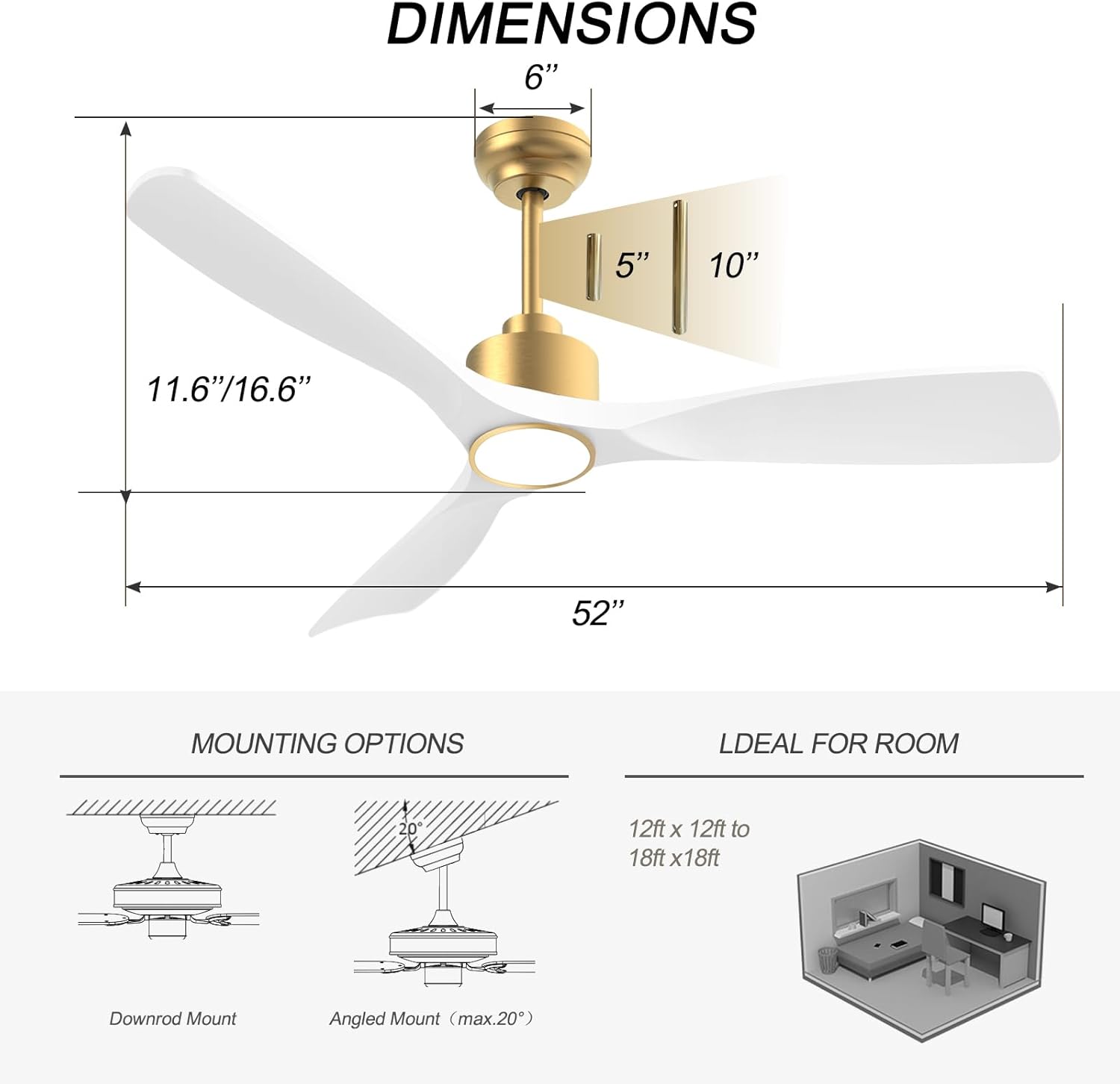
Image: Diagram showing fan dimensions and available downrod and angled mounting options.
- Attach the mounting bracket to the ceiling outlet box using the provided screws.
- Feed the electrical wires from the ceiling through the center hole of the mounting bracket.
- Assemble the downrod to the motor assembly, ensuring all screws are tightened securely.
- Асцярожна падніміце вентылятарны блок і павесьце яго на мантажны кранштэйн.
4.3 Электраправодка
The fan features quick connectors for simplified wiring.
- Connect the fan's wires to the household wiring according to the color codes (typically black to black, white to white, green/bare copper to ground).
- Пераканайцеся, што ўсе злучэнні надзейна замацаваны з дапамогай дроцяных гаек.
- Акуратна ўстаўце ўсе правады ў разетку.
Video: A short demonstration of the fan's appearance and operation. This video is a 7-second preview and shows the fan spinning with its light on.
4.4 Blade Attachment
- Carefully attach each of the three fan blades to the motor housing using the provided screws.
- Ensure all screws are tightened evenly to prevent wobbling.
Відэа: Оверview of the BOOSANT White and Gold Ceiling Fan, demonstrating its features and design. This video provides a general look at the fan's aesthetics and functionality.
4.5 Light Kit Installation
- Connect the light kit wires to the corresponding wires from the fan motor.
- Secure the light kit assembly to the bottom of the fan motor housing.
5. Інструкцыя па эксплуатацыі
5.1 Функцыі дыстанцыйнага кіравання
The included remote control allows for convenient operation of all fan and light functions.
- Уключэнне/выключэнне харчавання: Уключае або выключае вентылятар і святло.
- Хуткасць вентылятара: Select from 6 different fan speeds.
- Уключэнне/выключэнне святла: Кіруе святлом самастойна.
- Каляровая тэмпература: Cycle through 3 color temperature options (3000K Warm White, 4500K Natural White, 6000K Cool White).
- Дыммер: Адрэгулюйце яркасць святла.
- Рэверсіўны рухавік: Switch between summer (downward airflow) and winter (upward airflow) modes.
- Таймер: Set the fan to turn off automatically after a set period (e.g., 1H, 2H, 4H, 8H).
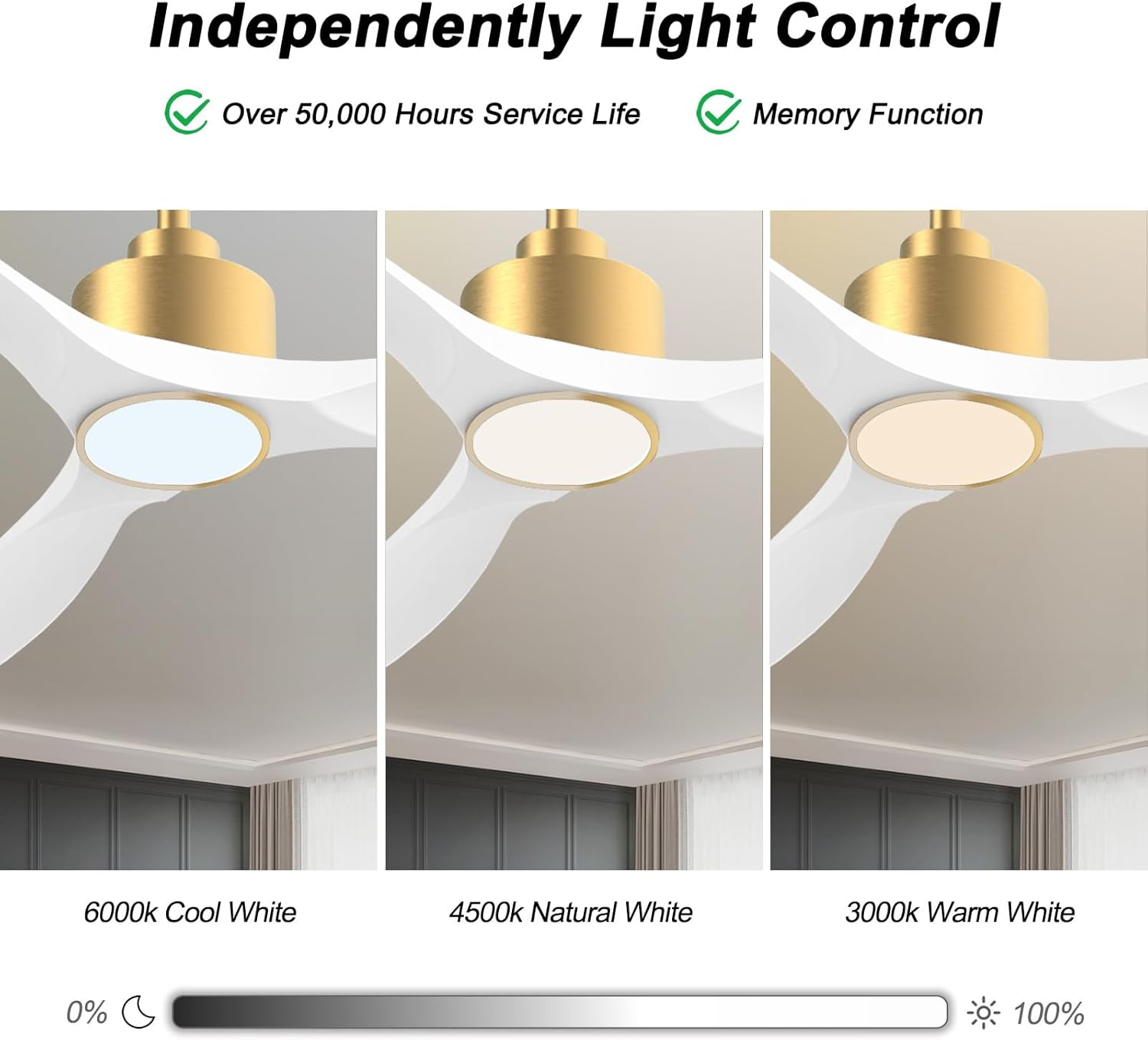
Image: Visual representation of the three adjustable light color temperatures (Warm, Natural, Cool White).

Image: Illustration of the reversible motor function for summer cooling and winter warm air circulation.
5.2 Інтэлектуальнае кіраванне (прыкладанне/голас)
The OFANTOP Smart Ceiling Fan can be controlled via the Smart Life app or voice assistants like Amazon Alexa and Google Assistant.
- Загрузка прыкладання: Download the "Smart Life" app from your device's app store.
- Спалучэнне Wi-Fi:
- Пераканайцеся, што ваша сетка Wi-Fi працуе на частаце 2.4 ГГц.
- Turn the fan power off and back on at the switch.
- Within 10 seconds, press the "8H Fan Timer & Wi-Fi Pairing" button on the remote for 3 seconds to enter pairing mode.
- Open the Smart Life app, select "Add Device" or click the "+" in the upper right corner.
- Find the fan device and click "ADD".
- Fill in your 2.4GHz Wi-Fi name and password.
- Wait for the connection to complete. A beep from the fan indicates successful pairing.
- Галасавое кіраванне: Once paired with the Smart Life app, enable the Smart Life skill/action in your Amazon Alexa or Google Assistant app to control the fan with voice commands.

Image: Depiction of smart control features, including compatibility with Google Assistant and Amazon Alexa.
Video: Instructions on how to connect the BOOSANT 102 Series Smart Ceiling Fan to the Smart Life app for mobile control. This video details the Wi-Fi pairing process.
6. Тэхнічнае абслугоўванне
- Уборка: Каб ачысціць вентылятар, працярыце яго мяккай тканінайamp тканіна. Не выкарыстоўвайце абразіўныя ачышчальнікі або растваральнікі.
- Сыход за лязом: Periodically check blade screws for tightness. Loose blades can cause wobbling and noise.
- Крыніца святла: The integrated LED light source is designed for long life (over 50,000 hours) and is not user-replaceable.
- Матор: Рухавік пастаяннага току не патрабуе абслугоўвання і змазкі.
7. Выпраўленне непаладак
| праблема | Магчымая прычына | Рашэнне |
|---|---|---|
| Вентылятар не запускаецца | Няма харчавання на вентылятар; няшчыльныя злучэнні правадоў; нізкі ўзровень зарада батарэі пульта дыстанцыйнага кіравання. | Check circuit breaker; Verify all wire connections; Replace remote control battery. |
| Веер хістаецца | Loose blade screws; Improperly balanced blades; Loose mounting bracket. | Зацягніце ўсе шрубы ляза; пры неабходнасці выкарыстоўвайце камплект для балансавання (не ўваходзіць у камплект); пераканайцеся, што мантажны кранштэйн надзейна замацаваны. |
| Святло не працуе | Loose wire connection to light kit; LED driver failure; Remote control issue. | Check light kit wiring; Contact customer support if LED driver is suspected; Check remote battery/functionality. |
| Пульт дыстанцыйнага кіравання не працуе | Battery depleted; Remote not paired with fan; Obstruction between remote and receiver. | Replace battery (23A 12V); Re-pair remote with fan (refer to pairing instructions); Ensure clear line of sight. |
| Праблемы з падключэннем да Wi-Fi | Incorrect Wi-Fi password; 5GHz Wi-Fi network; Fan not in pairing mode. | Verify password; Ensure 2.4GHz network is used; Follow app pairing instructions carefully. |
8. Гарантыя і падтрымка
OFANTOP products are manufactured to the highest quality standards. For specific warranty details and customer support, please refer to the warranty card included with your purchase or contact OFANTOP customer service directly. Keep your proof of purchase for warranty claims.
Кантактная інфармацыя: Refer to your product packaging or the official OFANTOP webсайт для атрымання найбольш актуальнай кантактнай інфармацыі.
Ask a question about this manual
Ask about setup, troubleshooting, compatibility, parts, safety, or missing instructions. Manuals+ will review the question and use this page’s manual context to help answer it.