
Bowost F3J
Bowost Wireless Bluetooth Earbuds User Manual
Model: F3J
Уводзіны
Thank you for choosing Bowost Wireless Bluetooth Earbuds, Model F3J. These earbuds are designed to provide a superior audio experience with advanced features such as Bluetooth 5.1 connectivity, IP7 waterproofing, and intuitive touch controls. This manual will guide you through the setup, operation, and maintenance of your new earbuds to ensure optimal performance and longevity.
Прадукт скончаныview
Змест пакета
Перад пачаткам пераканайцеся, што ў камплекце ёсць усе неабходныя рэчы:
- Bowost Wireless Bluetooth Earbuds (Left and Right)
- Чахол для зарадкі
- Зарадны кабель USB Type-C
- Розныя памеры амбушюр (малыя, сярэднія, вялікія)
- Кіраўніцтва карыстальніка

Image: All components included in the Bowost Wireless Bluetooth Earbuds package.
Асноўныя характарыстыкі
- Найвышэйшая якасць гуку: Equipped with 10mm professional speaker units and composite vibration diaphragms for crisp highs, rich mids, and powerful deep bass.
- Пашыраны Bluetooth 5.1: Ensures faster, more stable signal transmission with low latency for an uninterrupted listening experience.
- Воданепранікальнасць IP7: Designed with high-quality waterproof materials and multi-process sealing, effectively protecting internal components from water, rain, and sweat.
- Павялічаны тэрмін службы батарэі: Up to 6 hours of playback on a single charge, with the charging case providing an additional 40 hours of battery life.
- Convenient Type-C Fast Charging: Хуткая 10-хвілінная зарадка забяспечвае 1 гадзіну прайгравання.
- Інтуітыўнае сэнсарнае кіраванне: Manage music playback, calls, and voice assistant activation with simple taps on the earbuds.
- Святлодыёдны дысплей батарэі: The charging case features an LED indicator to show the battery level of both the case and the earbuds.
- Эрганамічны дызайн: 120° ergonomic fit ensures comfort and stability, ideal for various activities including sports.

Image: The Bowost Wireless Bluetooth Earbuds with their charging case, highlighting the compact design.

Image: Visual summary of the main features of the Bowost Wireless Earbuds.

Image: Illustration of the ergonomic design and included ear tip sizes for a comfortable fit.
Настройка
Зарадка навушнікаў і чахла
For first-time use, fully charge the earbuds and the charging case. The charging case features an LED digital display that shows the battery percentagкорпуса і стан зарадкі асобных навушнікаў.
- Place the earbuds into the charging case. Ensure they are correctly seated; the earbuds will light up to indicate charging.
- Падключыце зарадны кабель USB Type-C да зараднага порта на корпусе, а другі канец — да крыніцы харчавання USB (напрыклад, адаптара да сеткі, USB-порта кампутара).
- The LED display on the charging case will show the current battery level and charging progress.
- Пасля поўнай зарадкі адключыце зарадны кабель.
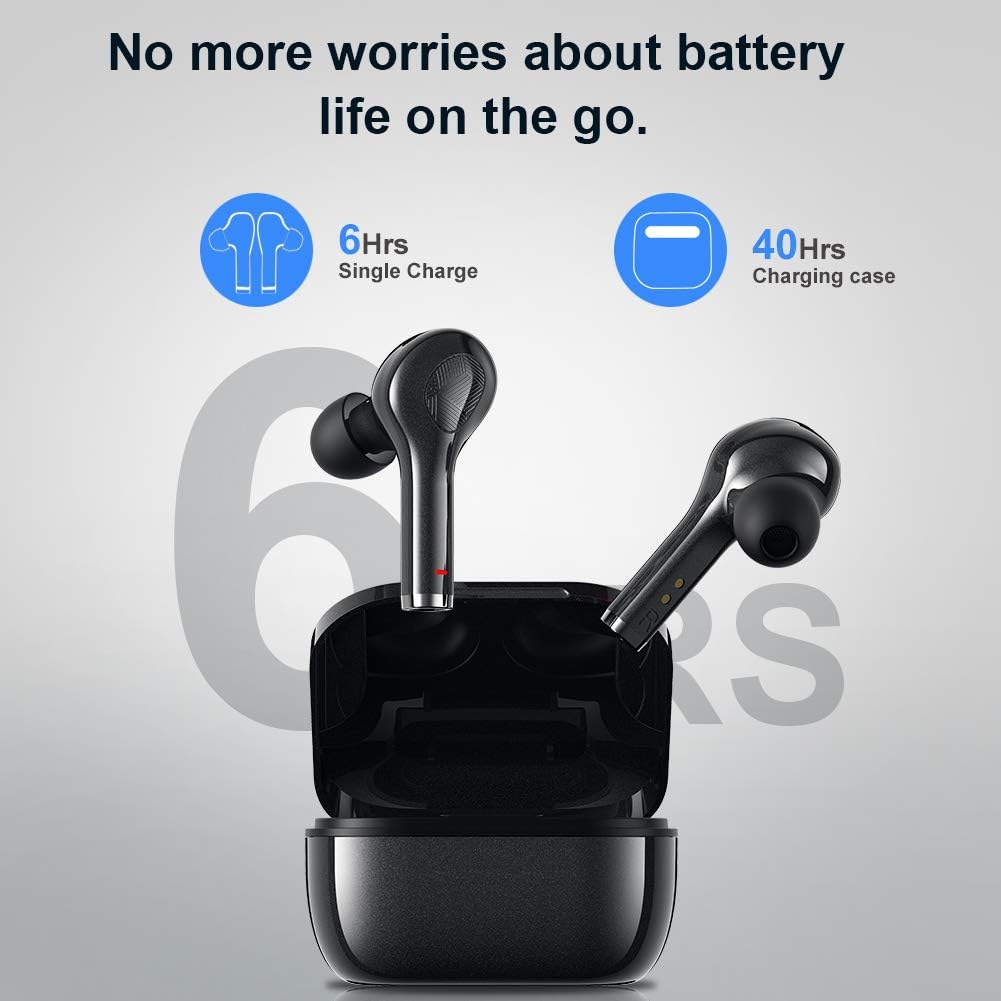
Image: Battery life indication for the earbuds and charging case.
Pairing with Your Device (One-Step Pairing)
Для зручнасці навушнікі маюць функцыю аўтаматычнага спалучэння.
- Пераканайцеся, што Bluetooth на вашай прыладзе ўключаны.
- Адкрыйце зарадны кейс і дастаньце абодва навушнікі. Яны аўтаматычна ўключацца і пяройдуць у рэжым спалучэння.
- On your device, search for Bluetooth devices and select "F3J" from the list.
- Пасля падключэння вы пачуеце гук пацверджання, і навушнікі будуць гатовыя да выкарыстання.
- After the initial pairing, the earbuds will automatically connect to the last paired device when removed from the case.
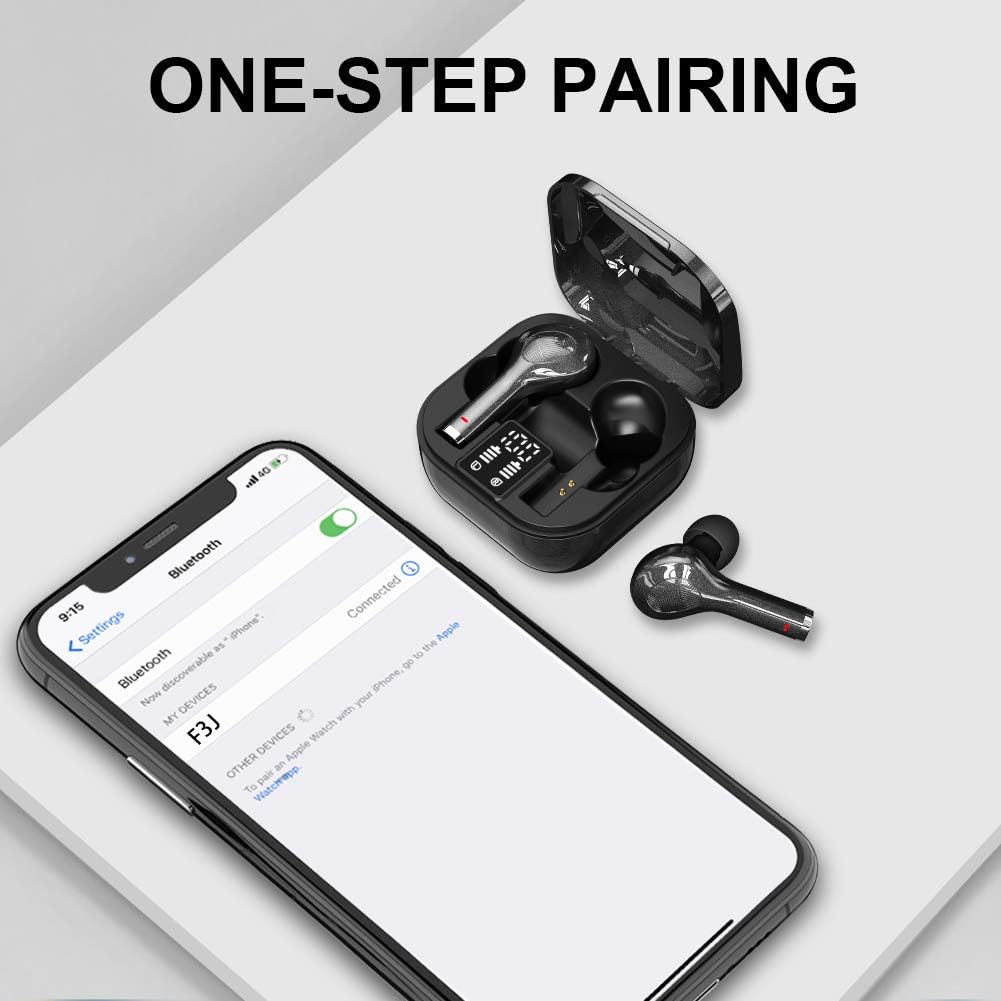
Image: The one-step pairing process shown with a smartphone's Bluetooth settings.

Image: Visual representation of the automatic pairing sequence.
Інструкцыя па эксплуатацыі
The Bowost earbuds feature intuitive touch controls for easy management of audio and calls.
Функцыі сэнсарнага кіравання
| Дзеянне | Левы навушнік | Правая ўкладыш |
|---|---|---|
| Прайграванне/прыпыненне музыкі | Адзін націск | Адзін націск |
| Наступны трэк | Н/Д | Двайны дотык |
| Папярэдні трэк | Двайны дотык | Н/Д |
| Павялічыць гучнасць | Н/Д | Трайны кран |
| Памяншэнне гучнасці | Трайны кран | Н/Д |
| Адказаць/завяршыць выклік | Адзін націск | Адзін націск |
| Адхіліць выклік | Доўгі націск (2 с) | Доўгі націск (2 с) |
| Актывацыя галасавога памочніка (Siri/Google Assistant) | Доўгі націск (3 с) | Доўгі націск (3 с) |
| Уключэнне/выключэнне харчавання | Доўгі націск (5 с) | Доўгі націск (5 с) |
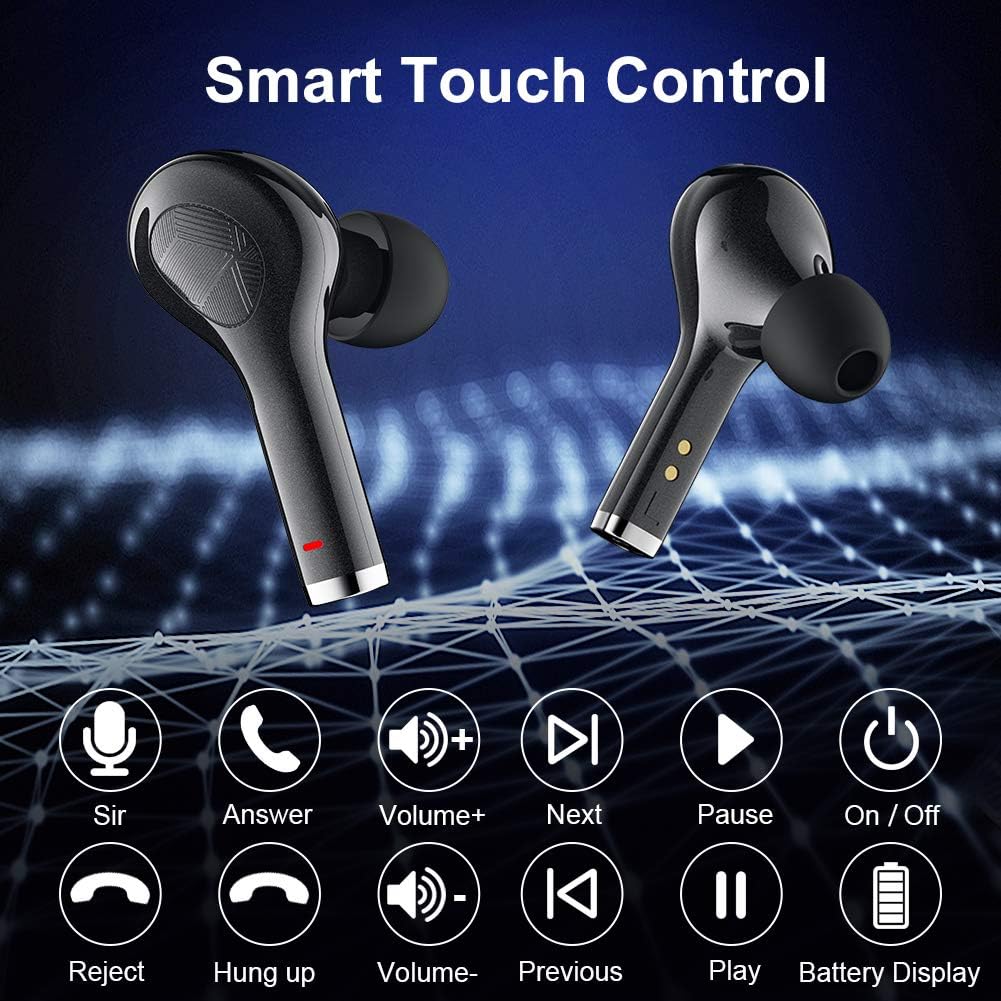
Image: Visual guide to the smart touch control functions.

Выява: Падрабязная view of the touch control area on the earbud.
Тэхнічнае абслугоўванне
Water Resistance (IP7 Rating)
The earbuds are rated IP7 waterproof, meaning they can withstand immersion in water up to 1 meter for 30 minutes. This makes them suitable for workouts, running in light rain, and other activities where they might be exposed to sweat or splashes. However, they are not designed for swimming or prolonged submersion.
- Не падвяргайце зарадны чахол уздзеянню вады, бо ён не воданепранікальны.
- After exposure to water or sweat, ensure the earbuds are completely dry before placing them back into the charging case to prevent damage to the charging contacts.

Image: The earbuds demonstrating their IPX7 waterproof capability.

Image: Close-up of the earbuds showing water resistance.
Ачыстка і захоўванне
- Рэгулярна працірайце навушнікі і зарадны футляр мяккай, сухой тканінай без ворса.
- Зніміце вушныя насадкі і памыйце іх мяккім мылам і вадой, затым старанна высушыце перад тым, як зноў прымацаваць іх.
- Use a cotton swab or a small, soft brush to gently clean the charging contacts on both the earbuds and inside the case.
- Захоўвайце навушнікі-ўкладышы ў зарадным чахле, калі яны не выкарыстоўваюцца, каб абараніць іх і падтрымліваць зарад.
- Пазбягайце экстрэмальных тэмператур і прамых сонечных прамянёў.
Ліквідацыю непаладак
If you encounter any issues with your Bowost Wireless Bluetooth Earbuds, please refer to the following common solutions:
Навушнікі не спалучаюцца або не падключаюцца
- Праверце акумулятар: Пераканайцеся, што і навушнікі, і зарадны футляр маюць дастатковы зарад батарэі.
- Паўторная пара:
- Адключыце Bluetooth на прыладзе.
- Place both earbuds back into the charging case, close the lid, and wait a few seconds.
- Выміце навушнікі з чахла.
- Turn on Bluetooth on your device and search for "F3J" to reconnect.
- Clear Bluetooth History: On your device, forget or unpair "F3J" from your Bluetooth device list, then repeat the pairing process.
- Адлегласць: Ensure the earbuds are within the effective Bluetooth range (typically 10 meters) of your device.
Працуе толькі адзін навушнік
- Праверце акумулятар: Пераканайцеся, што абодва навушнікі зараджаны.
- Скід навушнікаў: Place both earbuds back into the charging case. Close the lid, then open it again. This often resets the connection between the two earbuds.
- Чыстыя кантакты: Clean the charging contacts on both earbuds and inside the case to ensure proper connection and charging.
Нізкая гучнасць або дрэнная якасць гуку
- Наладзіць гучнасць: Increase the volume on both your device and using the earbud touch controls.
- Памер вушной насадкі: Ensure you are using the correct size ear tips for a secure and comfortable seal in your ear canal. A poor seal can significantly affect sound quality and bass.
- Чыстыя навушнікі: Check for any earwax or debris blocking the earbud nozzles and clean them gently.
- Перашкоды: Move away from other electronic devices that might cause wireless interference.

Image: Highlighting the deep bass and Hi-Fi stereo sound quality.

Image: Visual representation of the Hi-Fi stereo sound quality.
Тэхнічныя характарыстыкі
| Асаблівасць | Дэталь |
|---|---|
| Нумар мадэлі | F3J |
| Марка | Bowost |
| Сувязь | Bluetooth 5.1 (бесправадны) |
| Тып навушнікаў-ўкладышаў | In-Ear (Intra-aural) |
| Воданепранікальнасць | Воданепранікальны IP7 |
| Час прайгравання на адной зарадцы | Да 6 гадзін |
| Агульны час прайгравання (з кейсам) | Да 40 гадзін |
| Порт для зарадкі | USB Type-C |
| Тып кіравання | Touch Control (Volume, Track, Calls, Voice Assistant) |
| Мікрафон | Built-in (Bi-directional) |
| Тып батарэі | Літый-іённы (акумулятарны) |
| Вага | Approximately 4 Grams (per earbud) |
| Матэрыял | Пластыкавыя |
| Сумяшчальныя прылады | Bluetooth-enabled mobile phones, tablets, laptops (iOS, Android, etc.) |
Гарантыя і падтрымка
Bowost provides the following support for your product:
- Поўны вяртанне за 30 дзён: If you are not satisfied with your purchase, you may be eligible for a full refund within 30 days.
- 24-Month Repair Warranty: The product is covered by a 24-month warranty for repairs against manufacturing defects.
- 24-Hour Quick Response: For any inquiries or support needs, expect a quick response within 24 hours.
Please retain your proof of purchase for warranty claims. For further assistance, refer to the contact information provided with your product packaging or visit the official Bowost support webсайт.
Ask a question about this manual
Ask about setup, troubleshooting, compatibility, parts, safety, or missing instructions. Manuals+ will review the question and use this page’s manual context to help answer it.