
1. Уводзіны
The iOptron CEM26 is a portable, high-performance telescope mount designed for both observational astronomy and astrophotography. Its unique center-balanced 'Z' design enhances stability and portability. This manual provides essential information for the setup, operation, and maintenance of your CEM26 mount, including the AccuAlign optical polar scope and 1.5-inch stainless steel tripod.
2. Асноўныя магчымасці
- Лёгкая партатыўнасць: Designed for easy transport, allowing the mount to be carried conveniently.
- Robust Support: Provides stable and secure support for various telescope configurations.
- Center-Balanced 'Z' Design: Optimizes stability and reduces the need for heavy counterweights.
- Intuitive GoTo Functionality: Enables precise automatic pointing to celestial objects.
- Smooth Stepper Motor Drive System: Ensures accurate and quiet tracking of astronomical targets.
- Sturdy 1.5-inch Stainless Steel Tripod: Provides a stable foundation for the mount.
- Integrated AccuAlign Optical Polar Scope: Facilitates quick and accurate polar alignment.
- Універсальнае прымяненне: Suitable for both visual observing and light astrophotography.
3. Змесціва ўпакоўкі
Upon unpacking, verify that all components are present. The standard package for the iOptron CEM26 mount includes:
- iOptron CEM26 Go-To German Equatorial Mount Head
- 1.5-inch Stainless Steel Tripod
- AccuAlign Optical Polar Scope (integrated)
- Вал процівагі
- Hand Controller (Go2Nova® 8407+)
- Адаптар сілкавання
- Кабель USB
- Hard Carrying Case (as shown in image)

Figure 3.1: The iOptron CEM26 mount and its primary accessories are securely stored within a durable hard carrying case, designed for protection and portability.
4. Настройка
Proper setup is crucial for the performance of your CEM26 mount. Follow these steps carefully:
- Зборка штатыва: Extend the legs of the 1.5-inch stainless steel tripod to a stable height. Ensure the tripod is level using a bubble level.
- Mount Head Attachment: Securely attach the CEM26 mount head to the tripod. Ensure all locking knobs are tightened.
- Counterweight Shaft Installation: Thread the counterweight shaft into the mount head. Attach appropriate counterweights to balance your telescope setup.
- Telescope Mounting: Attach your telescope to the mount's dovetail saddle. Ensure it is securely fastened and balanced in both Right Ascension (RA) and Declination (DEC) axes.
- Кабельныя злучэнні: Connect the hand controller to the mount. Connect the power adapter to the mount and then to a suitable power source.
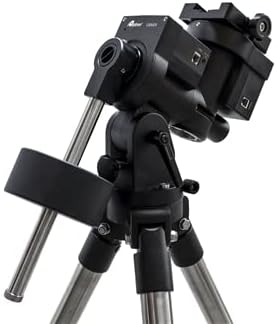
Figure 4.1: The iOptron CEM26 mount fully assembled on its 1.5-inch stainless steel tripod, ready for telescope attachment and operation.
5. Інструкцыя па эксплуатацыі
This section outlines the basic steps for operating your iOptron CEM26 mount.
- Уключэнне: Turn on the mount using the power switch. The hand controller will illuminate and display the initial boot screen.
- Інфармацыя аб сайце: Enter your current location (latitude, longitude) and time zone into the hand controller. This is crucial for accurate GoTo functionality.
- Polar Alignment (AccuAlign): Use the integrated AccuAlign optical polar scope to precisely align the mount's polar axis with the celestial pole. Follow the instructions displayed on the hand controller or refer to the detailed polar alignment guide in the full manual (available on the iOptron webсайт).
- Star Alignment: Perform a 1-star, 2-star, or 3-star alignment using bright stars. This calibrates the mount's internal model for accurate pointing.
- GoTo Function: Select a celestial object from the hand controller's database (e.g., planets, stars, deep-sky objects). Press "GoTo" and the mount will automatically slew to the target.
- Адсочванне: Once an object is targeted, the mount will automatically begin tracking it across the sky, compensating for Earth's rotation.
- Slewing Speeds: Adjust the slewing speed using the hand controller's arrow keys for fine adjustments or rapid movement.
6. Тэхнічнае абслугоўванне
Regular maintenance ensures the longevity and optimal performance of your iOptron CEM26 mount.
- Уборка: Keep the mount free from dust and debris. Use a soft, dry cloth for cleaning the exterior. Avoid abrasive cleaners or solvents.
- змазка: The mount's internal gears are factory-lubricated. Do not attempt to lubricate internal components unless specifically instructed by iOptron support.
- захоўванне: When not in use, store the mount in its original carrying case in a dry, temperature-controlled environment to prevent moisture damage.
- Праверка кабеля: Periodically inspect all cables for signs of wear or damage. Replace damaged cables immediately.
- Абнаўленні прашыўкі: Check the iOptron website periodically for firmware updates for the mount and hand controller. Keeping the firmware updated can improve performance and add new features.
7. Выпраўленне непаладак
This section addresses common issues you might encounter with your CEM26 mount.
- Mount Not Powering On:
- Ensure the power adapter is securely connected to both the mount and a working power outlet.
- Пераканайцеся, што крыніца харчавання забяспечвае правільную гучнасцьtage (12 В пастаяннага току).
- Праверце кабель сілкавання на наяўнасць пашкоджанняў.
- GoTo Inaccuracy:
- Re-check your site location (latitude, longitude) and time settings in the hand controller.
- Perform a precise polar alignment using the AccuAlign scope.
- Ensure your star alignment procedure was accurate and used bright, well-separated stars.
- Verify the mount is properly balanced with your telescope.
- Праблемы з адсочваннем:
- Confirm accurate polar alignment.
- Check for any obstructions or cable snags that might impede smooth movement.
- Ensure the mount is not overloaded beyond its weight capacity.
- Hand Controller Not Responding:
- Disconnect and reconnect the hand controller cable.
- Restart the mount.
- Check for any bent pins in the hand controller port or cable.
For more detailed troubleshooting or issues not listed here, please refer to the comprehensive user manual on the iOptron support website or contact iOptron customer service.
8. Тэхнічныя характарыстыкі
Technical specifications for the iOptron CEM26 Go-To German Equatorial Mount:
| Асаблівасць | Дэталь |
|---|---|
| Назва мадэлі | CEM26 |
| Нумар мадэлі тавару | C262A1 |
| Тып мацавання | Center Balanced German Equatorial Mount (CEM) |
| Абмежаванне вагі | 26 фунта (прыблізна 11.8 кг) |
| Mount Head Weight | 10 фунта (прыблізна 4.5 кг) |
| Тып штатыва | 1.5-inch Stainless Steel Tripod |
| Максімальная вышыня | 66.93 цаляў (прыблізна 170 см) |
| Тып галоўкі штатыва | iPolar TM electronic polar scope (integrated) |
| Матэрыял | All metal, Casting + CNC machined |
| Колер | Чорны |
| Сумяшчальныя прылады | Camera, Laptop, Tablet, Smartphone (for control/imaging) |
| Асаблівасць | Рэгуляваны |
| Дата першай даступнасці | 11 снежня 2021 г |
9. Гарантыя і падтрымка
iOptron products are designed for durability and performance. For specific warranty terms and conditions, please refer to the official iOptron website or the warranty card included with your product. Typically, iOptron offers a limited warranty covering manufacturing defects.
For technical support, product registration, or to download the latest firmware and comprehensive user manuals, please visit the official iOptron support portal:
iOptron Official Webсайт: www.ioptron.com
When contacting support, please have your product model number (C262A1) and serial number ready.