
1. Уводзіны
This manual provides detailed instructions for the installation, configuration, operation, and maintenance of your Ruijie Reyee Wi-Fi 6 Ceiling Access Point, model RG-RAP2260(G). Please read this manual thoroughly before using the device to ensure proper setup and optimal performance.
2. Інфармацыя па бяспецы
- крыніца харчавання: Use only the specified power adapter (DC 12V/1.5A) or a Power over Ethernet (PoE) source that complies with IEEE 802.3at/af standards.
- Асяроддзе ўстаноўкі: Install the device in a dry, well-ventilated area, away from direct sunlight, heat sources, and strong electromagnetic fields.
- Мантаж: Ensure the device is securely mounted to a stable surface (ceiling or wall) to prevent accidental falls.
- Тэхнічнае абслугоўванне: Не адкрывайце прыладу casing. Па ўсіх пытаннях тэхнічнага абслугоўвання звяртайцеся да кваліфікаванага персаналу.
3. Змесціва ўпакоўкі
Праверце наяўнасць усіх прадметаў у камплекце:
- 1 x Ruijie Reyee Wi-Fi 6 Ceiling Access Point (RG-RAP2260(G))
- Мантажны кранштэйн
- Шрубы і дзюбелі
- Кароткае кіраўніцтва карыстальніка (можа быць уключана асобна)
4. Прадукт скончыўсяview
The Ruijie Reyee RG-RAP2260(G) is a high-performance Wi-Fi 6 (802.11ax) ceiling-mounted access point designed for robust wireless connectivity.
4.1 фронт View
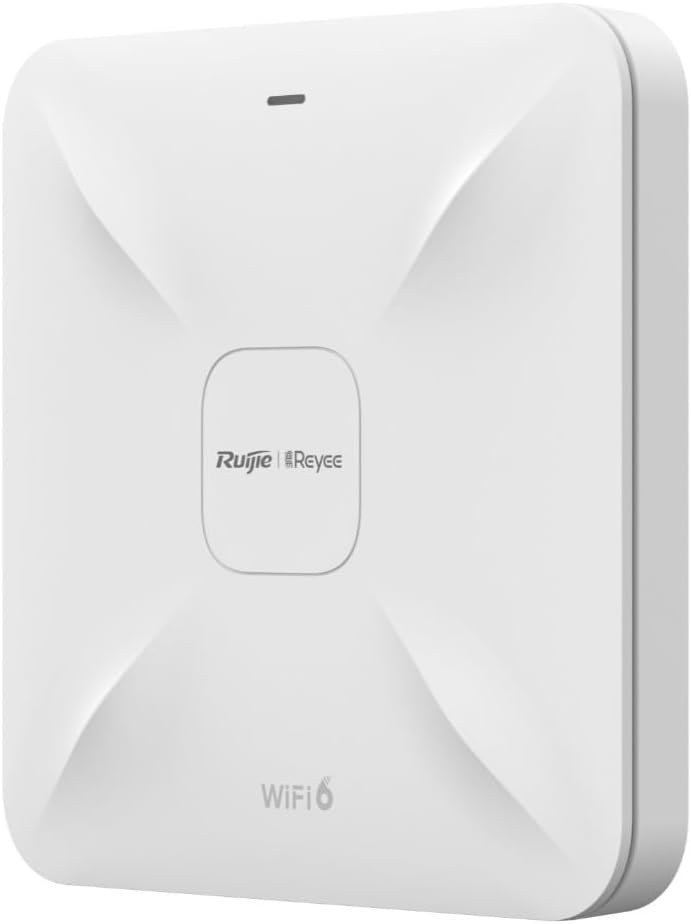
Апісанне малюнка: На гэтым малюнку паказаны пярэдні бок view of the Ruijie Reyee RG-RAP2260(G) access point. It is a square-shaped white device with a subtle X-pattern on its surface, featuring the 'Ruijie | Reyee' logo centrally and 'WiFi 6' text at the bottom. A small LED indicator is visible at the top edge.
4.2 Ззаду View і парты

Апісанне малюнка: This image shows the rear panel of the Ruijie Reyee RG-RAP2260(G) access point. It features several ports and a reset button. From left to right, the ports are labeled 'RESET', 'LAN2', 'LAN1/PoE', and 'DC=12V'. There are also mounting points visible around the perimeter.
4.3 Святлодыёдныя індыкатары
The LED indicator on the front of the device provides status information:
- Суцэльны сіні: Прылада працуе нармальна.
- Міргае сіні: Прылада загружаецца або выконвае абнаўленне прашыўкі.
- Суцэльны чырвоны: Device error or failure.
- Выключана: Прылада адключана.
5. Настройка
5.1 Мантаж кропкі доступу
- Выберыце месца: Select a central location on a ceiling or wall for optimal Wi-Fi coverage. Avoid obstructions.
- Усталюйце мантажны кранштэйн: Use the provided screws and wall plugs to securely attach the mounting bracket to the chosen surface.
- Attach Access Point: Align the access point with the mounting bracket and twist it clockwise until it locks into place.
5.2 Харчаванне прылады
The RG-RAP2260(G) can be powered in two ways:
- Харчаванне праз Ethernet (PoE): Connect an Ethernet cable from a PoE-enabled switch or injector to the LAN1/PoE port on the access point. This provides both power and data connectivity.
- Адаптар сілкавання пастаяннага току: Connect a 12V/1.5A DC power adapter (sold separately) to the DC = 12V port. Then, connect an Ethernet cable from your network to either the LAN1/PoE or ЛВС2 port for data.
5.3 Пачатковая канфігурацыя
You can configure the access point using the Reyee Cloud App or a web браўзер.
5.3.1 Using the Reyee Cloud App
- Download the Reyee Cloud App from your mobile app store.
- Register or log in to your Reyee Cloud account.
- Tap '+' to add a new device and follow the on-screen instructions to scan the QR code on the device or manually add it.
- Configure your Wi-Fi network name (SSID) and password.
5.3.2 Выкарыстанне a Web Браўзэр
- Connect your computer to the access point's network (either directly via Ethernet or to its default Wi-Fi SSID, if broadcast).
- Адкрыйце a web browser and enter the default IP address (refer to the Quick Start Guide or device label for the specific IP, commonly 192.168.1.1 or 192.168.120.1).
- Enter the default username and password (e.g., admin/admin or as specified on the device label).
- Follow the setup wizard to configure your network settings, including SSID, security type, and password.
6. Аперацыйная
6.1 Падключэнне прылад да Wi-Fi
Once configured, your Wi-Fi network will be broadcast. On your wireless devices (smartphones, laptops, tablets):
- Go to Wi-Fi settings.
- Select your configured Wi-Fi network name (SSID).
- Увядзіце пароль Wi-Fi.
- Злучыцца.
6.2 Гасцявая сетка
The RG-RAP2260(G) supports a guest network feature. This allows you to provide internet access to guests without giving them access to your main network resources. This feature can be enabled and configured through the Reyee Cloud App or the web інтэрфейс кіравання.
- Enable Guest Mode.
- Set a separate SSID and password for the guest network.
- Configure bandwidth limits or access restrictions if desired.
7. Тэхнічнае абслугоўванне
7.1 Абнаўленне прашыўкі
Regularly updating the firmware ensures optimal performance, security, and access to new features. Firmware updates can typically be managed via the Reyee Cloud App or the web management interface. It is recommended to perform updates during off-peak hours.
7.2 Ачыстка
To clean the device, gently wipe the exterior with a soft, dry cloth. Do not use liquid cleaners or abrasive materials, as they may damage the casinг або ўнутраныя кампаненты.
7.3 Скід да заводскіх налад
To restore the access point to its factory default settings:
- Пераканайцеся, што прылада ўключана.
- Знайдзіце СКІД button on the rear panel (refer to Section 4.2).
- Using a paperclip or a similar pointed object, press and hold the RESET button for approximately 5-10 seconds until the LED indicator changes.
- Адпусціце кнопку. Прылада перазагрузіцца з заводскімі наладамі па змаўчанні.
8. Выпраўленне непаладак
8.1 Няма харчавання
- Check if the power adapter is securely connected to the DC=12V port and a power outlet, or if the PoE source is active and connected to the LAN1/PoE port.
- Пераканайцеся, што разетка працуе.
8.2 Няма сігналу Wi-Fi
- Ensure the device is powered on and the LED indicator is solid blue.
- Check if the Ethernet cable is properly connected to the LAN1/PoE or LAN2 port and to your network.
- Verify Wi-Fi settings (SSID, password) in the configuration interface.
- Перазапусціце кропку доступу.
8.3 Павольная хуткасць Wi-Fi
- Check for interference from other wireless devices or networks.
- Пераканайцеся, што кропка доступу размешчана ў аптымальным месцы, без перашкод.
- Праверце хуткасць вашага інтэрнэт-правайдэра.
- Update the access point's firmware to the latest version.
9. Тэхнічныя характарыстыкі
| Асаблівасць | Спецыфікацыя |
|---|---|
| Марка | RUIJIE |
| Назва мадэлі | RG-RAP2260(G) |
| Стандарт Wi-Fi | 802.11ac, 802.11ax (Wi-Fi 6) |
| Клас дыяпазону частот | Двухдыяпазонны |
| Тэхналогія падлучэння | Wi-Fi |
| Асаблівасць | Гасцявы рэжым |
| Тып антэны | Унутраны |
| Колер | Белы |
| Сумяшчальныя прылады | All compatible devices |
| Кампаненты ў камплекце | 1 Reyee WiFi 6 Dual Band 1775 Mbps Ceiling Access Point - White |
10. Гарантыя і падтрымка
10.1 Інфармацыя аб гарантыі
This product comes with a standard manufacturer's warranty. Please refer to the warranty card included in your product packaging or visit the official Ruijie webпадрабязныя гарантыйныя ўмовы для вашага рэгіёна глядзіце на сайце.
10.2 Тэхнічная падтрымка
For technical assistance, troubleshooting, or further inquiries, please contact Ruijie Networks customer support. Support resources, including FAQs and contact details, are available on the official Ruijie webсайт:
- Webсайт: www.ruijienetworks.com
- Электронная пошта/тэлефон: Звярніцеся да webсайт для кантактнай інфармацыі ў рэгіёне.