Уводзіны
Дзякуй за пакупкуasing the Northpoint NP-TL LED Desk Lamp. This modern and versatile desk lamp is designed to provide optimal lighting for your workspace while offering convenient features such as QI wireless charging and an integrated display for time and temperature. Please read this manual carefully before use to ensure proper operation and to maximize the lifespan of your product.
Інструкцыі па тэхніцы бяспекі
- Ensure the power adapter is compatible with your local power supply before connecting.
- Не разбірайце, не рамантуйце і не мадыфікуйце лamp самастойна. Звярніцеся па дапамогу да кваліфікаванага абслугоўваючага персаналу.
- Пазбягайце размяшчэння lamp in high-temperature, humid, or dusty environments.
- Захоўвайце лamp away from water and other liquids.
- Do not look directly into the LED light source for extended periods to prevent eye strain.
- Адключыце lamp from the power outlet before cleaning or when not in use for a long time.
- Гэты прадукт прызначаны толькі для выкарыстання ў памяшканнях.
Змест пакета
Калі ласка, праверце ўпакоўку на наяўнасць наступных прадметаў:
- Northpoint NP-TL LED Desk Lamp
- 12В адаптар сілкавання
- Кіраўніцтва карыстальніка
Прадукт скончаныview
Familiarize yourself with the components of your Northpoint NP-TL LED Desk Lamp.

Выява 1: Спераду view of the Northpoint NP-TL LED Desk Lamp, showing the adjustable light head, flexible arm, integrated display, and QI wireless charging base with mood lighting.

Малюнак 2: Збоку view of the Northpoint NP-TL LED Desk Lamp, highlighting the flexible arm design and the integrated display on the lamp's body.

Image 3: The Northpoint NP-TL LED Desk Lamp in a typical desk environment, demonstrating its compact size and ambient lighting capabilities.
- Adjustable LED Head: Забяспечвае накіраванае асвятленне.
- Гнуткая рука: Allows for easy positioning of the light.
- Убудаваны дысплей: Shows time, date, and ambient temperature.
- Сэнсарная панэль кіравання: For adjusting light settings and display functions.
- QI Wireless Charging Pad: Размешчаны на падставе для сумяшчальных прылад.
- Mood Light Base: Provides ambient RGB lighting.
Настройка
- Распакуйце: Акуратна дастаньце ўсе кампаненты з упакоўкі.
- Пасада: Змесціце lamp на ўстойлівую роўную паверхню.
- Падключыце харчаванне: Insert the DC plug of the 12V power adapter into the power input port on the back of the lamp base. Plug the adapter into a standard wall outlet.
- Initial Display Setup: Upon first power-on, the display will illuminate. You may need to set the time and date using the touch controls (refer to "Operating Instructions - Display Settings").
Інструкцыя па эксплуатацыі
Функцыі святла
- Уключэнне/выключэнне харчавання: Націсніце Кнопка харчавання (
 ) on the touch control panel to turn the lamp уключана або выключана.
 - Brightness Adjustment (Dimmable): У той час як лamp уключаны, націсніце і ўтрымлівайце Кнопка яркасці (often represented by a sun icon or +/-) to smoothly adjust the light intensity. Release when the desired brightness is reached.
- Рэгуляванне каляровай тэмпературы: Націсніце Mode/Color Temperature button (often represented by a 'M' or color spectrum icon) to cycle through different color temperatures: Warm White, Neutral White, and Cool White.
QI Бесправадная зарадка
- Place your QI-compatible smartphone or device directly onto the wireless charging pad located on the lampбаза.
- Для аптымальнай зарадкі пераканайцеся, што прылада размешчана па цэнтры зараднай пляцоўкі.
- A charging indicator (if available on your device) will confirm that charging has begun.
- Remove any metallic objects or thick cases from your device that may interfere with wireless charging.
Integrated Display Settings (Time, Date, Temperature)
The integrated LCD displays time, date, and ambient temperature. Specific buttons for setting these functions are usually located near the display or on the touch panel.
- Устаноўка часу/даты: Look for buttons labeled "SET", "MODE", or similar. Typically, you press "SET" to enter setting mode, then use arrow buttons or +/- to adjust values, and "SET" again to confirm and move to the next setting (e.g., hour, minute, year, month, day).
- Дысплей тэмпературы: У лamp automatically detects and displays the ambient temperature. No manual setting is required for this function.
Асвятленне настрою
- У лamp features an integrated mood light base. Look for a dedicated Кнопка падсветкі настрою (often a color wheel or RGB icon).
- Tap the button to cycle through different static colors or activate a color-changing mode.
- Press and hold the button to turn the mood light off.
Тэхнічнае абслугоўванне
- Уборка: Адключыце сілкаванне перад чысткай. Выкарыстоўвайце мяккую сухую тканіну, каб выцерці лamp. Do not use abrasive cleaners, solvents, or harsh chemicals.
- захоўванне: Пры захоўванні lamp працяглы час, адключыце яго ад сеткі і захоўвайце ў прахалодным, сухім месцы.
- Святлодыёдная крыніца святла: Святлодыёдная крыніца святла ўбудаваная і не падлягае замене карыстальнікам.
Ліквідацыю непаладак
| праблема | Магчымая прычына | Рашэнне |
|---|---|---|
| Lamp не ўключаецца. | Няма падключэння да сілкавання. Няспраўны адаптар сілкавання. | Упэўніцеся, што адаптар сілкавання надзейна падключаны да абодвух lamp і насценную разетку. Try a different outlet. If the issue persists, contact customer support. |
| Бесправадная зарадка не працуе. | Device not QI-compatible. Прылада няправільна выраўнавана. Obstruction (e.g., thick case, metallic object). | Verify your device supports QI wireless charging. Reposition your device on the charging pad. Remove any cases or metallic objects. |
| Display shows incorrect time/date. | Time/date not set or reset after power interruption. | Refer to "Operating Instructions - Display Settings" to manually set the time and date. |
| Святло мігціць або працуе нестабільна. | Нестабільная крыніца харчавання. Праблема з унутраным кампанентам. | Паспрабуйце падключыць lamp into a different power outlet. If the problem continues, discontinue use and contact customer support. |
Тэхнічныя характарыстыкі
| Марка | Нортпойнт |
| Нумар мадэлі | NP-TL |
| Памеры прадукту (Д х Ш х У) | 16.6 х 6 х 33.5 см |
| Матэрыял | Штучная скура |
| Тып аздаблення | Leather look |
| Тып крыніцы святла | святлодыёд |
| Магутнасць | 18 ват |
| Светлавы струмень | 480 лм |
| Індэкс колераперадачы (CRI) | 80.00 |
| Асаблівасці | Dimmable, QI Wireless Charging, Temperature Display, Mood Lighting |
| Стыль пераключэння | Дакранацца |
| Рэйтынг IP | IP20 |
| тtage | 12 вольт |
| Уключаныя кампаненты | QI Charging Station, 12V Power Adapter |

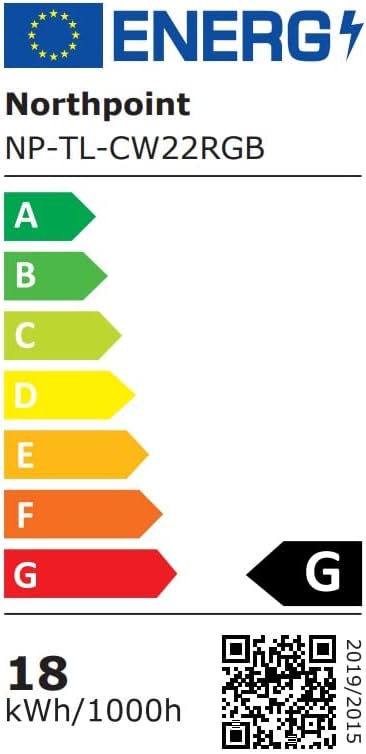
Image 4: Energy efficiency label for the Northpoint NP-TL LED Desk Lamp, indicating energy class G and 18 kWh/1000h consumption.
Гарантыя і падтрымка
Northpoint products are manufactured to high-quality standards. For warranty information or technical support, please refer to the contact details provided with your purchase documentation or visit the official Northpoint webсайт. Калі ласка, захавайце пацвярджэнне пакупкі для любых гарантыйных прэтэнзій.
Note: Information regarding spare parts availability and software updates is not available at the time of printing.