
1. Уводзіны
Thank you for choosing the LEICKE DJ Roxxx Portable Bluetooth Speaker. This manual provides essential information for setting up, operating, and maintaining your speaker. Please read it carefully before use to ensure optimal performance and longevity of your device.
2. Інструкцыі па тэхніцы бяспекі
- Не падвяргайце дынамік уздзеянню экстрэмальных тэмператур, прамых сонечных прамянёў або высокай вільготнасці.
- Пазбягайце падзення дынаміка і не падвяргайце яго моцным ударам.
- Не разбірайце і не спрабуйце рамантаваць дынамік самастойна. Гэта прывядзе да анулявання гарантыі.
- Keep the speaker away from water and liquids. While splashproof, it is not waterproof and should not be submerged.
- Выкарыстоўвайце толькі зарадны кабель, які ўваходзіць у камплект, або яго сертыфікаваны эквівалент.
3. Змесціва ўпакоўкі
Калі ласка, праверце ўпакоўку на наяўнасць наступных прадметаў:
- LEICKE DJ Roxxx Portable Bluetooth Speaker
- USB-кабель для зарадкі
- Auxiliary Audio Cable (3.5mm Stereo Plug)
- карабін
- Кіраўніцтва па эксплуатацыі
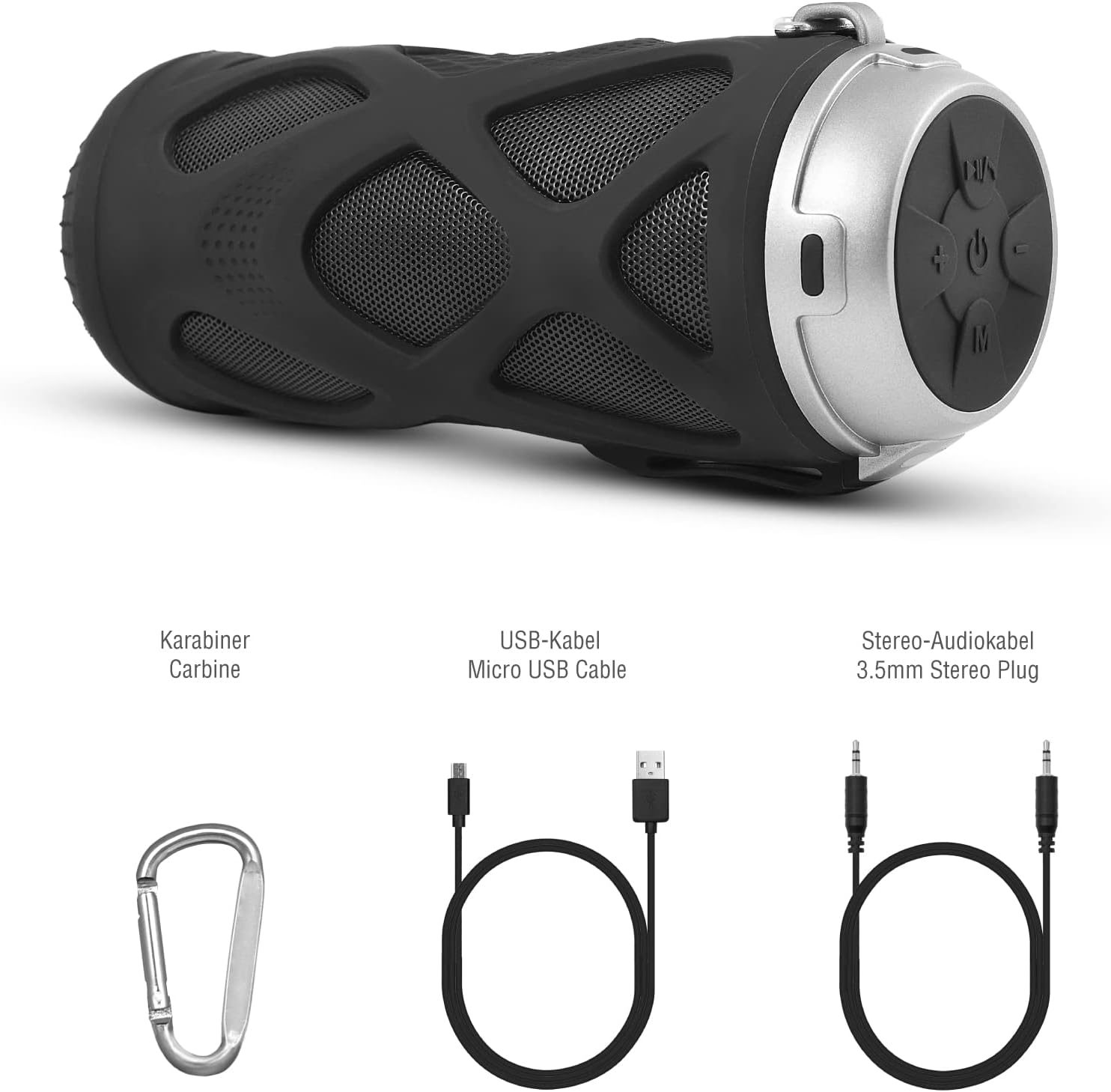
Малюнак 3.1: Аксэсуары ў камплекце
4. Прадукт скончыўсяview
4.1 Панэль кіравання

Малюнак 4.1: Макет панэлі кіравання
- Кнопка ўключэння/выключэння: Уключае або выключае дынамік.
- Play/Pause/Call/Voice Assistant Button: Controls music playback, answers/ends calls, and activates voice assistant (Siri/Google Assistant).
- Кнопка памяншэння гучнасці / папярэдняга трэка: Змяншае гучнасць або пераходзіць да папярэдняй кампазіцыі.
- Кнопка павелічэння гучнасці / наступнага трэка: Павялічвае гучнасць або пераходзіць да наступнай кампазіцыі.
- Кнопка рэжыму: Switches between Bluetooth, MicroSD/TF, Aux, and FM Radio modes.
4.2 Парты і індыкатары
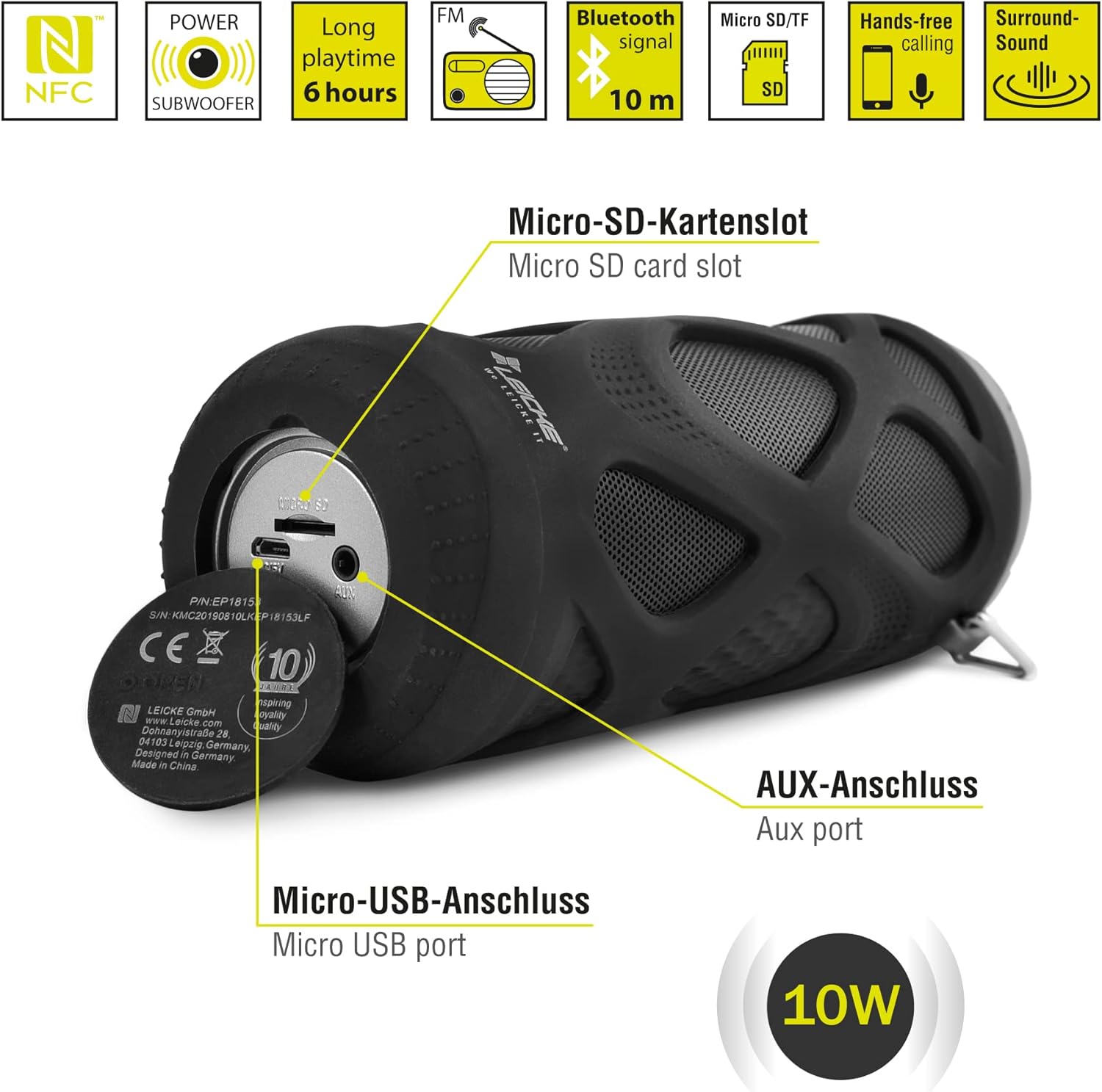
Малюнак 4.2: Парты скончаныview
- Слот для карты Micro SD/TF: Insert a Micro SD or TF card for MP3 playback.
- AUX порт: Connect external audio devices using the 3.5mm auxiliary cable.
- Порт Micro USB: Выкарыстоўваецца для зарадкі калонкі.
- Святлодыёдны індыкатар: (Typically near the charging port or control panel) Indicates power status, charging status, and Bluetooth pairing status.
5. Настройка і эксплуатацыя
5.1 Зарадка дынаміка
- Connect the Micro USB end of the charging cable to the speaker's Micro USB port.
- Падключыце канец USB-A да адаптара харчавання USB (не ўваходзіць у камплект) або да USB-порта кампутара.
- The LED indicator will typically show red while charging and turn off or change color when fully charged.
- A full charge takes approximately 2-3 hours and provides up to 6 hours of playtime.
5.2 Уключэнне/выключэнне
- Каб уключыць: Націсніце і ўтрымлівайце Кнопка ўключэння/выключэння for a few seconds until you hear an audible prompt and the LED indicator lights up.
- Каб выключыць: Націсніце і ўтрымлівайце Кнопка ўключэння/выключэння again for a few seconds until you hear an audible prompt and the LED indicator turns off.
5.3 Спалучэнне па Bluetooth
- Ensure the speaker is powered on and in Bluetooth mode (the LED indicator will typically flash blue). If not, press the Кнопка рэжыму каб пераключыцца ў рэжым Bluetooth.
- На смартфоне, планшэце або іншай прыладзе з падтрымкай Bluetooth перайдзіце ў налады Bluetooth.
- Пошук available devices and select "LEICKE DJ Roxxx" from the list.
- Once paired, the LED indicator will stop flashing and remain solid blue, and you will hear a confirmation sound.
- Пры ўключэнні дынамік аўтаматычна падключыцца да апошняй спалучанай прылады, калі прылада знаходзіцца ў зоне дзеяння і Bluetooth уключаны.
5.4 MicroSD/TF Card Playback
- Insert a Micro SD or TF card (pre-loaded with MP3 audio files) into the Micro SD/TF card slot.
- The speaker will automatically switch to MicroSD/TF mode and begin playing music. If not, press the Кнопка рэжыму to select MicroSD/TF mode.
- Выкарыстоўвайце Прайграванне/Паўза, Павялічыць гучнасць/наступны трэк, і Памяншэнне гучнасці/Папярэдні трэк кнопкі для кіравання прайграваннем.
5.5 AUX ўваход
- Connect one end of the 3.5mm auxiliary cable to the speaker's AUX port.
- Connect the other end to the headphone jack of your audio device (e.g., MP3 player, laptop).
- The speaker will automatically switch to AUX mode. If not, press the Кнопка рэжыму каб выбраць рэжым AUX.
- Volume can be controlled via the speaker or your connected device. Track control must be done from the connected device.
Праца з радыё 5.6 FM
- Націсніце Кнопка рэжыму repeatedly until you enter FM Radio mode.
- У рэжыме FM націсніце Кнопка прайгравання/паўзы once to automatically scan and save available FM stations. The speaker will then play the first saved station.
- Выкарыстоўвайце Павялічыць гучнасць/наступны трэк і Памяншэнне гучнасці/Папярэдні трэк кнопкі для пераключэння паміж захаванымі станцыямі.
5.7 Функцыя сапраўднага бесправаднога стэрэа (TWS)
The LEICKE DJ Roxxx speaker supports TWS pairing, allowing you to connect two DJ Roxxx speakers for a stereo sound experience (20W total output).

Малюнак 5.1: Сапраўднае спалучэнне бесправадной стэрэа (TWS)
- Ensure both DJ Roxxx speakers are powered on and in Bluetooth pairing mode (LED flashing blue).
- На адным з дынамікаў націсніце і ўтрымлівайце Кнопка рэжыму for a few seconds until you hear a pairing tone. The speakers will attempt to connect to each other.
- Once successfully paired, you will hear a confirmation sound, and the LED indicator on one speaker will flash blue (master), while the other will be solid blue (slave).
- Now, connect your device to the master speaker via Bluetooth as described in section 5.3. Both speakers will play audio in stereo.
6. Інструкцыя па эксплуатацыі
6.1 Прайграванне музыкі
- Прайграванне/Паўза: Націсніце Кнопка прайгравання/паўзы адзін раз.
- Наступны трэк: Націсніце і ўтрымлівайце Кнопка павелічэння гучнасці / наступнага трэка.
- Папярэдні трэк: Націсніце і ўтрымлівайце Кнопка памяншэння гучнасці / папярэдняга трэка.
- Павялічыць гучнасць: Націсніце Кнопка павелічэння гучнасці / наступнага трэка коратка.
- Паменшыць гучнасць: Націсніце Кнопка памяншэння гучнасці / папярэдняга трэка коратка.
6.2 Званкі ў рэжыме гучнай сувязі
- Адказаць на званок: Пры паступленні выкліку націсніце Кнопка прайгравання/прыпынення/выкліку адзін раз.
- Завяршыць выклік: Падчас размовы націсніце Кнопка прайгравання/прыпынення/выкліку адзін раз.
- Адхіліць выклік: When a call comes in, press and hold the Кнопка прайгравання/прыпынення/выкліку на працягу 2 секунд.
- Паўторны набор апошняга нумара: In standby mode, double-press the Кнопка прайгравання/прыпынення/выкліку.
6.3 Актывацыя галасавога памочніка
- With one click, you can activate Siri (iOS) or Google Assistant (Android) on your connected smartphone. Press the Play/Pause/Call/Voice Assistant button адзін раз, каб актываваць.
7. Тэхнічнае абслугоўванне
7.1 Ачыстка
- Працярыце дынамік мяккай, сухой або злёгку змочанай тканінайamp тканіна.
- Не выкарыстоўвайце абразіўныя ачышчальнікі, спірт або хімічныя растваральнікі, бо яны могуць пашкодзіць паверхню.
- Перад зарадкай або падключэннем іншых прылад пераканайцеся, што ўсе парты сухія.
7.2 Захоўванне
- Захоўвайце дынамік у прахалодным, сухім месцы, удалечыні ад прамых сонечных прамянёў і экстрэмальных тэмператур.
- Калі вы захоўваеце акумулятар працяглы час, зараджайце яго прыкладна да 50% кожныя некалькі месяцаў, каб падтрымліваць яго ў працоўным стане.
7.3 Воданепранікальнасць
The LEICKE DJ Roxxx speaker is designed to be splashproof, offering protection against light rain or splashes. It is не воданепранікальны and should not be submerged in water or exposed to heavy rain. Ensure the port cover is securely closed to maintain splash resistance.

Малюнак 7.1: Splashproof Design for Outdoor Use
8. Выпраўленне непаладак
| праблема | Магчымая прычына | Рашэнне |
|---|---|---|
| Дынамік не ўключаецца. | Нізкі акумулятар. | Зараджайце дынамік не менш за 30 хвілін. |
| Немагчыма падключыцца праз Bluetooth. | Дынамік не ў рэжыме спалучэння; Bluetooth прылады выключаны; занадта далёка ад прылады. | Ensure speaker is in Bluetooth mode (flashing blue LED). Turn on Bluetooth on your device. Move speaker closer to device (within 10m). Forget previous pairings on your device and try again. |
| Няма гуку. | Занадта нізкая гучнасць; няправільны рэжым; прылада не прайгравае. | Increase speaker and device volume. Ensure correct mode (Bluetooth, AUX, MicroSD). Check if audio is playing on your source device. |
| Слабы прыём FM-радыё. | Слабы сігнал; перашкоды. | Move the speaker to a different location. Re-scan for stations. |
| Карта MicroSD не распазнаецца. | Card not inserted correctly; unsupported format; corrupted files. | Устаўце карту зноў. Пераканайцеся files are in MP3 format. Try a different MicroSD card. |
9. Тэхнічныя характарыстыкі
| Назва мадэлі | Дыджэй Roxxx |
| Нумар мадэлі | B09P4Z5MN5 |
| Марка | ЛЕЙКЕ |
| Тэхналогія падлучэння | Bluetooth |
| Тэхналогія бесправадной сувязі | Bluetooth |
| Тып дынаміка | Партатыўная калонка Bluetooth |
| Максімальная выходная магутнасць дынаміка | 10 ват |
| Метад кантролю | Тактыльныя кнопкі |
| Асаблівасці | Integrated Microphone, Portable Wireless, MicroSD/TF Player, Aux Input, FM Radio, Hands-Free Calling, Voice Assistant Support, TWS Function, Splashproof |
| Крыніца харчавання | Электрычны кабель (акумулятарная батарэя) |
| Памеры прадукту (Д х Ш х У) | 7 х 7 х 18 см |
| Вага прадмета | 400 грамаў |
| Рэкамендуемае выкарыстанне | Для смартфона або планшэта |
| Сумяшчальныя прылады | Ноўтбук, смартфон |
| Воданепранікальны | False (Splashproof only) |
10. Гарантыя і падтрымка
LEICKE products come with a standard manufacturer's warranty. For detailed warranty information, please refer to the warranty card included in your package or visit the official LEICKE webсайт.
If you encounter any issues or have questions regarding your LEICKE DJ Roxxx speaker, please contact LEICKE customer support:
- вытворца: ЛЕЙКЕ
- Прадавец: LEICKE - Leipzig (as per Amazon listing)
- падтрымка: Refer to the official LEICKE website or contact information provided with your purchase for the most up-to-date support channels.