
1. Уводзіны
Thank you for choosing the Maclean MC-898 Professional Microphone Boom Arm. This manual provides essential information for the safe and efficient installation, operation, and maintenance of your new microphone stand. Please read this manual thoroughly before use and retain it for future reference.
The Maclean MC-898 is designed for professional audio applications, offering high stability, a robust construction, and integrated cable management. Its adjustable design allows for precise microphone positioning, making it ideal for studios, podcasts, streaming, and voice-overs.
2. Інструкцыі па тэхніцы бяспекі
- Пераканайцеся, што стол клamp is securely fastened to a stable surface before attaching the boom arm.
- Do not exceed the maximum recommended microphone weight of 1 kg.
- Avoid over-tightening adjustment knobs, as this may damage the mechanism.
- Падчас рэгулявання трымайце пальцы далей ад рухомых частак, каб пазбегнуць заціскання.
- Не спрабуйце мадыфікаваць прадукт. Любыя мадыфікацыі могуць ануляваць гарантыю і стварыць пагрозу бяспецы.
- Трымайце прадукт далей ад дзяцей, каб прадухіліць няшчасныя выпадкі.
3. Змесціва ўпакоўкі
Калі ласка, праверце наяўнасць і спраўнасць усіх кампанентаў:
- Рычаг мікрафона
- Настольны клamp
- Integrated Cable Management System (clips)
- 3/8" to 5/8" Microphone Thread Adapter
4. Настройка і ўстаноўка
4.1 Attaching the Desk Clamp
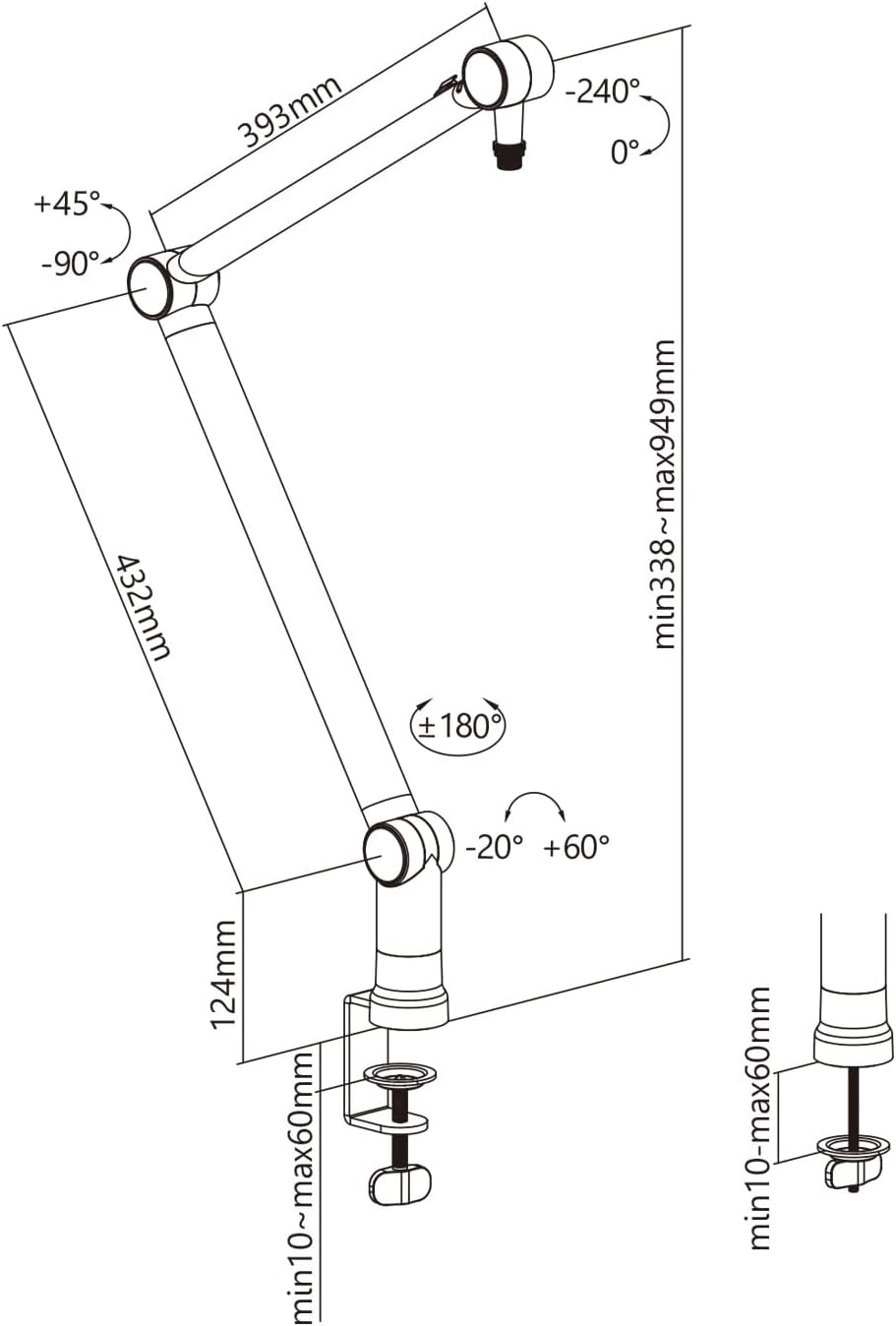
- Choose a sturdy desk or table surface with a thickness between 10mm and 60mm.
- Месца пісьмовага стала клamp onto the edge of the chosen surface.
- Tighten the screw mechanism on the clamp until it is firmly secured to the desk. Ensure it does not wobble.

4.2 Mounting the Boom Arm
- Insert the base pin of the microphone boom arm into the hole on the top of the securely fastened desk clamp.
- Ensure the arm is fully seated and can rotate freely within the clamp.
4.3 Падключэнне мікрафона
- Identify the thread size of your microphone or shock mount. The boom arm features a 5/8" thread.
- If your microphone requires a 3/8" thread, use the included 3/8" to 5/8" adapter by screwing it onto the boom arm's thread first, then attach your microphone or shock mount.
- Carefully screw your microphone or shock mount onto the boom arm's thread until it is secure. Do not overtighten.


4.4 Арганізацыя кабеляў
- Route your microphone cable along the boom arm.
- Utilize the integrated cable management clips to secure the cable neatly along the arm, preventing tangles and ensuring a clean setup.

5. Інструкцыя па эксплуатацыі
5.1 Adjusting the Arm Position
The Maclean MC-898 features multiple adjustable joints for flexible positioning:
- Кручэнне: The arm can rotate 360 degrees at its base connection to the desk clamp.
- Рэгуляванне кута: The joints along the arm allow for tilting and angling. Loosen the adjustment knobs at each joint, position the arm as desired, and then tighten the knobs to secure it.
- Рэгуляванне вышыні: The arm's height can be adjusted within a range of 338mm to 949mm. Adjust the angles at the joints to achieve the desired height and reach.

5.2 Optimal Microphone Placement
Position your microphone to capture the best audio quality while maintaining comfort. Experiment with different distances and angles relative to the sound source (e.g., your mouth) to find the ideal setup for your specific needs.
6. Тэхнічнае абслугоўванне
- Уборка: Wipe the boom arm with a soft, dry cloth to remove dust. For stubborn marks, use a slightly damp тканінай і мяккім мылам, затым старанна высушыце. Пазбягайце абразіўных ачышчальнікаў.
- Joints and Fasteners: Periodically check all screws and adjustment knobs to ensure they are tight. If the arm feels loose, gently tighten the relevant fasteners.
- Кабельнае кіраванне: Ensure cables are properly routed and not pinched or excessively bent, which could lead to damage.
7. Выпраўленне непаладак
- Рука не ўтрымлівае становішча: Ensure all adjustment knobs are sufficiently tightened. If the issue persists, check the weight of your microphone; it may exceed the maximum capacity of 1 kg.
- Arm feels wobbly: Пераканайцеся, што стол чысціццаamp is securely fastened to the desk and that the boom arm is fully inserted into the clamp's receiver.
- Difficulty rotating the arm: Check for any obstructions around the base or joints. Ensure no cables are caught in the rotation mechanism.
8. Тэхнічныя характарыстыкі
| Асаблівасць | Спецыфікацыя |
|---|---|
| Нумар мадэлі | МС-898 |
| Матэрыял | Метал |
| Колер | Чорны |
| Максімальная рэкамендаваная вага | 1 кг (1000 грамаў) |
| Рэгуляваны дыяпазон вышыні | 338 мм да 949 мм |
| Microphone Thread Size | 3/8 inch, 5/8 inch (with adapter) |
| Настольны клamp Дыяпазон таўшчыні | 10 мм да 60 мм |
| Памеры прадукту (Д х Ш х У) | 75 х 10 х 10 см |
| Вага прадукту | 1.7 кг |
| Інтэграваныя функцыі | Сістэма кіравання кабелем |
9. Гарантыя і падтрымка
Maclean products are designed for durability and performance. This product comes with a standard manufacturer's warranty against defects in materials and workmanship. For specific warranty terms and conditions, please refer to the documentation provided at the time of purchase or contact your retailer.
For technical support, troubleshooting assistance, or inquiries regarding replacement parts, please contact Maclean customer service through your point of purchase or visit the official Maclean webсайт.