
Strong Leap-S1+
Кіраўніцтва карыстальніка прыстаўкі STRONG Leap-S1+ для Android TV
Model: LEAP-S1+ | Brand: STRONG
1. Уводзіны
The STRONG LEAP-S1+ Android TV Box transforms your television into a smart TV, providing direct access to the Google Play Store. Running on the latest Android 10, this Google-certified device offers a vast array of applications, games, and streaming services. Enjoy your favorite content from platforms like Netflix, YouTube, Prime Video, and Disney+. The LEAP-S1+ supports 4K UHD resolution, H.265 decoding, dual-band Wi-Fi 5, and built-in Chromecast functionality. Its integrated Google Assistant allows for voice control of playback, searching for shows, and answering queries. Connectivity options include 2 USB ports (1 x 3.0, 1 x 2.0), Bluetooth 4.2, a Micro SD card slot, HDMI, and Ethernet, ensuring a comprehensive and user-friendly TV experience.

Image: The STRONG Leap-S1+ Android TV Box and its accompanying remote control, showcasinэлегантны дызайн абодвух кампанентаў.
2. Змесціва ўпакоўкі
Калі ласка, уважліва праверце змесціва ўпакоўкі. Калі якія-небудзь прадметы адсутнічаюць або пашкоджаныя, звярніцеся да прадаўца.
- STRONG LEAP-S1+ Android TV Box
- Bluetooth Remote Control (requires 2 AAA batteries, often included)
- Адаптар сілкавання
- Кабель HDMI
- Кароткае кіраўніцтва

Image: An illustration showing the contents of the STRONG Leap-S1+ package, including the TV box, Bluetooth remote control, power adapter, and HDMI cable.
3. Пачатковая налада
Follow these steps to set up your STRONG LEAP-S1+ Android TV Box:
- Падключэнне да тэлевізара: Connect one end of the HDMI cable to the HDMI OUT port on the LEAP-S1+ box and the other end to an available HDMI IN port on your television.
- Падключыце харчаванне: Plug the power adapter into the DC IN port on the LEAP-S1+ box, then plug the adapter into a wall outlet.
- Уключэнне: The device should power on automatically. If not, press the Power button on the remote control or the device.
- Першапачатковая канфігурацыя: Выконвайце інструкцыі на экране, каб завяршыць пачатковую наладу, якая ўключае ў сябе:
- Pairing the Bluetooth remote control.
- Выбар мовы.
- Connecting to your Wi-Fi network or Ethernet.
- Уваход з дапамогай вашага ўліковага запісу Google.
- Installing essential apps.
- Падключэнне да сеткі: For optimal performance, connect the device to your home network. You can use Wi-Fi (supports 2.4GHz and 5GHz) or an Ethernet cable for a wired connection.

Image: Visual representation of the STRONG Leap-S1+ supporting both 2.4GHz and 5GHz Wi-Fi bands for stable internet connectivity.
4. Інструкцыя па эксплуатацыі
4.1. Навігацыя па Android TV
The Android TV interface is designed for easy navigation. Use the directional pad on your remote to move between apps, content, and settings.
- Галоўны экран: Паказвае рэкамендаваны кантэнт, усталяваныя праграмы і крыніцы ўводу.
- Праграмы: Доступ да ўсіх усталяваных праграм.
- Налады: Configure network, display, sound, accounts, and device preferences.

Image: A screenshot of the Android TV home screen, showing various streaming apps and content recommendations, as seen on the STRONG Leap-S1+.
4.2. Выкарыстанне Google Assistant
The remote control features a dedicated Google Assistant button. Press and hold this button to activate voice commands.
- Search Content: Say "Find action movies" or "Play The Crown."
- Кіраванне прайграваннем: Say "Pause," "Resume," "Fast forward 30 seconds."
- Open Apps: Say "Open Netflix" or "Launch YouTube."
- Get Information: Ask "What's the weather?" or "Tell me about the Eiffel Tower."

Image: The remote control with an overlay indicating the Google Voice Assistant functionality, demonstrating how to use voice commands to control the TV box.
4.3. Стрымінгавыя сэрвісы
The LEAP-S1+ comes with pre-installed apps for popular streaming services and allows you to download more from the Google Play Store.
- Netflix, Prime Video, Disney+, YouTube: Access these services directly using the dedicated buttons on the remote or by selecting their apps.
- Крама Google Play: Спампуйце тысячы дадатковых праграм, гульняў і кантэнту.
- Убудаваны Chromecast: Cast content from your compatible smartphone, tablet, or computer directly to your TV via the LEAP-S1+.

Image: The STRONG Leap-S1+ box and remote, surrounded by logos of supported streaming services and features like Netflix, YouTube, Zattoo, Google Play, Prime Video, Disney+, Dolby Atmos, Dolby Audio, 4K Ultra HD, Chromecast built-in, and Google Assistant.

Image: A collage of various streaming service logos and movie/TV show thumbnails, illustrating the vast content library available through the Android TV platform on the LEAP-S1+.
5. Падключэнне і парты
The STRONG LEAP-S1+ offers a variety of ports for connecting external devices and ensuring robust network connectivity.
- Выхад HDMI: Для падлучэння да тэлевізара або дысплея.
- Порт USB 3.0: High-speed data transfer for external storage devices.
- Порт USB 2.0: For connecting peripherals like keyboards, mice, or additional storage.
- Слот для карты Micro SD: Expand storage for apps and media.
- Порт Ethernet (LAN): For a stable wired internet connection (10/100 Mbps).
- Лічбавы аўдыявыхад (аптычны): Для падлучэння да знешніх аўдыёсістэм або саўндбараў.
- Аўдыё/відэа выхад: For older TVs using analog connections.
- IR (Infrared) Port: For external IR receiver.
- Кнопка харчавання: Каб уключыць/выключыць прыладу.
- Уваход адаптара сілкавання: Для падключэння блока харчавання.
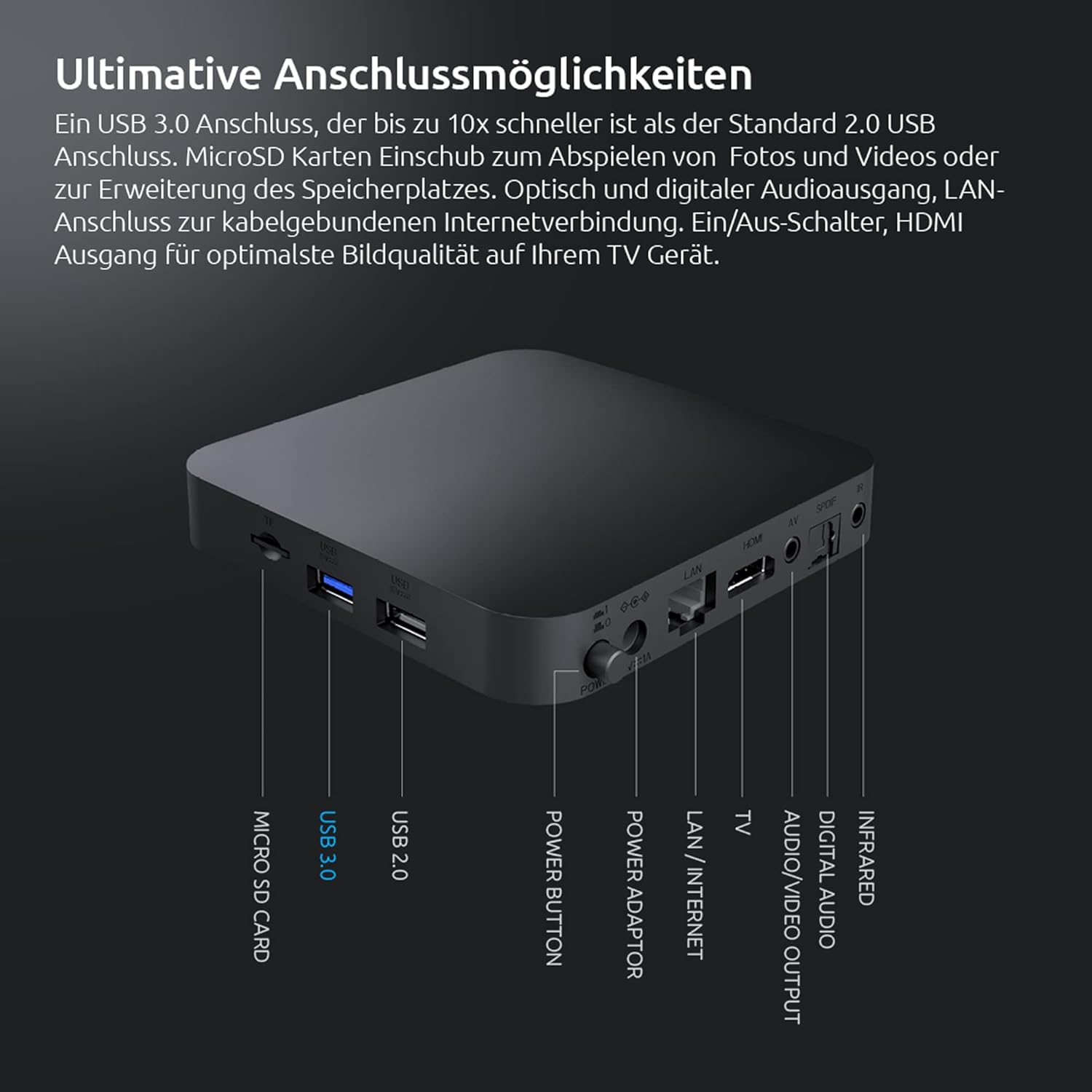
Image: A detailed diagram of the rear and side ports on the STRONG Leap-S1+ Android TV Box, labeling Micro SD Card, USB 3.0, USB 2.0, Power Button, Power Adaptor, LAN/Internet, TV (A/V), Digital Audio, Infrared, and HDMI ports.
6. Тэхнічныя характарыстыкі
| Асаблівасць | Спецыфікацыя |
|---|---|
| Назва мадэлі | Leap-S1+ |
| Марка | Моцны |
| Аперацыйная сістэма | Android TV 10.0 |
| дазвол | 4K UHD (3840 x 2160 pixels) with HDR10 |
| Працэсар | Quad Core Cortex-A53 (1.8 GHz) |
| Памяць | Аператыўная памяць DDR4 |
| Унутраная памяць | Expandable via Micro SD card |
| Падключэнне да Wi-Fi | Dual-band Wi-Fi 5 (2.4GHz & 5GHz) |
| Bluetooth | Bluetooth 4.2 |
| Парты USB | 1 х USB 3.0, 1 х USB 2.0 |
| Дэкадаванне відэа | H.265 |
| Асаблівасці | Chromecast Built-in, Google Voice Assistant, Netflix, Prime Video, YouTube, Disney+ support |

Image: A visual representation of the powerful Quad-Core A53 1.8 GHz processor, highlighting the internal hardware that ensures smooth performance for the STRONG Leap-S1+.
7. Выпраўленне непаладак
If you encounter issues with your STRONG LEAP-S1+ Android TV Box, try the following solutions:
- Няма харчавання:
- Пераканайцеся, што адаптар сілкавання надзейна падключаны да прылады і да спраўнай разеткі.
- Паспрабуйце іншую разетку.
- Няма выявы/гуку:
- Check HDMI cable connections at both the TV box and the TV.
- Пераканайцеся, што ваш тэлевізар настроены на правільную крыніцу ўваходнага сігналу HDMI.
- Restart the TV box by unplugging it for 10 seconds and plugging it back in.
- Check TV volume and audio settings.
- Пульт дыстанцыйнага кіравання не адказвае:
- Замяніце батарэйкі ў пульце дыстанцыйнага кіравання.
- Ensure there are no obstructions between the remote and the TV box.
- Re-pair the Bluetooth remote control if necessary (refer to initial setup or device settings).
- Праблемы з падключэннем да сеткі:
- For Wi-Fi, check your router and ensure it's broadcasting. Try restarting your router.
- If using Ethernet, ensure the cable is securely connected to both the box and your router.
- Go to Network settings on the device and try reconnecting or forgetting and re-adding the network.
- Завісанне/збой праграмы:
- Зачыніце і зноў адкрыйце праграму.
- Ачысціце кэш і дадзеныя праграмы ў Налады > Праграмы.
- Пераканайцеся, што праграма абноўлена да апошняй версіі з Google Play Store.
8. Догляд і абслугоўванне
To ensure the longevity and optimal performance of your STRONG LEAP-S1+ Android TV Box, follow these care guidelines:
- Уборка: Для чысткі прылады выкарыстоўвайце мяккую, сухую тканіну без ворса. Не выкарыстоўвайце вадкія ачышчальнікі або аэразолі.
- Размяшчэнне: Place the device on a stable, flat surface with adequate ventilation. Avoid placing it in direct sunlight, near heat sources, or in humid environments.
- Вентыляцыя: Do not block any ventilation openings. Proper airflow prevents overheating.
- Выключаць, калі не выкарыстоўваецца: If you plan not to use the device for an extended period, it is advisable to unplug it from the power outlet.
- Абнаўленні праграмнага забеспячэння: Regularly check for and install software updates to ensure the device has the latest features and security patches.
9. Гарантыя і падтрымка
Information regarding specific warranty terms and conditions for the STRONG LEAP-S1+ Android TV Box is typically provided with your purchase documentation or can be found on the official STRONG webсайт.
For technical support, product registration, or further assistance, please refer to the contact information provided by STRONG in your product packaging or visit their official support channels.
Note: Specific warranty duration and support contact details are not available in this manual. Please consult your product's official documentation.