
1. Уводзіны
This manual provides essential information for setting up, operating, maintaining, and troubleshooting your MEDION Akoya S3003 Desktop PC. Please read this manual thoroughly before using your device to ensure proper function and safety.

Выява 1.1: Спераду view of the MEDION Akoya S3003 Desktop PC, showcasinдзякуючы кампактнаму дызайну і пярэднім партам.
2. Інфармацыя па бяспецы
Observe the following safety guidelines to prevent damage to your device and ensure personal safety:
- Не падвяргайце прыладу ўздзеянню экстрэмальных тэмператур, вільготнасці або прамых сонечных прамянёў.
- Трымайце прыладу далей ад вадкасці і вільгаці.
- Забяспечце належную вентыляцыю, каб прадухіліць перагрэў. Не закрывайце вентыляцыйныя адтуліны.
- Выкарыстоўвайце толькі адаптар сілкавання, які пастаўляецца з прыладай.
- Не спрабуйце адкрываць або рамантаваць прыладу самастойна. Звяртайцеся да кваліфікаванага персаналу па любыя паслугі па абслугоўванні.
- Disconnect the power cable before cleaning or if the device will not be used for an extended period.
3. Прадукт скончыўсяview
Familiarize yourself with the components and ports of your MEDION Akoya S3003 Desktop PC.
3.1 Пярэдняя панэль

Малюнак 3.1: Пад вуглом view of the front panel, highlighting accessible ports.
- Кнопка харчавання: Каб уключыць або выключыць ПК.
- Парты USB: Для падключэння USB-прылад, такіх як клавіятуры, мышы або знешнія назапашвальнікі.
- Аўдыёраздымы: Headphone output and microphone input.
3.2 Задняя панэль

Малюнак 3.2: ззаду view of the PC, showing various connectivity options.
- 4 х USB 3.2 Gen 2 тыпу A: Высокахуткасныя USB-порты для перыферыйных прылад.
- 1 x HDMI-out: Для падлучэння да манітора або дысплея.
- 1 x VGA: For connecting to older monitors or displays.
- 1 x RJ45 GigaLAN: Для падлучэння да правадной сеткі.
- 1 x Mikrofon-In: Мікрафонны ўваход.
- 1 x Audio Line-out: Audio output for speakers or headphones.
- 1 x Netzteilananschluss (Power Adapter Connection): Для падключэння блока харчавання.
3.3 Dimensions and VESA Mounting
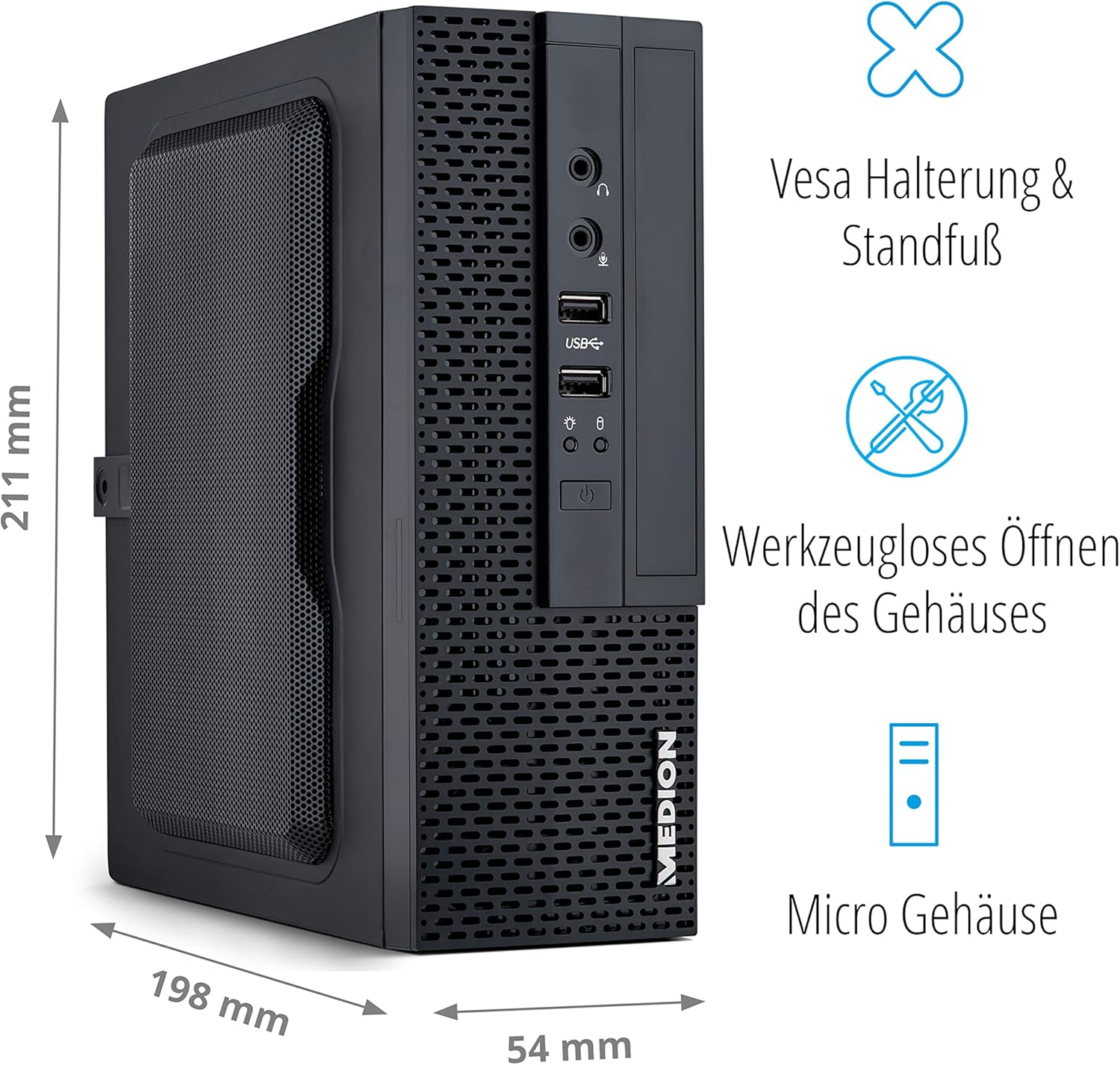
Image 3.3: Illustration showing the compact dimensions (211mm H x 198mm D x 54mm W) and VESA mounting capability of the PC.
The MEDION Akoya S3003 features a compact micro-case design, measuring approximately 211 mm in height, 198 mm in depth, and 54 mm in width. It supports VESA mounting, allowing it to be attached to the back of a compatible monitor or other VESA-compatible surfaces for space-saving installation. The case is designed for tool-less opening for easier access to internal components.

Image 3.4: A VESA mount bracket, illustrating the mounting mechanism.
4. Інструкцыі па ўсталёўцы
Follow these steps to set up your MEDION Akoya S3003 Desktop PC.
- Распакуйце ПК: Асцярожна дастаньце ПК і ўсе аксэсуары з упакоўкі.
- Падключэнне перыферыйных прылад:
- Connect your monitor(s) to the HDMI or VGA ports on the rear panel.
- Connect your keyboard and mouse to the available USB ports (front or rear).
- If using wired internet, connect an Ethernet cable to the RJ45 GigaLAN port.
- Connect speakers or headphones to the audio line-out port if desired.
- Падключыце харчаванне: Plug the power adapter into the power adapter connection on the rear panel, then plug the other end into a wall outlet.
- Уключэнне: Press the power button on the front panel to turn on the PC.
- Пачатковая ўстаноўка Windows: Выконвайце інструкцыі на экране, каб завяршыць наладу Windows 10 Home, у тым ліку мову, рэгіён, сеткавае падключэнне і стварэнне ўліковага запісу карыстальніка.

Image 4.1: Diagram illustrating how to connect peripherals like monitors, projectors, printers, and headsets to the MEDION Akoya S3003.
5. Інструкцыя па эксплуатацыі
Your MEDION Akoya S3003 comes pre-installed with Windows 10 Home, powered by an Intel Core i5 processor and a 512 GB SSD.
5.1 Асноўныя аперацыі
- Уключэнне/выключэнне харчавання: Націсніце кнопку харчавання, каб уключыць. Каб выключыць кампутар, націсніце кнопку «Пуск» у Windows, а затым «Харчаванне» > «Выключыць кампутар».
- Перазапуск: У меню «Пуск» абярыце «Харчаванне» > «Перазагрузка».
- Рэжым сну: У меню «Пуск» абярыце «Харчаванне» > «Сон».

Працэсар Intel Core i5

Аперацыйная сістэма Windows 10 Home

Fast SSD Storage

Сістэмная памяць (RAM)
5.2 Падключэнне да сеткі
- Правадное злучэнне: Connect an Ethernet cable to the RJ45 port on the rear panel. Windows will automatically detect the connection.
- Wireless Connection (WLAN):
- Click the network icon in the Windows taskbar.
- Выберыце патрэбную сетку Wi-Fi са спісу.
- Увядзіце ключ бяспекі сеткі (пароль), калі будзе прапанавана.
- Націсніце «Падключыцца».

Image 5.1: Graphic representing WLAN connectivity.
6. Тэхнічнае абслугоўванне
Рэгулярнае тэхнічнае абслугоўванне дапамагае забяспечыць даўгавечнасць і аптымальную прадукцыйнасць вашага ПК.
- Уборка:
- Выкарыстоўвайце мяккую, сухую тканіну для ачысткі вонкавага корпуса ПК.
- Для ўстойлівага бруду злёгку ачысціцеampпрамыйце тканіну вадой. Пазбягайце агрэсіўных хімічных рэчываў.
- Use compressed air to gently clear dust from ventilation openings.
- Абнаўленні праграмнага забеспячэння: Рэгулярна правярайце наяўнасць абнаўленняў і драйвераў Windows і ўсталёўвайце іх, каб забяспечыць стабільнасць і бяспеку сістэмы.
- Рэзервовае капіраванне даных: Перыядычна рабіце рэзервовыя копіі важных дадзеных на знешні дыск або ў воблачнае сховішча, каб прадухіліць іх страту.
- Антывіруснае праграмнае забеспячэнне: Keep your antivirus software (e.g., McAfee, if pre-installed) up to date to protect against malware.

Image 6.1: McAfee antivirus software logo, indicating potential pre-installed security.
7. Выпраўленне непаладак
У гэтым раздзеле разглядаюцца распаўсюджаныя праблемы, з якімі вы можаце сутыкнуцца.
| праблема | Магчымая прычына | Рашэнне |
|---|---|---|
| ПК не ўключаецца. | Не падключаны кабель харчавання, праблема з разеткай. | Ensure power cable is securely connected to both the PC and a working power outlet. Test the outlet with another device. |
| Няма адлюстравання на маніторы. | Monitor not connected, incorrect input selected, monitor power off. | Check monitor cable connections (HDMI/VGA). Ensure monitor is powered on and set to the correct input source. |
| Няма падключэння да інтэрнэту. | Ethernet cable loose, Wi-Fi disconnected, router issue. | For wired: Check Ethernet cable. For Wi-Fi: Reconnect to network, verify password. Restart your router/modem. |
| PC is running slow. | Занадта шмат запушчаных праграм, мала месца на дыску, шкоднасныя праграмы. | Закрыйце непатрэбныя праграмы. Вызваліце месца на дыску. Запусціце поўную праверку сістэмы з дапамогай антывіруснага праграмнага забеспячэння. Праверце наяўнасць абнаўленняў Windows. |
8. Тэхнічныя характарыстыкі
Key technical specifications for the MEDION Akoya S3003 Desktop PC.
| Асаблівасць | Дэталь |
|---|---|
| Нумар мадэлі | S30003 |
| Марка | MEDION |
| Працэсар | Intel Core i5 |
| Аперацыйная сістэма | Windows 10 хатняя |
| Захоўванне | 512 ГБ SSD |
| АЗП | 8 ГБ |
| Approximate Case Dimensions (H x D x W) | 211 мм x 198 мм x 54 мм |
| Вага | 2.5 кілаграма |
| Колер | Чорны |
| Сувязь | 4x USB 3.2 Gen 2 Type-A, 1x HDMI-out, 1x VGA, 1x RJ45 GigaLAN, 1x Microphone-In, 1x Audio Line-out, WLAN |
| Асаблівасці | VESA mount support, Tool-less case opening |
9. Гарантыя і падтрымка
Your MEDION Akoya S3003 Desktop PC is covered by a manufacturer's warranty. For detailed warranty terms and conditions, please refer to the documentation included with your product or visit the official MEDION webсайт.
For technical support, driver downloads, or service inquiries, please contact MEDION customer support through their official channels.
Афіцыйны прадстаўнік MEDION Webсайт: www.medion.com