
Прадукт скончаныview
The Link2Home Space Saver Pop Up Socket is a versatile power solution designed for various environments such as kitchen countertops, conference rooms, and office tables. It features a retractable design for a clean aesthetic, providing convenient access to power outlets and USB charging ports when needed. This unit includes 3 grounded outlets, 1 USB-A port, and 1 USB-C port, offering a total of 3.0 Amp charging capability. Its splash-resistant construction ensures durability and safety in areas prone to moisture.

Image: The Link2Home Pop Up Socket seamlessly integrates into diverse environments, providing power in kitchens, workshops, office spaces, and communal areas.
Асноўныя характарыстыкі
- Дызайн, які эканоміць месца: Fully retractable unit that sinks to only 4.0 inches beneath the countertop when concealed.
- Некалькі варыянтаў харчавання: Equipped with 3 grounded AC outlets, 1 USB-A port, and 1 USB-C port for comprehensive charging.
- Хуткая зарадка: USB ports provide a total of 3.0 Amp output for efficient device charging.
- Устойлівы да пырскаў: Designed to withstand splashes, making it suitable for kitchen and other moisture-prone areas.
- Трывалая канструкцыя: Features a stainless-steel finish for a sleek appearance and long-lasting use.
- Абарона ад перагрузкі: Integrated safety features to protect connected devices from power surges.
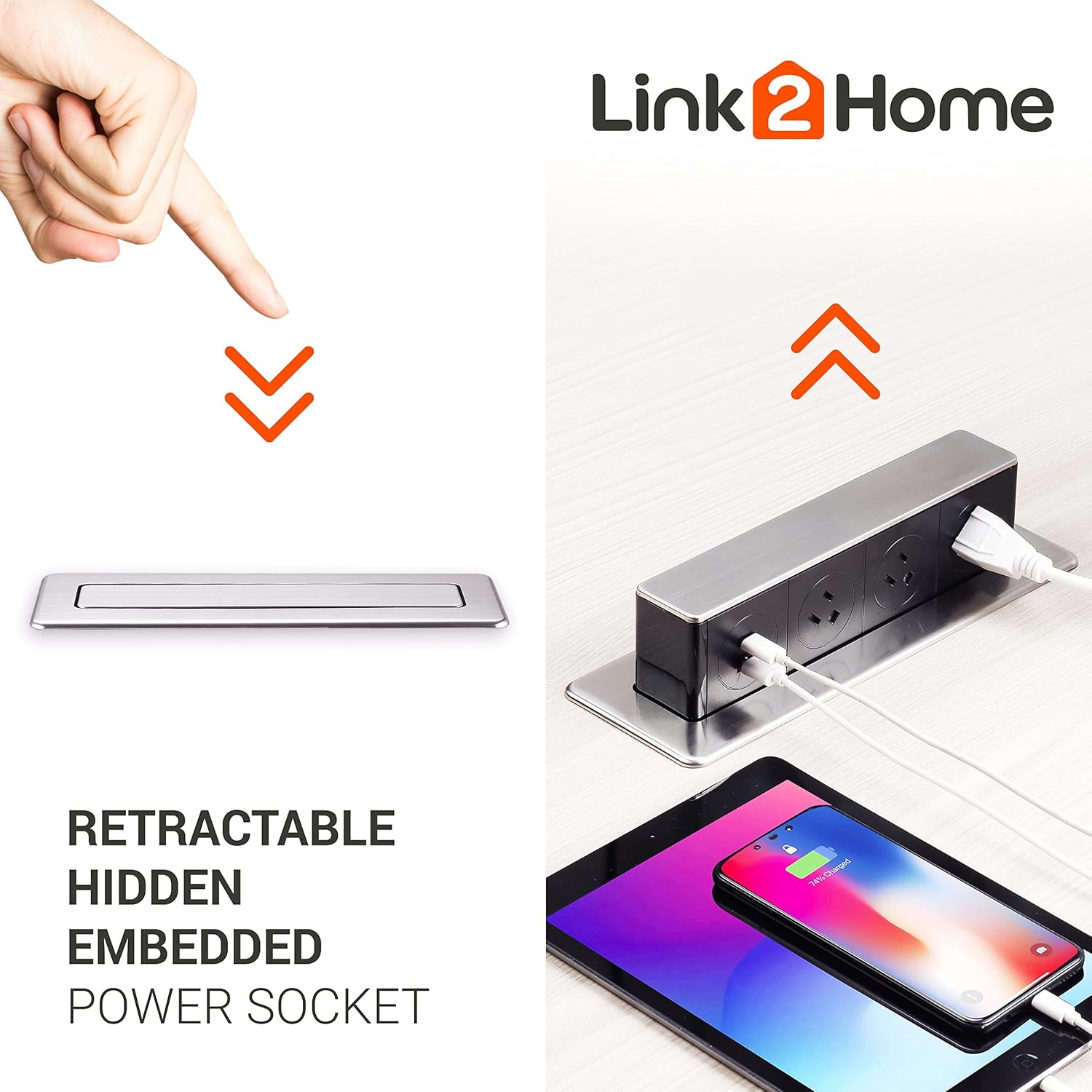
Image: The retractable design allows the power socket to be hidden when not in use, maintaining a clean surface. It pops up to reveal outlets and USB ports for charging multiple devices.
Настройка і ўстаноўка
Installation of the Link2Home Space Saver Pop Up Socket requires basic tools and adherence to safety guidelines. Ensure power is disconnected before beginning installation.
Этапы ўстаноўкі:
- Падрыхтуйце адкрыццё: Drill a rectangular hole with dimensions of 9.72 inches by 2.36 inches (approximately 24.7 cm x 6 cm) in your desired surface (e.g., countertop, desk) using a jigsaw. Ensure the location allows for the unit to fully retract and for the power cable to reach an existing outlet.
- Insert the Unit: Feed the power cable through the prepared hole. Slide the main body of the pop-up socket from the top into the opening.
- Забяспечце прыладу: From underneath the surface, push up the locking clips firmly to secure the device in place. Ensure the unit is flush with the surface.
- Падключыце харчаванне: Plug the unit's power cord into a standard wall outlet. The cable length is 6 feet (14 AWG).
Video: This official seller video demonstrates the installation process of the Link2Home Pop Up Socket, including drilling the opening, inserting the unit, securing it, and connecting the power. It also highlights key features like the stainless steel finish, 3 grounded outlets, 2 USB ports, and overload protection.

Image: The Link2Home Pop Up Socket shown with its integrated power cord, ready for installation and connection to a power source.
Інструкцыя па эксплуатацыі
The Link2Home Pop Up Socket is designed for simple and intuitive operation.
To Extend the Socket:
- Gently press down on the top surface of the concealed unit. The unit will slowly rise, revealing the power outlets and USB ports.
To Retract the Socket:
- Once you are finished using the outlets, unplug all devices.
- Gently push down on the top surface of the extended unit until it locks into its concealed position, flush with the surface.
Using the Outlets and USB Ports:
- Plug your AC-powered devices into the 3 grounded outlets.
- Connect your USB-A or USB-C compatible devices to the respective USB ports for charging.

Image: The Link2Home Pop Up Socket in use on an office desk, providing convenient power access for a computer and other devices.
Тэхнічнае абслугоўванне
To ensure the longevity and proper functioning of your Link2Home Pop Up Socket, follow these maintenance guidelines:
- Уборка: Regularly wipe the exposed surfaces with a soft, damp cloth. Avoid abrasive cleaners or solvents that could damage the finish. Ensure the unit is dry before retracting or using.
- Устойлівасць да пырскаў: While the unit is splash-resistant, it is not waterproof. Avoid submerging the unit or exposing it to excessive amounts of liquid. In case of spills, unplug the unit immediately and allow it to dry completely before reuse.
- Праверка механізму: Periodically check the pop-up mechanism for smooth operation. If it becomes stiff or difficult to operate, ensure there are no obstructions. Do not force the mechanism.

Image: The splash-proof design of the Link2Home Pop Up Socket provides protection against accidental water splashes, making it suitable for kitchen environments.
Ліквідацыю непаладак
If you encounter issues with your Link2Home Pop Up Socket, refer to the following common problems and solutions:
| праблема | Магчымая прычына | Рашэнне |
|---|---|---|
| Unit does not pop up or retract smoothly. | Obstruction in the mechanism; debris; improper installation. | Check for any foreign objects obstructing the movement. Ensure the locking clips underneath are not overly tightened or misaligned. |
| No power from AC outlets or USB ports. | Unit not plugged in; tripped circuit breaker; internal fault; overload protection activated. | Verify the main power cord is securely plugged into a live wall outlet. Check your home's circuit breaker. Reduce the number of connected devices to avoid overloading. If the issue persists, contact customer support. |
| Зарадка праз USB павольная або не працуе. | Damaged USB cable; device incompatibility; excessive power draw. | Try a different USB cable and device. Ensure the device is compatible with standard USB charging. The total USB output is 3.0 Amp; charging multiple high-power devices simultaneously may reduce individual charging speed. |
| Unit does not sit flush when retracted. | Няправільная ўстаноўка; перашкода. | Re-check the installation steps, ensuring the locking clips are correctly engaged and no cables are preventing full retraction. |
Тэхнічныя характарыстыкі
- Памеры прадукту: 2.26 х 5.96 х 10.75 цалі
- Вага прадмета: 2.53 фунта
- Агульная магутнасць разетак: 3
- Парты USB: 1 USB-A, 1 USB-C (Total 3.0 Amp)
- тtage: 240 Volts (Note: Product title mentions 3 outlets, USB, Type-C, and the specifications list 240 Volts. Please verify compatibility with your local electrical standards if different from 120V.)
- асаблівасць: USB Slot, Splash Resistant
- Даўжыня кабеля: 6 ft. / 14 AWG
- колер: Black (with Stainless-Steel finish)
Гарантыя і падтрымка
The Link2Home Space Saver Pop Up Socket comes with a Гарантыя 1 год з даты пакупкі, якая пакрывае вытворчыя дэфекты пры нармальным выкарыстанні.
For technical support, warranty claims, or any questions regarding your product, please contact Link2Home customer service. Refer to the product packaging or the official Link2Home webсайт для атрымання самай актуальнай кантактнай інфармацыі.