
Уводзіны
Thank you for choosing the Carro 52-inch Low Profile Smart Ceiling Fan with Light. This manual provides essential information for the safe installation, operation, and maintenance of your new smart ceiling fan. Please read this manual thoroughly before installation and keep it for future reference.
This smart ceiling fan is designed to provide efficient air circulation and illumination, featuring smart control options via app, voice commands (Alexa, Google Assistant, Siri Shortcuts), and a wall control switch. Its low-profile design is ideal for various indoor spaces, including living rooms, bedrooms, and kitchens.
Інфармацыя па бяспецы
ПАПЯРЭДЖАННЕ: To reduce the risk of fire, electric shock, or personal injury, always turn off power at the main circuit breaker or fuse box before beginning installation or performing any maintenance.
- All electrical connections must be in accordance with local codes, ordinances, or national electrical codes. If you are unfamiliar with proper electrical wiring, consult a qualified electrician.
- Ensure the installation site is structurally sound and can support the weight of the fan.
- Do not connect the fan to a dimmer switch unless specifically designed for ceiling fans. The included wall control switch is designed for this fan.
- This fan is designed for flush-mount installation only and cannot be angled.
- Requires Neutral Wire (White), Live Wire (Red or Black), Bare or Ground Wire (Green), and separate Load Wires (2 wires) for Fan & Light. Confirm your home's wiring compatibility before purchase.
Змест пакета
Carefully unpack all components and ensure all items are present before beginning installation. If any parts are missing or damaged, contact customer support.
- Зборка рухавіка потолочного вентылятара
- Лопасці вентылятара (3)
- LED Light Kit with Frosted Glass Cover
- Wall Control Switch
- Мантажныя элементы (шрубы, гайкі і г.д.)
- Кіраўніцтва па эксплуатацыі

Image: The Carro 52-inch Low Profile Smart Ceiling Fan with Light, showcasing its gold/black finish and three blades.
Тэхнічныя характарыстыкі
| Асаблівасць | Дэталь |
|---|---|
| Марка | Каро |
| Нумар мадэлі | VWGS-523B-L11-G2-1 |
| Колер | Залаты/Чорны |
| Матэрыял | Engineered Wood (Blades), Glass (Shade) |
| Памеры прадукту | 52 см Д х 52 см Ш х 11.6 см В |
| Выкарыстанне ў памяшканні/на вуліцы | У памяшканні |
| Крыніца харчавання | Правадная электрычная |
| Тып ўстаноўкі | Flush Mount (Cannot be angled) |
| Тып крыніцы святла | святлодыёд |
| Яркасць | 1062 люмен |
| Светлы колер | Цёплае святло (3000K) |
| тtage | 120 вольт |
| Ватtage | 68 ват |
| Метад кантролю | App, Wall Control, Voice (Alexa/Google Assistant/Siri) |
| Тып рухавіка | Reversible AC Motor |
| Вага прадмета | 16.7 фунта |
Ўстаноўка
Before starting, ensure the power is turned off at the circuit breaker. It is recommended to have a second person assist with the installation.
1. Мантаж вентылятара
- Secure the mounting bracket to the ceiling junction box. Ensure the junction box is securely fastened to the building structure.
- Прымацуеце вузел рухавіка вентылятара да мантажнага кранштэйна.

Image: The Carro 52-inch Low Profile Smart Ceiling Fan installed flush against a ceiling in a room.
2. Wiring the Fan
This fan requires specific wiring for proper operation. You will need a Neutral Wire (White), Live Wire (Red or Black), Bare or Ground Wire (Green), and two separate Load Wires for the fan and light functions.
- Connect the fan's light wire to the light load wire from the ceiling.
- Connect the fan's motor wire to the fan load wire from the ceiling.
- Connect the fan's neutral wire to the neutral wire from the ceiling.
- Connect the fan's ground wire to the ground wire from the ceiling.

Image: A detailed diagram illustrating the wiring connections for the Carro Smart Ceiling Fan's wall control switch, showing connections for Live, Neutral, Ground, and separate Load wires for fan and light.
3. Wiring Instruction Video
For a visual guide on wiring, please refer to the official instruction video below:
Video: A step-by-step guide demonstrating the wire connection process for the smart ceiling fan, showing how to link light, neutral, motor, and ground wires.
4. Attaching the Blades and Light Kit
- Attach the fan blades securely to the motor housing.
- Install the LED light kit and secure the frosted glass cover.
Setup & Smart Features
Your Carro Smart Ceiling Fan offers multiple control methods for convenience.
1. Насценны кантроль
The included wall control switch allows direct control of fan speeds and light functions. The fan and light can be operated separately.
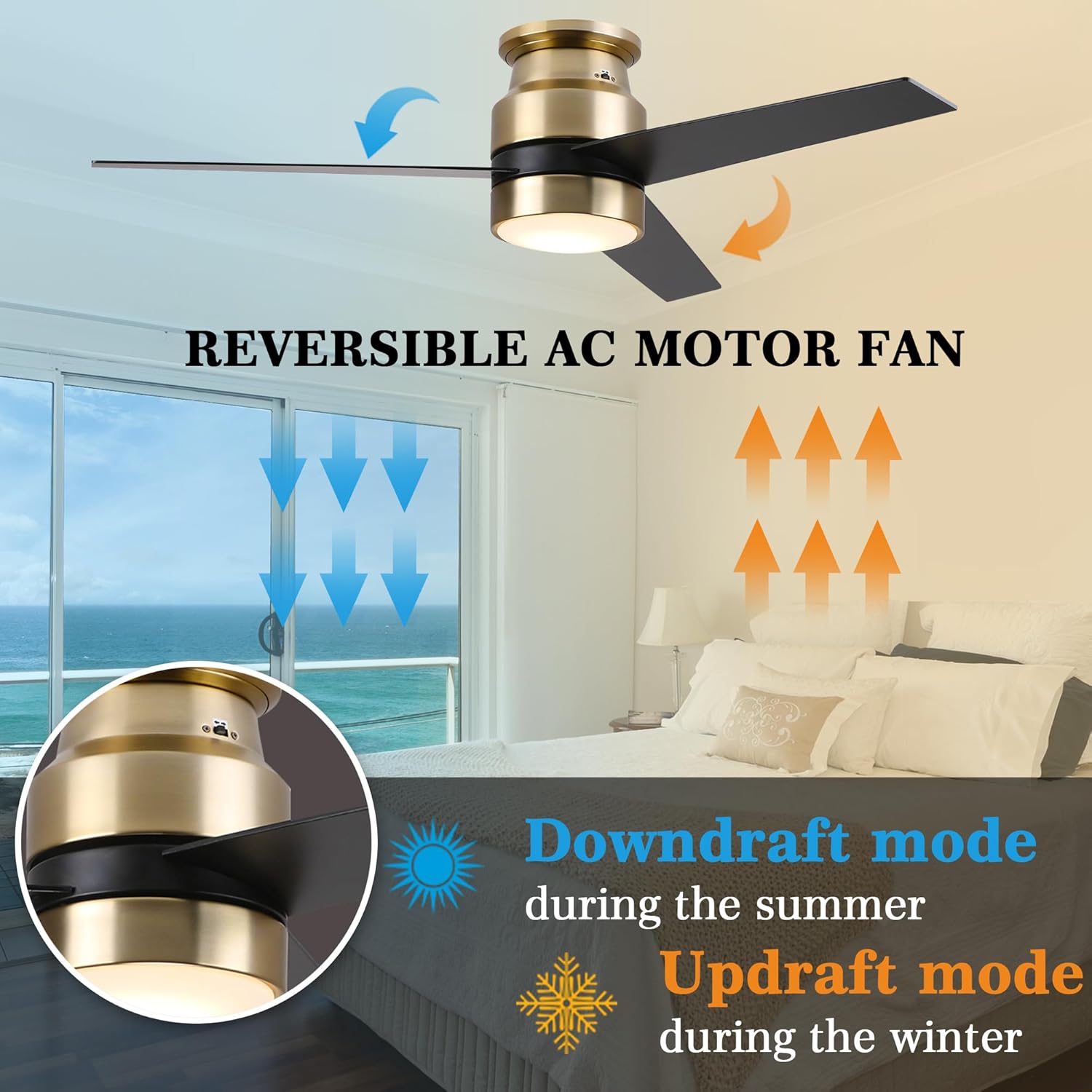
Image: The Carro Smart Ceiling Fan wall control switch, showing buttons for fan speed, light on/off, and other functions.
2. Кіраванне праграмамі
Download the official Carro app from your smartphone's app store. Follow the in-app instructions to connect your fan. The fan requires a 2.4GHz Wi-Fi connection for initial setup; after connection, it can operate on 5GHz networks.
The app provides full functionality, including fan speed adjustment, light control, and advanced features like scheduling and timing (up to 24 hours).

Image: An illustration showing the four control methods for the Carro Smart Ceiling Fan: Wall Control, App Control, Voice of Alexa, and Google Assistant, with a couple dancing in a room with the fan.
3. Voice Control (Alexa, Google Assistant, Siri Shortcuts)
Integrate your Carro Smart Ceiling Fan with your preferred smart home ecosystem. Once connected via the app, you can use simple voice commands to control the fan and light.
- "Alexa, turn on ceiling fan to speed 3."
- "Hey Google, turn off the ceiling fan and light."
- "Siri, set fan to low."

Image: A kitchen scene demonstrating voice control, with an Amazon Echo device and speech bubbles showing commands like "Alex, turn on ceiling fan to speed 3" and "Alex turn off the ceiling fan and light."
Інструкцыя па эксплуатацыі
Кантроль хуткасці вентылятара
Adjust the fan speed using the wall control or the Carro app. The fan offers multiple speed settings to suit your comfort needs.
Кіраванне святлом
Turn the LED light on or off using the wall control, app, or voice commands. The integrated LED light provides 1062 Lumens of 3000K warm light.
Функцыя рэверсіўнага рухавіка
The fan features a reversible AC motor, allowing you to change the direction of airflow for year-round comfort. This function is typically controlled via a button on the fan housing or through the app.
- Downdraft Mode (Summer): Лопасці круцяцца супраць гадзіннікавай стрэлкі, выштурхоўваючы халоднае паветра ўніз.
- Updraft Mode (Winter): Лопасці круцяцца па гадзіннікавай стрэлцы, падцягваючы халоднае паветра ўверх і цыркулюючы цёплае паветра, затрыманае каля столі.

Image: An illustration demonstrating the downdraft mode (blue arrows, pushing air down for summer) and updraft mode (orange arrows, pulling air up for winter) of the reversible AC motor fan.
Планаванне і таймер
Utilize the Carro app to set schedules for your fan and light to automate operation according to your daily routine. You can also set countdown timers for automatic shut-off.
Image: A visual representation of the timer and scheduling features, showing examples like "Timer: 7:30/ON" and "Countdown: 15 min/OFF" with people waking up and sleeping.
Тэхнічнае абслугоўванне
Рэгулярнае абслугоўванне дапаможа падоўжыць тэрмін службы і прадукцыйнасць вашага потолочного вентылятара.
- Уборка: Каб пазбегнуць пашкоджання аздаблення, чысціце вентылятар мяккай губкайamp толькі тканіна. Не выкарыстоўвайце абразіўныя ачышчальнікі або растваральнікі.
- Сыход за лязом: Перыядычна правярайце зацяжку шруб ляза. Няшчыльна закручаныя ляза могуць выклікаць хістанне і шум.
- Камплект святла: The LED light kit is integrated and designed for long life (50,000+ hours). Replacement of individual LEDs is not typically required.
Ліквідацыю непаладак
Калі ў вас узніклі праблемы з вентылятарам, выканайце наступныя распаўсюджаныя дзеянні па ліквідацыі непаладак:
| праблема | Магчымая прычына | Рашэнне |
|---|---|---|
| Вентылятар не працуе | No power; loose wiring; incorrect wiring; circuit breaker tripped. | Check power supply; ensure all wire connections are secure; verify wiring against diagram; reset circuit breaker. |
| Святло не працуе | Loose wiring; incorrect wiring; LED failure (rare). | Check light wire connections; verify wiring; contact support if LED is suspected to be faulty. |
| Веер хістаецца | Loose blades; unbalanced blades; loose mounting bracket. | Tighten blade screws; ensure blades are balanced (balancing kit not included, but can be purchased); secure mounting bracket. |
| Немагчыма падключыцца да Wi-Fi/праграмы | Incorrect Wi-Fi band (not 2.4GHz); weak signal; incorrect password. | Ensure your router is broadcasting a 2.4GHz network; move closer to router; re-enter Wi-Fi password carefully. |
| Галасавое кіраванне не рэагуе | Not linked to smart assistant; incorrect voice commands. | Verify fan is linked in Alexa/Google Home app; use precise commands as listed in manual or app. |
Гарантыя і падтрымка
Carro offers a 5-year guarantee to resolve any quality problems related to the motor. If there is any problem with the product, please contact us. We will be glad to assist with replacement or refund.
For further assistance, please visit the official Carro webсайт або звярніцеся непасрэдна ў службу падтрымкі кліентаў. Захоўвайце чэк аб куплі для прэтэнзій па гарантыі.
Кантактная інфармацыя: Please refer to the product packaging or official Carro webсайт для атрымання найбольш актуальнай кантактнай інфармацыі.