
Xtorm XP300U
Xtorm XP300U Portable Power Station 300W - User Manual
Model: XP300U
Уводзіны
Thank you for choosing the Xtorm XP300U Portable Power Station. This device is designed to provide reliable and portable power for various applications, from home use to outdoor camping. With a 300W output and multiple charging options, it ensures your devices stay powered wherever you are. This manual provides essential information on the safe operation, setup, maintenance, and troubleshooting of your power station.
Інфармацыя па бяспецы
Please read all safety warnings and instructions before using this product to ensure safe operation and prevent damage. Keep this manual for future reference.
- Не разбірайце, не рамантуйце і не мадыфікуйце прыладу. Няправільная зборка можа прывесці да пажару або траўмаў.
- Не падвяргайце прыладу ўздзеянню агню або высокіх тэмператур (вышэй за 60°C/140°F).
- Не выкарыстоўвайце і не захоўвайце прыладу пад прамымі сонечнымі прамянямі або ў гарачым асяроддзі.
- Не выкарыстоўвайце і не захоўвайце прыладу ў ваннай пакоі або ў месцах, дзе яна можа падвяргацца ўздзеянню вады ці вільгаці.
- Не кідайце, не ўдарайце і не падвяргайце прыладу моцным ударам.
- Захоўваць у месцах, недаступных дзецям.
- Выкарыстоўвайце толькі арыгінальныя або сертыфікаваныя зарадныя кабелі і адаптары.
- Забяспечце належную вентыляцыю падчас выкарыстання і зарадкі. Не накрывайце прыладу.
- In case of leakage from the battery, do not allow the liquid to come into contact with skin or eyes. If contact occurs, wash with plenty of water and seek medical advice.

Image: Safety features of the Xtorm XP300U, highlighting Pure Sine Wave, Short Circuit Protection, Temperature Control, Overcharge Protection, APM Chip, A-Class Batteries, and High Efficiency.
Змест пакета
Калі ласка, праверце змесціва ўпакоўкі пасля адкрыцця. Калі якія-небудзь прадметы адсутнічаюць або пашкоджаныя, звярніцеся да прадаўца.
- Xtorm XP300U Portable Power Station
- Зарадная прылада пераменнага току
- Аўтамабільны кабель для зараднай прылады
- MC4 to DC Cable (for solar panel connection, solar panel not included)
- Кіраўніцтва карыстальніка

Image: The Xtorm XP300U Portable Power Station displayed with its included accessories: AC wall charger, car charger cable, and MC4 to DC cable.
Прадукт скончаныview
Familiarize yourself with the different parts of your Xtorm XP300U Power Station.
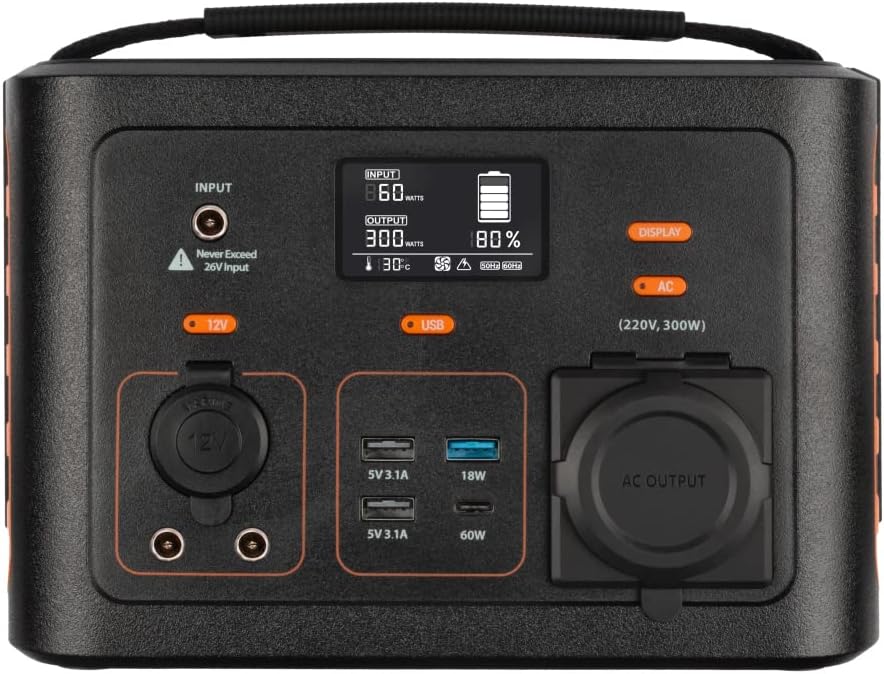
Выява: Крупны план view of the Xtorm XP300U's front panel, showing the digital display, input port, 12V DC output, USB-A and USB-C ports, and AC output socket.
Асаблівасці пярэдняй панэлі:
- ВК-дысплей: Паказвае ўзровень зарада батарэі, уваходную/выхадную магутнасць і індыкатары стану.
- Уваходны порт: Для зарадкі электрастанцыі праз адаптар пераменнага току, аўтамабільную зарадную прыладу або сонечную панэль.
- Выхад 12 В пастаяннага току: Для харчавання прылад на 12 В.
- Порты USB-A: Multiple USB-A outputs for charging various devices (e.g., 5V 3.1A, 18W Quick Charge).
- Порт USB-C PD: High-speed USB-C Power Delivery output (up to 60W).
- Выхад пераменнага току: Standard AC outlet for powering household appliances (220V, 300W).
- Кнопкі кіравання: Buttons for turning on/off specific outputs (e.g., AC, DC, USB).

Выява: Уверсе view of the Xtorm XP300U, highlighting its integrated carrying handle for portability.

Выява: Задняя частка view of the Xtorm XP300U, featuring the Xtorm brand logo and "Portable Power Station 300" text.
Настройка
Before first use, it is recommended to fully charge your Xtorm XP300U Power Station.
- Распакуйце: Асцярожна выміце электрастанцыю і ўсе аксэсуары з упакоўкі.
- Initial Charge (AC Wall Charger):
- Connect the AC wall charger to the input port on the power station.
- Падключыце зарадную прыладу пераменнага току да звычайнай разеткі.
- The LCD display will show the charging status. Charge until the battery indicator shows 100%.
- Размяшчэнне: Place the power station on a stable, flat surface in a well-ventilated area, away from direct sunlight or heat sources.
Інструкцыя па эксплуатацыі
The Xtorm XP300U offers multiple ways to charge and power your devices.
Зарадка электрастанцыі:
The XP300U can be recharged using four different methods:
Image: Visual representation of the four charging methods for the Xtorm XP300U: via wall socket, USB-C PD, solar panel (not included), and 12V car charger.
- Via Wall Socket (AC Charger): Connect the included AC wall charger to the input port and a wall outlet.
- Via USB-C PD: Use a compatible USB-C Power Delivery charger (not included) to charge the unit via its USB-C port.
- Праз сонечную панэль: Connect a compatible solar panel (not included) to the input port using the provided MC4 to DC cable. Ensure the solar panel is placed in direct sunlight for optimal charging.
- Via 12V Car Charger: Connect the included car charger cable to the input port and your vehicle's 12V cigarette lighter socket.
На ВК-дысплеі будзе адлюстроўвацца ўваходная вагаtage and battery charge status during charging. You can use the outputs even while the power station is charging (pass-through charging).
Using the Outputs:
The XP300U provides various output ports to power different types of devices.

Image: The Xtorm XP300U demonstrating its universal compatibility with icons representing various devices and output types: 1x AC 300W/220V, 1x USB-C PD 60W, 2x DC 5.5mm 60W, 2x USB QC3.0 18W, 1x USB 18W, and 1x 12V Car 120W.
- AC Output (220V, 300W):
- Press the "AC" button to activate the AC output. The AC indicator on the display will light up.
- Plug your device's power cord into the AC outlet.
- Ensure your device's power consumption does not exceed 300W.
- Press the "AC" button again to turn off the AC output when not in use.
- Выхад пастаяннага току (12 В):
- Press the "12V" button to activate the DC output. The DC indicator will light up.
- Connect your 12V device to the DC port.
- Press the "12V" button again to turn off the DC output.
- USB Outputs (USB-A, USB-C PD):
- The USB outputs are typically always active when the unit is on.
- Connect your USB-powered devices to the appropriate USB-A or USB-C PD ports.
- На дысплеі будзе паказана выходная магутнасцьtagе для падлучаных прылад.
The power station can provide power for extended periods, depending on the connected devices' power consumption.

Малюнак: Examples of device runtimes with the Xtorm XP300U: 17.5 hours for a 10W LED light, 5.5 hours for a 30W small TV, 4 hours for a 40W small coolbox, and 6 hours for a 40W small coolbox (via 12V carplug output).
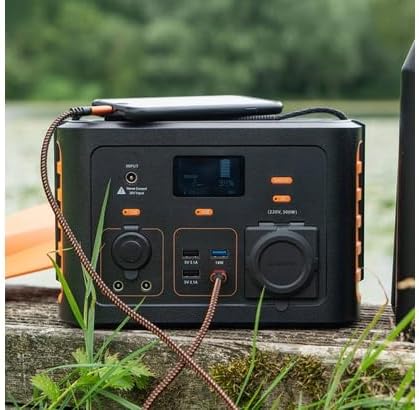
Image: The Xtorm XP300U Portable Power Station being used outdoors on a wooden surface, charging a smartphone, demonstrating its portability and utility in various environments.
Тэхнічнае абслугоўванне
Proper maintenance ensures the longevity and optimal performance of your power station.
- Уборка: Для чысткі вонкавых паверхняў прылады выкарыстоўвайце мяккую сухую тканіну. Не выкарыстоўвайце абразіўныя ачышчальнікі або растваральнікі.
- захоўванне:
- Захоўвайце электрастанцыю ў прахалодным, сухім месцы, удалечыні ад прамых сонечных прамянёў і экстрэмальных тэмператур.
- For long-term storage, charge the unit to approximately 50-80% every 3-6 months to maintain battery health.
- Пазбягайце захоўвання ў памяшканнях з падвышанай вільготнасцю.
- Сыход за батарэяй: Do not fully discharge the battery frequently, as this can reduce its lifespan. Recharge promptly when the battery level is low.
Ліквідацыю непаладак
If you encounter issues with your Xtorm XP300U, refer to the following common problems and solutions.
| праблема | Магчымая прычына | Рашэнне |
|---|---|---|
| Агрэгат не ўключаецца. | Акумулятар цалкам разраджаны. | Connect the power station to an AC wall outlet and charge it for at least 30 minutes. |
| Выхад пераменнага току не працуе. | AC output not activated; device exceeds 300W; overheating. | Press the "AC" button to activate. Check device wattage. Allow unit to cool down if overheated. |
| USB-парты не зараджаюцца. | Device not compatible; cable faulty. | Ensure device is compatible. Try a different USB cable. |
| Павольная зарадка. | Using a low-power charger; environmental factors (e.g., cloudy for solar). | Use the original AC charger or a higher wattage USB-C PD charger. Optimize solar panel placement. |
If the problem persists, please contact Xtorm customer support.
Тэхнічныя характарыстыкі
Detailed technical specifications for the Xtorm XP300U Portable Power Station.
| Асаблівасць | Дэталь |
|---|---|
| Назва мадэлі | XP300U |
| Марка | Xtorm |
| Выходная магутнасць | 300 Вт (пераменны ток) |
| Уваходны кнtage | 12 В (пастаянны ток) |
| Крыніца харчавання | AC Wall, USB-C PD, Solar, Car Charger |
| Рэкамендуемае выкарыстанне | Дом, Сampінж |
| Вага | 3300 грамаў (3.3 кг) |
| Колер | Аранжавы |
| Уключаныя кампаненты | 1 package (Power Station, AC Charger, Car Charger, MC4 to DC Cable) |

Image: Dimensions of the Xtorm XP300U Portable Power Station (240mm x 154mm x 142mm) and its weight (3.3 kg), highlighting its convenient travel size.
Гарантыя і падтрымка
Xtorm products come with a standard warranty. Please refer to the warranty card included in your package or visit the official Xtorm webсайт для атрымання падрабязных гарантыйных умоў.
For technical support, troubleshooting assistance, or warranty claims, please contact Xtorm customer service:
- Webсайт: www.xtorm.eu (Check for support contact information)
- электронная пошта: Refer to the Xtorm webсайт для атрымання канкрэтных адрасоў электроннай пошты падтрымкі.
- тэлефон: Refer to the Xtorm webсайт з нумарамі тэлефонаў рэгіянальнай падтрымкі.
When contacting support, please have your product model (XP300U) and purchase details ready.
Ask a question about this manual
Ask about setup, troubleshooting, compatibility, parts, safety, or missing instructions. Manuals+ will review the question and use this page’s manual context to help answer it.