
1. Уводзіны
This manual provides essential information for the safe and efficient operation of your Vispera Ai43T1 43-inch Smart Full HD Google Android TV. Please read this manual thoroughly before using the television and retain it for future reference. Your Vispera TV offers a 43-inch Full HD display (1920 x 1080 resolution), integrated Google Android TV features including Google Assistant and Chromecast, and access to popular streaming services like Netflix, Amazon Prime Video, Disney+, and YouTube. It also supports Freeview Play for catch-up TV services.
2. Важная інфармацыя па бяспецы
- Крыніца харчавання: Пераканайцеся, што тэлевізар падключаны да крыніцы харчавання ў межах указанага аб'ёмуtagдыяпазон е. Не перагружайце разеткі.
- Вентыляцыя: Не блакуйце вентыляцыйныя адтуліны. Пакіньце дастатковую прастору вакол тэлевізара для належнай цыркуляцыі паветра і прадухілення перагрэву.
- Вада і вільгаць: Не падвяргайце тэлевізар уздзеянню дажджу, вільгаці і не стаўце прадметы, напоўненыя вадкасцямі, на тэлевізар або побач з ім.
- Уборка: Адключыце тэлевізар ад сеткі перад чысткай. Выкарыстоўвайце мяккую сухую тканіну. Не выкарыстоўвайце вадкія або аэразольныя ачышчальнікі.
- Размяшчэнне: Пастаўце тэлевізар на ўстойлівую, роўную паверхню або надзейна прымацуйце яго да сцяны. Пазбягайце размяшчэння яго пад прамымі сонечнымі прамянямі або побач з крыніцамі цяпла.
- дзеці: Сачыце за дзецьмі, каб яны не залазілі на тэлевізар або падстаўку.
- Абслугоўванне: Не спрабуйце самастойна абслугоўваць гэты прадукт. Звярніцеся да ўсіх абслугоўванняў кваліфікаванага абслуговага персаналу.
3. Змесціва ўпакоўкі
Калі ласка, праверце, ці ўваходзяць у камплект вашага тэлевізара наступныя рэчы:
- Vispera Ai43T1 43-inch Smart Full HD Google Android TV
- Пульт дыстанцыйнага кіравання
- Сілавы кабель
- Падстаўка для тэлевізара (2 штукі) і шрубы
- Кіраўніцтва карыстальніка (гэты дакумент)
- Кароткае кіраўніцтва
4. Настройка
4.1 Устаноўка падстаўкі
If you are not wall-mounting the TV, attach the included stand pieces to the bottom of the TV using the provided screws. Ensure the stand is securely fastened before placing the TV on a flat, stable surface.
4.2 Насценны мантаж
The Vispera Ai43T1 TV supports VESA standard wall mounts with a pattern of 200 x 200 mm. Use appropriate wall mounting hardware (not included) and consult a professional installer if you are unsure about the process. Ensure the wall can support the weight of the TV.
4.3 Падключэнне перыферыйных прылад
Глядзіце дыяграму ніжэй для больш падрабязнай інфармацыіview of the TV's rear ports and typical connections.

Малюнак 1: Задняя частка view of the Vispera Ai43T1 TV showing various input and output ports.
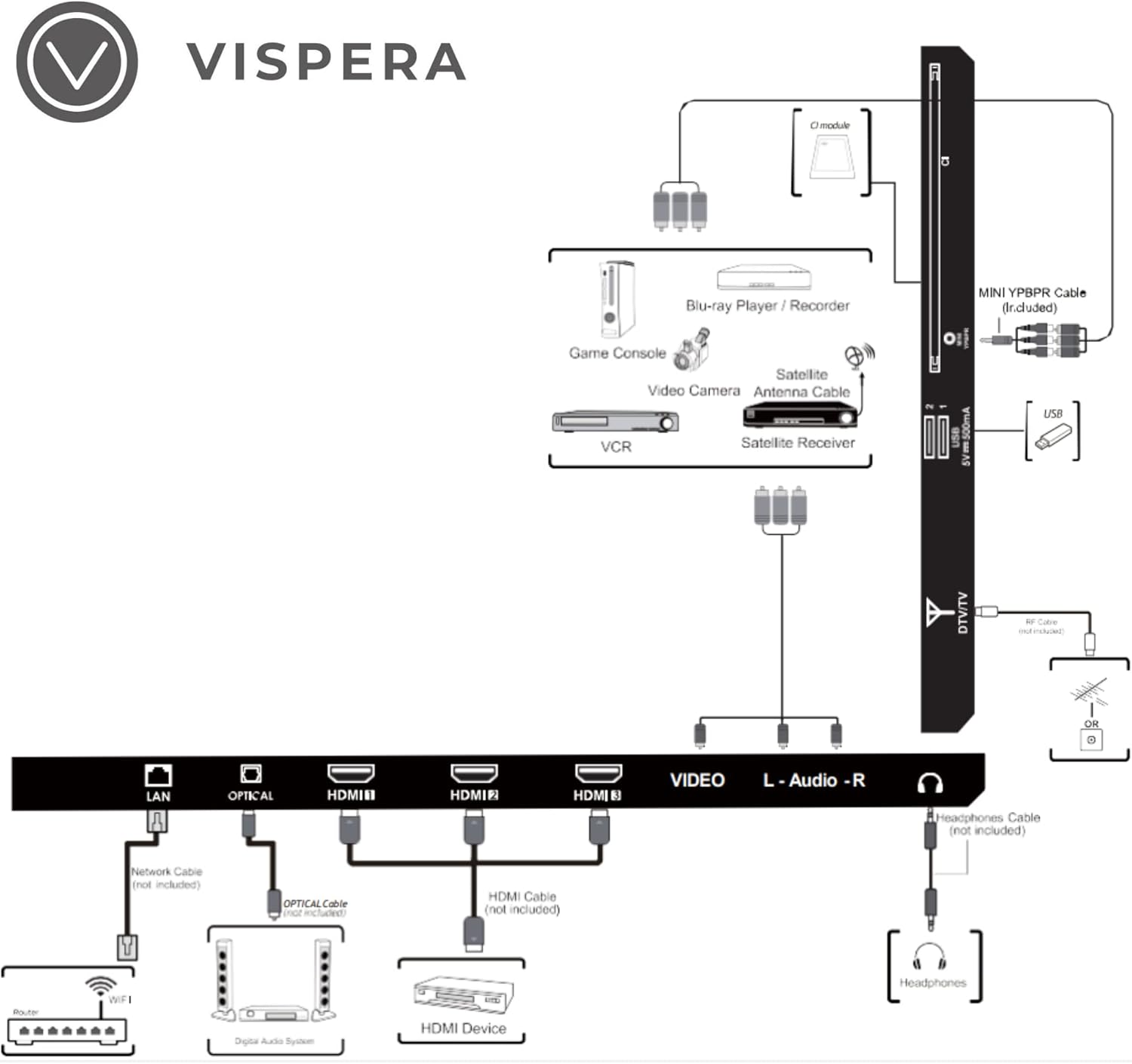
Figure 2: Diagram illustrating various connection types for external devices to the Vispera Ai43T1 TV.
- Порт лакальнай сеткі (Ethernet): Connect an Ethernet cable from your router for a stable wired internet connection.
- OPTICAL (Digital Audio Out): Connect to a digital audio system for high-quality sound.
- HDMI Inputs (HDMI1, HDMI2, HDMI3): Connect High-Definition (HD) signal output devices such as Blu-ray players, game consoles, or set-top boxes.
- VIDEO Input: Connect to composite video output devices.
- L-AUDIO-R Input: Connect to composite audio (L/R) output sockets on external video devices.
- Раз'ём для навушнікаў: Падключыце навушнікі для асабістага праслухоўвання.
- DTV/TV Input: Connect to an antenna (75Ω VHF/UHF) socket with an RF coaxial cable for terrestrial TV broadcasts.
- USB ўвод: Connect a USB storage device to play photo files or other compatible media.
- MINI YPBPR: Connect to AV devices with component (Y/Pb/Pr) video and audio output sockets.
- Слот CI: Used to insert a CI card for encrypted digital TV channels.
4.4 Пачатковае ўключэнне і першая налада
- Падключыце кабель харчавання да тэлевізара, а затым да разеткі.
- Націсніце кнопку харчавання на пульце дыстанцыйнага кіравання або на тэлевізары.
- Follow the on-screen instructions to complete the initial setup, which typically includes:
- Выбар мовы.
- Connecting to a Wi-Fi network or wired LAN.
- Signing in with your Google Account to access Google services and apps.
- Scanning for TV channels (if an antenna is connected).
- Прыняцце ўмоў і палажэнняў.
5. Кіраванне тэлевізарам
5.1 Функцыі дыстанцыйнага кіравання
The included remote control allows you to navigate your TV's features. Ensure batteries are correctly inserted.
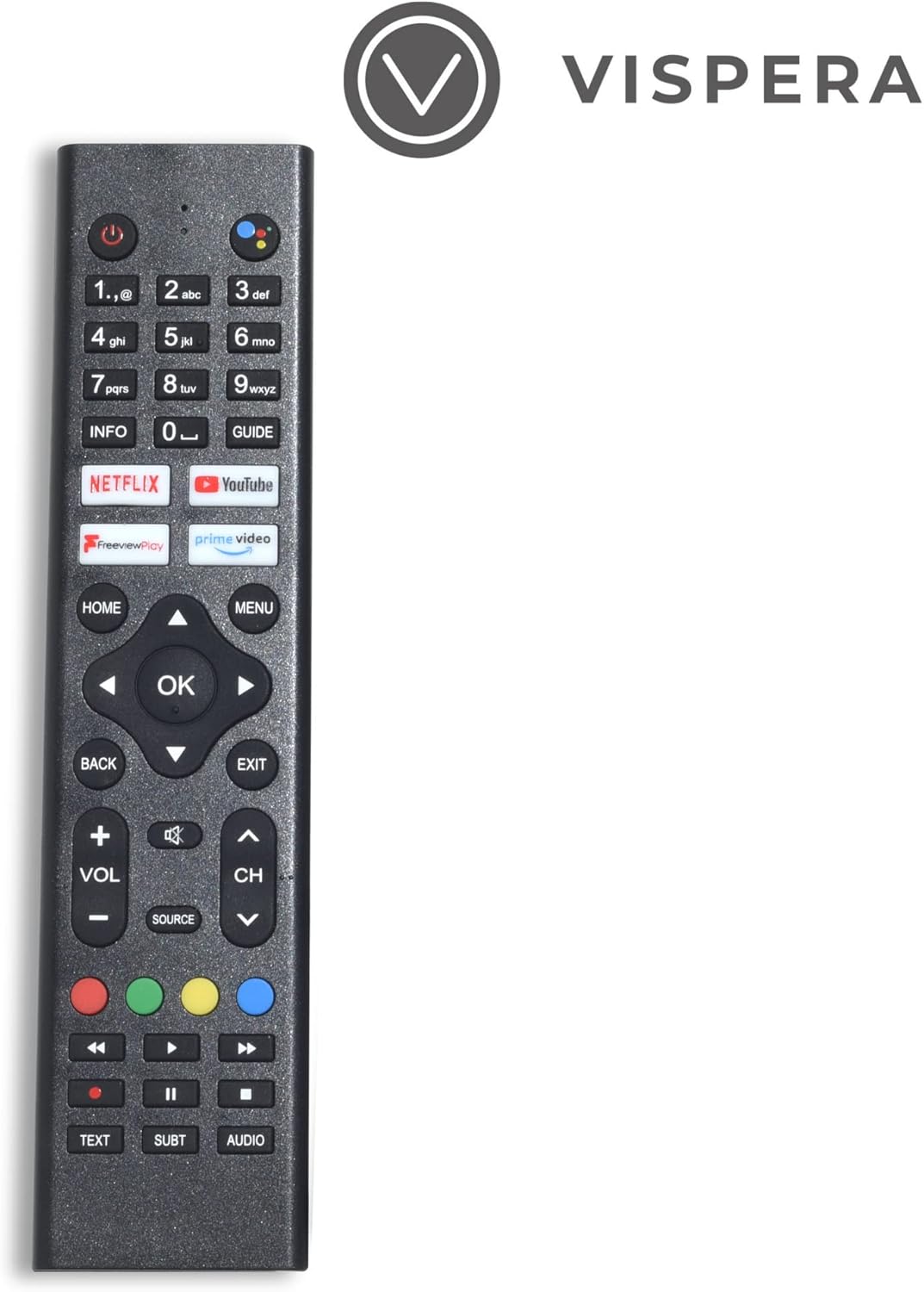
Figure 3: Vispera Ai43T1 Remote Control.
- Кнопка харчавання: Уключае або выключае тэлевізар.
- Лічбавыя кнопкі (0-9): Select TV channels directly.
- Кнопка Памочніка Google: Activates voice control for searching, controlling smart home devices, and more.
- Навігацыйная панэль (Уверх/Уніз/Улева/Управа/ОК): Навігацыя па меню і выбар опцый.
- Кнопка HOME: Вяртаецца на галоўны экран Android TV.
- Кнопка НАЗАД: Вяртанне да папярэдняга экрана або меню.
- Павялічыць/паменшыць гучнасць: Рэгулюе ўзровень гучнасці.
- Канал уверх/уніз: Змяняе тэлеканалы.
- Кнопка крыніцы: Выбірае крыніцы ўваходнага сігналу (HDMI, AV, TV і г.д.).
- App Buttons (Netflix, Prime Video, YouTube, Freeview Play): Прамы доступ да гэтых праграм для струменевай перадачы.
5.2 Smart TV Features (Google Android TV)
Your Vispera Ai43T1 TV runs on Google Android TV, providing access to a wide range of entertainment and smart features.

Figure 4: The Google Android TV interface on the Vispera Ai43T1, showing various streaming applications.
- Памочнік Google: Use your voice to search for movies and shows, get answers, control your TV, and manage compatible smart home devices. Press the Google Assistant button on your remote to activate.
- Убудаваны Chromecast: Cast photos, videos, and music from your smartphone, tablet, or computer directly to your TV. Ensure your device and TV are on the same Wi-Fi network.
- Праграмы для струменевай перадачы: Access pre-installed apps like Netflix, Amazon Prime Video, Disney+, and YouTube. Download more apps from the Google Play Store.
- Крама Google Play: Browse and download thousands of apps, games, and content directly to your TV.
5.3 бясплатнаview гуляць
Бясплатнаview Play allows you to watch live TV, catch up on shows you've missed, and access on-demand content from various UK broadcasters. You can scroll back through the TV guide to watch programs directly from the guide, without needing to open individual catch-up apps.
6. Тэхнічнае абслугоўванне
- Ачыстка экрана: Акуратна працярыце экран мяккай тканінай без ворса. Для выдалення ўстойлівых плям злёгкуampпрацярыце тканіну вадой або спецыяльным сродкам для чысткі экранаў (наносьце на тканіну, а не непасрэдна на экран).
- Уборка шафы: Працярыце корпус тэлевізара мяккай сухой анучай.
- Ачыстка пылу: Regularly dust the ventilation openings to prevent dust buildup.
- Абнаўленні праграмнага забеспячэння: Тэлевізар можа атрымліваць аўтаматычныя абнаўленні праграмнага забеспячэння. Пераканайцеся, што ваш тэлевізар падключаны да Інтэрнэту, каб атрымліваць гэтыя абнаўленні, якія могуць палепшыць прадукцыйнасць і дадаць новыя функцыі.
7. Выпраўленне непаладак
Калі ў вас узніклі праблемы з тэлевізарам, звярніцеся да наступных распаўсюджаных праблем і іх рашэнняў:
- Няма харчавання:
- Check if the power cable is securely connected to the TV and the power outlet.
- Ensure the power outlet is working by plugging in another device.
- Паспрабуйце націснуць кнопку харчавання на самым тэлевізары, а не толькі на пульце дыстанцыйнага кіравання.
- Няма выявы/гуку:
- Verify the correct input source is selected (e.g., HDMI1, TV).
- Праверце надзейнасць усіх кабельных злучэнняў (HDMI, антэны і г.д.).
- Адрэгулюйце гучнасць.
- Perform a channel scan if using an antenna.
- Пульт дыстанцыйнага кіравання не працуе:
- Заменіце батарэі на новыя.
- Пераканайцеся, што паміж пультам дыстанцыйнага кіравання і ІЧ-датчыкам тэлевізара няма перашкод.
- Pair the remote again if it's a Bluetooth remote (refer to TV settings).
- Праблемы з падключэннем да сеткі:
- Перазагрузіце маршрутызатар і мадэм.
- Check Wi-Fi password and network settings on the TV.
- Паспрабуйце правадное падключэнне да Ethernet, калі Wi-Fi нестабільны.
- Праграмы не загружаюцца/выходзяць з ладу:
- Ensure the TV has a stable internet connection.
- Clear the cache and data for the problematic app in the TV's settings.
- Update the app or the TV's system software.
8. Тэхнічныя характарыстыкі
Below are the technical specifications for the Vispera Ai43T1 43-inch Smart Full HD Google Android TV.

Figure 5: Technical specifications of the Vispera Ai43T1 TV.
| Асаблівасць | Спецыфікацыя |
|---|---|
| Памер панэлі | 43 inches (diagonally) |
| Тып дысплея | святлодыёд |
| Тэхналогія панэлі | TFT |
| Частата абнаўлення | 60 Гц |
| Дазвол дысплея | 1080p (1920 x 1080) Full HD |
| Падтрымка HDMI | Да 1080p |
| Суадносіны бакоў | 16:9 |
| Панэль дынамічнай кантраснасці | 2400~3000:1 |
| Час водгуку (ад G да G) | 11.5 мс |
| Lamp Тэрмін службы (тып. гадзіны) | >30,000 гадзін |
| Гарызантальны Viewвугал (пры CR>10) | 178° |
| Вертыкальны Viewвугал (пры CR>10) | 178° |
| Wall-mount (LxW-mm) | 200*200 (mm) VESA |
| Аперацыйная сістэма | Android |
| Тэхналогія падлучэння | Wi-Fi |
| Падтрымліваюцца інтэрнэт-сэрвісы | Amazon Prime Video, Google Assistant, Netflix, YouTube |
| Вага прадукту | 9.53 кг |
| Памеры (пакет) | 104 х 63 х 14 см |
9. Гарантыя і падтрымка
Your Vispera Ai43T1 TV comes with a standard manufacturer's warranty. Please refer to the warranty card included in your package for specific terms and conditions, including the warranty period and coverage details. For technical support, troubleshooting assistance, or service inquiries, please contact Vispera customer support through the contact information provided on the official Vispera webсайт або дакументы аб куплі.