
1. Настройка
1.1 Распакоўка і змесціва ўпакоўкі
Carefully remove the television and all components from the packaging. Verify that all items listed below are present:
- 70-цалевы тэлевізар LG серыі UQ9000 з дыагональю 4K і падтрымкай Smart TV
- Чароўны пульт дыстанцыйнага кіравання
- Батарэйкі пульта дыстанцыйнага кіравання (2 батарэйка тыпу АА)
- Падстаўка для тэлевізара
- Сілавы кабель
- Кароткае кіраўніцтва
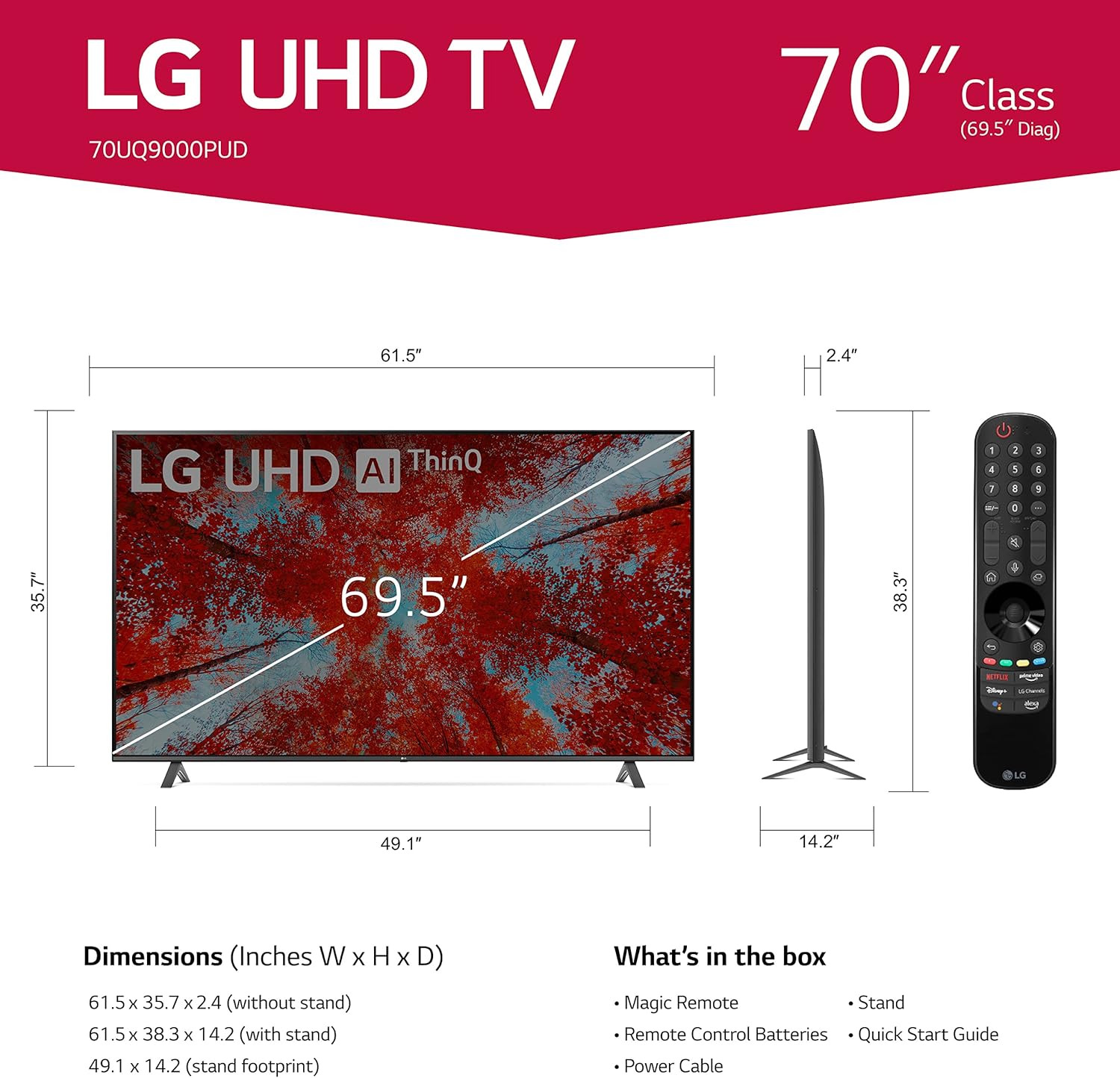
Image 1.1: LG 70UQ9000PUD TV with dimensions, Magic Remote, and a list of included accessories.
1.2 Фізічная ўстаноўка
The television can be installed using the included stand or mounted on a wall.
Ўстаноўка падстаўкі:
- Attach the stand components to the bottom of the TV using the provided screws.
- Ensure the stand is securely fastened before placing the TV on a stable, flat surface.
Ўстаноўка насценнага мацавання:
For wall mounting, use a VESA compatible mount with a 400 x 400 mm standard. Consult a professional for wall mounting to ensure proper and safe installation.
1.3 Падключэнне знешніх прылад
Connect your external devices to the TV's ports. The LG 70UQ9000PUD features multiple connectivity options:
- Парты HDMI (3): For connecting devices such as gaming consoles, Blu-ray players, and set-top boxes.
- USB-парты (x2): Для падлучэння USB-назапашвальнікаў або іншых сумяшчальных перыферыйных прылад.
- Порт LAN: Для праваднога падключэння да Інтэрнэту.
- Аптычны лічбавы аўдыёвыхад: Для падлучэння да знешніх аўдыёсістэм.
- Уваход для антэны/кабеля: Для падключэння антэны або кабельнага тэлебачання.
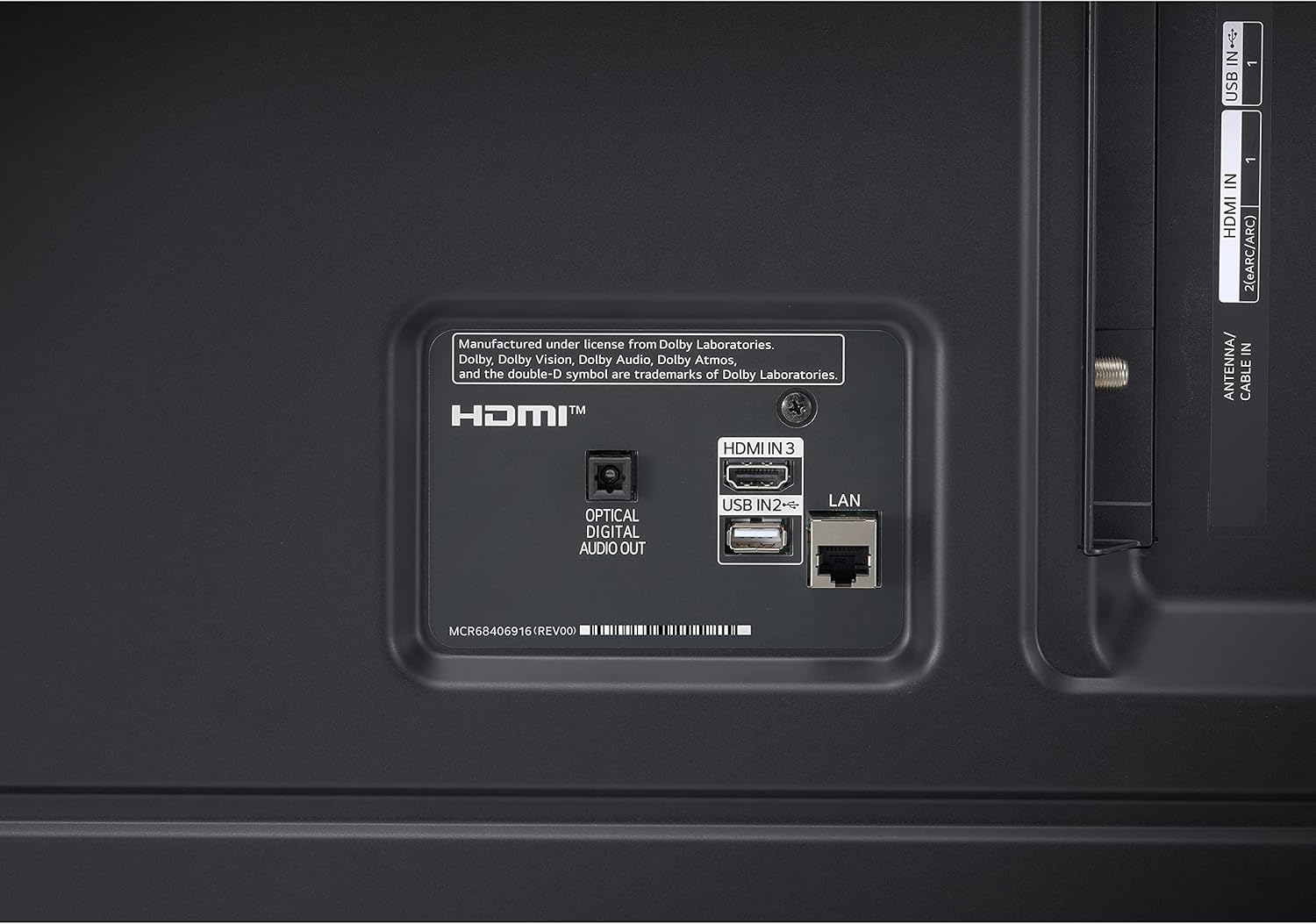
Image 1.2: Rear panel connections showing HDMI, USB, LAN, and Optical Digital Audio Out ports.
1.4 Пачатковае ўключэнне і асноўныя налады
- Падключыце кабель сілкавання да тэлевізара і разеткі.
- Націсніце кнопку харчавання на пульце дыстанцыйнага кіравання або на тэлевізары.
- Follow the on-screen instructions to complete the initial setup, including language selection, network connection (Wi-Fi or LAN), and channel scanning.
2. Інструкцыя па эксплуатацыі
2.1 Using the Magic Remote Control
The LG Magic Remote allows for intuitive control of your TV. It supports point, click, scroll, and voice commands.

Image 2.1: The LG Magic Remote, designed for easy navigation and voice control.
Асноўныя характарыстыкі:
- навядзенне: Point the remote at the screen to move the on-screen cursor.
- Пстрычка: Націсніце кола пракруткі (кнопку OK), каб выбраць элементы.
- Пракрутка: Use the scroll wheel to move through menus and web старонкі.
- Галасавое кіраванне: Press and hold the microphone button to activate voice commands for searching content or controlling TV functions.

Image 2.2: Using the Magic Remote for intuitive control, including voice commands.
2.2 Функцыі Smart TV (webOS with ThinQ AI)
The LG UQ9000 Series TV runs on webOS, providing a user-friendly interface for accessing various smart features and applications. ThinQ AI integrates artificial intelligence for enhanced control and personalized experiences.
Video 2.1: This video demonstrates the LG webІнтэрфейс АС, дэманстрацыяasing user profiles and personalized recommendations for a customized viewвопыту.
Key Smart Features:
- Персаналізаваныя рэкамендацыі: webOS learns your viewing habits to suggest content.
- Убудаваныя праграмы для струменевай перадачы: Access popular services like Netflix, Prime Video, Apple TV app, Disney+, HBO Max, and over 300+ free LG Channels.
- Убудаваная Alexa: Use voice commands to control your TV and smart home devices.
Video 2.2: This video highlights various LG UHD TV features, including the α5 Gen5 AI Processor 4K, AI Brightness, and AI Sound, enhancing picture and audio quality.
2.3 Паляпшэнне выявы і гуку
The TV incorporates advanced technologies to optimize your viewі вопыт праслухоўвання.
- Працэсар α5 5-га пакалення са штучным інтэлектам, 4K: Паляпшае якасць выявы і гуку дзякуючы штучнаму інтэлекту.
- Павялічэнне раздзялення да 4K: Transforms lower-resolution content into near-4K quality for sharper detail.
- Кіраванне яркасцю з дапамогай штучнага інтэлекту: Automatically adjusts screen brightness based on ambient room lighting.
- HDR Format Support: Compatible with HDR10 and HLG for improved contrast and color.
- Рэжым рэжысёра: Захоўвае арыгінальныя колеры, налады і частату кадраў рэжысёра для стварэння сапраўднага кінематаграфічнага ўражання.
- AI Sound Pro: Automatically up-mixes 2-channel audio into virtual 5.1.2 channel sound for an immersive audio experience.

Image 2.3: AI Brightness Control automatically adjusts screen brightness to match room conditions.
2.4 Гульнявыя функцыі
The TV offers features designed to enhance the gaming experience.
- Воблачныя гульні: Access games directly from the cloud (GeForce Now compatible, subscription and compatible controller may be required).
- Аптымізатар гульняў і панэль кіравання: Centralized settings for quick adjustments to game-specific parameters.
- HGiG: Delivers realistic HDR gaming with optimized tone mapping.

Image 2.4: Game Optimizer and Dashboard for quick adjustment of gaming settings.
2.5 Спартыўная абвестка
Receive real-time updates for your favorite teams and matches, ensuring you never miss important sports moments.

Image 2.5: Sports Alert feature providing real-time updates for ongoing matches.
3. Тэхнічнае абслугоўванне
3.1 Чыстка тэлевізара
- экран: Акуратна працярыце экран мяккай сухой тканінай з мікрафібры. Для ўстойлівых плям злёгку працярыцеampпрацярыце тканіну вадой або спецыяльным сродкам для чысткі экранаў. Пазбягайце агрэсіўных хімічных рэчываў.
- Рама і падстаўка: Выкарыстоўвайце мяккую сухую тканіну, каб выцерці пыл з рамы і падстаўкі тэлевізара.
- Вентыляцыя: Каб пазбегнуць перагрэву, пераканайцеся, што вентыляцыйныя адтуліны на задняй панэлі тэлевізара не заблакаваныя.
3.2 Абнаўленне праграмнага забеспячэння
The TV may receive regular software updates to improve performance, add new features, and enhance security. It is recommended to allow these updates to install when prompted to ensure optimal functionality.
3.3 Замена батарэйкі пульта дыстанцыйнага кіравання
The Magic Remote requires two AA batteries. Replace them when the remote's performance diminishes.
- Адкрыйце вечка адсека для батарэй на задняй частцы пульта дыстанцыйнага кіравання.
- Выміце старыя батарэі.
- Устаўце дзве новыя батарэйкі тыпу АА, сачыце за правільнай палярнасцю (+/-).
- Зачыніце крышку батарэйнага адсека.
4. Выпраўленне непаладак
If you encounter issues with your LG 70UQ9000PUD TV, refer to the following common troubleshooting steps:
- Няма харчавання: Пераканайцеся, што кабель харчавання надзейна падключаны як да тэлевізара, так і да разеткі. Праверце працаздольнасць разеткі, падключыўшы іншую прыладу.
- Няма выявы/гуку: Пераканайцеся, што выбрана правільная крыніца ўваходнага сігналу. Праверце ўсе кабельныя злучэнні (HDMI, антэна і г.д.) на наяўнасць няшчыльнасці або пашкоджанняў.
- Пульт дыстанцыйнага кіравання не працуе: Замяніце батарэйкі ў пульце Magic Remote. Пераканайцеся, што паміж пультам і тэлевізарам няма перашкод.
- Праблемы з падключэннем да сеткі: For Wi-Fi, restart your router and modem. For wired connections, ensure the LAN cable is properly connected. You can also try resetting network settings on the TV.
- Праблемы з якасцю выявы: Адрэгулюйце параметры выявы (яркасць, кантраснасць, колер) у меню тэлевізара. Пераканайцеся, што крыніца кантэнту высокай якасці.
For more detailed troubleshooting or persistent issues, consult the full electronic manual available through the TV's settings or contact LG customer support.
5. Тэхнічныя характарыстыкі
| Асаблівасць | Спецыфікацыя |
|---|---|
| Нумар мадэлі | 70UQ9000PUD |
| Марка | LG |
| Памер экрана | 69.5 цаляў (клас 70 цаляў) |
| Тэхналогія адлюстравання | святлодыёд |
| дазвол | 4K (3840 x 2160) |
| Частата абнаўлення | 60 Гц |
| Працэсар | Працэсар α5 5-га пакалення са штучным інтэлектам, 4K |
| Аперацыйная сістэма | webOS |
| Галасавы памочнік | Убудаваная Alexa |
| Тэхналогія падлучэння | Bluetooth 5.0, Wi-Fi |
| Парты HDMI | 3 |
| Парты USB | 2 |
| Памеры прадукту (Д х Ш х У) | 14.2" Г x 61.5" Ш x 38.3" У |
| Стандарт мацавання VESA | 400 х 400 мм |
| Энергаспажыванне | 22 ват |
| Батарэі для пульта дыстанцыйнага кіравання | 2 батарэйкі АА |
| UPC | 195174030073 |
6. Інфармацыя аб гарантыі
This LG TV is covered by a Manufacturer’s Warranty. For specific details regarding warranty coverage, duration, and terms, please refer to the warranty card included with your product or visit the official LG webсайт. Захоўвайце пацвярджэнне пакупкі для прэтэнзій па гарантыі.
7. Падтрымка кліентаў
For further assistance, technical support, or service inquiries, please contact LG Customer Support. You can find contact information on the official LG webна сайце або ў дакументацыі, якая пастаўляецца з вашым тэлевізарам.
Інтэрнэт-рэсурсы: Звярніцеся ў службу падтрымкі LG website for FAQs, software downloads, and detailed product manuals.
Падтрымка па тэлефоне: Refer to your product documentation for regional customer service numbers.