
Edision EDI-RCU 4 Learn
Кіраўніцтва карыстальніка універсальнага пульта дыстанцыйнага кіравання Edision EDI-RCU 4 Learn
Model: EDI-RCU 4 Learn (07-00-0064)
Марка: Edision
1. Уводзіны і большview
The Edision EDI-RCU 4 Learn is a versatile 2-in-1 universal remote control designed for seamless operation of your Edision receiver and television. It is pre-programmed for common TV brands like Samsung and LG, and offers a learning function to customize up to four buttons for any TV.

На гэтым малюнку паказаны пярэдні бок view of the Edision EDI-RCU 4 Learn universal remote control, highlighting its compact design and button layout.
Асноўныя характарыстыкі:
- 2-in-1 functionality for Edision receivers and televisions.
- Pre-programmed for major TV brands (Samsung, LG).
- Four programmable TV buttons for custom control.
- Original replacement remote for compatible Edision models.

This image highlights the 2-in-1 functionality of the Edision EDI-RCU 4 Learn remote, indicating its use for both Set-Top Box (STB) and TV control. It also shows a close-up of the TV control buttons.
2. Настройка
2.1 Устаноўка батарэі
The Edision EDI-RCU 4 Learn remote control requires two AAA batteries (not included). Follow these steps to install them:
- Знайдзіце крышку батарэйнага адсека на задняй частцы пульта дыстанцыйнага кіравання.
- Зрушыце вечка ўніз або націсніце на зашчапку, каб адкрыць яго.
- Устаўце дзве батарэйкі тыпу AAA, пераканаўшыся, што станоўчая (+) і адмоўная (-) клемы правільна сумяшчаюцца з індыкатарамі ўнутры адсека.
- Адсуньце крышку батарэйнага адсека на месца, пакуль яна не зашчоўкнецца.
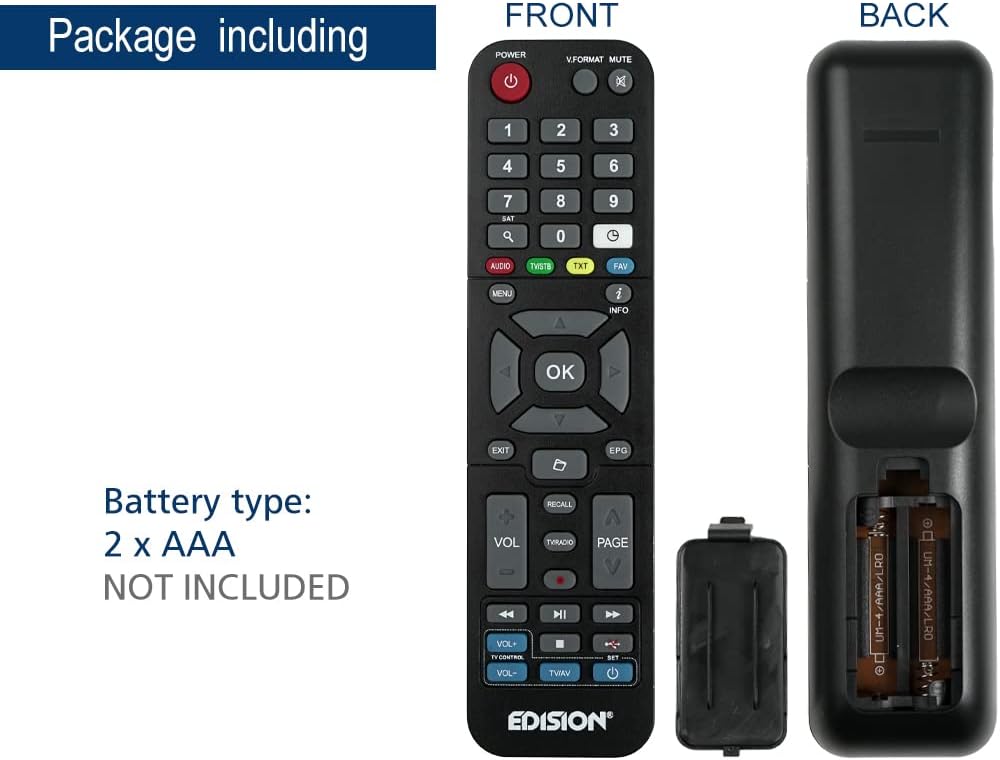
This image illustrates the battery compartment of the Edision EDI-RCU 4 Learn remote control, showing where to insert two AAA batteries. Batteries are not included.
2.2 Initial Setup and Pre-programmed Functions
The remote is pre-programmed for immediate use with compatible Edision receivers. Additionally, the four main TV control buttons (VOL+, VOL-, TV/AV, Power) are pre-programmed for Samsung and LG televisions. For other TV brands or custom functions, use the learning feature described in the Operating Instructions section.
3. Інструкцыя па эксплуатацыі
3.1 Асноўныя функцыі
The remote control features standard buttons for navigating your Edision receiver and controlling basic TV functions:
- Кнопка харчавання (чырвоная): Turns the Edision receiver on or off.
- Лічбавая клавіятура (0-9): Для прамога ўводу канала.
- Кнопкі навігацыі (Уверх, Уніз, Улева, Управа, ОК): Для навігацыі па меню і выбару.
- ГУЧ+ / ГУЧ-: Adjusts volume (pre-programmed for TV).
- CH+ / CH-: Мяняе каналы.
- МУК: Mutes TV sound.
- МЕНЮ: Accesses the receiver's main menu.
- ВЫХОД: Выхад з бягучага меню або экрана.
- ІНФА: Адлюстроўвае інфармацыю аб праграме.
- ТБ/AV: Switches TV input source (pre-programmed for TV).
- TV Power Button (Blue): Turns the TV on or off (pre-programmed for TV).
3.2 Learning Function for TV Control
The EDI-RCU 4 Learn allows you to program its four dedicated TV control buttons (VOL+, VOL-, TV/AV, TV Power) using your original TV remote control. This enables universal control over your TV's essential functions.
- Увайдзіце ў рэжым навучання: Press and hold the blue 'SET' button on the EDI-RCU 4 Learn remote until the red LED light stays lit.
- Select Button to Learn: Press the specific TV control button on the EDI-RCU 4 Learn remote that you wish to program (e.g., VOL+). The red LED will blink slowly.
- Перадача сігналу: Point your original TV remote control directly at the EDI-RCU 4 Learn remote (infrared sensors should face each other, typically 1-3 cm apart). Press and hold the corresponding button on your original TV remote (e.g., TV's VOL+ button). The red LED on the EDI-RCU 4 Learn will blink rapidly, then light up steadily to indicate successful learning.
- Выйсці з рэжыму навучання: Once all desired buttons are programmed, press the blue 'SET' button again to exit learning mode. The red LED will turn off.

Image illustrating holding the SET button to enter learning mode.

Image showing selection of a button on the EDI-RCU 4 Learn remote for learning.

Image depicting the process of transmitting the signal from the original TV remote to the EDI-RCU 4 Learn.

Image showing pressing the SET button to exit learning mode.
Tips for Learning:
- Ensure both remotes have fresh batteries.
- Perform the learning process in a well-lit area, away from direct sunlight or strong artificial light sources that might interfere with infrared signals.
- If a button fails to learn, repeat the process for that specific button.
4. Тэхнічнае абслугоўванне
4.1 Замена батарэі
Replace the AAA batteries when the remote's performance degrades or if the LED indicator does not light up during button presses. Refer to section 2.1 for battery installation instructions.
4.2 Ачыстка
Для чысткі пульта дыстанцыйнага кіравання выкарыстоўвайце мяккую сухую тканіну. Для ўстойлівага бруду злёгкуampПрацярыце тканіну вадой або мяккім неабразіўным ачышчальнікам. Не выкарыстоўвайце агрэсіўныя хімікаты і не апускайце пульт у ваду.
5. Выпраўленне непаладак
- Пульт не адказвае:
- Праверце, ці правільна ўстаўлены батарэйкі і ці дастаткова яны зараджаныя. Пры неабходнасці замяніце іх.
- Ensure there are no obstructions between the remote and the receiver/TV.
- Verify that the remote is pointed directly at the device's infrared sensor.
- Функцыя навучання не працуе:
- Ensure the original remote has working batteries and is transmitting a strong signal.
- Make sure the distance between the two remotes is correct (1-3 cm) and they are aligned properly.
- Avoid strong light sources during the learning process.
- Repeat the learning steps carefully.
- Some buttons work, others don't:
- For TV control buttons, re-program the non-working buttons using the learning function.
- For receiver control buttons, ensure the remote is compatible with your specific Edision receiver model.
6. Тэхнічныя характарыстыкі

This image displays the Edision EDI-RCU 4 Learn remote control, indicating its dimensions: approximately 17.5 cm in length and 4.5 cm in width. It also lists key features such as original replacement, 2-in-1 functionality, learn function, and 4 programmable TV buttons.
| Асаблівасць | Дэталь |
|---|---|
| Назва мадэлі | EDI-RCU 4 Навучыцца |
| Нумар мадэлі | 07-00-0064 |
| Марка | Выданне |
| Колер | Чорны |
| Тэхналогія падлучэння | Інфрачырвоны |
| Асаблівасць | Універсальны, праграмуемы |
| Сумяшчальныя прылады | EDISION Set Top Box, Various TVs (via learning function) |
| Тып батарэі | 2 х ААА (не ўключаны) |
| Максімальны дыяпазон | 2 метраў |
| Колькасць праграмуемых кнопак | 4 (for TV control) |
7. Гарантыя і падтрымка
Warranty information for the Edision EDI-RCU 4 Learn remote control is typically provided with your purchase or can be found on the official Edision webсайт. Калі ласка, захавайце пацвярджэнне пакупкі для прэтэнзій па гарантыі.
For technical support, troubleshooting assistance, or further inquiries, please visit the official Edision support website or contact their customer service department. Contact details are usually available on the manufacturer's packaging or webсайт.