
zelotes C12
zelotes C12 Wired Gaming Mouse User Manual
Мадэль: C12
1. Уводзіны
Дзякуй за пакупкуasing the zelotes C12 Wired Gaming Mouse. This manual provides detailed instructions for setting up, operating, and maintaining your new gaming mouse. Please read this manual thoroughly before use to ensure optimal performance and longevity of your device.
Інфармацыя па бяспецы
- Трымайце прыладу далей ад вады і іншых вадкасцей.
- Пазбягайце падзення мышы і не падвяргайце яе моцным ударам.
- Do not attempt to disassemble or repair the mouse yourself. Contact customer support if issues arise.
- Use the mouse in a clean, dry environment.
2. Змесціва ўпакоўкі
Праверце, ці ёсць усе прадметы ў вашай упакоўцы:
- 1x zelotes C12 Gaming Mouse
- 1x CD (for driver/software)
- 1x Інструкцыя па эксплуатацыі
- 1x набор накладак для ног
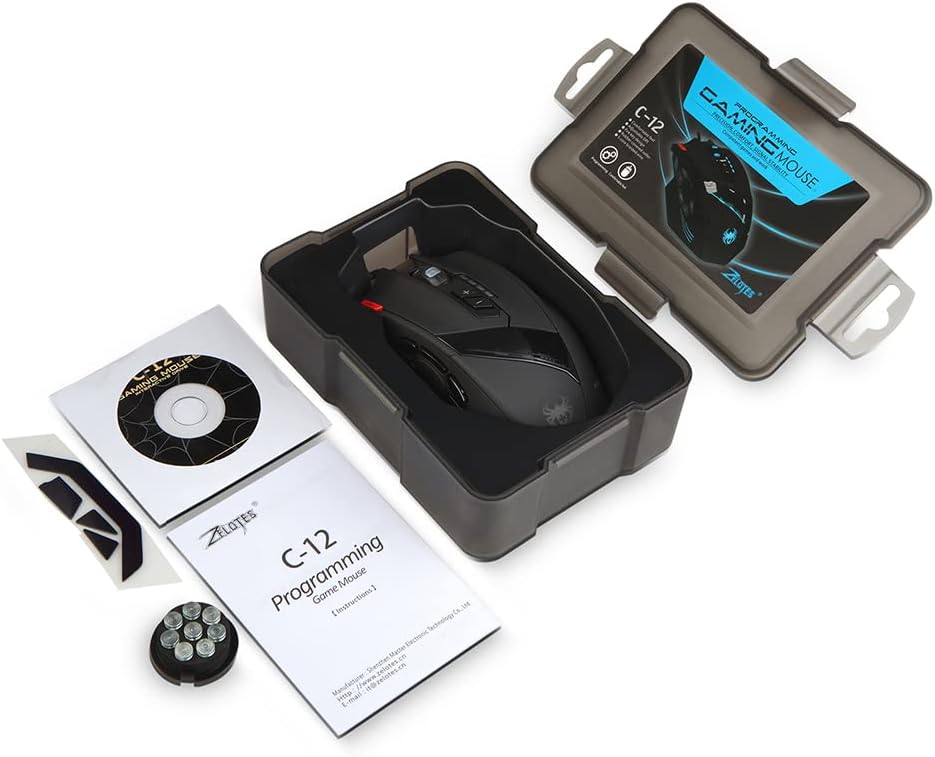
Image: Contents of the zelotes C12 Gaming Mouse package.
3. Прадукт скончыўсяview
The zelotes C12 Gaming Mouse features 12 programmable buttons and an ergonomic design for comfortable use. Refer to the diagram below for button identification.
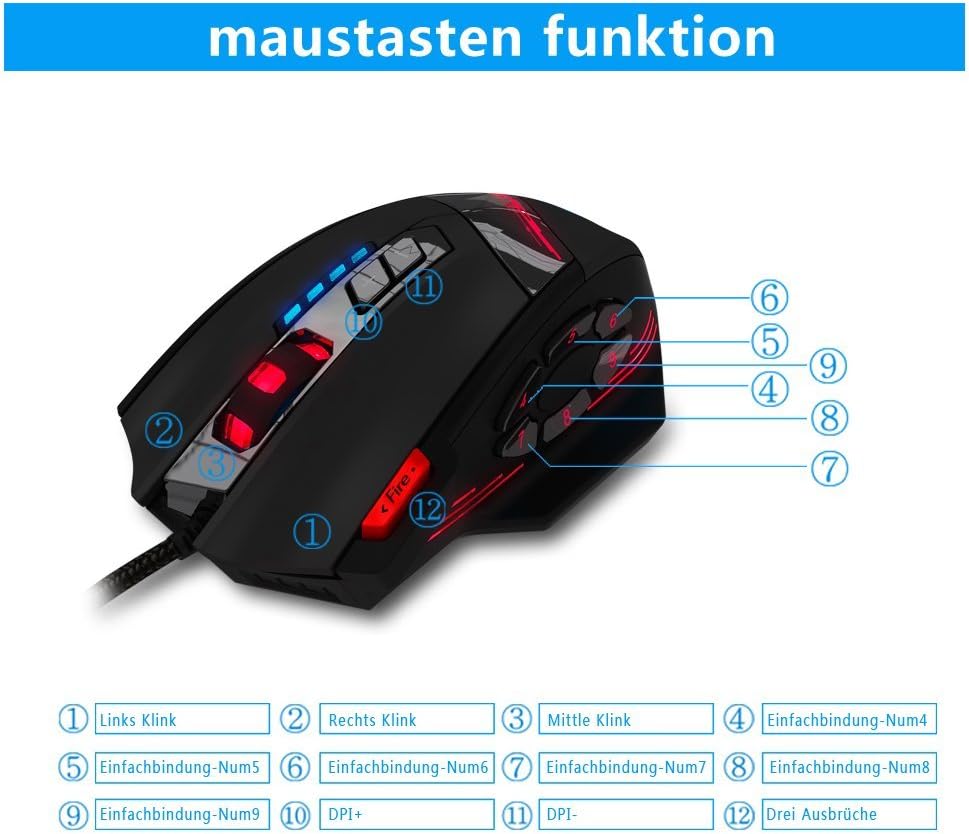
Image: zelotes C12 Gaming Mouse button layout.
Функцыі кнопак:
- Пстрыкніце левай кнопкай мышы
- Пстрыкніце правай кнопкай мышы
- Middle Click (Scroll Wheel)
- Праграмуемая кнопка 4
- Праграмуемая кнопка 5
- Праграмуемая кнопка 6
- Праграмуемая кнопка 7
- Праграмуемая кнопка 8
- Праграмуемая кнопка 9
- Кнопка DPI+
- Кнопка DPI
- Fire Key (Triple Click)

Image: Ergonomic design of the zelotes C12 Gaming Mouse.
4. Настройка
The zelotes C12 Gaming Mouse is designed for simple plug-and-play functionality.
Падлучэнне мышы
- Знайдзіце даступны USB-порт на вашым камп'ютары (ПК або Mac).
- Plug the USB connector of the zelotes C12 mouse into the USB port.
- Your operating system should automatically detect and install the necessary basic drivers. The mouse will be ready for use.
Video: Demonstration of the zelotes C12 Gaming Mouse features, including its design and button functionality.
5. Інструкцыя па эксплуатацыі
Рэгуляванне DPI (кропак на цалю)
The mouse features adjustable DPI settings to change cursor sensitivity. You can cycle through preset DPI levels using the DPI+ (Button 10) and DPI- (Button 11) buttons located on the top of the mouse.
- Default DPI settings: 1000/1500/2000/4000 DPI.
- DPI can be adjusted up to 8000 DPI through the dedicated software.
Праграмуемыя кнопкі
The zelotes C12 mouse includes 12 programmable buttons (Buttons 4-9, Fire Key, etc.) that can be customized to perform specific functions according to your gaming or work requirements. Customization is performed using the provided software.

Image: Shortcut key function and lighting modes.
Weight Adjustment System
The mouse is equipped with 8 removable weight blocks, each weighing 2.5g (0.1oz). You can add or remove these weights from the bottom of the mouse to achieve your preferred balance and feel.
- Перавярніце мышку.
- Locate the circular weight compartment cover on the underside.
- Twist the cover counter-clockwise to open and remove it.
- Add or remove the 2.5g weights as desired.
- Replace the cover and twist clockwise to secure it.
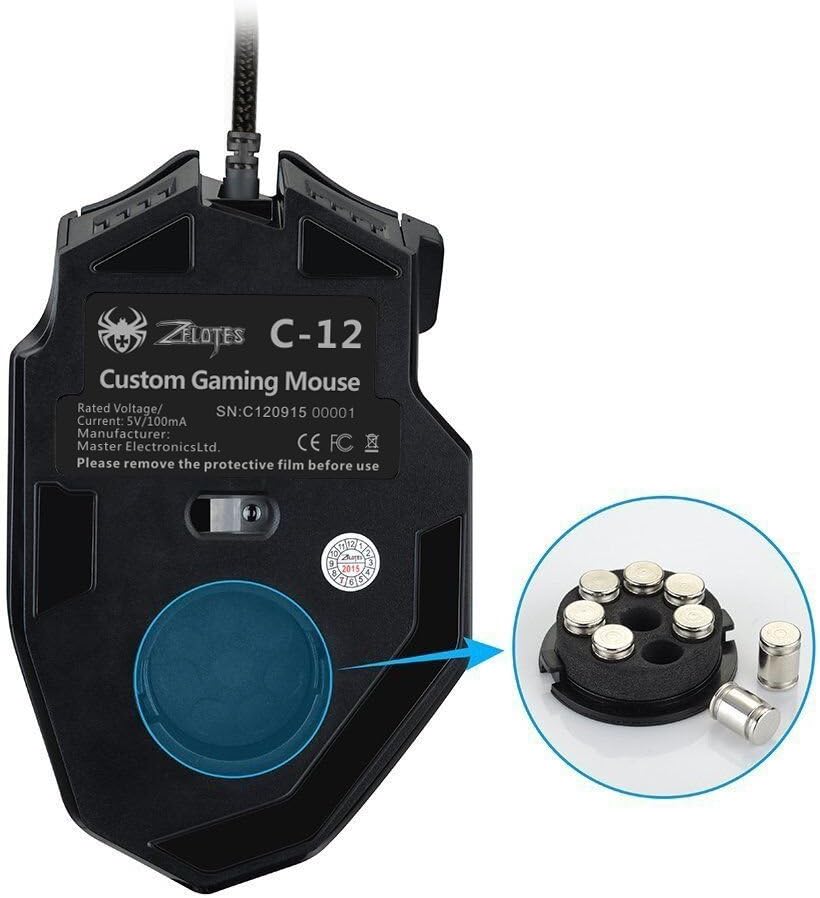
Image: Weight adjustment system on the zelotes C12 Gaming Mouse.
Рэжымы святлодыёднага асвятлення
The mouse features customizable LED lighting. The lighting modes, including 7-color cycle breathing and monochromatic constant bright, can be adjusted through the software.
6. Software Installation and Customization
To unlock the full potential of your zelotes C12 Gaming Mouse, including button programming, advanced DPI settings (up to 8000 DPI), and LED customization, install the dedicated driver software.
- Insert the included CD into your computer's optical drive.
- Follow the on-screen instructions to install the software. If your computer does not have an optical drive, please visit the zelotes official webсайт для запампоўкі найноўшых версій драйвераў.
- Once installed, launch the software to access customization options for button assignments, DPI profiles, polling rate, and LED effects.
Note: Programming software is not fully available for Mac operating systems.
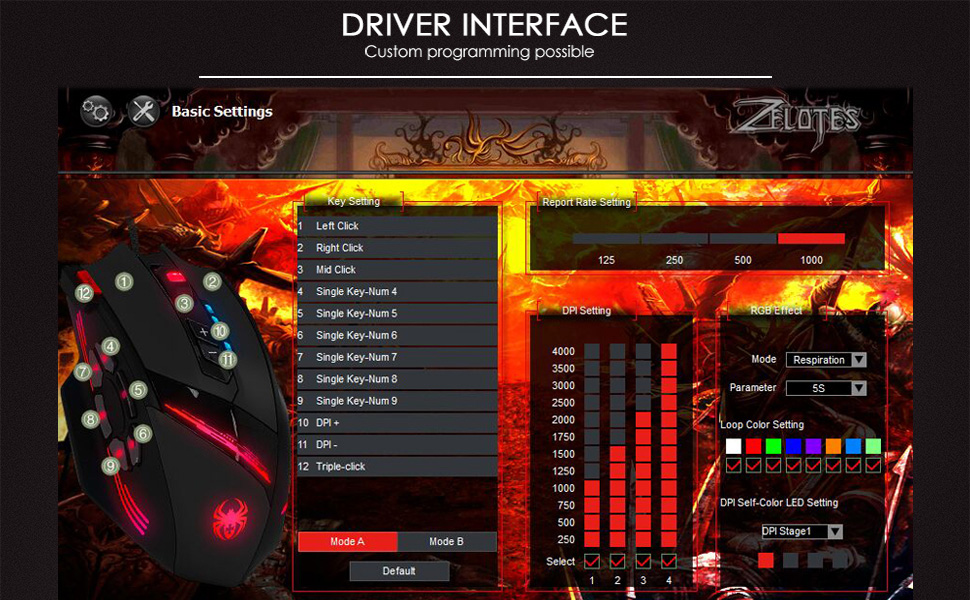
Image: Driver interface for custom programming.
7. Тэхнічнае абслугоўванне
Proper care will extend the life of your gaming mouse.
- Уборка: Выкарыстоўвайце мяккую сухую тканіну для працірання паверхні мышы. Для выдалення ўстойлівага бруду злёгкуamp можна выкарыстоўваць тканіну, але сачыце за тым, каб вільгаць не трапляла ўнутр прылады.
- захоўванне: Store the mouse in a cool, dry place when not in use. Avoid extreme temperatures.
- Сыход за кабелем: Do not excessively bend or pull the USB cable.
8. Выпраўленне непаладак
If you encounter issues with your zelotes C12 Gaming Mouse, try the following solutions:
- Мышка не рэагуе:
- Пераканайцеся, што кабель USB надзейна падключаны да спраўнага порта USB.
- Try plugging the mouse into a different USB port or another computer to rule out port or system issues.
- Перазагрузіце кампутар.
- Рух курсора няўстойлівы або з затрымкай:
- Працярыце аптычны датчык на ніжняй частцы мышы мяккай сухой тканінай.
- Пераканайцеся, што вы выкарыстоўваеце мыш на адпаведнай паверхні (напрыклад, кілімку для мышы). Пазбягайце моцна бліскучых або празрыстых паверхняў.
- Adjust the DPI settings to a lower value if the cursor is too sensitive.
- Buttons not working or programmable features not functioning:
- Ensure the driver software is correctly installed and updated.
- Праверце прызначэнні кнопак у праграме.
- Перазапусціце праграму і/або камп'ютар.
If the problem persists after trying these steps, please contact zelotes customer support for further assistance.
9. Тэхнічныя характарыстыкі

Image: Dimensions of the zelotes C12 Gaming Mouse.
| Асаблівасць | Апісанне |
|---|---|
| Марка | zelotes |
| Назва мадэлі | C12 |
| Тэхналогія падлучэння | USB (правадной) |
| Тэхналогія выяўлення руху | Аптычны |
| Налады DPI | 1000/1500/2000/4000 DPI (Adjustable up to 8000 DPI via software) |
| Гузікі | 12 (праграмуемых) |
| Рука арыентацыі | правільна |
| Вага | 160 Grams (Adjustable with 8x 2.5g weights) |
| Даўжыня кабеля | 1.8 метраў |
| Стаўка апытання | 125-1000 Гц |
| Паскарэнне | 24G |
| Ключавое жыццё | 12 мільёнаў клікаў |
| Сумяшчальныя аперацыйныя сістэмы | Win11, Win10, Win8, Win7, Mac OS (Programming software limited on Mac) |
| Памеры (Д х Ш х У) | 130 мм х 81.5 мм х 39.8 мм |
10. Гарантыя і падтрымка
Your zelotes C12 Gaming Mouse comes with a standard manufacturer's warranty. Please refer to the warranty card included in your package or visit the official zelotes webсайт для атрымання падрабязных гарантыйных умоў.
For technical support, troubleshooting assistance, or warranty claims, please contact zelotes customer service through their official webсайт або кантактную інфармацыю, указаную ў дакументацыі да прадукту.
Ask a question about this manual
Ask about setup, troubleshooting, compatibility, parts, safety, or missing instructions. Manuals+ will review the question and use this page’s manual context to help answer it.