
1. Уводзіны
The Zelotes F17 Vertical Wireless Mouse is designed for enhanced comfort and productivity, featuring an ergonomic vertical design that promotes a natural hand posture. This manual provides comprehensive instructions for setting up, operating, maintaining, and troubleshooting your new mouse.

Image: The Zelotes F17 Vertical Wireless Mouse, showcasing its ergonomic design and the included USB receiver.
2. Змесціва ўпакоўкі
Калі ласка, пераканайцеся, што ўсе прадметы прысутнічаюць у вашай упакоўцы:
- 1 x Zelotes Wireless Vertical Mouse
- 1 х USB-прыёмнік
- 1 х Інструкцыя па эксплуатацыі
3. Кіраўніцтва па наладцы
Follow these steps to set up your Zelotes F17 Vertical Wireless Mouse:
- Усталюйце батарэі: The mouse requires two AA batteries (not included). Locate the battery compartment on the underside of the mouse. Open the cover, insert the batteries according to the polarity indicators, and close the cover.
- Атрымаць USB-прыёмнік: The USB receiver is conveniently stored next to the battery compartment. Gently pull it out.
- Падключыце USB-рэсівер: Plug the USB receiver into an available USB port on your computer (Laptop, PC, Mac).
- Уключэнне: Locate the On/Off switch on the underside of the mouse and slide it to the 'On' position. The mouse is plug-and-play, requiring no driver installation.

Image: The underside of the Zelotes F17 mouse, illustrating the battery compartment and the integrated storage slot for the USB receiver.
Video: A demonstration of the Zelotes F17 Vertical Wireless Mouse in use, highlighting its ergonomic grip and functionality.
4. Інструкцыя па эксплуатацыі
The Zelotes F17 mouse features 6 buttons and adjustable DPI settings for optimal control.
4.1 Эрганамічная ручка
The vertical design allows your hand to rest in a natural handshake position, reducing wrist and forearm strain during prolonged use.
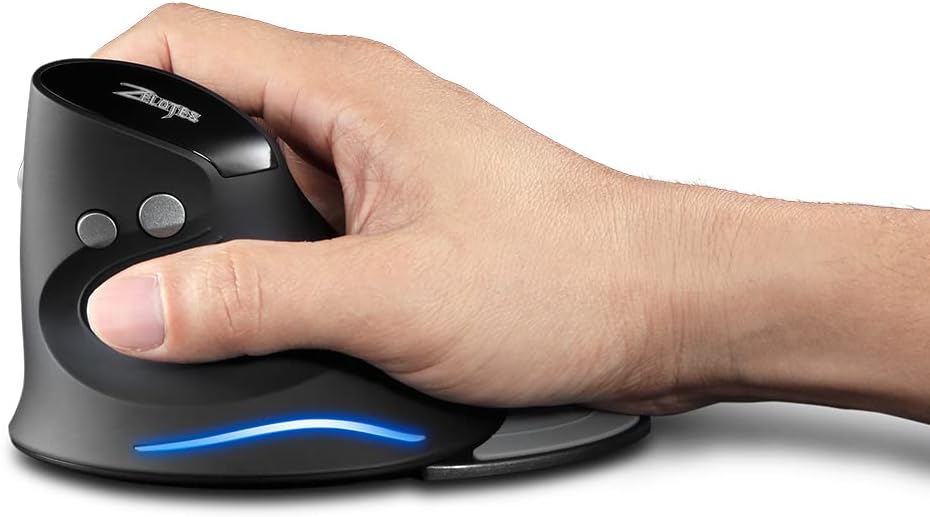
Image: A hand demonstrating the natural, ergonomic grip on the Zelotes F17 vertical mouse.
4.2 Функцыі кнопак
- Пстрычка левай кнопкай мышы: Стандартная функцыя асноўнага кліку.
- Пстрыкніце правай кнопкай мышы: Стандартная функцыя другаснага кліку.
- Кола пракруткі: Scroll up or down, and click for middle-button functionality.
- Кнопка DPI: Цыклічнае пераключэнне налад DPI (1200/1600/2400 DPI).
- Кнопкі наперад/назад: Located on the thumb side, these buttons allow for quick navigation in web браўзэры або file даследчыкі.
4.3 Рэгуляваны DPI
Press the DPI button (located near the scroll wheel) to switch between 1200, 1600, and 2400 DPI settings. This allows you to adjust the mouse sensitivity to suit your task, whether it's precise graphic design or fast-paced gaming.
4.4 Detachable Palm Rest
The Zelotes F17 includes a detachable palm rest for additional wrist support. You can easily attach or remove it based on your preference and comfort needs.

Image: The Zelotes F17 mouse with its detachable palm rest separated, illustrating the modular design.
5. Тэхнічнае абслугоўванне
To ensure the longevity and optimal performance of your Zelotes F17 mouse, follow these maintenance guidelines:
- Уборка: Выкарыстоўвайце мяккую сухую тканіну для працірання паверхні мышы. Для выдалення ўстойлівага бруду злёгку працярыцеampПрацярыце тканіну вадой або мяккім ачышчальным растворам. Пазбягайце агрэсіўных хімічных рэчываў або абразіўных матэрыялаў.
- Замена батарэі: When the mouse's performance degrades or the LED illumination dims, it's time to replace the AA batteries. Refer to Section 3.1 for battery installation instructions.
- захоўванне: When not in use for extended periods, turn off the mouse to conserve battery life. Store the USB receiver in its dedicated slot on the underside of the mouse to prevent loss.
6. Выпраўленне непаладак
If you encounter issues with your Zelotes F17 mouse, try the following solutions:
| праблема | Магчымая прычына | Рашэнне |
|---|---|---|
| Мышка не рэагуе | Low battery; USB receiver disconnected; Mouse is off. | Replace batteries; Re-insert USB receiver; Turn mouse On. |
| Няўстойлівы рух курсора | Брудны аптычны датчык; непрыдатная паверхня; нізкі ўзровень зарада батарэі. | Clean optical sensor; Use on a smooth, non-reflective surface; Replace batteries. |
| LED illumination not working | Low battery; Mouse is off. | Replace batteries; Turn mouse On. |
| DPI setting not changing | Няспраўнасць кнопкі DPI. | Ensure the mouse is powered on and connected. If the issue persists, contact customer support. |
7. Тэхнічныя характарыстыкі
Key technical specifications for the Zelotes F17 Vertical Wireless Mouse:
| Асаблівасць | Дэталь |
|---|---|
| Памеры прадукту | 4.33 х 3.39 х 3.15 цалі |
| Вага прадмета | 3.53 унцыі |
| Нумар мадэлі тавару | F17 |
| Марка | zelotes |
| Колер | Чорны |
| Тэхналогія падлучэння | USB (2.4 ГГц бесправадная сувязь) |
| Асаблівасць | Ergonomic Design, Removable Wrist Rest, LED Illumination |
| Тэхналогія выяўлення руху | Аптычны |
| Налады DPI | 1200/1600/2400 DPI |
| Колькасць кнопак | 6 |
| Крыніца харчавання | 2 батарэйкі АА (не ўключаны) |
| Сумяшчальнасць | Win11, Win10, Win8, Win7, Mac OS |

Image: A diagram illustrating the dimensions of the Zelotes F17 Vertical Wireless Mouse.
8. Гарантыя і падтрымка
For warranty information or technical support, please refer to the contact details provided on the product packaging or the official Zelotes webсайт. Захоўвайце чэк аб куплі як пацверджанне пакупкі.