
1. Уводзіны
Дзякуй за пакупкуasing the Aogamb D3000 Kids Alarm Clock. This device combines a digital alarm clock, Bluetooth speaker, wake-up light, and sleep sound machine to create a versatile and engaging experience for children's bedrooms. Please read this manual carefully to ensure proper use and maintenance of your device.
Змест пакета:
- Aogamb D3000 Alarm Clock
- USB-кабель для зарадкі
- Кіраўніцтва карыстальніка

Image: The Aogamb D3000 Alarm Clock, USB charging cable, and user manual are shown as included items.
2. Інфармацыя па бяспецы
- Не падвяргайце прыладу ўздзеянню экстрэмальных тэмператур, прамых сонечных прамянёў або высокай вільготнасці.
- Трымайце прыладу далей ад вады ці іншых вадкасцей.
- Не спрабуйце самастойна разабраць або адрамантаваць прыладу. Звярніцеся ў службу падтрымкі па дапамогу.
- Выкарыстоўвайце толькі той кабель для зарадкі USB, які ўваходзіць у камплект, або яго сертыфікаваны эквівалент.
- Ensure the device is placed on a stable surface to prevent falling.
3. Настройка
Першапачатковая зарадка
Before first use, fully charge the alarm clock using the provided USB cable. Connect the USB cable to the charging port on the back of the device and to a suitable USB power adapter (not included). The charging indicator light will be red during charging and turn blue when fully charged.
Выява: буйны план view of the USB charging interface located on the back of the alarm clock.
Protective Film Removal
Before operating the device, gently remove the transparent protective film from the black display lens.
Image: A hand is shown peeling off a transparent protective film from the black display area of the alarm clock.
4. Інструкцыя па эксплуатацыі
Кантроль надview
Familiarize yourself with the buttons located on the top of the alarm clock:
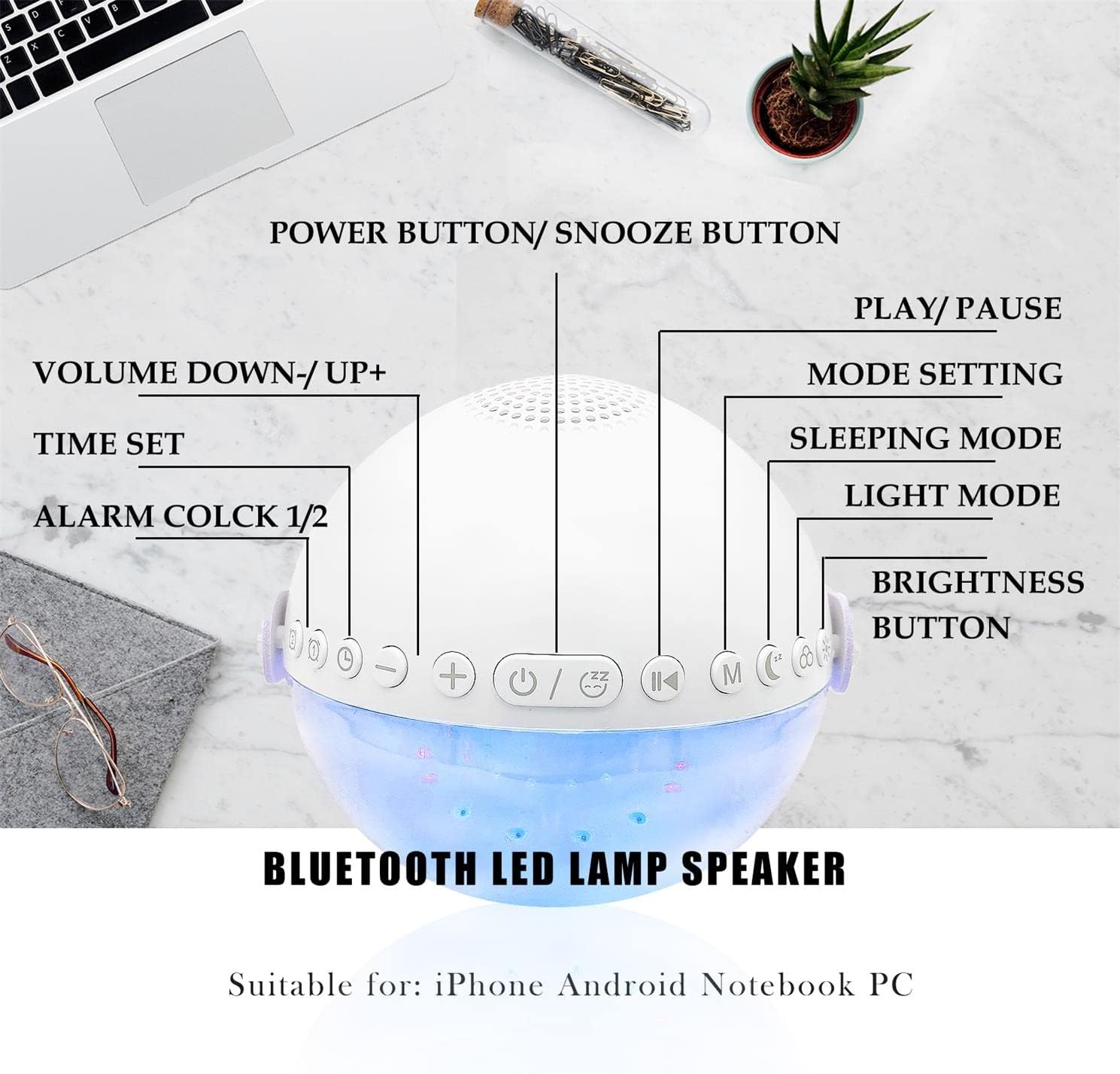
Выява: Над галавой view of the alarm clock with labels pointing to each button: Power/Snooze, Volume Down/Up, Time Set, Alarm 1/2, Play/Pause, Mode Setting, Sleeping Mode, Light Mode, and Brightness Button.
- Power Button / Snooze Button: Press to power on/off. Short press during an alarm to activate snooze.
- Volume Down (-) / Volume Up (+): Кароткае націсканне для рэгулявання гучнасці.
- Усталяваны час: Націсніце, каб увайсці ў рэжым налады часу.
- Alarm 1 / Alarm 2: Press to set or activate/deactivate Alarm 1 or Alarm 2.
- Прайграванне/Паўза: Controls media playback in Bluetooth or Sound Machine mode.
- Mode Setting (M): Press to cycle through modes (Bluetooth, Sound Machine).
- Рэжым сну: Activates sleep mode features.
- Светлавы рэжым: Cycles through light colors and effects.
- Кнопка яркасці: Adjusts display and light brightness.
Ўстаноўка часу
- Націсніце Усталяваны час кнопка. Індыкатар гадзін будзе міргаць.
- Выкарыстоўвайце Павелічэнне гучнасці (+) or Volume Down (-) кнопкі для рэгулявання гадзіны.
- Прэса Усталяваны час зноў, каб пацвердзіць гадзіны і перайсці да налады хвілін.
- Выкарыстоўвайце Павелічэнне гучнасці (+) or Volume Down (-) кнопкі для налады хвілін.
- Прэса Усталяваны час яшчэ раз для пацверджання і выхаду з налады часу.
- The clock supports a 24-hour format.
Налада будзільніка (падвойны будзільнік)
The device features two independent alarms. You can customize ringtones, alarm volume, and light color/brightness for each.
- Націсніце Трывога 1 or Трывога 2 button to select an alarm. The alarm icon will flash.
- Follow the time setting steps to set the desired alarm time.
- After setting the time, you can customize the alarm sound, volume, and wake-up light settings using the respective buttons (e.g., Светлавы рэжым, Гучнасць +/-).
- Націсніце Трывога 1 or Трывога 2 button again to activate/deactivate the alarm. The alarm icon will appear/disappear on the display.
Image: Two panels illustrate customized alarm times: one for waking up at 7:30 AM and another for going to sleep at 10:00 PM, both for Monday to Friday.
Функцыя адкладання
Калі гучыць будзільнік, націсніце кнопку Power Button / Snooze Button to activate the snooze function. The alarm will pause for 5 minutes and then sound again. This can be repeated up to three times, after which the alarm will turn off automatically.
Image: The alarm clock is displayed with a clear indication of its snooze function.
Рэжым дынаміка Bluetooth
The alarm clock features advanced Bluetooth 5.0 technology for wireless audio streaming.
- Націсніце Mode Setting (M) button repeatedly until the Bluetooth icon appears on the display.
- On your smartphone or Bluetooth-enabled device, search for "Aogamb D3000" in the Bluetooth settings and pair.
- Once connected, you can play music or audio from your device through the alarm clock speaker.
- Выкарыстоўвайце Прайграванне / Паўза кнопка для кіравання прайграваннем.
- Выкарыстоўвайце Павелічэнне гучнасці (+) or Volume Down (-) кнопкі для рэгулявання гучнасці.

Image: A child and adult are shown with the alarm clock, which is wirelessly connected to a smartphone via Bluetooth, playing music.
Сонная гукавая машына
The alarm clock offers 8 soothing natural sounds to aid sleep or relaxation.
- Націсніце Mode Setting (M) button repeatedly until the Sound Machine icon appears on the display.
- Кароткае націсканне Павелічэнне гучнасці (+) or Volume Down (-) buttons to cycle through the 8 available sounds: Rain, Ocean Waves, Birds, Water Stream, White Noise, Cicada, Bonfire, Tick-Tock.
- Доўгі націск Павелічэнне гучнасці (+) or Volume Down (-) buttons to adjust the volume of the sleep sounds.
- Націсніце Прайграванне / Паўза button to start or stop the sound.

Image: A child and adult are shown sleeping, with the alarm clock nearby. Icons for 8 natural sounds (Rain, Water Stream, Cicadas, Birds, Ocean Waves, White Noise, Bonfire, Tick-Tock) are displayed, indicating the sleep sound feature.
Wake-up Light / Night Light
The alarm clock features a touch-activated backlight and adjustable colored lights.
- Touch-Activated Backlight: Gently tap the device to activate the backlight for checking the time in the dark.
- Светлавы рэжым: Націсніце Светлавы рэжым button to cycle through various light colors (Warm White, Green, Red, Blue, Orange, Yellow) and lighting effects (e.g., breathing lights, flashing light).
- Наладзіць яркасць: Націсніце Кнопка яркасці to adjust the intensity of the light (3 levels: Low, Middle, High).

Image: The alarm clock is shown displaying various colorful night light options, including 9 different colors, 3 breathing light effects, and 1 flashing light, with adjustable brightness levels (Low, Middle, High).

Image: The alarm clock is shown with various light colors and brightness settings, illustrating its wake-up light functionality.
Sleep Trainer Function (Sun & Moon Icons)
The alarm clock features sun and moon icons on the LED display to help children understand day and night cycles, promoting better sleep habits. The sun icon indicates daytime, and the moon icon indicates nighttime.
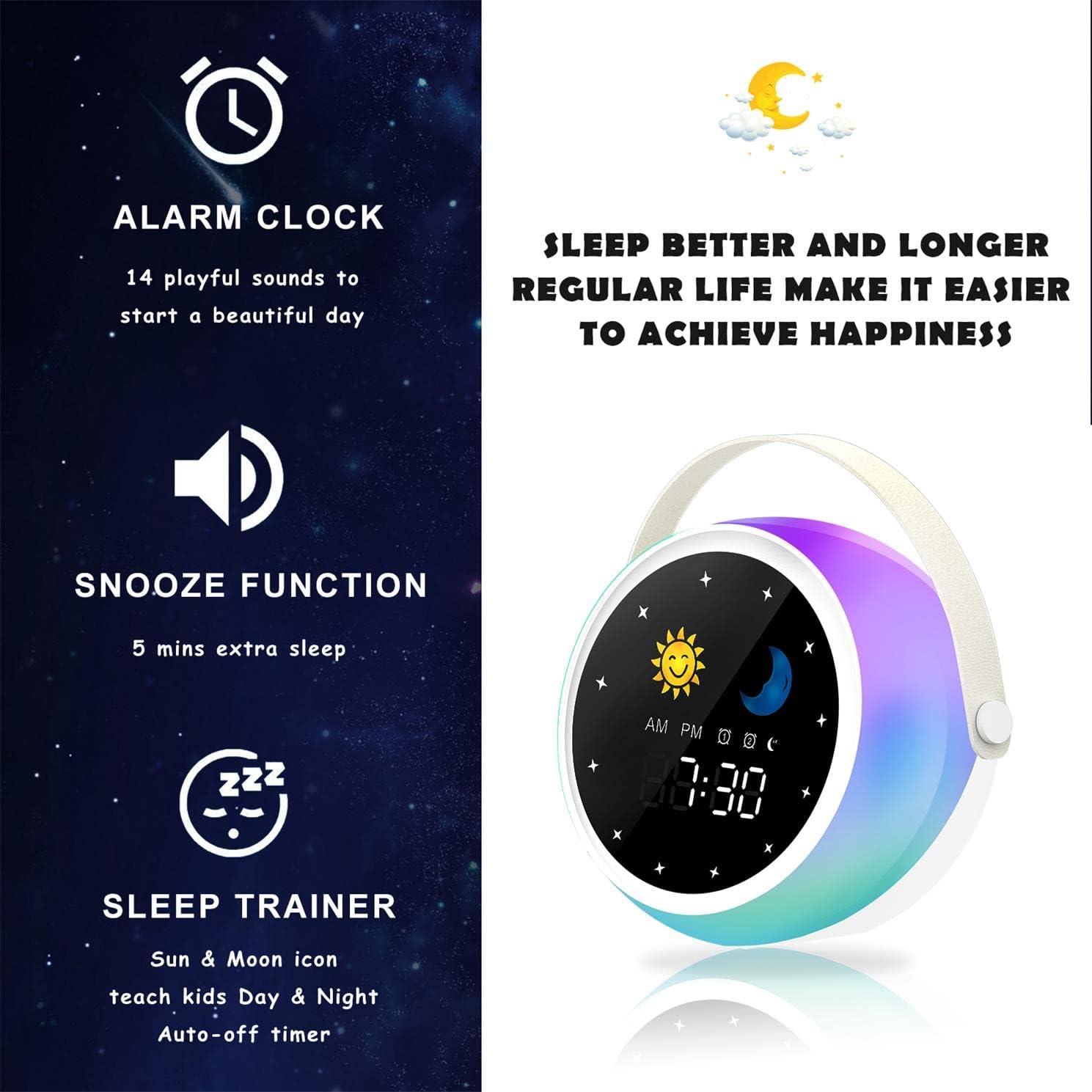
Image: A visual representation of the alarm clock's key features: alarm, snooze, and sleep trainer, with the sun and moon icons visible on the display to teach day and night.

Image: Two panels show the alarm clock display: one for sleep time (10:30 PM with moon icon) and one for wake-up time (7:00 AM with sun icon), illustrating the sleep trainer function.
5. Тэхнічнае абслугоўванне
- Працірайце прыладу мяккай сухой тканінай. Не выкарыстоўвайце абразіўныя ачышчальнікі або растваральнікі.
- Пераканайцеся, што порт зарадкі не мае пылу і смецця.
- Захоўвайце прыладу ў прахалодным, сухім месцы, калі яна не выкарыстоўваецца працяглы час.
6. Выпраўленне непаладак
Прылада не ўключаецца:
- Пераканайцеся, што прылада цалкам зараджана. Падключыце яе да крыніцы харчавання з дапамогай USB-кабеля.
- Press and hold the Power Button for a few seconds.
Праблемы спалучэння Bluetooth:
- Make sure the alarm clock is in Bluetooth mode (Bluetooth icon visible).
- Ensure your smartphone or device's Bluetooth is enabled and within range.
- Паспрабуйце перазагрузіць і будзільнік, і прыладу Bluetooth.
- Выдаліце прыладу са спісу Bluetooth вашага тэлефона і паспрабуйце зноў падключыць яе.
Будзільнік не гучыць:
- Праверце, ці ўключаны сігнал трывогі (на дысплеі бачны значок сігналізацыі).
- Check the alarm volume settings.
- Пераканайцеся, што час будзільніка ўсталяваны правільна.
7. Тэхнічныя характарыстыкі
| Марка | Аогамб |
| Нумар мадэлі | D3000 |
| Колер | Белы |
| Памеры (Д х Ш х У) | 12 х 12.1 х 10.5 см |
| Вага | 430 г |
| Матэрыял | Крышталь |
| Тып дысплея | Лічбавы |
| Крыніца харчавання | Электрычны кабель |
| Асаблівасці | Alarm, Charging Port, Snooze, Bluetooth Speaker, Wake-up Light, Sleep Sound Machine |
| Батарэі ўваходзяць у камплект | няма |
8. Гарантыя і падтрымка
This product comes with a standard manufacturer's warranty. For detailed warranty information, please refer to the product packaging or contact Aogamb customer support. If you encounter any issues or have questions not covered in this manual, please reach out to our support team for assistance.
Кантакт службы падтрымкі: Please refer to the contact information provided on the product packaging or the official Aogamb webсайт.