
1. Уводзіны
This manual provides detailed instructions for the safe and efficient operation of your HANMATEK HM305T Programmable DC Power Supply. The HM305T is a high-precision, adjustable DC power supply designed for laboratory, research, and repair applications, offering stable and reliable power output.
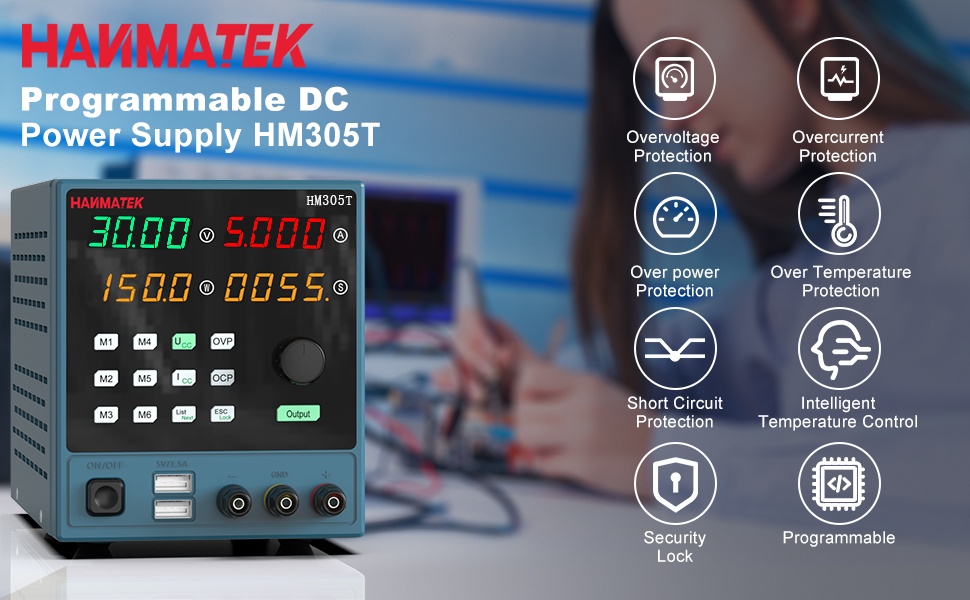
Figure 1: HANMATEK HM305T Programmable DC Power Supply overview, highlighting key features such as overvoltage protection, overcurrent protection, and intelligent temperature control.
2. Асноўныя магчымасці
The HANMATEK HM305T is equipped with advanced features to ensure precision, safety, and versatility:
- High Precision Output: Provides adjustable voltage from 0-30V and current from 0-5A, with a resolution of 10mV and 1mA.
- Four-Digit Display: Simultaneously displays output voltage, current, power, and time with high accuracy.
- Некалькі функцый абароны: Уключае Over Voltage Protection (OVP), Over Current Protection (OCP), Over Power Protection (OPP), Over Temperature Protection (OTP), and Short-Circuit Protection.
- Programmable Control: Connects to a PC via USB for software control and programming functions.
- Два порта USB для зарадкі: Front-panel 5V 1.5A USB ports for convenient device charging.
- Захоўванне памяці: Six groups of parameter shortcut keys (M1-M6) for quick recall of frequently used settings.
- Інтэлектуальны вентылятар астуджэння: Automatically adjusts fan speed based on temperature to maintain optimal operating conditions.
- Output ON/OFF Switch: One-key control for output, allowing pre-setting of values before activation.
- Блакаванне клавіятуры: Прадухіляе выпадковую змену налад падчас працы.

Figure 2: The HM305T features a high-precision four-digit display for voltage, current, and power, shown alongside other measurement devices for comparison.
3. Змесціва ўпакоўкі
Пасля распакавання пераканайцеся, што ўсе прадметы ёсць у камплекце:
- HANMATEK HM305T Programmable DC Power Supply
- Сілавы кабель
- Кабель сувязі USB
- Test Leads (Alligator clips)
- Кіраўніцтва па эксплуатацыі
- Software CD (for PC control)

Figure 3: All items included in the HANMATEK HM305T package, neatly arranged.
4. Прадукт скончыўсяview і элементы кіравання
Familiarize yourself with the front and rear panels of the power supply.

Figure 4: Detailed diagram of the HM305T's front and rear panels, indicating the location and function of all controls and ports.
Элементы кіравання на пярэдняй панэлі:
- тtage Дысплей: Паказвае аб'ём выхаднога сігналуtage.
- Бягучы дысплей: Shows the output current.
- Power/Menu/Status Display: Shows output power, menu options, or status.
- Time/Status Display: Shows output time or status.
- тtage Setting Key (UCV): Press to adjust voltage.
- Current Setting Key (ICC): Press to adjust current.
- Rotating Jog Wheel: Used to adjust values when setting voltagе або ток.
- Над Voltage Setting Key (OVP): Sets the overvoltagмяжа абароны.
- Over Current Setting Key (OCP): Sets the overcurrent protection limit.
- Output On/Off Switch: Toggles the power output.
- Memory Shortcut Keys (M1-M6): Store and recall up to six sets of voltagе і параметры току.
- List Next/Mode Key: Navigates through lists or changes modes.
- ESC/Keyboard Lock Key: Exits menu or locks/unlocks the keyboard.
- Dual USB Output Charging Key (5V/1.5A): Activates the front USB charging ports.
- Выхадныя тэрміналы: Positive (+), Negative (-), and Ground (GND) connections for load.
Кампаненты задняй панэлі:
- Вентылятар астуджэння: Dissipates heat from the unit.
- Інтэрфейс сувязі USB: Connects to a PC for software control.
- Улада пераменнага току: Connects the power supply to the mains electricity.
- Трымальнік засцерагальніка: Змяшчае ахоўны засцерагальнік.
5. Настройка
- Размяшчэнне: Place the power supply on a stable, level surface with adequate ventilation. Ensure the cooling fan at the rear is not obstructed.
- Падключэнне сілкавання: Connect the provided AC power cable to the AC Power Input on the rear panel and then to a suitable mains power outlet.
- Падключэнне USB (неабавязкова): For PC control, connect the provided USB communication cable from the USB Communication Interface on the rear panel to your computer. Install the software from the included CD or download the latest version from the HANMATEK webсайт.
- Першапачатковае ўключэнне: Press the Power Button on the front panel to turn on the unit. The display will illuminate.
6. Інструкцыя па эксплуатацыі
6.1 Налада Voltagе і ток
- Ensure the output is OFF (Output button LED is off).
- Націсніце UCV (Томtage Setting) key. The voltage display will start blinking.
- Павярнуць Rotating Jog Wheel to adjust the desired voltage. Press the jog wheel to move between digits for fine adjustment.
- Націсніце ICC (Current Setting) key. The current display will start blinking.
- Павярнуць Rotating Jog Wheel to adjust the desired current limit. Press the jog wheel to move between digits.
- Once settings are complete, press the Выхад button to enable the power output. The Output button LED will illuminate.
6.2 Using Memory Functions (M1-M6)

Figure 5: The memory buttons (M1-M6) allow for quick storage and recall of frequently used voltagе і бягучыя налады.
- To Save Settings: Усталюйце патрэбную гучнасцьtage and current. Press and hold one of the memory keys (M1-M6) for approximately 3 seconds until a confirmation beep or display change indicates the settings are saved.
- To Recall Settings: Briefly press the desired memory key (M1-M6). The stored voltage and current values will be loaded.
6.3 Над VoltagАбарона ад электроннай напругі (OVP) і абарона ад перагрузкі па току (OCP)
These functions protect your connected load from excessive voltagе або ток.
- Setting OVP: Націсніце OVP key. The OVP value will blink. Use the Rotating Jog Wheel to set the maximum allowable output voltage. Прэса OVP яшчэ раз для пацверджання.
- Setting OCP: Націсніце OCP key. The OCP value will blink. Use the Rotating Jog Wheel to set the maximum allowable output current. Press OCP яшчэ раз для пацверджання.
6.4 Блакаванне клавіятуры
Каб пазбегнуць выпадковай змены налад, націсніце і ўтрымлівайце кнопку ESC/Lock key for 3 seconds to lock the keyboard. Repeat to unlock.
6.5 Using Dual USB Charging Ports

Figure 6: The front panel features two 5V 1.5A USB ports for convenient charging of external devices.
Connect your USB-powered devices to the 5V/1.5A USB ports on the front panel. These ports provide a fixed 5V output at up to 1.5A for charging or powering compatible devices.
6.6 Кіраванне праграмным забеспячэннем ПК
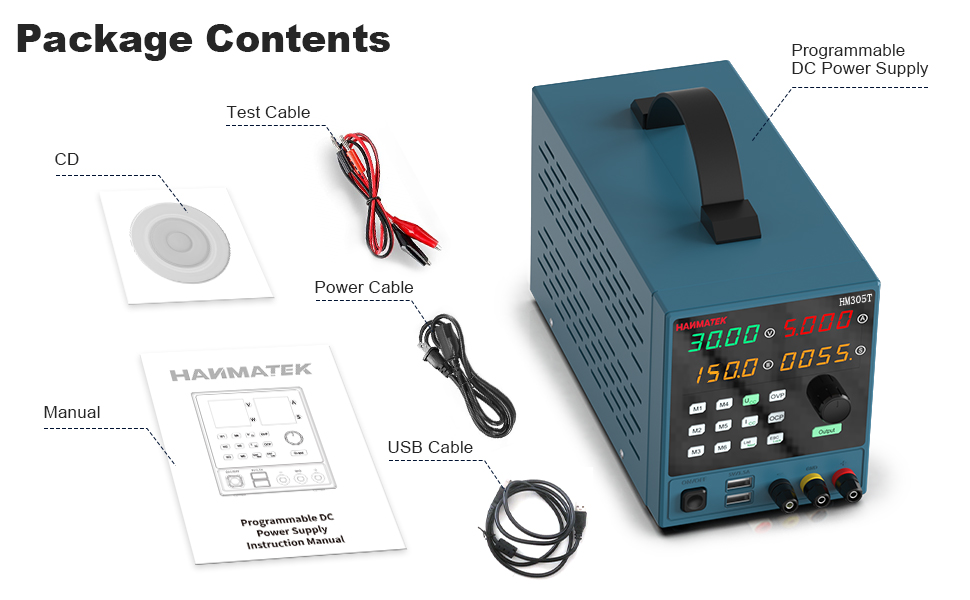
Figure 7: The PC software interface allows for remote control, data logging, and advanced programming of the HM305T power supply.
Install the provided software on your computer. Connect the power supply to your PC using the USB communication cable. The software allows for remote control of voltage and current, data logging, and advanced programming functions. Refer to the software's dedicated help documentation for detailed usage instructions.
7. Тэхнічнае абслугоўванне
7.1 Ачыстка
Regularly clean the exterior of the power supply with a soft, dry cloth. Do not use abrasive cleaners or solvents. Ensure the unit is powered off and disconnected from the mains before cleaning.
7.2 Вентылятар астуджэння

Figure 8: The rear cooling fan ensures proper heat dissipation for stable operation.
Periodically check the cooling fan and its vents for dust accumulation. Use compressed air to gently clear any dust to ensure proper airflow and prevent overheating. Do not attempt to disassemble the unit to clean the fan.
7.3 Замена засцерагальніка

Figure 9: The fuse holder is located on the rear panel, integrated with the AC power input.
If the unit fails to power on, the fuse may need replacement. Ensure the power supply is disconnected from the mains. Carefully remove the fuse holder from the AC power input socket using a small flat-head screwdriver. Replace the fuse with one of the same type and rating (refer to specifications for details). Reinsert the fuse holder securely.
8. Выпраўленне непаладак
- Няма харчавання:
- Check if the power cable is securely connected to both the unit and the mains outlet.
- Verify the mains outlet is functional.
- Праверце і пры неабходнасці заменіце засцерагальнік (гл. раздзел 7.3).
- Няма вываду Voltagэ/ток:
- Забяспечце Выхад button is pressed and its LED is illuminated.
- Check if OVP or OCP limits have been triggered. Adjust limits or reset the unit if protection is active.
- Verify that the load is correctly connected to the output terminals.
- Пераканайцеся, што ўстаноўлены аб'ёмtage and current values are not zero.
- Няправільныя паказанні:
- Ensure proper connection of test leads to the load.
- Compare readings with a calibrated multimeter to verify accuracy. If significant discrepancies exist, contact support.
- Memory Settings Not Saving (M1-M6):
- Ensure you are pressing and holding the memory key for approximately 3 seconds to save. A brief press will recall.
- If issues persist, try a factory reset (refer to manual for specific procedure, if available, or contact support).
- PC Software Connection Issues:
- Пераканайцеся, што кабель USB надзейна падлучаны.
- Ensure the correct drivers are installed on your PC.
- Check the software settings for the correct COM port selection.
9. Інфармацыя па бяспецы
Observe the following safety precautions to prevent electric shock, injury, or damage to the unit:
- Заўсёды падключайце блок харчавання да заземленай разеткі.
- Не выкарыстоўвайце прыладу ў вільготным абоamp умовы.
- Не адчыняйце casing of the power supply. There are no user-serviceable parts inside, and doing so voids the warranty and poses a risk of electric shock.
- Забяспечце належную вентыляцыю вакол прылады, каб прадухіліць перагрэў.
- Не перавышайце максімальны аб'ёмtage and current ratings of the power supply or the connected load.
- Utilize the Over Voltage Protection (OVP) and Over Current Protection (OCP) features to safeguard your circuits.
- Disconnect the power supply from the mains before performing any maintenance or connecting/disconnecting loads.
- Трымайце дзяцей далей ад прылады.

Figure 10: The internal components of the HM305T are designed with multiple protection features including overvoltage, overcurrent, overpower, overtemperature, and short-circuit protection.
10. Тэхнічныя характарыстыкі
| Параметр | Каштоўнасць |
|---|---|
| мадэль | HM305T |
| Выхад Voltagе далёкасць | 0-30В |
| Дыяпазон выхаднога току | 0-5А |
| Выходная магутнасць | 150 ват |
| тtage Рэзалюцыя | 10mV |
| Дзеючае дазвол | 1 мА |
| Дысплей | 4-digit LED (Voltage, Current, Power, Time) |
| Функцыі абароны | OVP, OCP, OPP, OTP, Short-Circuit |
| Парты USB для зарадкі | 2 х 5 В/1.5 А |
| Інтэрфейс сувязі | USB |
| Матэрыял | ПК (полікарбанат) |
| Памеры (Д х Ш х У) | 35.61 х 21.49 х 17.81 см (прыблізна 14 х 8.5 х 7 цалі) |
| Вага | 2.42 кг (прыбл. 5.34 фунта) |

Figure 11: Approximate dimensions of the HM305T power supply.
11. Гарантыя і падтрымка
The HANMATEK HM305T Programmable DC Power Supply comes with a standard manufacturer's warranty. For specific warranty terms, please refer to the warranty card included in your package or visit the official HANMATEK webсайт.
For technical support, troubleshooting assistance beyond this manual, or warranty claims, please contact HANMATEK customer service through their official channels. Provide your model number (HM305T) and purchase details when contacting support.