
Уводзіны
This manual provides essential information for the safe and efficient operation of your DuraPro 55-Inch Outdoor 4K UHD LED TV. Please read these instructions thoroughly before installation and use, and retain them for future reference.
The DuraPro 55-Inch Outdoor 4K UHD LED TV is designed for outdoor entertainment in partially shaded areas. It features a 4K display with HDR, 500-nit brightness, and a rugged, weatherproof IP54-rated exterior with tempered glass for protection against environmental elements.
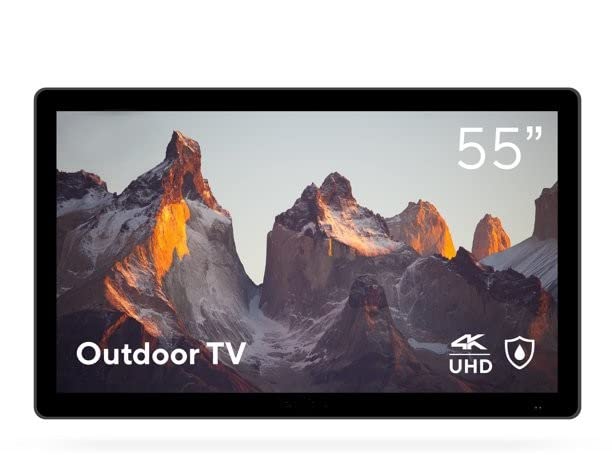
Image: DuraPro 55-Inch Outdoor 4K UHD LED TV.

Image: DuraPro TV mounted on an outdoor wall, showcasinг WebРазумная платформа АС.

Image: DuraPro TV displaying 4K UHD and HDR capabilities.

Image: DuraPro TV demonstrating IP54 weatherproof rating with water resistance.
Асноўныя характарыстыкі
- Optimized for Outdoors: Designed for use in outdoor spaces like covered patios and gazebos.
- 4K UHD HDR Screen: Delivers crisp 4K resolution with High Dynamic Range and 500-nit brightness for enhanced clarity.
- Абарона ад любых надвор'яў: IP54-rated exterior and tempered glass screen provide protection against rain, dust, and UV rays.
- Інтэграваныя кампаненты: Includes built-in speakers, an IP55 waterproof remote, and a compatible TV wall mount.
- Зручнае падключэнне: Equipped with 3 HDMI 2.0 inputs (HDCP 2.2 compatible) and 1 USB input for various media sources.
Што ў скрынцы
Перад тым, як працягнуць усталёўку, пераканайцеся, што ўсе кампаненты наяўныя.
- DuraPro 55-Inch Outdoor 4K UHD LED TV
- Сілавы кабель
- IP55 Waterproof Remote Control
- Compatible Wall Mount Bracket

Image: Included wall mount bracket for DuraPro outdoor TV.
Інфармацыя па бяспецы
Заўсёды выконвайце асноўныя меры бяспекі пры выкарыстанні гэтага вырабу, каб знізіць рызыку пажару, паражэння электрычным токам і траўмаў людзей.
- Do not expose the TV to direct sunlight for extended periods. This TV is designed for partially shaded outdoor areas.
- Забяспечце належную вентыляцыю вакол тэлевізара. Не блакуйце вентыляцыйныя адтуліны.
- Use only the power cable supplied with the TV. Connect to a grounded outdoor-rated power outlet.
- Не спрабуйце самастойна абслугоўваць гэты прадукт. Звярніцеся да ўсіх абслугоўванняў кваліфікаванага абслуговага персаналу.
- Keep the remote control dry. While it is IP55 waterproof, prolonged submersion or exposure to harsh chemicals should be avoided.
- Securely mount the TV using the provided wall mount and follow all installation instructions carefully to prevent injury or damage.
Настройка
1. Устаноўка насценнага мацавання
The DuraPro 55-Inch Outdoor TV includes a compatible wall mount. Follow the instructions provided with the wall mount for secure installation. Ensure the mounting surface is structurally sound and capable of supporting the TV's weight (approximately 72 pounds).

Выява: Задняя частка view of DuraPro TV showing VESA mounting points and rugged exterior.
2. Падключэнне прылад
Locate the input ports on the back or side of the TV. Connect your external devices (e.g., streaming box, game console) using HDMI cables. The TV supports HDMI 2.0 and HDCP 2.2 for 4K sources. A USB port is also available for media playback.
- HDMI: Падключыце да трох прылад HDMI.
- USB: Insert a USB drive for viewing photos or playing videos.
3. Падключэнне сілкавання
Connect the supplied power cable to the TV's power input and then to a suitable outdoor-rated, grounded electrical outlet.
4. Пачатковае ўключэнне і налада сеткі
Press the power button on the remote control or on the TV. Follow the on-screen prompts to complete the initial setup, including language selection, time zone, and network connection for smart TV features (WebАС).

Image: DuraPro Outdoor TV with WebOS interface on a patio.
Інструкцыя па эксплуатацыі
Выкарыстанне пульта дыстанцыйнага кіравання
The included IP55 waterproof remote control allows full functionality of your TV. Familiarize yourself with the button layout for power, volume, channel, input selection, and smart TV navigation.

Image: DuraPro IP55 waterproof remote control with water droplets.
Асноўныя функцыі тэлевізара
- Уключэнне/выключэнне харчавання: Націсніце Магутнасць кнопка.
- Рэгулятар гучнасці: Выкарыстоўвайце Павялічыць/паменшыць гучнасць кнопкі.
- Выбар уводу: Націсніце Увод button to cycle through connected sources (HDMI 1, HDMI 2, HDMI 3, USB).
Функцыі Smart TV (WebАС)
Your DuraPro TV is powered by WebOS, providing access to various streaming applications and smart features. Connect the TV to your home Wi-Fi network during initial setup to enable these functions.
- Галоўная прыборная панэль: Access your favorite apps, inputs, and settings from the home screen.
- App Store: Download and install additional streaming applications.
- Налады сеткі: Manage your Wi-Fi connection and other network preferences.

Image: DuraPro TV displaying the WebІнтэрфейс АС Smart TV.
Тэхнічнае абслугоўванне
Regular maintenance helps ensure the longevity and optimal performance of your outdoor TV.
- Ачыстка экрана: Акуратна працярыце экран мяккай тканінай без ворса. Для выдалення ўстойлівых плям,ampПрацярыце тканіну вадой або мяккім неабразіўным сродкам для чысткі экранаў. Не распыляйце вадкасць непасрэдна на экран.
- Ачыстка вонкавага выгляду: Wipe the TV's exterior casinг з мяккім, дamp тканінай. Пазбягайце агрэсіўных хімічных рэчываў або абразіўных ачышчальнікаў.
- Абарона ад надвор'я: While the TV is IP54-rated, it is designed for partially shaded areas. For prolonged periods of extreme weather (heavy rain, snow, direct intense sunlight), consider using a protective cover (not included) to extend the product's life.
- Кабельнае кіраванне: Ensure all cables are securely connected and routed to prevent water ingress or damage.
Ліквідацыю непаладак
Калі ў вас узніклі праблемы з тэлевізарам, перад зваротам у службу падтрымкі кліентаў азнаёмцеся з наступнымі распаўсюджанымі праблемамі і іх рашэннямі.
| праблема | Магчымае рашэнне |
|---|---|
| Няма харчавання / тэлевізар не ўключаецца. |
|
| Няма выявы, але гук ёсць. |
|
| Няма гуку. |
|
| Не працуе пульт дыстанцыйнага кіравання. |
|
| Немагчыма падключыцца да Wi-Fi. |
|
Тэхнічныя характарыстыкі
| Асаблівасць | Дэталь |
|---|---|
| Марка | DuraPro |
| Нумар мадэлі | ДП-55 |
| Памер экрана | 55 цалі |
| Тэхналогія адлюстравання | святлодыёд |
| дазвол | 4K UHD |
| Частата абнаўлення | 120 Гц |
| Асаблівасць | Flat, HDR, Weatherproof (IP54), Tempered Glass |
| Тэхналогія падлучэння | 3x HDMI 2.0 (HDCP 2.2), 1x USB |
| Тып дынаміка | Убудаваны |
| Суадносіны бакоў | 16:9 |
| Памеры прадукту (Д х Ш х У) | 7 х 45.5 х 28.5 цалі |
| Вага прадмета | 72 фунта |
| Колер | Чорны |
| Уключаныя кампаненты | Power Cable, Remote, Wall Mount |
Гарантыя і падтрымка
For warranty information and technical support, please refer to the warranty card included with your product or visit the official DuraPro website. You may also contact DuraPro customer service directly for assistance with product registration, troubleshooting, or service requests.
Please note: Specific warranty terms and conditions may vary by region and purchase date. Keep your proof of purchase for warranty claims.