
1. Уводзіны
This manual provides detailed instructions for the installation, operation, and maintenance of your SriHome 3MP FHD Security Camera (Model SH039B/SP039). Please read this manual thoroughly before using the product to ensure proper functionality and safety. This camera offers 3MP Full HD resolution, color night vision, sound and light alarms, IP66 waterproofing, two-way audio, and local TF card storage.
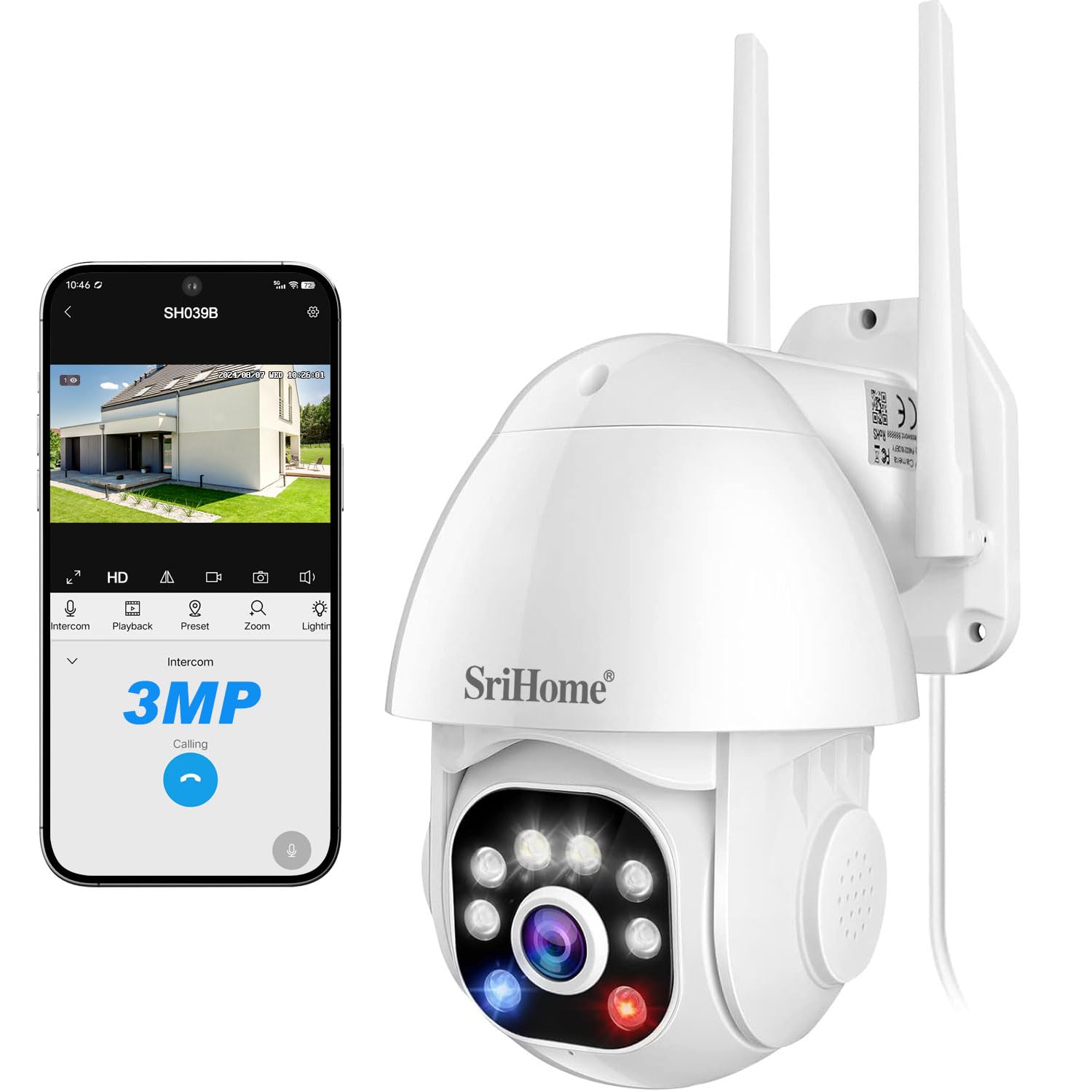
Image 1: SriHome 3MP IP Camera highlighting key features like 3MP resolution, starlight lens, two-way audio, waterproof design, human detection, motion detection, ONVIF support, color night vision, MicroSD card slot, and H.265 compression.
2. Змесціва ўпакоўкі
Праверце, ці ўсе пералічаныя ніжэй прадметы ўваходзяць у вашу ўпакоўку:
- SriHome IP Camera (x1)
- Адаптар харчавання (x1)
- Кіраўніцтва карыстальніка (x1)
- Мацавальныя шрубы (камплект 1 шт.)
- Waterproof Plug (x1)

Малюнак 2: Візуальнае адлюстраванне прадметаў, якія ўваходзяць у камплект прадукту.
3. Схема прадукту
Familiarize yourself with the components of your SriHome security camera:
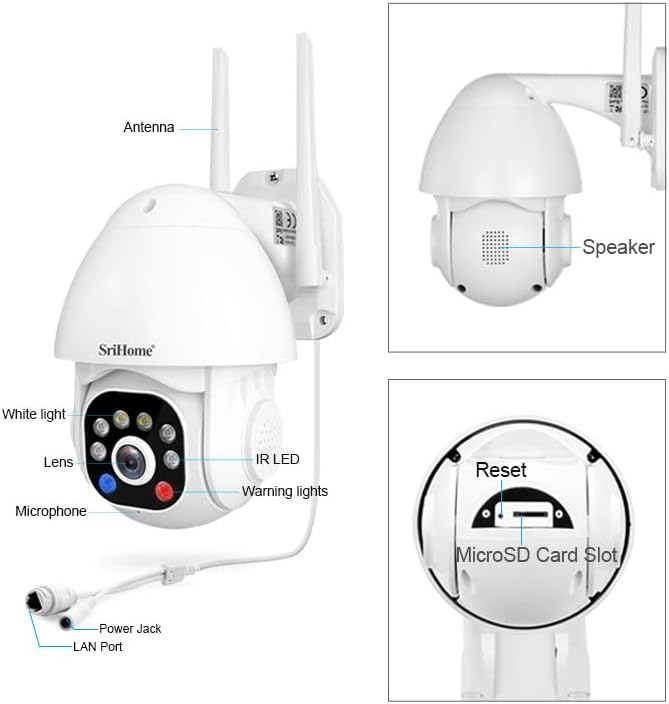
Image 3: Detailed diagram illustrating the various parts and ports of the SriHome IP Camera.
- Антэна: Для падключэння да Wi-Fi.
- Дакладчык: For two-way audio communication and audible alarms.
- Белае святло: Provides illumination for color night vision and acts as a warning light.
- Аб'ектыў: The primary camera sensor.
- Мікрафон: Для двухбаковай гукавой сувязі.
- Раз'ём харчавання: Падключаецца да адаптара сілкавання.
- Порт LAN: Для падлучэння да правадной сеткі.
- ІЧ-святлодыёд: Infrared LEDs for black and white night vision.
- Папярэджальныя агні: Red and blue lights for active deterrence.
- Кнопка скіду: Выкарыстоўваецца для скіду камеры да заводскіх налад.
- Слот для карты MicroSD: Для лакальнага захоўвання відэа.
4. Настройка
4.1 Спампоўка прыкладання
Download the SriHome app to your smartphone for camera control and monitoring.
- Для Android: Адсканіруйце QR-код або наведайце Крама Google Play.
- Для iOS: Адсканіруйце QR-код або наведайце Apple App Store.
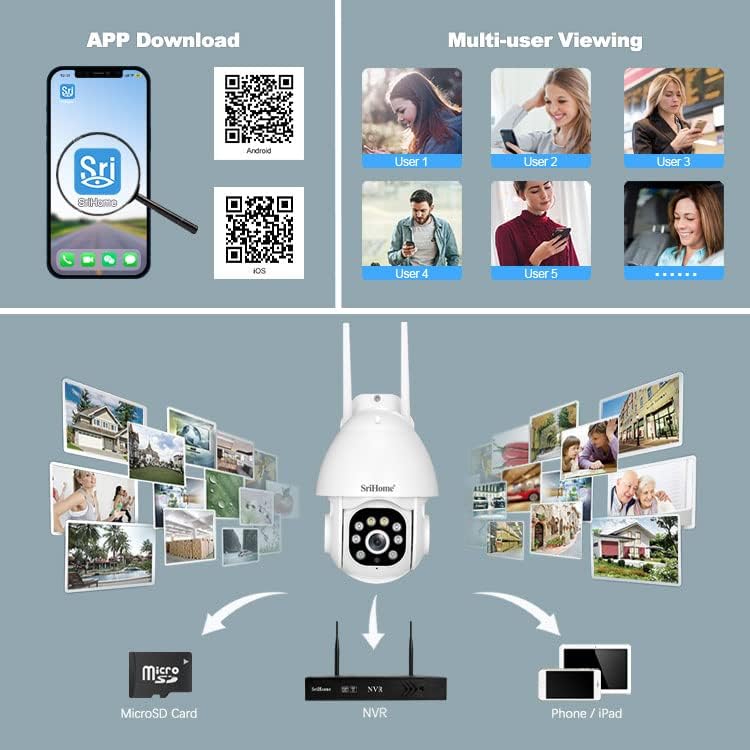
Image 4: Instructions for downloading the SriHome app and an overview of multi-user viewing and storage options.
4.2 Сеткавае падключэнне
The camera supports both wireless (Wi-Fi) and wired connections.
- QR Code Network: Follow the in-app instructions to connect the camera to your Wi-Fi network by scanning a QR code generated by the app.
- AP Hotspot Network: The camera can connect directly to your phone via its built-in AP hotspot without a router for initial setup or direct monitoring.
- Правадная сетка: Connect an Ethernet cable to the LAN port for a stable wired connection.
4.3 Усталёўка карты MicroSD
To enable local storage, install a MicroSD card (up to 128GB, not included) into the designated slot. Ensure the camera is powered off before inserting or removing the card.
4.4 Мантаж
The camera is designed for wall mounting. Use the provided screws and waterproof plug to secure the camera in your desired outdoor location. Ensure the mounting surface is stable and can support the camera's weight.
5. Інструкцыя па эксплуатацыі
5.1 Pan & Tilt Rotation
Кіруйце камерай viewing angle remotely through the SriHome app. The camera offers 355° horizontal pan and 90° vertical tilt for comprehensive coverage.

Image 5: Remote control of camera pan and tilt functions via the SriHome app.
5.2 Рэжымы начнога бачання
The camera features three night vision modes:
- Alarm Mode (Default): Provides black and white night vision. When a human figure is detected, the white light automatically turns on, switching to full-color night vision.
- Рэжым белага святла: The white light remains on, providing continuous full-color night vision. Brightness is adjustable.
- Інфрачырвоны рэжым: White light is off, and the camera uses IR LEDs for standard black and white night vision.
5.3 Human Detection & Tracking
Equipped with AI, the camera can distinguish human motion from other movements (e.g., pets, wind, leaves) to reduce false alarms. Upon human detection, the camera sends immediate notifications to your smartphone and can track the detected person.
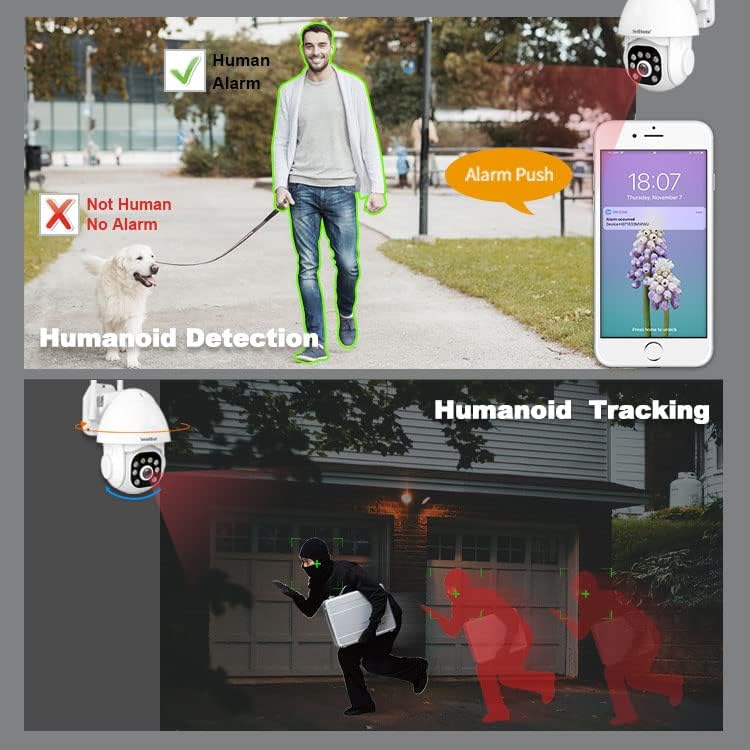
Image 6: Demonstration of the camera's ability to detect and track human figures.
5.4 Двухбаковае аўдыё
The integrated microphone and high-fidelity speaker allow for real-time two-way communication through the mobile app. You can listen to the camera's surroundings and speak through the camera.

Image 7: The camera's IP66 waterproof design and two-way audio communication capability.
5.5 Audible Alarm & Active Defense
When motion or a human is detected, the camera can actively deter intruders by emitting loud sound alarms and flashing red and blue warning lights.

Image 8: The camera activating its audible alarm and flashing lights to deter a person.
5.6 Multi-User Viewінж
The camera supports up to 5 simultaneous viewers. The first user to set up the camera becomes the administrator. Other users require administrator authorization to access the camera feed.
5.7 Варыянты захоўвання
Запісы можна захоўваць двума спосабамі:
- Карта MicroSD: Local storage on a MicroSD card (up to 128GB).
- NVR: Connect the camera to a Network Video Recorder (NVR) for continuous recording and extended storage (NVR not included).
6. Тэхнічнае абслугоўванне
The SriHome camera is designed for outdoor use with an IP66 waterproof rating, making it resistant to dust, heat, and cold. Regular cleaning of the lens with a soft, dry cloth is recommended to ensure clear image quality. Avoid using harsh chemicals.
7. Выпраўленне непаладак
- Камера не падключаецца да Wi-Fi: Ensure the camera is within range of your Wi-Fi router. Check Wi-Fi password accuracy. Try resetting the camera using the reset button.
- No image or black screen: Verify the power adapter is correctly connected and the camera is powered on. Check network connection.
- Ілжывыя трывогі: Adjust the motion detection sensitivity settings in the app. Utilize the human detection feature to minimize alerts from non-human movements.
- MicroSD card not recording: Ensure the MicroSD card is correctly inserted and formatted within the app. Check if the card is full or corrupted.
- Праблемы з двухбаковым аўдыё: Check microphone and speaker permissions for the SriHome app on your smartphone. Ensure network connection is stable.
8. Тэхнічныя характарыстыкі
| Асаблівасць | Спецыфікацыя |
|---|---|
| Нумар мадэлі | SH039B/SP039 |
| дазвол | 3 мегапікселяў (2304x1296) |
| Сувязь | Wired (LAN) / Wireless (Wi-Fi) |
| Вугал панарамавання/нахілу | Панарамаванне: 355°, нахіл: 90° |
| Начное бачанне | Color Night Vision, Infrared Night Vision (up to 15 meters) |
| Аўдыё | Двухбаковая аўдыёсувязь (убудаваны мікрафон і дынамік) |
| Захоўванне | MicroSD Card (up to 128GB), NVR |
| Ўстойлівасць да надвор'я | Воданепранікальны IP66 |
| Асаблівасці | Human Detection, Motion Tracking, Audible Alarm, Red/Blue Warning Lights |
| Крыніца харчавання | Адаптар сілкавання 12V пастаяннага току |
| Памеры | 16 х 16 х 11 см |
| Вага | 420 грам |
9. Гарантыя і падтрымка
For warranty information and technical support, please refer to the contact details provided in the product packaging or visit the official SriHome webсайт. Захоўвайце чэк аб пакупцы на выпадак прэтэнзій па гарантыі.