
Amazon Echo Show 5 (3-га пакалення)
Кіраўніцтва карыстальніка Amazon Echo Show 5 (3-га пакалення)
Мадэль: Echo Show 5 (3-е пакаленне)
1. Уводзіны
The Amazon Echo Show 5 (3rd Gen) is a smart display designed to integrate seamlessly into your daily life. It features a 5.5-inch screen and enhanced audio capabilities, providing visual and auditory interactions with Alexa. This device is refurbished, tested, and certified to function like a new unit, and comes with the same limited warranty.
The device is constructed with sustainability in mind, utilizing 100% post-consumer recycled polyester yarn for its fabric and 100% recycled aluminum. Its packaging is also 100% recyclable.
2. Што ў скрынцы
Upon unboxing your Amazon Echo Show 5 (3rd Gen), you should find the following items:
- Echo Show 5 (3rd Gen) device
- Power adapter (22W) and cable (4.9ft)
- Кароткае кіраўніцтва
3. Кіраўніцтва па наладцы
Выканайце наступныя дзеянні, каб наладзіць Echo Show 5:
- Уключэнне: Connect the included power adapter to your Echo Show 5 and plug it into a wall outlet. The device will automatically power on.
- Выконвайце інструкцыі на экране: The device will guide you through the initial setup process on its 5.5-inch touch screen.
- Падключыцеся да Wi-Fi: Select your Wi-Fi network from the list and enter the password. The Echo Show 5 supports dual-band Wi-Fi (802.11a/b/g/n/ac). It does not support ad-hoc (peer-to-peer) networks.
- Log in to Amazon Account: Enter your Amazon account credentials when prompted.
- Персаналізаваныя налады: Configure your time zone, location, and other preferences.
- Дасьледуйце функцыі: Once setup is complete, you can begin interacting with Alexa and exploring the device's capabilities.
The device utilizes Amazon Wi-Fi Simple Setup technology for an easier connection process to your Wi-Fi network.
4. Кіраванне Echo Show 5
The Echo Show 5 allows for various interactions through voice commands and its touch screen.
4.1. Асаблівасці дысплея
The 5.5-inch touch screen provides visual information and controls:
- Інфармацыя з першага погляду: View news headlines, weather forecasts, and calendar events.
- Фотадысплей: Set the background to a rotating slideshow of your favorite photos. You can invite family and friends to share photos.
- Змест ViewING: Stream shows, view song titles, and follow along with recipes.

4.2. Аўдыёфункцыі
The device features a full-range 1.75-inch built-in speaker, offering enhanced bass and clearer vocals for audio playback.
- Музыка і падкасты: Stream audio content from services like Amazon Music and Spotify.
- Злучэнне Bluetooth: Падтрымлівае Advanced Audio Distribution Profile (A2DP) for streaming audio from your mobile device to the Echo Show 5, or from the Echo Show 5 to a Bluetooth speaker. Audio/Video Remote Control Profile (AVRCP) allows voice control of connected mobile devices. Bluetooth speakers requiring PIN codes are not supported.


4.3. Асаблівасці камеры
The Echo Show 5 includes a 2 MP camera with a built-in shutter.
- Відэавыклік: Use the camera to make video calls to friends and family who have the Alexa app or another Echo device with a screen.
- Хатні маніторынг: Check in on your home, family, or pets using the built-in camera. You can also view compatible video doorbells.


4.4. Кіраванне разумным домам
Control compatible smart devices such as lights and thermostats using voice commands or the touch screen, even when you are away from home. The device supports Wi-Fi, Bluetooth Low Energy Mesh, and Matter for smart home compatibility.
4.5. Функцыі прыватнасці
The Echo Show 5 incorporates multiple layers of privacy controls:
- Кнопка выключэння мікрафона/камеры: A physical button to electronically disconnect the microphone and camera.
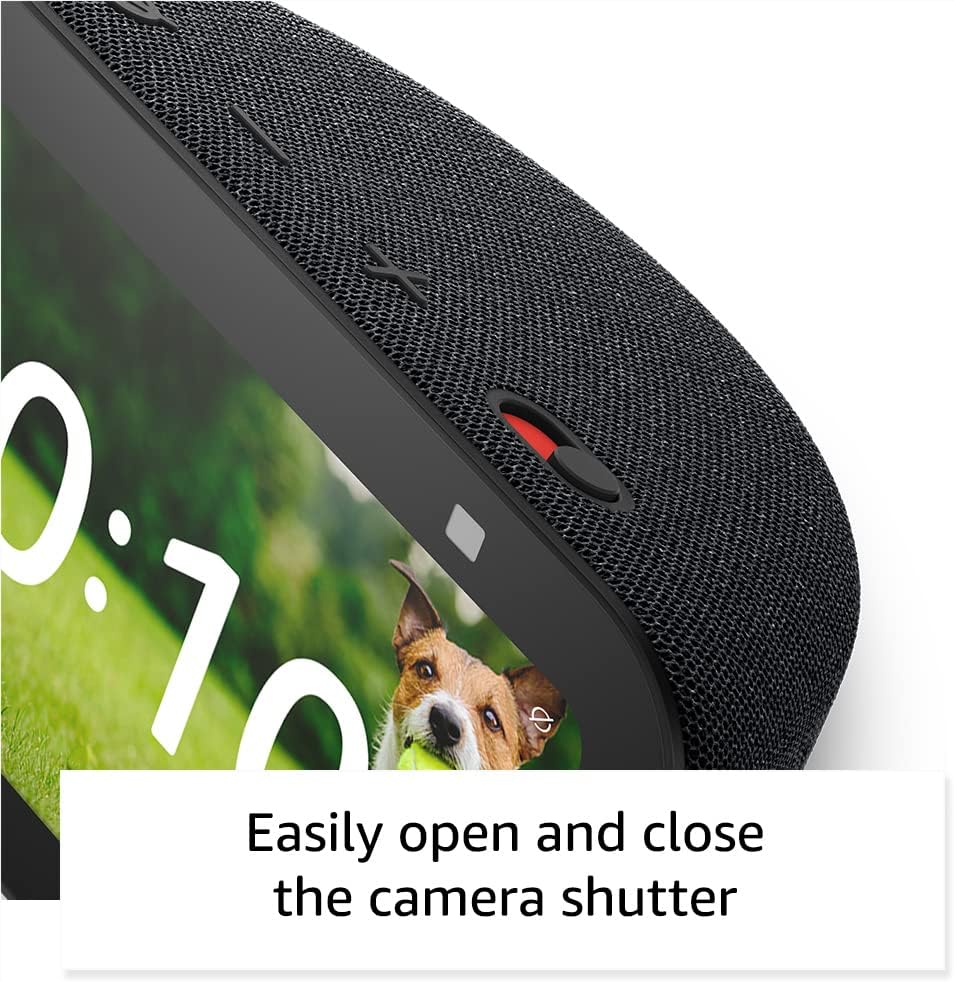
- Убудаваны затвор камеры: Фізічны паўзунок для закрыцця аб'ектыва камеры.
- Тэхналогія Wake Word: The device only begins recording and sending audio to the cloud after detecting the wake word (e.g., "Alexa").
- Паказчыкі струменевай перадачы: Visual indicators show when the device is actively streaming to the cloud.
- Кіраванне галасавымі запісамі: Здольнасць да view і выдаліць свае галасавыя запісы.
- Ring Video Encryption: Падтрымлівае viewing end-to-end encrypted Ring video.
4.6. Спецыяльныя магчымасці
Echo Show 5 мае розныя функцыі даступнасці, якія дазваляюць персаналізаваць Alexa ў адпаведнасці з вашымі здольнасцямі. Да іх можна атрымаць доступ праз Налады → Даступнасць.
- Націсніце, каб Alexa: Атрымлівайце доступ да Alexa праз сэнсарны інтэрфейс праз экранныя пліткі або клавіятуру.
- Адаптыўнае праслухоўванне: Дае больш часу, каб скончыць гаварыць, перш чым Alexa адкажа.
- Пажаданы тэмп маўлення: Кантралюйце хуткасць або павольнасць гаворкі Alexa.
- Субтытры: Alexa Captioning, Call Captioning, and Closed Captioning provide text captions for supported content.
- Паказаць і расказаць: Helps users who are blind or visually impaired identify products by saying "Alexa, what am I holding."
- ГоласView Праграма чытання з экрана: Enables access for users who are blind or visually impaired.
- Павелічальнік экрана: Allows zooming in/out and panning around the screen.
- Паведамляць, калі побач: Прайграе гукі апавяшчэнняў пры выяўленні побач з прыладай.
- Kindle Чытанне ўслых: Alexa can read Kindle books aloud.
- Тэкст у рэжыме рэальнага часу: Enables typing live text in a video call.
- Additional features include Color Inversion, Color Correction, and Request Sound.
5. Тэхнічнае абслугоўванне
Каб забяспечыць даўгавечнасць і аптымальную працу вашага Echo Show 5, выконвайце наступныя рэкамендацыі па тэхнічным абслугоўванні:
- Уборка: Use a soft, lint-free cloth to gently wipe the screen and exterior. Avoid abrasive cleaners, solvents, or aerosol sprays.
- Размяшчэнне: Размясціце прыладу на ўстойлівай, роўнай паверхні, удалечыні ад прамых сонечных прамянёў, крыніц цяпла і празмернай вільгаці. Забяспечце належную вентыляцыю вакол прылады.
- Абнаўленні праграмнага забеспячэння: The device receives guaranteed software security updates for at least four years after its last availability for purchase as a new unit. Ensure your device is connected to Wi-Fi to receive these updates automatically.
- Цыкл харчавання: If the device becomes unresponsive, unplug it from the power outlet, wait for 10 seconds, and then plug it back in.
6. Выпраўленне непаладак
If you encounter issues with your Echo Show 5, try the following solutions:
- Няма харчавання: Пераканайцеся, што адаптар сілкавання надзейна падключаны як да прылады, так і да спраўнай разеткі. Паспрабуйце іншую разетку.
- Праблемы з падключэннем да Wi-Fi:
- Check if your Wi-Fi router is working correctly.
- Перазагрузіце маршрутызатар і мадэм.
- On the Echo Show 5, go to Settings → Network and try reconnecting to your Wi-Fi network.
- Пераканайцеся, што прылада знаходзіцца ў зоне дзеяння вашага Wi-Fi маршрутызатара.
- Alexa не адказвае:
- Ensure the microphone is not muted (the light ring will be red). Press the mic/camera off button if it is.
- Speak clearly and directly to the device.
- Паспрабуйце перазагрузіць прыладу, адключыўшы і зноў падключыўшы яе.
- Праблемы з адлюстраваннем: If the screen is unresponsive or frozen, try restarting the device.
- Праблемы з гукам:
- Check the volume level on the device.
- Ensure no external Bluetooth speakers are connected if you intend to use the internal speaker.
- Камера не працуе: Ensure the camera shutter is open and the camera is not disabled via the mic/camera off button.
Каб атрымаць дадатковую дапамогу, звярніцеся ў службу падтрымкі Amazon webсайт або звярніцеся ў службу падтрымкі.
7. Тэхнічныя характарыстыкі
| Асаблівасць | Дэталь |
|---|---|
| мадэль | Echo Show 5 (3-е пакаленне) - выпуск 2023 года |
| Памеры (Ш х Г х У) | 5.8 цаляў x 3.6 цалі x 3.2 цаляў (147 мм x 91 мм x 82 мм) |
| Вага | 16.1 унцыі (456 грамаў) |
| Дысплей | 5.5 -цалевы сэнсарны экран |
| Камера | 2 MP with built-in shutter |
| Працэсар | MediaTek MT 8169 B |
| Падключэнне да Wi-Fi | Dual-band 802.11a/b/g/n/ac (does not support ad-hoc networks) |
| Злучэнне Bluetooth | A2DP support for audio streaming, AVRCP for voice control (Bluetooth speakers requiring PIN codes not supported) |
| Аўдыё | Убудаваны паўнадыяпазонны 1.75-цалевы дынамік |
| Сумяшчальнасць з разумным домам | Wi-Fi, Bluetooth Low Energy Mesh, матэрыя |
| Моўная падтрымка | Англійская і іспанская |
8. Гарантыя і падтрымка
Your Amazon Echo Show 5 (3rd Gen) comes with a 1-year limited warranty and service. As a refurbished device, it receives the same limited warranty as a new device.
For detailed warranty information and terms of service, please refer to the documentation provided with your device or visit the official Amazon support website. Information regarding software security updates is also available through Amazon's official channels.
Ask a question about this manual
Ask about setup, troubleshooting, compatibility, parts, safety, or missing instructions. Manuals+ will review the question and use this page’s manual context to help answer it.