
1. Уводзіны
Thank you for choosing the Awei TC-7 Wired Earphones. These in-ear earphones are designed for clear audio and convenient communication, featuring a Type-C connector for modern devices and an inline microphone with control buttons. Please read this manual carefully to ensure proper use and maintenance of your earphones.
2. Змесціва ўпакоўкі
- Awei TC-7 Wired Earphones
- Multiple sizes of Ear Cushions (Small, Medium, Large)

Малюнак 2.1: The Awei TC-7 earphones include ear caps in various sizes to ensure a comfortable and secure fit for different users.
3. Прадукт скончыўсяview
The Awei TC-7 earphones feature a durable design with a Type-C plug for direct connection to compatible devices. The inline remote control allows for easy management of audio playback and calls.

Малюнак 3.1: A close view of the Awei TC-7 earphones, showcasing their in-ear design for optimal sound delivery.

Малюнак 3.2: The inline remote control features multi-function buttons for managing audio and calls.

Малюнак 3.3: The integrated HD microphone is designed to pick up clear audio, even in noisy environments.
4. Настройка
- Выберыце амбушюры: Choose the ear cushion size (Small, Medium, or Large) that provides the most comfortable and secure fit for your ears. A proper fit enhances sound quality and noise isolation.
- Падключэнне да прылады: Insert the USB-C plug of the earphones into the Type-C port of your smartphone, tablet, laptop, or other compatible device.
- Аўдыявыхад: Ensure your device's audio output is set to the connected earphones. This is usually automatic upon connection.
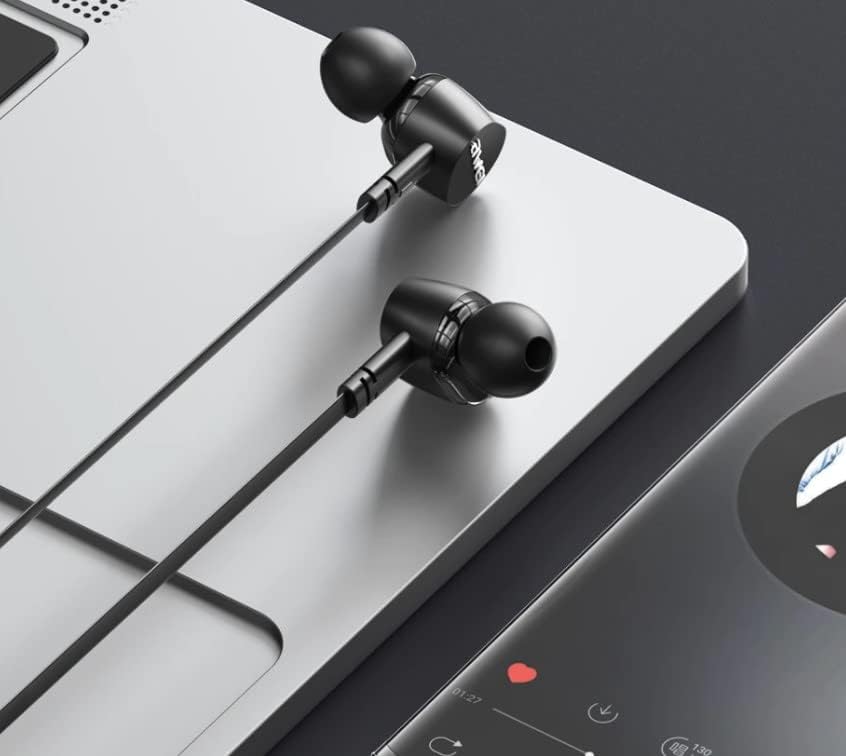
Малюнак 4.1: The earphones are compatible with various devices featuring a USB-C port, such as laptops and smartphones.
5. Інструкцыя па эксплуатацыі
The Awei TC-7 earphones feature an inline remote with buttons for convenient control of your audio and calls.
5.1. Кіраванне прайграваннем музыкі
- Прайграванне/Паўза: Націсніце цэнтральную кнопку адзін раз.
- Наступны трэк: Двойчы хутка націсніце цэнтральную кнопку.
- Папярэдні трэк: Тры разы хутка націсніце цэнтральную кнопку.
- Павялічыць гучнасць: Націсніце кнопку «+».
- Паменшыць гучнасць: Націсніце кнопку «-».
5.2. Кіраванне выклікамі
- Адказ/завяршэнне выкліку: Press the center button once during an incoming call or an active call.
- Адхіліць выклік: Press and hold the center button for approximately 2 seconds during an incoming call.
6. Тэхнічнае абслугоўванне
Proper care will extend the lifespan of your Awei TC-7 earphones.
- Чыстка амбушюр: Regularly remove the ear cushions and clean them with a soft, damp тканінай. Перад тым, як зноў прымацаваць іх, пераканайцеся, што яны цалкам высахлі.
- Сыход за кабелем: The cable is designed to be tangle-free. Avoid excessive pulling or sharp bending to prevent internal damage.
- захоўванне: When not in use, store the earphones in a clean, dry place, away from extreme temperatures.
- Воданепранікальнасць: The earphones are rated as waterproof. However, avoid prolonged submersion and ensure the USB-C port is dry before connecting to a device after exposure to water.
7. Выпраўленне непаладак
If you encounter issues with your Awei TC-7 earphones, please refer to the following common solutions:
| праблема | Магчымая прычына | Рашэнне |
|---|---|---|
| Няма гуку з навушнікаў | Earphones not properly connected; device volume too low; incorrect audio output setting on device. | Ensure the USB-C plug is fully inserted. Increase device volume. Check device audio settings to confirm output is set to earphones. |
| Не працуе мікрафон | Microphone port blocked; incorrect input setting on device; application permissions. | Ensure the microphone area is clear. Check device sound settings for microphone input. Verify application permissions for microphone access. |
| Кнопкі не рэагуюць | Loose connection; device incompatibility; software glitch. | Reconnect the earphones. Test with another compatible device if possible. Restart your device. |
8. Тэхнічныя характарыстыкі
| Асаблівасць | Дэталь |
|---|---|
| Назва мадэлі | TC-7 |
| Тэхналогія падлучэння | Правадная |
| Раз'ём для навушнікаў | USB-C |
| Размяшчэнне вушэй | У вуха |
| Дыяпазон частот | 20 Гц - 20 кГц |
| Дадатковыя магчымасці | Microphone Included, Inline Control |
| Матэрыял | Пластыкавыя |
| Узровень воданепранікальнасці | Воданепранікальны |
| Асаблівасці кабеля | Блытанне бясплатна |
| Сумяшчальныя прылады | Smartphones, Laptops, Tablets, Desktops with USB-C |
9. Гарантыя і падтрымка
Каб атрымаць інфармацыю аб гарантыі і падтрымцы кліентаў, звярніцеся да дакументацыі, прадстаўленай у месцы пакупкі, або звярніцеся да прадаўца. Захоўвайце пацвярджэнне пакупкі для любых гарантыйных прэтэнзій.


